Picture the pattern every people leader recognises. Late on a Thursday evening, a logistics company quietly emails a few hundred employees that their roles are being eliminated. Within a couple of hours the first Glassdoor review goes up: one star, headline "Layoffs by email, no warning, no severance." By Friday breakfast there are dozens more like it, the overall rating has slid most of a point overnight, the "Recommend to a friend" figure has collapsed, and the top of the employer page reads like an indictment. Nobody inside notices until a candidate the recruiter is trying to close forwards the page on Friday afternoon, asking whether the offer is still safe to accept. Two finalists withdraw that week, and a quarter of recruiting-funnel work drains away in 48 hours.
Glassdoor and Indeed sit at the exact moment a candidate decides whether to apply, interview, or accept. A review bomb after a layoff, a botched return-to-office mandate, or a viral resignation thread can move your public rating a full point in a single night, and that number shows up in Google's snippet for "[company] reviews" within days. Most social-listening tools index Twitter, Reddit, and news, but they under-index employer review platforms, which is precisely where a recruiting and PR crisis becomes visible first. The star rating is a leading indicator, not a lagging one.
This guide covers why employer-rating movement is a distinct early-warning signal, which numbers to watch on Glassdoor and Indeed, how to recognize a coordinated review bomb, and how to set up alerts that capture a timestamped screenshot of every new 1-star review and route it to HR and comms on the next check.
Why does a Glassdoor or Indeed rating drop matter so much?
An employer-rating drop matters because it is the earliest public, quantified signal of an internal problem, and it directly throttles your recruiting funnel. A fall from 4.1 to 3.8 is roughly a 7 percent decline that shows up in Google snippets, candidate research, and offer-acceptance rates within days, long before the issue surfaces in engagement surveys or exit interviews.
The mechanics are unforgiving. Glassdoor and Indeed both display a single headline star rating out of five, and that aggregate is what a candidate sees in search results before they ever reach your careers page. A single star of difference measurably shifts applicant volume and acceptance rates. When the number moves down, three things happen at once: fewer qualified people apply, more accepted offers fall through, and the candidates who do show up arrive pre-loaded with objections your recruiters now have to defuse.
The drop is also a proxy for things you cannot otherwise see in real time. A coordinated cluster of negative reviews almost always traces back to a specific, datable event: a layoff, a leadership change, a benefits cut, a pay-freeze memo. Catching the rating movement gives you the event. This is the same logic behind watching executive leadership changes and hiring signals in competitor job postings, where a public page shift reveals an internal decision days before any announcement. Employer reviews are the version of that signal the labor market reads.
What exactly should you monitor on an employer profile?
Monitor five distinct values on each employer profile: the overall star rating (e.g. 4.1 to 3.8), the total review count (a spike signals a review bomb), the "Recommend to a friend" percentage, the CEO approval percentage, and the business-outlook positive percentage. Each moves independently, and each tells a different part of the story when it shifts.
The five core numbers on Glassdoor
Glassdoor's employer page surfaces an overall rating out of 5.0, a total review count, a "Recommend to a Friend" percentage, a CEO approval percentage tied to a named chief executive, and category sub-ratings for culture and values, work-life balance, senior management, compensation and benefits, and career opportunities. The business-outlook figure ("positive business outlook") is a sentiment gauge that often moves first when employees sense trouble. A 10-point fall in approval or recommend percentage is frequently a sharper early signal than the headline star, which is slow to move.
Indeed's parallel set
Indeed shows an overall rating out of 5.0, a total review count, a Work Happiness Score with sub-dimensions (such as compensation, support, belonging, and purpose), and category ratings for work-life balance, pay and benefits, job security and advancement, management, and culture. Indeed reviews tend to skew toward hourly and frontline roles, so a divergence between your Glassdoor and Indeed ratings reveals which workforce segment is unhappy. That cross-platform gap is itself a finding worth routing to HR.
A complete watchlist tracks all five Glassdoor figures and the Indeed equivalents per company, plus the raw review feed so that each new individual review is captured on the first check after it posts.
What does a review bomb look like, and how do you catch it?
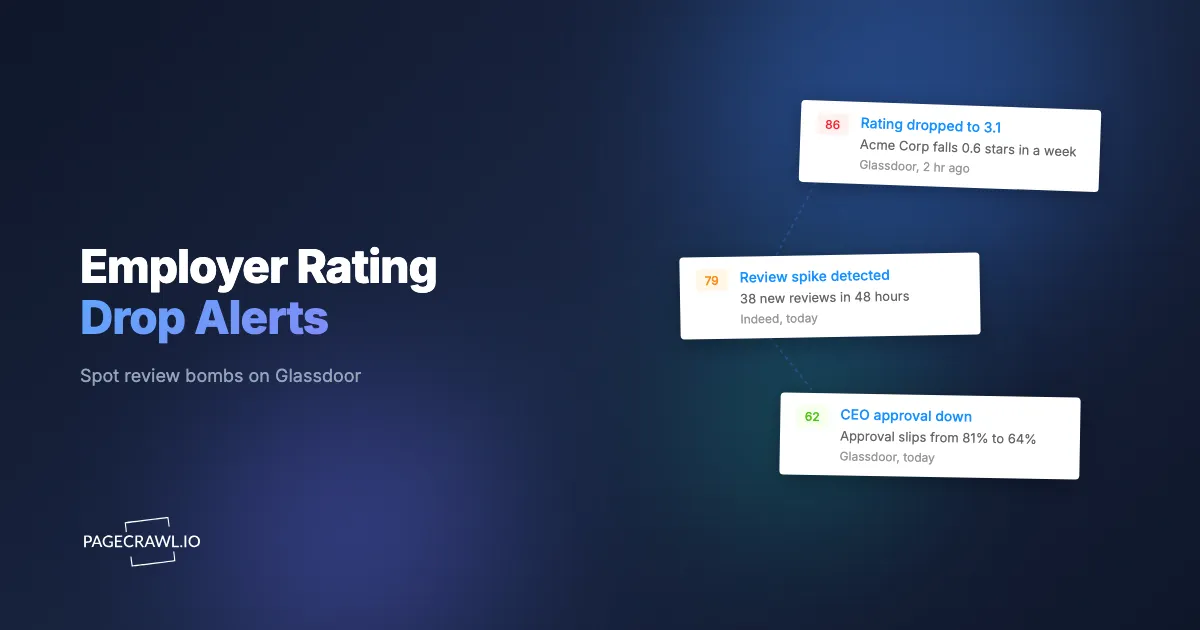
A review bomb looks like a sudden vertical spike in review count, typically three or more negative reviews inside a 48-hour window, paired with a sharp drop in the recommend and CEO-approval percentages while the headline star lags. Track the review count as a number with a threshold, and any abnormal jump fires before the rating finishes falling.
The defining feature of a review bomb is velocity, not volume. Ten new reviews over a month is healthy activity. Ten new reviews between 10pm and 9am, clustered at one and two stars, is an event. Because the headline star rating averages over thousands of historical reviews, it can take a day or more to register what a velocity monitor catches in the first hour, which is why review-count tracking matters more than rating tracking for crisis detection.
The signatures of a coordinated cluster
Three patterns distinguish a genuine internal-event review bomb from organic noise. First, timing compression: the reviews land in a tight window rather than spread across days. Second, thematic consistency: the same word recurs ("layoff," "RTO," "PIP," "outsourced," "toxic"), which keyword tracking flags directly. Third, structural similarity: many reviews hit the same sub-rating (senior management or job security craters while compensation holds), pointing at a specific decision rather than diffuse dissatisfaction. When all three line up, you have a datable internal event, and your comms team needs the underlying screenshots, not just the number.
This is the same crisis-velocity logic covered in the Trustpilot, G2, and Capterra review velocity guide and in multi-location review velocity, except here the audience is candidates and current employees rather than buyers, and the cost is a stalled recruiting pipeline.
How is an employer-rating drop a recruiting and PR crisis signal?
An employer-rating drop is a leading crisis signal because it surfaces in the labor market before it reaches mainstream social listening or the press. Candidates and employees post on Glassdoor and Indeed first, often anonymously and at night, days before a layoff or scandal becomes a Twitter thread or a news story.
Watching the rating gives recruiting and comms a head start measured in hours, not news cycles. Mainstream brand-monitoring and social-listening tools are tuned for public conversation: posts, mentions, articles, and shares. Employer reviews live in a walled garden that those tools index lightly or not at all, which is why an employer-rating collapse can run for a full day inside a vacuum of "everything looks fine" on your social dashboard. That gap is the window where a crisis is cheapest to manage, which is why employer pages belong on the same watchlist as the review sites and comparison pages covered by brand and reputation monitoring. Treat employer-platform monitoring as a dedicated layer alongside general online reputation monitoring, not a subset.
For PR specifically, the timestamped screenshot is the artifact that matters. When a journalist calls about "dozens of scathing Glassdoor reviews," your comms lead should already have the captured page state, the exact review-count delta, and the time each review appeared. That turns a reactive scramble into a prepared response with a defensible timeline of what was visible when.
Which page elements move, and what tracking mode catches each?
Each signal on an employer page maps to a specific tracking mode: the star rating and the percentages are numbers, the review feed is captured as content and as a visual, the bomb signature is keyword text, and any login-gated section needs a session-aware monitor. Matching the mode to the element is what keeps alerts precise instead of noisy.
Numbers, thresholds, and direction
The overall star rating, total review count, recommend percentage, CEO approval percentage, and business-outlook percentage are all numeric. Use number or price tracking, which extracts the value, lets you set a threshold (alert only when the rating moves at least 0.2, or the review count jumps by 3 or more), and lets you set a direction. Alert on the down direction for the star rating, recommend, and approval percentages; alert up on review count, because a spike is the bomb. Thresholds and direction together suppress the meaningless 4.07 to 4.08 wobble while guaranteeing the 4.1 to 3.8 fall fires. Combining a numeric threshold with keyword and direction logic is covered in the conditional alert rules guide, and the help article on monitoring numeric values for changes shows the charts and statistics you get once a rating is tracked as a number.
Capturing individual reviews
To capture every new 1-star review as it posts, pair fullpage content tracking with visual change capture. Content tracking flags that the review feed changed and feeds the AI summary that describes the new review in plain language. Visual capture takes the timestamped screenshot your HR and comms teams need as evidence. New monitors default to screenshots on, so this works out of the box. Add keyword and text tracking to fire a high-priority alert when a new review contains terms like "layoff," "discrimination," "unsafe," or "lawsuit," so the worst reviews jump the queue.
Structured data and gated sections
Some employer profiles expose rating data in structured markup or an underlying data feed; JSON or API field tracking can read a specific value directly when that path is stable, avoiding layout noise entirely. When a platform hides full review detail behind a login wall, login-gated monitoring captures the authenticated view, so you see what a signed-in candidate sees. PageCrawl renders each page fully and reliably monitors these protected sections without you babysitting the session.
How do you set up Glassdoor and Indeed monitoring with PageCrawl?
Setting up takes about ten minutes per company: add the Glassdoor and Indeed employer pages, choose the right tracking mode for each signal, set frequency by priority, and route alerts to a fast channel. Follow these six steps for your own company first, then repeat for competitors.

Step 1: Add the employer pages and pick a tracking mode
Add your Glassdoor employer reviews page (the URL pattern is glassdoor.com/Reviews/Company-Reviews-E{id}.htm) and your Indeed reviews page (indeed.com/cmp/{company}/reviews). For the headline rating, recommend percentage, CEO approval, and business-outlook figures, use number tracking on each value. For the review feed itself, use fullpage content tracking so the AI summary describes new reviews. Keep screenshots on, which is the default.
Step 2: Set thresholds and direction on every numeric value
On the star rating, set a threshold of 0.2 and direction down. On review count, set a threshold of 3 and direction up to catch a bomb. On recommend percentage and CEO approval, set a threshold of 5 points and direction down. These thresholds let normal daily drift pass silently while guaranteeing a real shift fires, so your team trusts the alerts instead of muting them.
Step 3: Add keyword tracking for crisis language
Layer keyword and text tracking on the review feed for high-severity terms: "layoff," "fired," "discrimination," "harassment," "unsafe," "lawsuit," "wage," "RTO," "outsourced." A match routes to a separate, higher-urgency alert than a routine new review, so the reviews most likely to become a PR problem surface first.
Step 4: Choose check frequency by priority
For your own company pages, check every 15 minutes on a paid plan so a nighttime review bomb is caught on the next check rather than the next morning. For competitor employer pages, daily checks are enough, because you are watching a trend rather than running a crisis desk. The Free plan's hourly cadence is plenty to validate the setup on your single most important page before you scale up.
Step 5: Route alerts to the right people
Send own-company alerts to a fast channel where HR and comms both watch. PageCrawl pushes to Slack, Telegram, Discord, email, browser push notifications, or a webhook into your incident tooling. A #employer-brand Slack channel subscribed by the people, recruiting, and comms leads means the first responder wins time; the help centre walks through sending change notifications to a Slack channel with an incoming webhook. Crisis-keyword alerts can go to a separate, louder channel.
Step 6: Confirm the screenshot and review the first capture
Run the first check manually and confirm the visual capture saved a clean, timestamped screenshot of the current employer page. That first capture becomes your baseline. Every future alert arrives with a before-and-after image, so HR and comms see exactly which review appeared and when, without logging in to verify.
How do you monitor competitor employer brands too?
Monitor competitors by adding their Glassdoor and Indeed pages as a second tier on daily checks, watching the same five numbers but reading them as opportunity signals rather than crisis signals, the way you would read any other competitive intelligence monitoring feed. A competitor's rating sliding from 3.9 to 3.5, or a recommend percentage cratering after their layoff, is a recruiting and talent-poaching opening you can act on within days.
The competitor read is strategic, not reactive. When a rival's employer rating drops, three openings appear at once. First, talent: their best people start reading their own reviews, and your recruiters can reach out with timing on their side. Second, positioning: a competitor visibly struggling with culture or management gives your own employer-brand marketing a contrast to lean into. Third, intelligence: a cluster of reviews mentioning a specific reorganization or pay change tells you what is happening inside a rival before any press release does, complementing the broader competitor website analysis you already run. Tag competitor monitors separately and roll them into a weekly digest, because here the two-week pattern matters more than any single review.
How do you keep alerts useful and avoid noise?
Keep alerts useful by combining numeric thresholds, direction, and keyword rules so only meaningful movement fires, and by separating crisis alerts from routine new-review notifications. The goal is that every alert that reaches HR or comms is worth opening, because once a channel cries wolf, people stop reading it during the one night it matters.
Three habits keep the signal clean. Set thresholds high enough that ordinary daily churn (a single new review nudging a 4.12 to 4.11) stays silent, which the threshold-and-direction logic handles automatically. Split routing so a crisis-keyword match and a 0.4-point overnight rating drop go to a loud, urgent channel, while a routine positive review goes to a quiet digest. And review your false-positive rate after the first week, tightening any rule that fired without a real event, using the same discipline described in the guide to reducing monitoring false positives. A monitor that fires twice a quarter on genuine events, and never otherwise, is the one your leadership team will trust at 11pm on a Thursday.
Choosing your PageCrawl plan
PageCrawl's Free plan lets you monitor 6 pages with 220 checks per month, which is enough to validate the approach on your most critical pages. Most teams graduate to a paid plan once they see the value.
| Plan | Price | Pages | Checks / month | Frequency |
|---|---|---|---|---|
| Free | $0 | 6 | 220 | every 60 min |
| Standard | $8/mo or $80/yr | 100 | 15,000 | every 15 min |
| Enterprise | $30/mo or $300/yr | 500 | 100,000 | every 5 min |
| Ultimate | $99/mo or $999/yr | 1,000 | 100,000 | every 2 min |
Annual billing saves two months across every paid tier.
Enterprise and Ultimate scale up to 100x if you need thousands of pages or multi-team access.
How do you get started in the next ten minutes?
Get started in about ten minutes: add your company's Glassdoor employer-reviews URL, set number tracking with a 0.2 threshold and direction down on the star rating, keep the default visual capture on, and route alerts to a Slack channel your HR and comms leads both watch. That one monitor fits the Free plan.
It is the difference between learning about a review bomb from a candidate on Friday afternoon and learning about it from an alert at 11:04pm Thursday while you can still respond. Add Indeed next, then your top competitors, and your employer reputation stops being something you discover after the damage and becomes something you catch as it starts.