At 3:12 a.m. on a Thursday, a finance manager at a mid-size logistics firm approved a wire transfer to a "new banking partner." The email looked perfect: correct logo, correct signature, correct reply-to address. It sailed past every spam filter because, eleven days earlier, someone had quietly rewritten the company's SPF record from -all to +all, effectively announcing to every mail server on the planet that any host was authorized to send messages as that domain. Nobody noticed. The DNS zone had not been edited in months, so nobody was watching it. The first sign of trouble arrived with the bank's fraud confirmation, by which point the money was gone.
DNS is the control plane for everything your brand does online. Email authentication records (SPF, DKIM, DMARC) decide whether a message claiming to come from your domain is trusted. MX records decide where your mail is delivered. NS records decide who controls the entire zone. These values are plain text, they change rarely, and they are public to anyone in the world who runs a lookup. That combination is exactly why a single unexpected edit is one of the highest-signal events in security: when a record that has been stable for a year suddenly flips, something or someone changed it, and you want to know on the very next check, not after the wire clears.
The problem is that DNS records do not live on a web page you naturally visit. They sit in a zone file, invisible until you go looking. PageCrawl has a native DNS Records tracked element for exactly this: you give it your domain, tick the record types you care about, and it resolves those records on every check. This guide explains which records to watch, what a malicious change looks like for each one, and how to set the element up so a weakened SPF, a rogue MX, or an altered nameserver raises an alert on the next check after it happens.
What does DNS and email-authentication drift monitoring actually watch?
DNS drift monitoring continuously re-queries your domain's records and alerts you when any value changes from its last known state. It tracks the email-authentication trio (SPF, DKIM, DMARC) plus the structural records that define your domain: MX (mail routing), NS (delegation), A and AAAA (host addresses), and CNAME (aliases). A change in any of these is the signal.
Unlike registrar-level monitoring, which watches ownership and expiry, DNS drift watches the live operational records that route mail and traffic. The two are complementary. Pairing DNS drift with WHOIS and registrar change monitoring gives you both the lock (who owns the domain) and the wiring (where it points). It also sits alongside certificate transparency log monitoring, which catches unauthorized TLS certificates issued for your name, and broader domain monitoring that watches the whole footprint at once.
The records worth watching, and what each one governs:
- SPF (
v=spf1TXT record): which mail servers may send as your domain. - DKIM (TXT at
selector._domainkey): the public key that signs your outbound mail. - DMARC (TXT at
_dmarc): the enforcement policy and reporting addresses for failures. - MX: the mail servers that receive inbound mail, ordered by priority.
- NS: the authoritative nameservers that control the entire zone.
- A / AAAA / CNAME: where hostnames and subdomains resolve.
The DNS Records element also covers SOA, CAA, and SRV, so a zone-administration change, an unexpected certificate authority, or a moved service endpoint is caught by the same monitor.
Why is a weakened SPF record like +all such a dangerous signal?
A weakened SPF record is one of the clearest indicators of either a misconfiguration or an active attack, because it directly tells the world's mail servers to trust spoofed mail. The most dangerous change is the all qualifier flipping from -all or ~all to +all, which authorizes any server on the internet to send mail as your domain.
What SPF changes should trigger an alert?
SPF lives in a TXT record that begins with v=spf1. The mechanics that matter for monitoring are the qualifier on the final all and the list of authorized senders. Watch for these specific shifts:
-allor~allchanging to+allor?all: the domain now passes spoofed mail. Highest-severity alert.- A new
include:orip4:/ip6:entry you do not recognize: an attacker quietly adding their own sending infrastructure to your authorized list. - The record disappearing entirely: no SPF means weaker spoofing protection across the board.
- SPF exceeding the 10 DNS-lookup limit defined in RFC 7208: the record silently fails to evaluate, so legitimate mail starts failing authentication.
Because these are precise text values, the diff does the work for you. Tick the SPF preset on the DNS Records element and PageCrawl stores the resolved v=spf1 string on every check, so a flip to +all or a new include: token shows up as a single edited line in the change view and raises an alert on the next check.
How do DKIM and DMARC changes expose your domain to spoofing?
DKIM and DMARC changes break the chain that lets receiving servers verify and enforce your identity. DKIM publishes the public key that signs your mail; if that key is swapped or deleted, an attacker can sign forgeries or your legitimate mail starts failing. DMARC sets the enforcement policy, and downgrading it from reject to none quietly disables protection.
What is the DMARC downgrade attack?
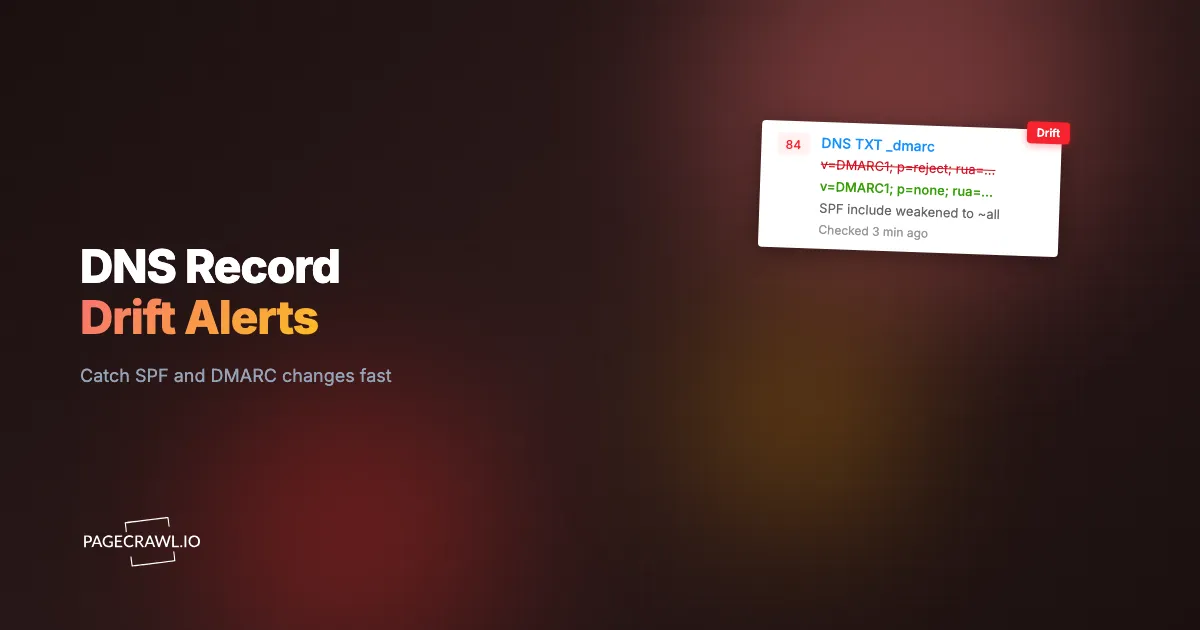
DMARC lives in a TXT record at _dmarc.yourdomain.com and looks like v=DMARC1; p=reject; rua=mailto:reports@yourdomain.com; pct=100. The p= tag is the policy defined in RFC 7489: reject blocks failing mail, quarantine sends it to spam, and p=none only monitors and enforces nothing. A common stealth move is to flip p=reject to p=none, or to drop pct=100 to pct=10, so only a sliver of mail is enforced. The record still exists, so a casual glance looks fine, but spoofed mail now flows freely.
Two other DMARC edits deserve alerts. First, a changed rua or ruf reporting address: an attacker redirecting your aggregate failure reports to their own inbox to study your mail flow. Second, a relaxed aspf or adkim alignment tag moving from strict (s) to relaxed (r). Because the whole policy is stored as one line, each of these shows as a plain before-and-after edit: tick the DMARC preset and PageCrawl reads _dmarc.yourdomain.com for you on every check.
What DKIM changes matter?
DKIM keys rotate legitimately, so the goal is to distinguish a planned rotation from a hostile swap. Monitor the public key value (p= in the DKIM TXT record, as specified in RFC 6376) at each selector you publish. A key that changes outside your rotation schedule, a new selector you did not create, or a removed key that breaks signing are all events worth your fastest check interval. Tick the DKIM preset and type your selector (for example google), and PageCrawl reads <selector>._domainkey.yourdomain.com on every check, keeping a full history of every key value so you can prove exactly when it changed.
Note: a wildcard TXT record on your zone answers for names that do not really exist, so a DKIM selector you have not published can look present. If a DKIM line appears for a selector you never created, check whether the zone has a wildcard TXT before treating it as a rogue key.
What do MX and NS record changes tell you about a possible hijack?
MX and NS changes are among the most serious DNS events because they can reroute your entire mail flow or hand control of your whole zone to an attacker. A new MX record can silently redirect mail through a server that reads or copies messages, and a changed NS record repoints your domain's authority to nameservers you do not control.
Why MX changes are a mail-interception risk
MX records list the mail servers that receive your inbound email, each with a priority number (lower wins). An attacker who adds a high-priority MX pointing to their own server can intercept mail destined for your domain, a classic man-in-the-middle setup for business-email-compromise. Alert on any MX value that is added, removed, or reprioritized. Because the change is rare and the value is exact, even a slow check frequency catches it, but for high-value domains, a 5 to 15 minute cadence minimizes exposure.
Why NS changes can mean a full zone takeover
NS records delegate authority for your domain to specific nameservers. If those records change to nameservers run by an attacker, every other record (SPF, MX, A, everything) can be rewritten at will, because the attacker now answers all queries for your domain. An unexpected NS change is close to a worst-case event and warrants your highest-priority channel. This is where DNS drift monitoring overlaps with broader brand and domain fraud protection: a hijacked zone is often the first step in standing up convincing phishing infrastructure under your real name.
What is a dangling CNAME and why does it lead to subdomain takeover?
A dangling CNAME is a record that points a subdomain to an external service that no longer exists or has been deprovisioned, leaving the alias resolving to nothing. An attacker who registers that abandoned resource can then serve content from your subdomain, a subdomain takeover. The signal you monitor for is a CNAME whose target stops resolving or changes unexpectedly.
These happen quietly. A marketing team spins up promo.yourdomain.com pointing via CNAME to a SaaS landing-page host, the campaign ends, the SaaS account is closed, but the CNAME stays. The external host frees the resource, an attacker claims it, and now promo.yourdomain.com (a real, trusted subdomain) serves their content. Monitoring the resolved value of each CNAME and alerting when the target changes or starts returning an error catches the window before takeover. The same approach catches A and AAAA records that suddenly point to an unfamiliar IP block, a sign of a hijacked host or defacement.
How does PageCrawl monitor DNS records when they are not on a normal web page?
PageCrawl resolves your domain's DNS records on every check using the native DNS Records tracked element, so nothing has to be published on a web page first. You enter your domain, tick the record types you want to watch, and each check stores the resolved records as a sorted plain-text list. No lookup page, no query URL, and no JSON path to write.
The stored value is deliberately boring, because boring is what makes a diff readable. One record per line, one type per label, sorted so the order never wobbles:
MX       10 aspmx.l.google.com
MX       20 alt1.aspmx.l.google.com
NS       ns1.example.com
NS       ns2.example.com
TXT      "google-site-verification=abc123"
SPF      "v=spf1 include:_spf.google.com -all"
DMARC    "v=DMARC1; p=reject; rua=mailto:dmarc@example.com"
If an attacker adds their own mail server, the next check stores the same blob with one line different, and the change view shows exactly that line in red and green. The notification summary states it in one sentence:
MX changed: 10 aspmx.l.google.com → 10 mx.attacker.netA record type you selected that currently has no records is stored as CAA (none), so a record being deleted is a visible change rather than a silent absence.
What record types can you watch?
You tick the types you care about on a single DNS element. The raw types are A, AAAA, CNAME, MX, NS, TXT, SOA, CAA, and SRV. On top of those sit three email-authentication presets that save you from remembering where each record lives: SPF (the v=spf1 record at your domain), DMARC (read from _dmarc.yourdomain.com), and DKIM (read from <selector>._domainkey.yourdomain.com, so you type your selector, for example google).
The presets are filtered views of your TXT records, which means an SPF record is listed once even when you have TXT selected as well. The default selection is MX, NS, TXT, SPF, and DMARC, which covers mail routing, zone delegation, and the whole email-authentication trio out of the box.
Why does it not alert on routine DNS noise?
Because the stored value is normalized before it is compared. TTLs are never stored, so a countdown ticking down on its own never counts as a change. Records are sorted, so a nameserver set that comes back in a different round-robin order every query stays quiet. Trailing dots are removed, and the SOA serial number is normalized out, so routine zone re-signing does not wake anyone up.
Note: A and AAAA records can legitimately rotate on their own behind a CDN or an ALIAS-flattened apex, which is why they are not ticked by default. If you turn them on and see repeated address-only changes, deselect them and keep the records that only move when a human edits the zone.
Note: if your DNS provider exposes a zone API, you can pair the DNS element with JSON and API field monitoring to watch the authoritative zone alongside what the rest of the internet resolves.
How do you set up DNS and email-authentication monitoring with PageCrawl?
Setting up DNS drift monitoring takes about two minutes per domain. One monitor per domain is usually enough: select every record type you care about on a single DNS element, rather than standing up a separate monitor for each record. Here is the full sequence.
Step 1: Create a monitor for your domain. Enter the domain you want to watch, for example https://yourdomain.com. PageCrawl works out the domain from the URL and queries its records, so you do not need a lookup page or a special endpoint.
Step 2: Switch to the Advanced editor and choose DNS Records. In the tracked-element type list, pick DNS Records. The selector field is replaced by a record-type picker, so there is no CSS selector to write.
Step 3: Tick the record types you want. MX, NS, TXT, SPF, and DMARC are ticked by default. Add DKIM and type the selector you publish (for example google) if you sign your outbound mail, and add CAA if you want to know when a new certificate authority is authorized for your name. Add A, AAAA, or CNAME only if your addresses are stable enough not to rotate on their own.
Step 4: Set the check frequency. Match cadence to value. For your primary sending domain and any domain that handles money or customer data, check every 5 to 15 minutes so the window between an edit and your alert stays short. For secondary or parked domains, hourly is plenty. DNS changes are rare, so frequent checks cost little and shorten your detection time.
Step 5: Pick a notification channel. Route alerts where your security team already lives. PageCrawl delivers to Slack, Telegram, Discord, email, browser push, or a webhook that feeds your SIEM or incident tooling. A webhook is ideal here, because a DNS-record change can auto-open a ticket, page on-call, and attach the before-and-after values in one motion. The help-centre guide to sending change data to any external service with webhooks walks through the payload format and retry behaviour.
Step 6: Repeat per domain and organize with tags. A DNS monitor takes no screenshot, because no page is fetched: the resolved record values stored on every check are the audit trail. Repeat the setup for every domain you own, including parked and brand-defensive registrations, and tag them by domain so the whole estate is filterable. If you run many domains, bulk URL monitoring lets you stand up dozens of monitors from a single list instead of one at a time, and the REST API and webhooks for developers can create them programmatically.
Who needs DNS drift monitoring and how does it fit compliance?
DNS and email-authentication drift monitoring matters most for security, IT, and brand-protection teams at any organization that sends email or runs customer-facing domains. It is also increasingly a compliance expectation, and it belongs in the same program as your compliance and regulatory monitoring: frameworks that require continuous monitoring of critical infrastructure and timely incident detection treat unauthorized DNS changes as exactly the kind of event you must catch and document.
For regulated operators, the audit trail is as valuable as the alert. Every check stores the resolved record values, so you can show an auditor the exact check at which SPF was weakened or an MX was added, what it changed from and to, and how quickly you responded. Teams that want the same treatment for their web front end can pair this with website security monitoring for scripts, headers, and SSL certificates. This dovetails with operational-resilience and network-security regimes such as the EU's DORA and the NIS2 directive, both of which expect organizations to detect and evidence changes to critical systems rather than discover them after an incident.
Even outside formal compliance, the economics favor monitoring. A weakened SPF or a rogue MX can underwrite a six-figure business-email-compromise fraud, yet the change itself is a single line of text that flips once and sits there. The cost of watching that line continuously is negligible against what it prevents.
Choosing your PageCrawl plan
PageCrawl's Free plan lets you monitor 6 pages with 220 checks per month, which is enough to validate the approach on your most critical pages. Most teams graduate to a paid plan once they see the value.
| Plan | Price | Pages | Checks / month | Frequency |
|---|---|---|---|---|
| Free | $0 | 6 | 220 | every 60 min |
| Standard | $8/mo or $80/yr | 100 | 15,000 | every 15 min |
| Enterprise | $30/mo or $300/yr | 500 | 100,000 | every 5 min |
| Ultimate | $99/mo or $999/yr | 1,000 | 100,000 | every 2 min |
Annual billing saves two months across every paid tier. Enterprise and Ultimate scale up to 100x if you need thousands of pages or multi-team access.
How do you start DNS monitoring today?
Start by picking your single most important sending domain and standing up one monitor right now. Enter the domain, switch to the Advanced editor, choose DNS Records, and leave the default selection of MX, NS, TXT, SPF, and DMARC ticked. Point the alerts at your team's Slack or a webhook and set a 15-minute cadence.
The whole setup takes about two minutes. From then on, the next time someone quietly rewrites a record that has not moved in a year, you find out on the next check, not after the wire clears. Start free, watch the records that protect your name, and turn DNS drift from an invisible risk into a solved problem.