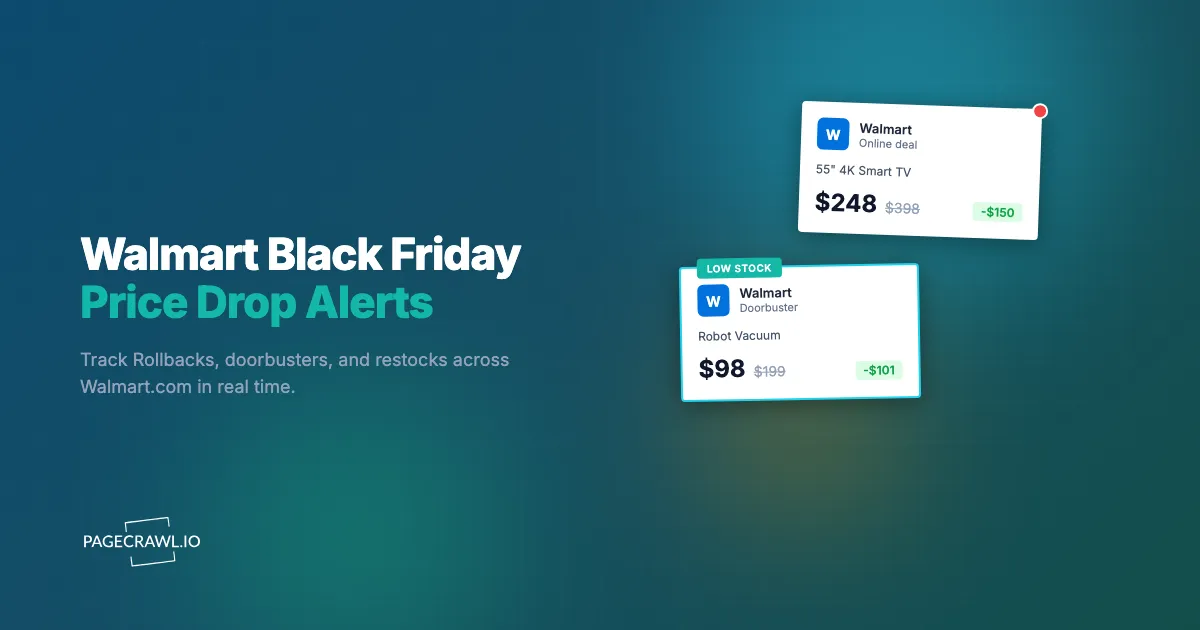
Last November, a 55-inch onn. 4K Roku TV dropped to $248 on Walmart.com at 5pm Eastern on the Monday before Thanksgiving, two full days before "Black Friday" technically started. By 9pm it was listed as out of stock online. It came back Thursday evening at the same price, sold through again, then reappeared one last time Friday morning as an in-store doorbuster at a handful of Supercenters. Three windows, same price, and if you were watching the page manually you probably caught zero of them.
This is how Walmart runs Black Friday now. The single Friday-morning stampede is long gone. In its place is a multi-week sequence of Rollbacks, "Walmart Deals" events, Walmart+ early-access windows, and limited-quantity doorbusters that go live, sell out, and quietly restock at unpredictable times across both Walmart.com and individual store inventories. The price you want exists. The problem is being in front of the page during the 30 to 90 minutes it is actually available.
This guide covers exactly when Walmart's 2026 deals drop, why doorbusters disappear so quickly, what to monitor on Walmart.com (product pages, category pages, and store-level stock), and how to set up automated price and availability alerts so the page tells you as soon as a check spots a change instead of you refreshing it. For the broader retailer-by-retailer strategy, start with our Black Friday and Cyber Monday deal alerts hub.
When do Walmart's Black Friday deals actually drop in 2026?
Walmart spreads Black Friday across roughly four weeks in waves, not a single day. Expect early-November Rollbacks, two or three named "Walmart Deals" online events through mid-November, a Walmart+ early-access window each event (members get in hours before the public), and in-store doorbusters on Black Friday morning itself. Prices and stock shift inside every window, and Walmart confirms the exact dates each year through its corporate newsroom a few weeks ahead.
The early-November Rollback wave
Walmart's first real discounts show up as Rollbacks in the first two weeks of November, well before any "Black Friday" branding. Many of these match or beat the prices that later appear during the official event. The catch is that they are not advertised with a countdown, so the only way to know a product just dropped is to be tracking its price continuously. A monitor that has been watching since late October will flag the exact moment a $398 TV becomes $248.
Black Friday week: the online events
Walmart runs its big online events in two parts. Walmart+ members get early access first, usually starting in the afternoon (Eastern time), and the same deals open to everyone several hours later, often in the evening. This staggered start matters: the most popular items can sell through their online allocation during the members-only window and never reach the public open. If you have Walmart+, your monitor should be running before early access begins so you catch the deal at the earliest possible second.
In-store doorbusters and the Friday morning rush
A separate set of deals is reserved for in-store doorbusters on Black Friday morning, and these often differ in price and quantity from the online versions. Walmart's site shows store-level availability, so you can monitor whether a specific item is "in stock" for pickup at your local Supercenter. That signal is gold: it tells you whether driving over is worth it before you leave the house, instead of arriving to an empty pallet.
Why do Walmart doorbusters sell out so fast?
Walmart doorbusters sell out fast because the deal quantity is deliberately limited and the discount is steep enough to draw resellers and bargain hunters at the same moment. A robot vacuum at $98 down from $199 has a fixed allotment per event, not unlimited stock at that price. Once the allotment clears, the listing flips to out of stock or snaps back to full price.
The pricing is engineered for urgency. Walmart uses these loss-leader doorbusters to pull shoppers onto the site and into stores, so the allocation is intentionally smaller than demand. Three things then happen in quick succession: the item goes live, the page shows the discounted price, and inventory drains over minutes rather than hours. Restocks do happen (Walmart frequently replenishes hot items two or three times across an event) but they are silent and short. There is no banner announcing "back in stock for the next 40 minutes."
Manual checking loses this race by design. By the time you remember to refresh, the window has usually closed. Automated out-of-stock and restock monitoring flips the model: instead of you polling the page, you get an alert as soon as a check detects the availability change, which is the only realistic way to catch a doorbuster that lives for half an hour.
What should you monitor on Walmart.com?
Monitor three things on Walmart.com: individual product pages for price and stock, category and deal pages for newly added discounts, and store-level availability for pickup. Each answers a different question, when did the price drop, what new deals just appeared, and can I grab it locally today. Together they cover every way a Walmart Black Friday deal can surface.
Product pages: price and availability
The product page is your core monitor, and product page monitoring covers price, stock, and spec changes on a single URL. For a specific item you intend to buy (a named TV model, a particular Shark vacuum, a LEGO set), track both the price element and the availability status on that exact URL. You want to know two facts: did the number go down, and did "Add to cart" turn into "Out of stock" or back again. Our Walmart price tracker guide and Walmart in-stock and restock guide walk through both setups in detail.
Category and deal pages
Product-page monitoring only works for items you already know you want. To catch deals you have not picked yet, monitor Walmart's curated deal and category pages, for example the Electronics deals page, the TV deals page, or a "Black Friday Deals" landing page. When Walmart adds a new doorbuster to one of these grids, the page content changes, and your monitor surfaces the new item before it spreads across deal-tracking sites. This is how you find the unadvertised discounts that never make the printed flyer.
Online vs in-store (pickup) stock
Walmart shows whether an item is available for shipping, for pickup at your store, or for same-day delivery, and these can differ wildly. An item can be sold out for shipping but sitting on a shelf 10 minutes away. Set your monitor on the product page with your store selected so the availability you are tracking reflects local pickup, not just the national shipping pool. For high-demand toys specifically, our holiday toy restock guide covers the same pickup-versus-ship distinction.
How do you set up Walmart Black Friday alerts with PageCrawl?
Setting up Walmart alerts takes about ten minutes: collect your product URLs, add each as a price or availability monitor, set meaningful thresholds, raise the check frequency for the peak window, and route notifications to a channel you actually watch. Here is the concrete walkthrough using PageCrawl's free tier (6 monitors, 220 checks per month) to start.
Step 1: Build your Walmart shopping list. Open every product you plan to buy on Walmart.com and copy the full product page URL for each, or add them as you browse with the one-click bookmarklet. Aim for 5 to 10 specific items first, the big-ticket purchases where a real Rollback saves the most money (a TV, a console bundle, a robot vacuum, a KitchenAid mixer). Add a few category or deal-page URLs too, so you catch newly added doorbusters in the categories you care about.
Step 2: Add each URL as a monitor. In PageCrawl, paste a product URL and choose "Price" tracking mode. PageCrawl renders the page fully like a real browser, so it reads the live Walmart price even on pages that build their content dynamically, then watches that number over time. For a stock-focused item where you mainly care about availability rather than the exact price, use "Availability" mode instead so you are alerted on in-stock and out-of-stock transitions.
Step 3: Set meaningful thresholds, not every wiggle. You do not want a ping for a one-cent change. Use conditional alerts to fire only on drops that matter: notify me when the price falls 15% or more below its recent average, or when it crosses a target dollar amount you would happily pay. For stock monitors, alert on the transition from out of stock to in stock. The help centre walkthrough on notification conditions and filters covers keyword and threshold rules in full. This keeps the signal high and alert fatigue low.
Step 4: Raise the check frequency for Black Friday week. A daily check is fine in late October while you build a price baseline. During the event window, doorbusters live for minutes, so you want the tightest interval your plan allows. PageCrawl's bulk edit for monitored pages lets you bump every monitor from daily to your fastest frequency in one action when the events start, then dial it back afterward to conserve your monthly check quota. Remember that an alert can only go out on the next scheduled check, so the interval you set is your worst-case delay.
Step 5: Route alerts to a channel you actually watch. For most products, email alerts are plenty. For doorbusters and limited-quantity items, speed wins, so send those to browser push notifications on your phone or a Slack channel you keep open. A family buying gifts together can share one Slack channel so whoever sees the alert first grabs the deal.
Step 6 (optional): Automate with webhooks. Power users can connect PageCrawl's webhook automation to log every Walmart price change to a Google Sheet, fan an alert out to multiple phones, or feed prices into a spreadsheet that ranks deals automatically. This is also how you compare the same product across Walmart, Amazon, and Target side by side, covered in our cross-retailer price comparison guide.
How do you tell a real Walmart deal from an inflated Rollback?
You tell a real deal from a fake one with price history. A genuine Rollback shows a stable price for weeks, then a clean drop. A manufactured one shows a quiet price bump in early November followed by a "discount" back to roughly where it started. If you have been monitoring since October, your price chart makes the difference obvious at a glance.

Not every "Rollback" tag is a true low. Some items drift up in late October, then get marked down during the event to a number that is no better than September's everyday price. Studies of holiday retail consistently find a meaningful share of advertised Black Friday deals are not at their actual yearly low. Without a baseline you are trusting the strikethrough price, which is exactly what the strikethrough price is designed for.
This is why starting early is the single highest-leverage move. Add your Walmart monitors in late October and let them run. By the time the events hit, PageCrawl's price history chart shows you each item's normal range, any pre-sale inflation, and what an honestly good price looks like. A flat line that suddenly drops is a real deal. A bump-then-discount is theater.
Which Walmart categories see the biggest Black Friday discounts?
Walmart's deepest Black Friday cuts land in electronics, home and kitchen, and toys, with TVs and its own-brand onn. and Roku devices among the most aggressively discounted. These are the categories where weeks of monitoring pay off most, because the dollar savings on a single TV or appliance can exceed a year of any paid monitoring plan.
- TVs and electronics: Walmart leans hard on TVs as doorbusters, especially onn. and partner Roku and Samsung models in the 50-inch-and-up range. Laptops, tablets, and Walmart-exclusive bundles also see steep, limited-quantity drops.
- Home and kitchen: Robot vacuums (Shark, iRobot), air fryers, Instant Pots, and KitchenAid mixers see some of the deepest cuts of the year. These are planned purchases where a price baseline tells you at a glance whether the event price is genuinely low.
- Toys: Walmart is a primary destination for the year's hot toys and LEGO sets, which sell out and restock silently. Monitor both price and availability, and read our holiday toy restock guide for the toy-specific playbook.
- Gaming: Console bundles, controllers, and game prices drop across the event, often with Walmart-exclusive bundle contents.
What are the most common Walmart Black Friday monitoring mistakes?
The biggest mistakes are starting too late (no baseline to verify deals), tracking the national shipping pool when you actually want local pickup, monitoring so many items that alerts become noise, and not having checkout ready when a doorbuster alert fires. Each one quietly costs you either money or the deal itself.
Starting on Black Friday week leaves you no price history, so you cannot tell a real Rollback from an inflated one. Tracking only shipping availability means you miss the unit sitting on a shelf nearby. Adding 150 items produces so many notifications that you tune them out and miss the one that mattered. And the fastest alert in the world is useless if your Walmart account is logged out and your card is not saved, because a limited doorbuster will sell through while you hunt for your wallet. Fix all four before the events start: monitor early, select your store, focus on items you will actually buy, and pre-load your checkout details.
Choosing your PageCrawl plan
PageCrawl's Free plan lets you monitor 6 pages with 220 checks per month, which is enough to validate the approach on your most critical pages. Most teams graduate to a paid plan once they see the value.
| Plan | Price | Pages | Checks / month | Frequency |
|---|---|---|---|---|
| Free | $0 | 6 | 220 | every 60 min |
| Standard | $8/mo or $80/yr | 100 | 15,000 | every 15 min |
| Enterprise | $30/mo or $300/yr | 500 | 100,000 | every 5 min |
| Ultimate | $99/mo or $999/yr | 1,000 | 100,000 | every 2 min |
Annual billing saves two months across every paid tier. Enterprise and Ultimate scale up to 100x if you need thousands of pages or multi-team access.
For Walmart Black Friday, the Standard plan at $80/year covers 100 product and deal pages at 15-minute checks, enough for a full holiday shopping list with room to track the same items at Amazon and Target too. A single genuine doorbuster caught, one $150 TV drop you would have missed refreshing manually, pays for the year. Enterprise at $300/year tightens checks to every 5 minutes, which is the difference between catching a 30-minute doorbuster and reading about it afterward.
Getting Started
Do not wait for Black Friday week. Open Walmart.com today, pick the 5 or 6 items you most want this season, and add each one to PageCrawl in Price or Availability mode on the free tier. Let them run through early November so you build a real price baseline before the events begin.
When the Rollbacks start landing and you watch your monitors flag genuine drops on the next check, expand to a full list and tighten your check frequency for the peak window. The shoppers who win Walmart Black Friday are not the ones refreshing at midnight. They are the ones whose phones buzz as soon as a check catches the drop, with checkout already loaded.