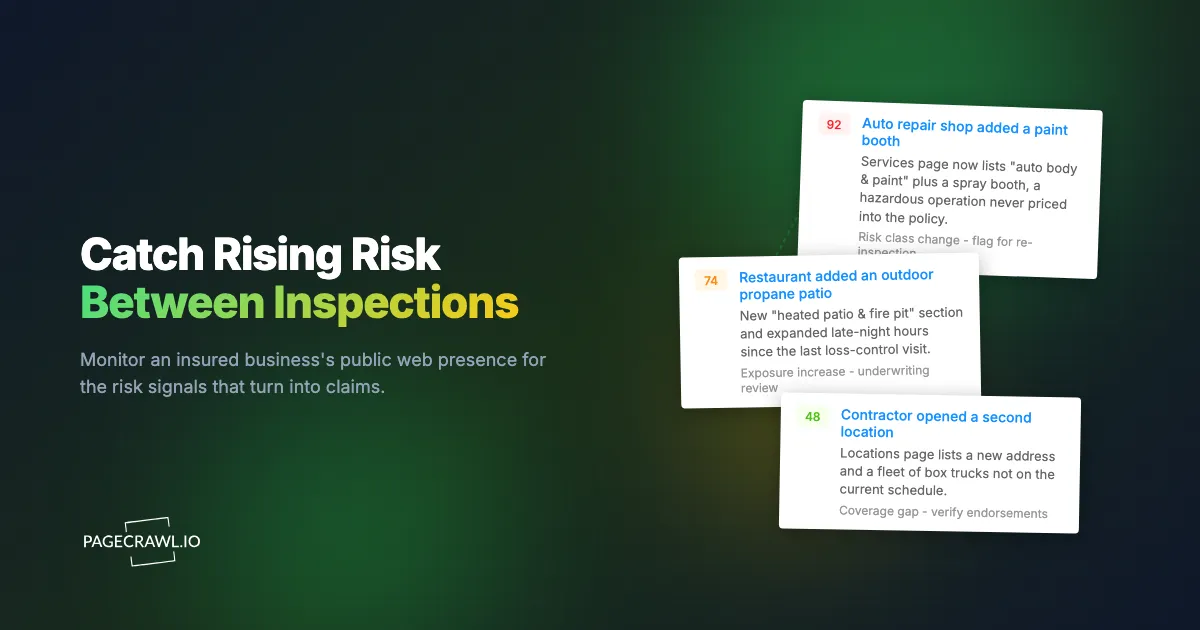
A regional carrier wrote a clean general liability and property policy on a suburban auto repair shop. The loss-control engineer visited, photographed the bays, confirmed there was no spray painting on site, and priced the account as a basic mechanical garage. Fourteen months later, with the next inspection still ten months out, the shop quietly added a downdraft paint booth in the back, listed "auto body and collision refinishing" on its website, and started advertising 24-hour towing for box trucks and RVs. None of that was on the policy. The carrier learned about the paint booth the way carriers usually do: a flash fire, a six-figure property claim, and an adjuster reading the shop's own website out loud during the investigation.
This is the structural blind spot in commercial loss control. You inspect an account once, maybe every year or two, and then you fly blind until the next visit or the next claim. Risk does not hold still between inspections. Insured businesses add services, open locations, expand hours, install equipment, change occupancy, and announce all of it on the one channel they can never resist updating: their public website. The information that would have repriced the account, triggered a re-inspection, or prompted a coverage conversation was sitting in plain sight the whole time. Nobody was watching it.
This guide covers how loss-control and underwriting teams use web monitoring to close the gap between inspections: which public signals predict rising risk, how to set up monitoring across a book of business, and how to turn a detected change into a documented underwriting action before it becomes a claim.
What is insurance loss control, and where does web monitoring fit?
Loss control is the risk-engineering discipline of identifying hazards in an insured operation and reducing the frequency and severity of claims before they happen. Web monitoring fits in the long silent stretch between physical inspections: it watches each insured's public web presence on a schedule and alerts you as soon as a check detects that the operation has changed in a way that affects exposure.
Traditional loss control is event-based. An engineer visits at binding, files a report, recommends improvements, and schedules a follow-up. Between those events, the carrier's picture of the risk is frozen at the date of the last visit. For a book of hundreds or thousands of accounts, the average account is being priced and reserved against information that is months out of date.
Web monitoring converts that event-based process into a continuous one. Instead of discovering a new hazardous operation at the next scheduled visit (or at first notice of loss), the carrier sees the website change on the next scheduled check after the insured publishes it, which for a daily-checked account means the same day or the next. The point is not to replace the physical inspection. Boots on the ground still verify housekeeping, equipment condition, and management commitment in ways a website never will. The point is to make the months between visits observable, so the next inspection is triggered by an actual change in the risk rather than by an arbitrary calendar date.
Why the gap between inspections is the expensive part
Most surprise claims are not surprises in hindsight. The insured added the exposure, advertised it, operated with it for months, and the carrier simply did not have a mechanism to notice. A restaurant adds an outdoor wood-fired oven and a heated patio. A warehouse starts storing lithium battery inventory. A landscaper adds tree removal with aerial lifts. Each of these is a material change in the hazard, each gets announced on the business website, and each typically goes undetected until renewal underwriting or a loss.
What public web signals predict rising risk?
The strongest predictors are any public sign that the operation has grown, changed what it does, or added a hazardous activity that was not present at underwriting. These show up across an insured's website and listings as new services, new locations, expanded hours, new equipment, hiring for hazardous roles, and changes to safety or compliance pages.

Here are the categories that consistently matter for commercial accounts:
New or expanded services. A "services" or "what we do" page that gains a line like welding, spray painting, deep frying, tree removal, roofing, demolition, or commercial driving is a direct exposure change. The classification the account was priced under may no longer fit the operation.
New locations or premises. A "locations" or "contact" page that adds an address means new property, new occupancy, possibly a new state, and a coverage question about whether the new premises is even scheduled. Monitoring the listings that insureds keep current, including their Google Business Profile, catches expansion early. See our guide on monitoring Google Business Profile and local listing changes.
Expanded hours and operations. Late-night hours, 24-hour service, or a shift from appointment-only to walk-in traffic changes the frequency exposure for liability. A restaurant that adds a 2 a.m. close has a different liquor and assault risk profile than one that closes at 9 p.m.
Hazardous additions and equipment. Paint booths, commercial fryers, propane fire features, industrial machinery, kilns, climbing walls, trampolines, pools, and pressure vessels are the items that drive severity. Their first public appearance is usually a marketing photo or a new product or amenity line on the site.
Hiring signals. A careers page that opens roles for forklift operators, CDL drivers, roofers, or welders tells you the operation is scaling a hazardous activity before the equipment or the claim shows up.
Trigger words in any page text. Phrases like "now offering," "coming soon," "under new ownership," "now hiring," "expanded," or specific hazard terms can be watched as keywords across a site so a single new sentence anywhere triggers a flag. Our guide on keyword and trigger-word monitoring covers how to set those up.
Safety, permit, and compliance pages. When an insured removes a safety certification, lets a license lapse, or changes its compliance language, that is a negative signal worth a conversation. Permit and license status often lives on government sites rather than the insured's own, which is why government permit and license status monitoring and local zoning and planning permit monitoring belong in the same program.
How do you monitor an insured's web presence without checking sites by hand?
You list the pages that reveal each insured's operation, add them to PageCrawl with the right tracking mode, and let it check them on a schedule and alert you only when the page actually changes. A loss-control analyst stops browsing dozens of client sites every week and instead reviews a feed of confirmed changes. Here is the setup, start to finish.
Step 1: Pick the pages that reveal the operation. For each insured, identify the URLs that expose risk: the homepage, the services or capabilities page, the locations or contact page, the careers page, and any "about" or "facilities" page. For most small commercial accounts that is three to six URLs. Prioritize the page where this particular insured would announce a new service or location.
Step 2: Create a free PageCrawl account and add the first URLs. The free tier covers 6 monitors and 220 checks per month, which is enough to pilot the approach on two or three of your highest-hazard accounts before you commit a budget. Paste each URL into PageCrawl and let it capture a baseline of the current page.
Step 3: Choose a tracking mode that matches the page. For text-heavy pages like services, careers, and about pages, use a reading or full-text mode so you catch new sentences and removed certifications. For pages where you only care about a specific region (a "current services" block, a locations list, or a single hours table), target that element so layout tweaks and marketing banners do not generate noise. The goal is to be alerted to substance, not to a rotated hero image.
Step 4: Organize accounts with folders and tags. Use folders to group monitors by insured, by line of business, or by underwriter. Use tags to mark hazard class, renewal quarter, or "watch list" accounts with a history of undisclosed changes. The guide to organizing monitored pages with labels, folders, and workspaces covers how nested folders and separate workspaces behave when a book grows into the hundreds, which is what keeps the dashboard usable and lets you filter the change feed down to one segment.
Step 5: Set a check frequency that fits the exposure. Daily checks are plenty for most commercial accounts, since operational changes are published days or weeks before they matter. Reserve more frequent checks for high-severity or watch-list accounts. Less frequent checks (a few times a week) are fine for stable, low-hazard insureds. Frequency also keeps you inside your monthly check budget.
Step 6: Enable screenshots for evidence. Turn on screenshots so every captured change includes a timestamped image of the page as it appeared. When you reprice an account or open a re-inspection because the insured added a paint booth, a dated screenshot of their own website is documentation an underwriting file and an insured conversation can both stand on.
Step 7: Route alerts to where the work happens. Send change notifications to the channel your team already lives in: email for individual analysts, a shared inbox for the loss-control desk, or a chat channel for the underwriting pod. For higher volumes, route them programmatically (covered below) so each material change lands as a task, not another email to triage.
For a wider view of how monitoring tools compare and what to evaluate, our competitor and website analysis tools guide walks through the broader category.
Tuning out the noise
The fastest way to kill a monitoring program is to flood analysts with alerts for cookie banners, blog posts, and rotating testimonials. Target specific page elements rather than entire pages where you can, use reading modes that ignore navigation and footer churn, and reserve full-page tracking for pages where any change matters. The aim is a change feed where most items are worth a human glance.
Which pages should a loss-control team actually watch?
Watch the pages where an insured describes what it does, where it operates, and who it is hiring, plus the external pages that govern its right to operate. In priority order that means the services page, the locations page, the careers page, the homepage, and then licensing, permit, and recall sources that sit on government or regulator sites rather than the insured's own domain, which is the territory covered by government and public records monitoring.
Services and capabilities pages are the single highest-value target. This is where a new hazardous operation appears first, in the insured's own marketing language, often months before equipment is even installed.
Locations and contact pages reveal expansion, new premises, and new jurisdictions. A new address is both a new property exposure and a coverage question.
Careers and hiring pages are a leading indicator, and job listing and career page monitoring turns them into a standing signal. Hiring welders, drivers, or roofers tells you a hazardous activity is scaling before the loss data does. The same hiring-signal technique competitive analysts use applies directly to risk: a careers page is an early read on where the operation is going.
Regulatory and safety sources round out the picture. Lapsed licenses, zoning and permit changes, and product recalls each change the risk and rarely appear on the insured's marketing site. Pair website monitoring with OSHA and safety regulation monitoring for the rule changes that OSHA applies to whole classes of insureds, and with product recall and consumer safety monitoring, which draws on the recall notices published by the Consumer Product Safety Commission, for accounts whose exposure is tied to the products they sell or use.
How do you turn a detected change into an underwriting or inspection action?
Treat every confirmed change as a triage item with three possible outcomes: ignore it, log it, or escalate it. Cosmetic changes get dismissed, minor changes get noted on the account file, and material exposure changes get routed to an underwriter or a loss-control engineer with the screenshot attached, so the response is documented and consistent rather than ad hoc.
A workable loss-control workflow looks like this:
- Confirm and classify. The analyst reviews the change, confirms it is substantive, and tags it: cosmetic, minor, or material. Material means the exposure, classification, or coverage adequacy may have changed.
- Attach the evidence. The timestamped screenshot and the source URL go onto the account record. This is the artifact that justifies repricing or re-inspection to both the underwriter and the insured.
- Route to the right desk. A new hazardous operation goes to underwriting for re-rating and to loss control for a possible site visit. A new location goes to underwriting to verify scheduled premises. A lapsed certification goes to the risk engineer for follow-up.
- Close the loop. Record the action taken, whether it was an endorsement, a re-inspection, a recommendation letter, or a decision to take no action, so the file shows the change was seen and handled.
What you may do with a detected change is governed by your policy language, filed classifications, and state insurance regulation, so run the workflow past compliance before it goes live. This article is informational, not legal or underwriting advice.
Automating the first response with webhooks
For a book of any size, an analyst manually copying changes into a system of record does not scale. Use webhooks to push each detected change straight into your workflow as soon as it is captured. A webhook can open a task in your policy administration or claims system, post the change and screenshot to the loss-control team's channel, write a row to a risk register, or kick off an automated re-inspection request. Our webhook automation guide covers the mechanics, and the help article on sending change data to any external service by webhook documents the payload and retry behaviour. The result is that no material change quietly ages out unaddressed, even on the days nobody is watching the dashboard.
This same continuous, evidence-backed pattern already drives mature third-party risk programs. Our guide on continuous vendor monitoring for third-party risk extends the approach to counterparties if your remit touches vendor exposure too.
How do you scale monitoring across a whole book of business?
Scale by tiering accounts so monitoring effort tracks potential severity, then standardize the setup so adding a new insured is a two-minute task rather than a project. Watch your highest-hazard and highest-premium accounts daily with full page coverage, watch the broad middle a few times a week, and watch low-hazard accounts lightly. Your monthly check budget gets spent where a missed change is most expensive.
Tier by severity, not by premium alone. A small premium account with a high-severity exposure (anything with fire, height, vehicles, or vulnerable occupants) deserves closer watching than a larger account with a benign operation. Map your tiers to potential claim severity.
Standardize the per-account setup. Decide once which page types you monitor, which tracking mode each uses, and which frequency each tier gets. Then every new bind follows the same recipe. Consistency also matters for fairness and documentation: every insured in a class is watched the same way.
Right-size the volume to a plan. A pilot on your worst ten accounts might need 30 to 50 monitors. A full small-commercial book can run into the hundreds or low thousands of monitors once you count three to six pages per insured. Match that to a plan with enough pages and a check budget that supports daily checks on your priority tier.
Choosing your PageCrawl plan
PageCrawl's Free plan lets you monitor 6 pages with 220 checks per month, which is enough to validate the approach on your highest-hazard accounts before committing budget. Most teams graduate to a paid plan once the first caught change pays for the year.
| Plan | Price | Pages | Checks / month | Frequency |
|---|---|---|---|---|
| Free | $0 | 6 | 220 | every 60 min |
| Standard | $8/mo or $80/yr | 100 | 15,000 | every 15 min |
| Enterprise | $30/mo or $300/yr | 500 | 100,000 | every 5 min |
| Ultimate | $99/mo or $999/yr | 1,000 | 100,000 | every 2 min |
Annual billing saves two months across every paid tier. Enterprise and Ultimate scale up to 100x if you need thousands of pages or multi-team access.
For a loss-control desk, the math is blunt. Standard at $80/year monitors 100 pages with daily checks and timestamped screenshots, enough to cover 20 to 30 small commercial accounts at three to five pages each. Catch one undisclosed paint booth, new location, or expanded operation before it becomes an unpriced claim and the program has paid for itself many times over. Enterprise at $300/year covers 500 pages and suits a full small-commercial book where one missed exposure change can run into six figures.
Getting Started
Pick the ten accounts that would hurt the most if their operation changed without you knowing, list the three or four pages on each that reveal what they do, and put them under watch this week. Create a free account, add the URLs, turn on screenshots, and route alerts to your loss-control desk. The free plan's 6 monitors are enough to prove the model on your worst exposures before you scale it to the book. Stop discovering the new paint booth from the adjuster's report. See it the day they post it.