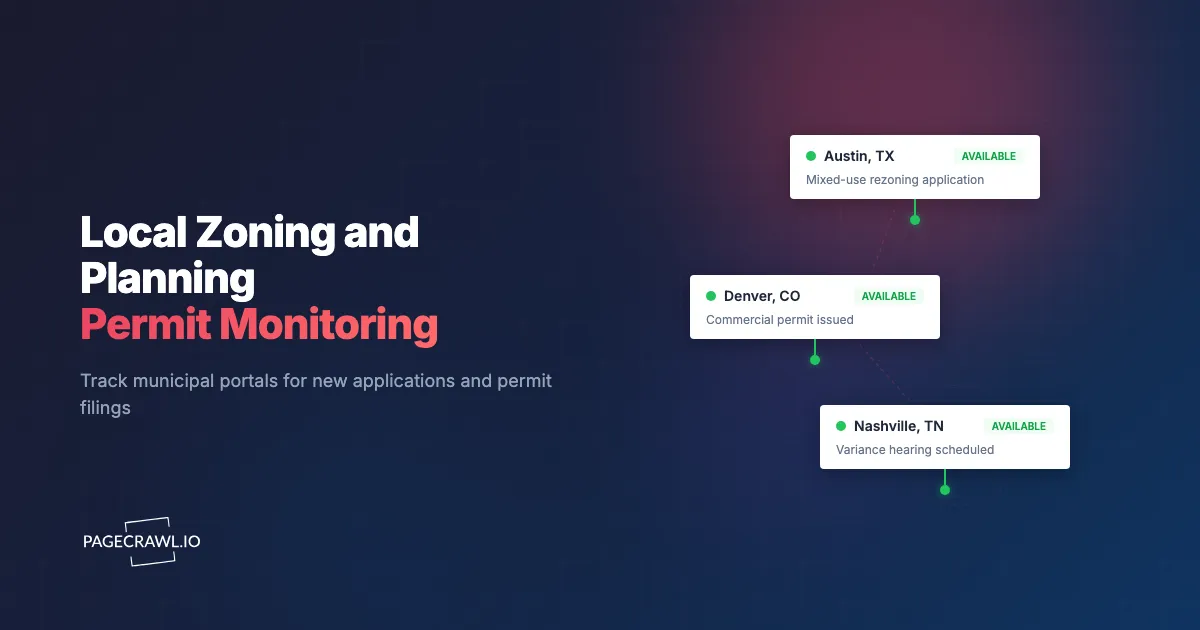
In late 2023, a regional multifamily developer noticed a zoning amendment application filed for a 7-acre parcel in a submarket they had been targeting for three years. The application appeared on the city planning portal on a Wednesday morning. By Friday, they had pulled the applicant's contact info, reached out to the seller, and were in informal conversation about a backup offer if the rezone failed. The original applicant's deal eventually fell through six months later. The developer who was monitoring the portal closed on the parcel within 30 days because the relationship was already built.
Land use information is public, but it is fragmented across hundreds of municipal portals and public records databases, each on its own schedule, with no central feed. For real estate developers tracking competitor activity, contractors watching for the point at which a project becomes biddable, or community organizations preparing for hearings, manual portal checks are not realistic. The portals update during business hours and the meaningful filings are buried in lists of routine permits.
This guide covers how municipal planning portals publish filings, the patterns worth watching for, and how to set up a continuous monitor across your target jurisdictions so that new zoning applications, hearing notices, and permit filings reach your team the day they post.
Why should you monitor planning portals?
Because a continuous monitor across a handful of target portals reveals patterns that single-portal browsing misses. Zoning applications precede construction by 6-18 months, permit filings name the general contractor, and hearing notices open a response window. Each portal in isolation looks routine; in aggregate, the activity tells a story about where the market is moving.
New Zoning Applications Signal Projects Months Ahead
Zoning change applications (rezones, conditional use permits, variances) typically precede actual construction by 6-18 months. Catching the application gives you maximum lead time on competitor projects, neighborhood opposition organizing, or your own positioning to backstop the deal if it falters.
Permit Filings Identify Active Construction and General Contractors
Building permit filings reveal who is actually building what, where, and with which GC. For subcontractors and suppliers, the permit data is the most reliable forward-looking pipeline source. For competitive intelligence, the GC and architect named on the permit reveals which teams are winning which work.
Hearing Notices Create Response Windows
Planning commission, zoning board, and city council hearings have statutory notice periods. Catching the notice the day it posts maximizes preparation time for community input, competitive participation, or your own affirmative filing.
Variance and Special Use Permits Flag Contested Projects
Variance applications and special use permits often face neighborhood opposition. Monitoring these is essential both for affected community organizations and for developers tracking which competitors are taking on hard projects.
How do municipal planning portals work?
Most municipal portals expose application search results at addressable URLs. The portals vary in technology (Accela, Cityworks, Tyler Technologies, Granicus, custom builds) but the user-facing pattern is consistent: a search results page filtered by date, status, type, or geography, with each application as a row that links to a detail page.
https://aca-prod.accela.com/{municipality}/Cap/CapHome.aspx
https://{municipality}.permits.gov/portal/permits/search
Filtering by submission date in descending order produces a "most recent filings" view. Copy that URL and you have a reproducible feed of new applications.
Some portals also publish hearing agendas as standalone documents, often PDFs, posted weekly. These are higher-signal than the raw application feed because they reflect what is actually progressing to a decision.
Which permit monitoring approach should you choose?
If you have a defined footprint of 5 to 30 jurisdictions, monitoring the portal URLs directly is the cheapest route to same-day awareness. National permit aggregators make sense when you prospect everywhere and cannot name your target cities in advance. Manual checking works only for casual tracking.
| Approach | Cost | Latency | Coverage | Best For |
|---|---|---|---|---|
| Manual portal checks | Free | Days | Per-portal | Casual tracking |
| Buildout / CoStar permit data | $K+/year | Days to weeks | Aggregated | Large CRE shops |
| Municipal email notifications | Free | Inconsistent | Per-portal | Limited reliability |
| BuildZoom / similar permit aggregators | $-$$ | Days | National | Contractors prospecting nationally |
| PageCrawl on portal URLs | Free tier to $300/year | Daily | Any portal | Developers and contractors with defined target submarkets |
The big commercial permit data aggregators such as CoStar do this well but at enterprise pricing and with multi-day latency. PageCrawl gives you same-day awareness on the specific portals that matter to your business at a fraction of the cost.
Setting Up Permit Monitoring in PageCrawl

Step 1: List your target municipalities
Pick the cities, counties, or townships you actively care about. Most developers and contractors have a clearly defined 5-15 jurisdiction footprint.
Step 2: Find the application search or new filings page for each
Most portals expose a search results URL filterable by date or status. Filter for "new" or "recent" or sort by submission date descending, then copy the URL. Some portals also have dedicated "recent filings" or "this week's applications" pages.
Step 3: Add each portal URL as a content monitor
Sign in to PageCrawl, click Track New Page, and paste the URL. Use content monitoring so new rows in the results table are detected. Each new row represents a new application.
Step 4: Add hearing agenda pages as siblings
Most planning departments post hearing agendas one to two weeks before the hearing. These are typically published on a dedicated agenda page that updates weekly. Add the agenda index page to catch new agendas as they post.
Step 5: Pick a check frequency
Planning portals update during business hours. Reasonable defaults:
- Awareness only: Daily check is enough for most use cases.
- Active acquisition team: Hourly checks for same-business-hour awareness.
- Hearing response cycles: 15-minute checks during the week before known hearings.
Step 6: Tag by jurisdiction and project type
Use PageCrawl folders to organize by jurisdiction or by project type (residential, commercial, mixed-use). Acquisition managers each subscribe to their region or specialty folder. The guide to organizing monitored pages with labels, folders, and workspaces covers nesting folders by county and splitting a large footprint across teams.
Worked Example: A Regional Multifamily Developer's Permit Watch
A regional multifamily developer with a 10-city footprint typically sets up:
- Add the application search page for each city's planning portal (10 monitors).
- Add the hearing agenda index page for the planning commission in each city (10 monitors).
- Add the council agenda index for cities where major rezones go to council (5 monitors).
- Set frequency to daily for application searches, weekly for hearing agendas.
- Route alerts to a
#land-pipelineSlack channel with sub-channels per city for acquisition managers. - Tag by jurisdiction.
Total: 25 monitors. Total cost: $80/year. Setup time: about 30 minutes. The acquisition team gets continuous awareness of every meaningful filing in their footprint.
Patterns Worth Watching For
Rezones on parcels you have evaluated. When a competitor files a rezone on a parcel you previously underwrote, the value of your underwriting just increased. The application reveals their planned program and entitlement strategy.
Repeat applicants in your submarket. When a single applicant files three or more applications across your footprint in a quarter, that operator is scaling. Worth understanding who they are and what they are doing.
Variance applications. Variances often face neighborhood opposition. Monitor for variances on parcels adjacent to your existing assets or pipeline projects.
Permit issuance after months of filings. A permit issued is the trigger for subcontractor mobilization and supplier outreach. For GCs and subs, this is the most actionable alert in the permit data.
Withdrawn or denied applications. When a major project is denied or withdrawn, the parcel often returns to the market within 6-12 months. Worth flagging for backup positioning.
Combining Permit Monitoring With Other Real Estate Signals
Permit data is most actionable in combination with broader real estate intelligence.
Combine with commercial listings. Pair with our LoopNet and Crexi listing alerts guide for parcels coming to market in your target submarkets.
Combine with foreclosure calendars. Pair with our foreclosure auction calendar monitoring guide for distressed inventory that may pair with entitlement opportunities.
Combine with rural land listings. Pair with our rural land and recreational property listing alerts guide for development-track land in transitional submarkets.
Combine with municipal RFP pages. Cities often issue RFPs for development of public parcels. Add the municipal procurement page as a sibling so new RFP and funding opportunity postings surface alongside your permit alerts.
Combine with utility hookup data where public. Some utility districts publish new-meter data that lags permits but confirms construction activity.
Who uses zoning and permit monitoring?
Developers, general contractors, subcontractors and suppliers, land use attorneys, community organizations, and local real estate reporters. Each group reads the same public filings for a different signal: competitor activity, biddable work, pipeline, client outreach, hearing turnout, or a story lead.
Real estate developers. Same-day awareness of competitor activity in target submarkets informs site acquisition timing, offer pricing, and backup positioning on parcels that may return to market. Most developers find the cost recovers itself the first time they get ahead of a competitor by a week.
General contractors. Permit filings identify projects that will need subs and suppliers. Same-day awareness gives GCs first-call positioning with developers before their existing relationships kick in.
Subcontractors and suppliers. Permit data is the highest-signal pipeline source for trade contractors. Continuous monitoring across a 20-30 jurisdiction footprint is a real competitive advantage.
Land use attorneys. Hearing notice monitoring supports proactive client outreach. A lawyer who emails their client the day the agenda posts is a different value proposition than one who responds after the client sees it themselves. Always confirm filing details, hearing dates, and comment deadlines on the municipality's own planning portal; this article is informational, not legal advice.
Community organizations and HOAs. Neighborhood groups can track upcoming hearings before formal mail notices arrive, increasing turnout and organizing time.
Real estate journalists and analysts. Permit and zoning data is the foundation of local real estate reporting. Continuous monitoring keeps reporters ahead of the news cycle.
Frequently Asked Questions
How quickly do new filings appear on municipal portals? Within hours of submission. Most portals batch overnight and post the next morning, though some publish continuously through the business day.
What if my target city's portal is hard to navigate? Most portals expose a results URL even if the UI is poor. Filter for the view you want, then copy the URL from the address bar. The URL is usually monitorable even when the portal feels clunky.
Can I monitor hearing agenda PDFs? PageCrawl monitors HTML pages reliably and can also track the text inside a PDF, as the walkthrough on monitoring changes in PDF files explains. For agendas published as PDFs linked from a HTML index page, monitor the index page and catch the new PDF link as it appears.
What about jurisdictions that publish only in printed bulletins? Some smaller jurisdictions still publish only on paper or weekly bulletins. These cannot be monitored continuously and require a different workflow.
Can I get alerts only for permits above a certain value? PageCrawl alerts on every detected change. AI change summaries describe the filing so you can filter in your channel by valuation, project type, or applicant.
Do I need a paid plan for permit monitoring? The free plan supports 6 monitors, which covers a small target footprint. Standard at $80/year supports a full multi-jurisdiction acquisition pipeline with room for hearing agendas and council pages.
Choosing your PageCrawl plan
PageCrawl's Free plan lets you monitor 6 pages with 220 checks per month, which is enough to validate the approach on your most critical pages. Most teams graduate to a paid plan once they see the value.
| Plan | Price | Pages | Checks / month | Frequency |
|---|---|---|---|---|
| Free | $0 | 6 | 220 | every 60 min |
| Standard | $8/mo or $80/yr | 100 | 15,000 | every 15 min |
| Enterprise | $30/mo or $300/yr | 500 | 100,000 | every 5 min |
| Ultimate | $99/mo or $999/yr | 1,000 | 100,000 | every 2 min |
Annual billing saves two months across every paid tier. Enterprise and Ultimate scale up to 100x if you need thousands of pages or multi-team access.
Compliance monitoring is the cheapest insurance you can buy. A single missed regulatory change can trigger fines in the tens or hundreds of thousands, not to mention the audit overhead of proving you did not see it coming. Enterprise at $300/year covers 500 regulatory pages with unlimited history and timestamped screenshots, which is usually exactly what an assessor wants to see. All plans include the PageCrawl MCP Server, so your compliance team can ask Claude to summarize every change to a specific regulation over the last quarter and pull the exact diff, turning your monitoring history into a queryable audit trail. AI assistants can create monitors through conversation on every plan, including Free. Standard at $80/year is enough to cover 100 pages across your primary regulatory bodies if your program is smaller.
How do you get started with permit monitoring?
Pick five target municipalities, find the new-filings search URL for each, and add them to PageCrawl on a daily check. Create a free account and the next zoning or permit filing will arrive in your channel the day it lands.