It is the second week of May, and somewhere a DV lottery entrant has been opening the same government page every single morning for a month. The Entrant Status Check still says results are not yet available. Then one ordinary Tuesday it quietly flips, the selection list goes live, and the people who happened to refresh that afternoon find out they were chosen. The people who got busy and forgot to check find out weeks later, sometimes too late to start the next step in time.
The Diversity Visa Program, better known as the green card lottery, runs on a handful of hard dates and one frustrating rule: the U.S. Department of State does not email or mail winners. The Entrant Status Check at the official program site is the only legitimate way to learn whether you were selected. No alert lands in your inbox. No letter arrives. If you do not look, you do not know.
That is exactly the kind of problem monitoring government portals and public records pages solves. Instead of refreshing the program instructions or the status page every day, you point a monitor at those pages once and let it watch for you. When the deadline moves or the results window opens, you get an alert as soon as the next scheduled check picks the change up. This guide shows you how to set that up, which pages matter, and how to avoid the scams that swarm around this program every year.
Why monitor the DV lottery pages instead of just checking yourself?
Because the green card lottery has no official notification system, and the dates shift every year. The State Department never emails selectees, so the program instructions page and the Entrant Status Check are the only sources of truth. A monitor watches them around the clock and alerts you as soon as a check detects the wording changing, so you never rely on remembering to look.
Manual checking fails in two predictable ways. First, the entry window is short, about a month each autumn, and the published instructions sometimes change after they go up: a corrected deadline, a clarified eligibility note, or a reopened entry period after a technical problem. If you read the page once in early October and never look again, you can miss an amendment that affects your entry.
Second, the results window in the following spring has no announced minute. The status check page sits in a "not yet available" state for months, then becomes active. Entrants who check sporadically can lose a week or more, and that week matters because selection is only the start. Selected entrants still have to submit the immigrant visa application, gather documents, and act before visa numbers run out for their region. Time you lose at the front end is time you do not get back.
Automated monitoring removes the discipline problem entirely. The same approach people use for visa appointment slot monitoring and government agency news monitoring applies cleanly here: watch the authoritative page, detect the change, get notified on the next check.
When are green card lottery results released?
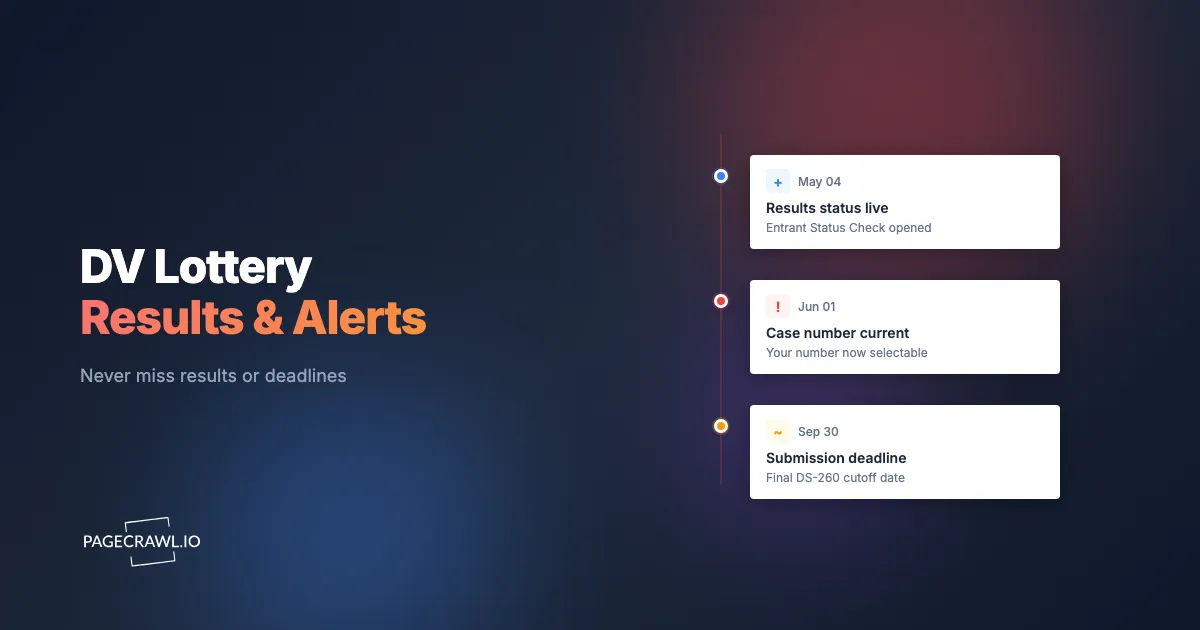
DV lottery results are typically released in early May of the year before the program year, and they stay viewable through about September 30. For a DV-2027 program, for example, entries are submitted in autumn 2025, and selections become visible on the Entrant Status Check from roughly early May 2026 onward. The exact day is never pre-announced, which is why a monitor matters.
The program follows a repeating annual rhythm. Knowing the shape of it tells you when to have monitors running and when you can let them idle.
| Phase | Typical timing | What to watch for |
|---|---|---|
| Instructions published | Late September / early October | Entry dates, eligibility rules, excluded country list |
| Entry period open | About one month, early October to early November | Deadline time (often noon US Eastern), any extension |
| Quiet period | November to April | Rare corrections or notices |
| Results window opens | Early May | Status check flips from "not available" to active |
| Visa processing | October 1 onward (new program year) | Region and country cutoffs, monthly movement |
| Status check closes | Around September 30 | Final chance to view your result |
Two practical takeaways. The two hot zones are the autumn entry window and the May results window, so keep monitors most active then. And because the precise release moment is never published, the only way to be early is to have something watching the page for you around the clock. This is the same logic behind scholarship deadline monitoring: the deadline is fixed, but the page that announces changes to it is the thing you actually need to watch.
Which DV lottery pages should you monitor?
Monitor three things: the official program instructions and dates page, the Entrant Status Check landing page, and the country eligibility list. Together these cover every public signal the program emits, from the entry deadline and any extension, to the moment the results window goes live, to whether your country of chargeability is still eligible this cycle.
Here is what each page gives you and the best tracking method for each.
The program instructions and dates page
This is the single most important page during the autumn entry window. It carries the official open and close dates, the exact deadline time, fee policy reminders (entry is always free), and any corrections. Monitor it with full page text or reader mode so you capture every wording change. A monitor here catches a moved deadline or a reopened entry period the day it posts, instead of after the window has closed.
The Entrant Status Check landing page
The public landing of the status check site tells you whether the results window is open. During the quiet months it shows a "results not yet available, check back in May" style message. When that text changes, the window has opened. Monitoring the public landing page for that wording change is the cleanest way to learn that results have gone live, without logging in repeatedly. Pair it with a keyword trigger so you only get pinged when words like "available" or "results" appear.
The country eligibility list
Eligibility changes year to year. Countries that have sent large numbers of immigrants to the United States recently are excluded, and that list is revised each cycle. If you are from a borderline country, monitor the eligibility section so you find out as soon as a check spots your country being added or removed. The list itself is the signal, so a plain text monitor on that section is all you need.
How do you set up DV lottery alerts in PageCrawl?
Setting up DV lottery monitoring takes about five minutes per page. You add the URL, choose what to track, set how often it checks, pick your alert channels, and let it run. The free tier covers 6 monitors and 220 checks per month, which is more than enough for the three core green card lottery pages plus a couple of related immigration pages.
Follow these steps for each page you want to watch.
Step 1: Add the program page URL
Create a free PageCrawl account and paste the URL of the official DV program instructions page. PageCrawl fetches it and shows a preview of exactly what it captures. Confirm the preview shows the real instructions text (dates, deadline, eligibility) and not a placeholder, so you know the monitor reads the content that matters.
Step 2: Choose what to track
For the instructions and eligibility pages, choose reader mode or full page text. Reader mode strips navigation and boilerplate and focuses on the main body, which is ideal for long official text. For the Entrant Status Check landing page, where you only care about one sentence flipping from "not available" to "available," target that specific block with an element selector so the alert fires on the part that matters and ignores the rest.
Step 3: Set the check frequency
Match frequency to the phase. During the autumn entry window and the May results window, check as often as your plan allows so you are first to know. During the quiet months, hourly or daily is plenty. On the free tier you get checks every 60 minutes, which comfortably catches a same-day deadline change or results release. Paid plans tighten this to every 15, 5, or 2 minutes for the high-stakes windows.
Step 4: Add noise filters so only real changes alert
Government pages often carry a "last updated" timestamp, a rotating banner, or a session token that changes on every load. Without filtering, those would trigger false alerts. Turn on date and timestamp removal, ignore numbers you do not care about, and set a small change threshold so a one-character cosmetic tweak does not page you. Our guide to reducing monitoring false positives covers the exact settings to use for official pages like these.
Step 5: Connect your alert channels
Decide how you want to hear about a change. Email alerts are the reliable default and work well for the entry deadline and eligibility pages. For the May results window, add a faster channel: browser push notifications are the quickest way to reach your desktop once a check finds the change, and Telegram alerts are popular for personal monitoring on your phone. You can combine several channels on a single monitor.
Step 6: Run, verify, and let it watch
Trigger a manual check to confirm the monitor captures the page and your alerts arrive, then leave it running. From here you never have to remember to check the page again. When the deadline moves, the eligibility list changes, or the results window opens, PageCrawl detects the change and notifies you on every channel you connected.
How fast will you hear when the results window opens?
Point a monitor at the Entrant Status Check landing page, target the status sentence, set the most frequent checks your plan allows for the month of May, and attach a fast channel like browser push. When the page text flips from "results not yet available" to active, the monitor fires on the next check, which on the tightest paid frequency is a couple of minutes later.

The key is layering speed on top of reliability. Use email as the durable record so the alert is waiting even if you miss the push. Add browser push for the seconds-matter speed, and a phone channel so the alert reaches you away from your desk.
A useful refinement is a keyword trigger. Instead of alerting on any change to the status page, configure the monitor to fire only when specific words appear, such as "available," "results," or "selected." Keyword and trigger-word monitoring keeps your May inbox quiet until the one change you actually waited for happens.
Because the State Department genuinely never emails winners, a monitor on the public status page is the closest thing to an official "results are live" notification that exists. It does not tell you your personal result, but it tells you when it is worth logging in to check.
Can you monitor your own Entrant Status Check result?
Your personal selection result lives behind a sign-in that needs your confirmation number, last name, and year of birth, so it is not a simple public page. PageCrawl can still reach it using a login sequence: a set of automated steps that enter your details and open your result page before each check. Treat this as a personal, single-entrant setup, and keep your confirmation number safe.
PageCrawl handles authenticated pages through its actions system. You define an ordered sequence the browser performs before capturing content: navigate to the status check, fill in your confirmation number, fill in your last name, enter your year of birth, click submit, then read the result. Our walkthrough on monitoring a website behind a login form explains how to build these step sequences for exactly this kind of gated page.
Two honest caveats. First, this is inherently personal: each entry has a unique confirmation number, so a login-based monitor watches one person's result, not a shared list. Second, for most entrants the simpler and safer play is to monitor the public status page for the window opening, then log in by hand to read your own result. That keeps your confirmation number out of any stored automation while still giving you the early warning that matters most.
How do you avoid scam "you won" emails and false alarms?
Treat every unsolicited "you have been selected" email, text, or social message as a scam, full stop. The Diversity Visa Program does not notify winners by email, postal mail, or phone, and it never asks for payment to "release" or "confirm" a win. The only legitimate result lives on the official Entrant Status Check. A monitor on the real page is how you separate the genuine signal from the noise.
Scammers time their campaigns to the results window because they know entrants are anxious and watching. Common patterns to ignore: an email congratulating you and linking to a lookalike site, a request for a "processing fee" paid by wire or gift card, or a message asking you to confirm bank details. Entry is free, and any official fees in the later visa stage are paid through government channels, never to an individual who emails you.
Monitoring helps on the false-alarm side too. Official pages carry rotating banners, timestamps, and small cosmetic edits that are not real news. Configure your monitors the way you would any official government news source: remove timestamps, set a change threshold, and use keyword triggers so only substantive wording changes reach you. That way the one alert you get during the results window is real, and your inbox is not full of cosmetic noise you learn to ignore.
A simple rule keeps you safe: if information about your DV result did not come from a page you monitored yourself on the official program site, do not trust it, and never pay anyone who contacts you claiming you won. Suspicious messages can be reported to the U.S. Federal Trade Commission. Always confirm dates and results on the official Diversity Visa Program pages; this article is informational and not legal or immigration advice.
Choosing your PageCrawl plan
PageCrawl's Free plan lets you monitor 6 pages with 220 checks per month, which comfortably covers the three core green card lottery pages plus a couple of related immigration pages. Most people start free, prove the approach, and upgrade only if they need faster checks during the May results window.
| Plan | Price | Pages | Checks / month | Frequency |
|---|---|---|---|---|
| Free | $0 | 6 | 220 | every 60 min |
| Standard | $8/mo or $80/yr | 100 | 15,000 | every 15 min |
| Enterprise | $30/mo or $300/yr | 500 | 100,000 | every 5 min |
| Ultimate | $99/mo or $999/yr | 1,000 | 100,000 | every 2 min |
Annual billing saves two months across every paid tier. Enterprise and Ultimate scale up to 100x if you need thousands of pages or multi-team access.
For a single entrant, the Free plan is genuinely all you need: 60-minute checks catch a same-day deadline change or a results release the day it happens. If you want to be among the first when the May window opens, Standard at $80/year drops you to 15-minute checks and adds room for eligibility lists, regional visa cutoffs, and related immigration pages for several family members. Immigration lawyers, relocation services, and community groups who watch these pages on behalf of many people lean toward Enterprise or Ultimate for the faster frequencies and larger page counts. All plans include the PageCrawl MCP Server, which connects your monitoring history to Claude, Cursor, and other AI tools so you can ask questions about what changed in plain language.
Getting Started
The green card lottery rewards the people watching at the right moment and punishes the ones who forgot to look. You do not have to be the person refreshing a government page every morning for a month. Set up three monitors today, point them at the program instructions, the status check, and the eligibility list, and let PageCrawl carry the discipline for you.
Start with these steps:
- Create a free account and add the official DV program instructions page
- Add the Entrant Status Check landing page and target the status sentence
- Add the eligibility list if your country is borderline
- Connect email plus push or Telegram so alerts reach you fast
- Leave it running through the autumn entry window and the May results window
Sign up for a free PageCrawl account, set up your green card lottery monitors in five minutes, and stop trusting your memory with a deadline this important. If you want help configuring the status-check monitor for your situation, reach out at hey@pagecrawl.io.