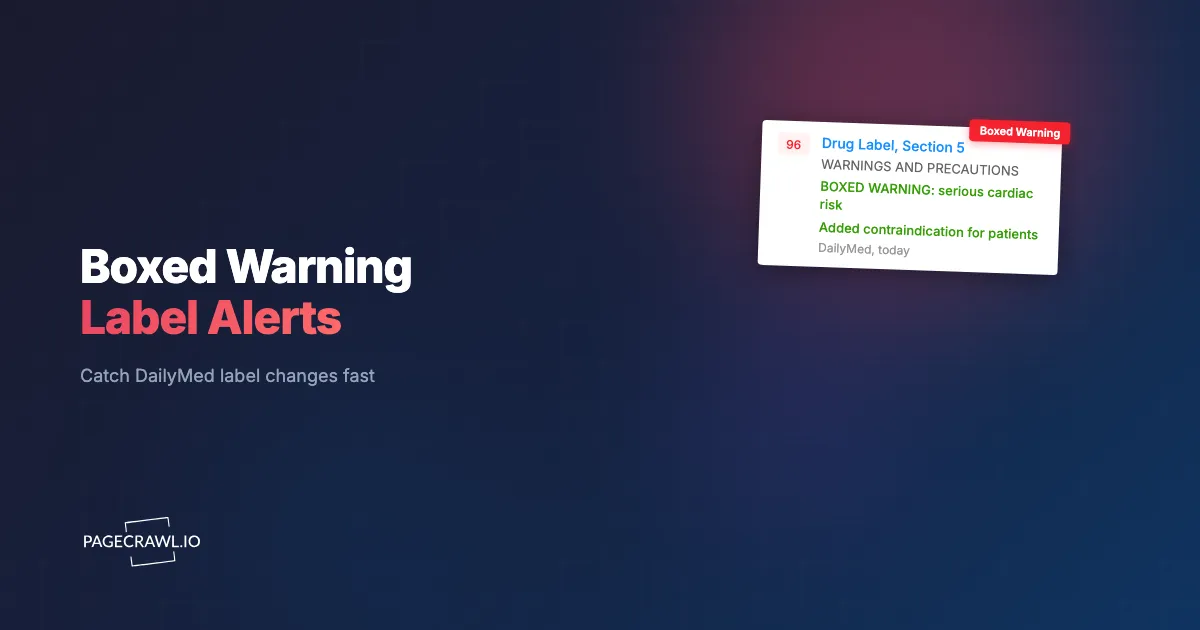
At 6:42 a.m. on a Tuesday, a drug safety physician at a mid-size pharma company opened her inbox to a forwarded email from a field medical liaison: "Did we know about the new boxed warning?" She did not. The labeling supplement had posted to DailyMed three days earlier, a fresh boxed warning added to the Highlights section of a competitor product in the same therapeutic class. By the time the company's medical-information line started fielding prescriber questions, the answer document was already a day late, and the formulary team at a major health system had quietly flagged the molecule for review. The change had been public the whole time. Nobody was watching the page.
This is the quiet failure mode of pharmacovigilance and medical affairs: the data is open, structured, and free, but it lands on a government page no human refreshes. The FDA-approved label is the single most legally and clinically authoritative document about a drug, and when its safety sections move, the consequences ripple into prescribing, formulary decisions, REMS obligations, and product-liability exposure. A new contraindication or a strengthened warning is not a press release. It appears, silently, in the structured product label.
This guide explains how to monitor a drug's DailyMed structured product label (SPL) so your team is alerted as soon as a check detects a change to a boxed warning, contraindication, indication, or other safety section. It covers what counts as a label change under 21 CFR 201.57, which sections matter, how PageCrawl detects diffs reliably, and a step-by-step setup you can run across an entire portfolio.
What is DailyMed, and why monitor a drug's structured product label?
DailyMed is the U.S. National Library of Medicine's official, public repository of FDA-approved drug labeling, hosting more than 100,000 current labeling documents. Each is a Structured Product Label (SPL), an HL7 XML standard that FDA requires manufacturers to submit. DailyMed is the authoritative, real-time mirror of what the FDA-approved label says today, which is exactly why it is worth monitoring.
Every product on DailyMed has a stable Set ID (a UUID in the page URL like drugInfo.cfm?setid=...) that persists across every revision, plus a per-version document ID and an effective date. When a manufacturer files a labeling change, NLM publishes a new SPL version under the same Set ID, increments the version number, and stamps a new effective date. The previous versions remain accessible under the product's history.
Because the SPL is structured, the same content also flows into electronic health records, e-prescribing systems, pharmacy databases, and clinical decision support. That means a change on DailyMed is not academic. It is the source feed that downstream prescribing tools eventually inherit. Catching it at the DailyMed layer puts you ahead of the systems your customers, prescribers, and formulary committees rely on.
Most teams discover this the hard way: they treat the approved label as static after launch and only revisit it during periodic literature reviews. A monitoring approach flips that, treating the label page like any other regulatory filing page you track continuously rather than a document you check once a quarter.

What counts as a label change under 21 CFR 201.57?
21 CFR 201.57 is the federal regulation that defines the required format and content of prescription drug labeling, and it organizes the label into named sections. A "label change" worth alerting on is any edit to those sections, especially the safety-critical ones. The regulation also mandates a Recent Major Changes section listing substantive edits from the past 12 months.
Under 201.57, the Highlights of Prescribing Information and the Full Prescribing Information are broken into standardized headings, each carrying a LOINC-coded section in the underlying SPL. The sections that drive medical, formulary, and legal decisions are:
- Boxed Warning (the "black box"), the strongest warning the FDA can require, displayed in a bordered box at the top of the label.
- Contraindications, situations where the drug must not be used because the risk clearly outweighs benefit.
- Indications and Usage, the approved uses (a new or removed indication is a major commercial and clinical event).
- Warnings and Precautions, including new safety signals, monitoring requirements, and risk language.
- Dosage and Administration, where titration, renal/hepatic adjustments, and REMS-linked steps live.
- Adverse Reactions, Drug Interactions, and Use in Specific Populations (pregnancy, pediatric, geriatric).
The Recent Major Changes heading under 201.57(a)(4) is the single best tripwire. By regulation it flags changes within the last year to the Boxed Warning, Indications and Usage, Dosage and Administration, Contraindications, and Warnings and Precautions, each with the month and year it took effect. If you monitor only one region of the page, monitor that one, because it is the FDA-mandated changelog of the label itself.
Behind these edits are real regulatory mechanisms: a Changes Being Effected (CBE-0) supplement, a Prior Approval Supplement (PAS), or an FDA-initiated Safety Labeling Change. You do not need to track the filing pathway. The outcome always lands as a new SPL version on DailyMed.
Which label sections should pharmacovigilance and medical-affairs teams watch?
Pharmacovigilance and medical-affairs teams should prioritize the Boxed Warning, Contraindications, Warnings and Precautions, and Recent Major Changes sections, because those are the edits that trigger safety reporting, response-document updates, and field-team briefings. Indications and Usage matters next for commercial and formulary impact. Everything else is useful context but rarely time-critical.
The reason to be selective is signal quality. A full label can run tens of thousands of words, and a single reformatting pass touches dozens of lines. Alert on every character and your team learns to ignore the alerts; scope to the safety-critical headings and every notification is worth opening.
A practical split looks like this. Your safety team owns Boxed Warning, Contraindications, Warnings and Precautions, Adverse Reactions, and Recent Major Changes. Your medical-information and field-medical teams own Indications and Usage and Dosage and Administration, since those drive prescriber questions. Your formulary and market-access teams care about indication and contraindication changes that move a drug on or off a hospital's preferred list.
This is the same discipline used in broader pharma competitive-intelligence monitoring: watch your own products to defend, and watch the competitor molecules in your class to anticipate. A new boxed warning on a rival drug is a selling and positioning event for medical affairs, not just a safety footnote.
How does PageCrawl detect a new boxed warning or contraindication?
PageCrawl loads the DailyMed label page, renders it fully, and stores a baseline. On each later check it compares the new capture to the previous one and surfaces exactly what changed, line by line, in the sections you chose. A new boxed warning, added contraindication, or reworded precaution appears as a highlighted diff.

You do not have to parse XML or write a scraper. PageCrawl handles the rendering and gives you a few complementary tracking modes that fit drug labels well:
Fullpage and keyword/text tracking for the prose sections
For the Boxed Warning, Contraindications, and Recent Major Changes blocks, fullpage content tracking captures the rendered text and flags any wording change. If you only care when a specific trigger word appears, keyword/text tracking watches for terms like "boxed warning," "contraindicated," "hepatotoxicity," or "increased mortality" and fires only when that language enters the label. You can combine the two so routine reformatting stays quiet while real safety language pages your team.
Version-number tracking as a clean tripwire
DailyMed exposes an SPL version number and an effective date for each revision. Number tracking can watch the version value and alert as soon as a check sees it increment, giving you a reliable "the label changed, go look" signal even before you read the diff. Pair it with the text diff to get both the trigger and the substance in one alert.
JSON/API field and PDF monitoring for structured pulls
If your team prefers structured data, JSON and API field tracking with JSONPath filters can monitor a specific field from a structured label feed and ignore the rest of the payload. DailyMed also offers a downloadable PDF of each label, and PDF monitoring can diff that document directly, which is useful when legal or regulatory wants the exact rendered artifact rather than page text.
Because PageCrawl stores a screenshot of every check by default, you keep a dated, defensible record of how the label looked the day it changed. That answers the core legal question: what did the label say, and when.
How do you set up DailyMed label monitoring with PageCrawl?
Setting up monitoring for a single drug takes a few minutes, and the same recipe scales to a portfolio. The goal is high signal: alert on the safety sections, route to the right team, and keep the noise out. Here is the full setup.
Step 1: Add the label page and choose a tracking mode. Paste the drug's DailyMed URL (the one carrying the stable setid) into PageCrawl, select fullpage content tracking from the available tracked element types, and narrow it to the Boxed Warning and Recent Major Changes regions. Add a second monitor with keyword/text tracking scoped to terms like "contraindicated" and "boxed warning," and, if you want a clean tripwire, number tracking on the SPL version value.
Step 2: Set the check frequency. Drug labels do not change minute by minute, but when they do, hours matter for medical-information readiness. A check every 15 to 60 minutes is more than enough to be first, and it keeps your check budget reasonable across a large portfolio. For a competitor molecule ahead of an expected safety review, tighten it.
Step 3: Pick your notification channel. Route alerts to where your team already works. PageCrawl can send label-change alerts straight into Slack, Telegram, or Discord, or fire a webhook into your safety database, ticketing system, or signal-management workflow. Many teams send safety-section changes to a dedicated pharmacovigilance channel and indication changes to a medical-affairs channel.
Step 4: Keep screenshots on. New monitors capture a screenshot on every check by default, and you should leave that on for label monitoring. The dated visual is your evidence trail: it shows exactly how the Highlights and Boxed Warning rendered on the day the version changed, which legal, regulatory, and audit reviewers ask for later.
Step 5: Set thresholds and conditional rules. Use conditional alerts with keyword and threshold rules so a notification only fires when it matters. For example, alert only when the diff contains "boxed warning," "contraindicat," "mortality," or "withdrawn," and suppress alerts that touch only formatting, "How Supplied," or storage text. For the version-number monitor, alert on any increment.
Step 6: Tag and organize the portfolio. Tag each monitor by product, therapeutic area, and owning team (safety, medical information, market access), using labels, folders, and workspaces to organize monitored pages. Tags let you route notifications, build a per-team view, and report on label activity across your catalog. When you manage dozens of molecules plus competitor products, this keeps monitoring maintainable rather than a pile of orphaned alerts.
How often do drug labels change, and how frequently should you check?
Drug labels change irregularly, often a handful of times per year, but across a portfolio of dozens of products the aggregate rate is steady, and FDA-initiated safety labeling changes can post at any time. Because you cannot predict which week a label moves, a check every 15 to 60 minutes per product is the right balance of speed and budget.
The reason not to rely on periodic manual review is timing asymmetry. A label can sit unchanged for nine months, then revise twice in a fortnight after a new safety signal. If your process is a quarterly audit, you will routinely be weeks late on exactly the changes that matter most. Continuous monitoring collapses that gap to under an hour.
FDA maintains a public Drug Safety-related Labeling Changes database with monthly summaries, and individual changes can take effect via a CBE-0 supplement before final FDA approval, meaning the public label can change before any agency announcement. Watching DailyMed directly catches the change on the next check after it becomes the official label, not weeks later when a digest reports it. The same logic drives teams that already run FDA drug-shortage list monitoring and clinical-trial status monitoring: go to the authoritative source, and check it on a schedule a human never would.
How do you monitor a whole drug portfolio without false positives?
To monitor a full portfolio cleanly, scope each monitor to the safety-critical sections, use keyword rules to ignore cosmetic edits, and tag monitors by product and team so alerts route precisely. The combination turns a noisy "the page changed" stream into a short list of "a safety section actually moved" notifications that your team will act on.
The biggest source of false positives on government pages is non-substantive churn: reformatting, reordered tables, updated revision dates, and "How Supplied" packaging tweaks. Three controls keep those quiet:
- Section scoping. Track the Boxed Warning, Contraindications, Warnings and Precautions, Indications and Usage, and Recent Major Changes regions, not the entire document. A change outside those regions does not page anyone.
- Keyword gating. Layer conditional rules so an alert requires safety language in the diff. A version bump with only date or formatting changes can log silently while a contraindication addition pages the on-call safety reviewer.
- Per-product tagging and routing. Send each product's alerts to the team that owns it, with a clear subject line. This is the difference between a tool people trust and one they mute.
If false positives still creep in, PageCrawl's tuning controls let you reduce monitoring noise systematically by ignoring specific elements, regions, or recurring non-substantive changes. For teams running this across hundreds of labels, this discipline is the whole game, and it mirrors the structured-source approach used in device-recall monitoring on FDA MAUDE.
Who needs label-change alerts, and what do they do with them?
Pharmacovigilance, medical affairs, medical information, market access, and legal all act on label changes, each for a different reason. A single new boxed warning can trigger a safety assessment, a response-document update, a formulary review, a field-team briefing, and a product-liability file note, often within the same day. The alert is the starting gun for all of them.
Here is how a real change cascades:
- Pharmacovigilance and drug safety assess the new language against ongoing signal management, update the safety database, and check whether the change affects periodic safety reports or REMS obligations.
- Medical information updates standard response documents and FAQs before the prescriber and patient calls start, so the medical-information line is never improvising.
- Medical affairs and field medical brief MSLs so they can answer prescriber questions accurately, especially when the change is on a competitor product in the same class.
- Market access and formulary teams evaluate the impact on hospital P&T committee decisions, since a new contraindication or lost indication can shift a drug's preferred status.
- Legal and regulatory note the dated change for the failure-to-warn and learned-intermediary record, using the screenshot archive as evidence of exactly when the label said what.
The competitive angle deserves emphasis. A strengthened warning on a rival molecule is a medical-affairs and commercial event, like a competitor's pricing or positioning shift. Teams that already monitor the regulatory landscape, including EMA and MHRA drug-approval activity, simply add DailyMed as the U.S. approved-label layer. For organizations under formal change-control obligations, it also feeds a documented change-management process with timestamped evidence rather than ad-hoc emails, the same discipline applied in compliance and regulatory monitoring. Always confirm prescribing details against the official FDA-approved label on DailyMed; this article is informational, not medical or legal advice.
Choosing your PageCrawl plan
PageCrawl's Free plan lets you monitor 6 pages with 220 checks per month, which is enough to validate the approach on your most critical pages. Most teams graduate to a paid plan once they see the value.
| Plan | Price | Pages | Checks / month | Frequency |
|---|---|---|---|---|
| Free | $0 | 6 | 220 | every 60 min |
| Standard | $8/mo or $80/yr | 100 | 15,000 | every 15 min |
| Enterprise | $30/mo or $300/yr | 500 | 100,000 | every 5 min |
| Ultimate | $99/mo or $999/yr | 1,000 | 100,000 | every 2 min |
Annual billing saves two months across every paid tier.
Enterprise and Ultimate scale up to 100x if you need thousands of pages or multi-team access.
How do you get started today?
Start with the single drug whose label change would cause the most scramble if you missed it. Add its DailyMed page to PageCrawl, scope the monitor to the Boxed Warning and Recent Major Changes sections, and route the alert to your safety team's Slack channel. You are watching in under five minutes on the Free plan.
Expand to your full portfolio and your competitor molecules once you see the first clean diff land. The label has always been public. Starting today, you will be the first to know when it moves.