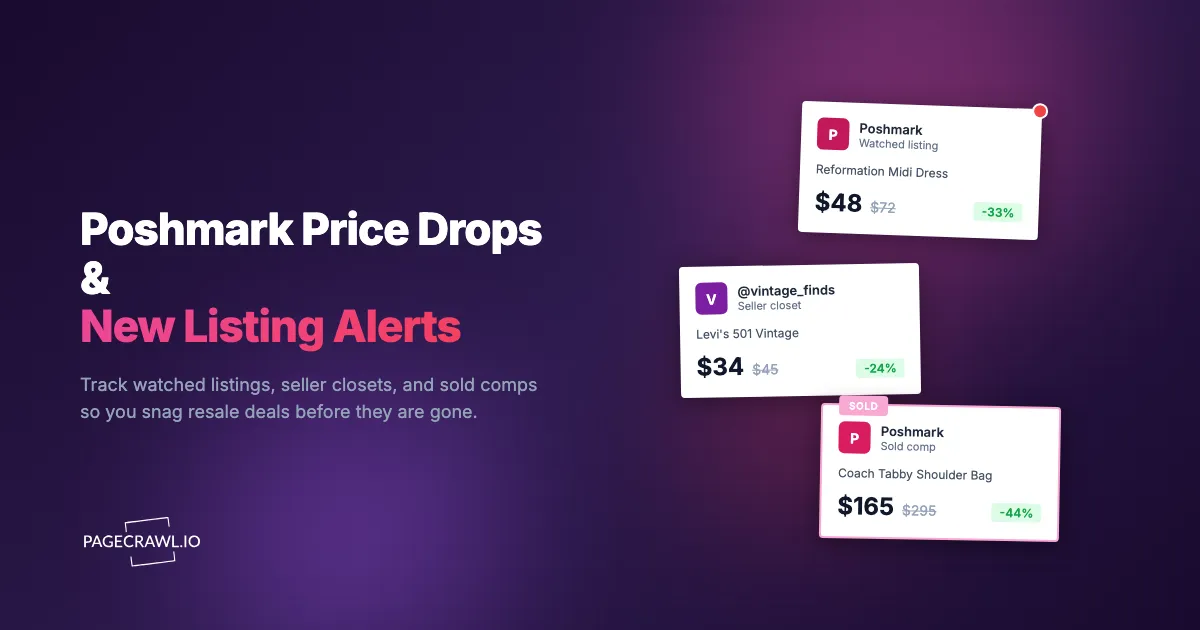
You liked a Reformation midi dress at $72 three weeks ago. You meant to wait for a price drop. On a Sunday night the seller dropped it to $48 and sent the offer out to everyone who liked it, all at once. By the time you opened the app on Monday morning, the listing said "Sold." Someone with the same taste and a faster thumb beat you to a 33% discount on the exact size you wanted.
Poshmark is a marketplace of one-of-one inventory. Most listings are a single secondhand item, so when it sells, it is gone for good. There is no restock, no "we made too much," no second production run. The same dynamic that makes Poshmark exciting to browse makes it brutal to shop deliberately: the listing you have been eyeing can vanish in the gap between two app sessions, and the new arrival that matches your saved search perfectly might surface for ten minutes before a reseller buys it to flip. The fix is to let automated price and availability monitoring watch the exact listings, closets, and searches you care about.
Why do good Poshmark deals disappear so fast?
Poshmark deals disappear fast because the marketplace runs on single-unit, secondhand inventory and a seller-driven price-drop game. Almost every listing is one item from one closet, so a sale is permanent. Add active resellers refreshing searches all day, and the best-priced items in popular brands and sizes clear within minutes.
One-of-one inventory with no restock
Unlike a retailer that replenishes stock, a Poshmark seller usually has exactly one of each item. When a vintage Levi's jacket in your size sells, the listing closes and that exact piece is unavailable forever. You are not waiting for a restock, you are racing every other interested buyer to a single unit. This is the same scarcity that drives designer resale listing alerts on The RealReal and Vestiaire, where individual consignment pieces sell once and never return.
The seller-controlled price-drop game
Poshmark sellers manually lower prices to attract buyers, and the platform rewards drops of at least 10% with a discounted-shipping offer that goes to everyone who liked the item. Sellers cluster these drops around evenings and weekends to create urgency. The window between a price drop and a sale on a desirable item is often measured in minutes, not days.
Resellers refreshing the same searches
A meaningful share of Poshmark buyers are resellers sourcing inventory to flip elsewhere, often on eBay or Mercari. They run the same brand and size searches you do, all day, hunting underpriced pieces to resell. The price-monitoring discipline that powers sneaker resale price tracking on StockX and GOAT applies here too: the people who move fastest on underpriced listings are monitoring, not browsing.
Brand and size scarcity
Popular brands in common sizes (Lululemon, Reformation, Madewell, Coach, vintage Levi's in mid-range waist sizes) draw the deepest pool of buyers competing for the smallest relative supply. A rare size or niche brand may sit for weeks, but the combinations everyone wants get bought the moment they are listed well below comp.

What should you monitor on Poshmark?
Monitor four things on Poshmark: the specific listings you want (for price drops), the closets of sellers you trust (for new arrivals), brand-plus-size search URLs (for fresh matches), and sold-listing searches (for comp research). Each one uses a distinct page URL, so each becomes its own monitor.
Specific listings you want, for price drops
The most targeted approach is monitoring the exact listing URL of an item you would buy at the right price. When the seller lowers the price, the page content changes from the old number to the new one, and the next check that sees it sends you an alert. This is far more reliable than hoping the seller crosses Poshmark's 10% threshold to trigger a native offer. Even a $4 drop that never fires a Poshmark notification will reach you. The same price-tracking principle powers our guide to Amazon price drop alerts.
Favorite seller closets, for new listings
Many regular Poshmark shoppers find a handful of sellers whose taste, sizing, and pricing they trust, then buy from them repeatedly. Every seller has a closet page that lists their available items, newest first. Monitoring that closet URL as a content change alerts you as soon as a check spots a new item in the closet, before it surfaces in crowded search results. This is the resale equivalent of following individual marketplace sellers for deal alerts on eBay.
Brand plus size search URLs, for new matches
Poshmark search supports filters for brand, size, category, color, condition, and price, and it encodes those filters in the URL. Build the exact search you want (for example, Madewell jeans in size 28 under $40, sorted by "Just In"), then monitor that URL. When a new listing matches your filters, the top of the results page changes and you are alerted. This turns an endless manual scroll into a passive feed of exactly what you are hunting.
Sold listings, for comp research
Poshmark lets you filter any search to show only sold items, which reveals what a piece actually sold for rather than what sellers are asking. Resellers live in this view to price their own inventory accurately. Monitoring a sold-filtered search for a specific brand and style gives you a running record of realized prices, so you know whether a $48 dress is a genuine deal or wishful pricing. Pairing sold comps with live listings is a form of cross-retailer price comparison applied inside a single resale marketplace.
Why isn't Poshmark's own "Like" and price-drop alert enough?
Poshmark's native notifications are limited to items you have already liked, only fire reliably on drops of 10% or more, arrive batched inside the app, and never tell you when a brand-new listing matches your taste. They are a courtesy nudge, not a monitoring system, so they consistently arrive after the fastest buyers have already acted.
Drops only fire at the 10% threshold
Poshmark's price-drop offer, as described in Poshmark's support centre, is triggered when a seller lowers a liked item's price by at least 10%, which also unlocks a discounted-shipping offer to likers. Smaller, incremental drops (a seller testing $72 to $68 to $62) often never reach you, even though the cumulative reduction is meaningful. Custom monitoring with your own price and threshold rules lets you decide the trigger, whether that is any drop at all or a specific target price.
Notifications are batched and app-bound
Native Poshmark alerts land in the app's notification feed and email, on Poshmark's schedule, not yours. There is no push to your phone's lock screen, no Slack message, no webhook into an automation. For an item that sells minutes after a drop, an alert you discover the next time you open the app is functionally too late. Faster browser push notifications are exactly what time-sensitive resale buying needs.
No alerts for brand-new matching listings
The biggest gap is discovery. Poshmark will nudge you about items you already liked, but it does not tell you when a seller lists a new piece that matches the brand, size, and price you care about. Monitoring a saved search URL closes that gap and turns new-listing discovery into a passive alert, the same way out-of-stock and availability monitoring turns "is it back yet" into an automatic notification.
No sold-comp or cross-seller alerts
Poshmark offers nothing to notify you when comparable items sell, when a trusted seller relists, or when the same piece appears cheaper in another closet. Resellers and deliberate shoppers want exactly these signals, yet the platform leaves them to manual checking.
How do you set up Poshmark monitoring with PageCrawl?
PageCrawl monitors the actual Poshmark pages (listings, closets, and searches) and alerts you through your preferred channel as soon as a check detects a price drop or a new item. You point it at a URL, choose a tracking mode, set a frequency, and pick where alerts go. Here is the core setup for each use case.
Track a price drop on a specific listing
Step 1: Open the Poshmark listing you want and copy its URL from your browser's address bar. Make sure it is the individual listing page, not a search result.
Step 2: Add the URL to PageCrawl and choose price tracking mode. PageCrawl analyzes the page and locks onto the listing price, then charts it over time the way the guide to monitoring numeric values for changes describes.
Step 3: Set your check frequency. For hot brands and common sizes, check every 1 to 2 hours, since drops and sales happen fast. For slower-moving niche items, every 4 to 6 hours is plenty.
Step 4: Set an optional target. If you only want to buy at or below a number, use notification conditions and filters to set a price threshold, so you are alerted when the listing hits, say, $50 or less rather than on every minor change.
Step 5: Choose your notification channel. For resale deals that sell in minutes, route alerts to your phone or, if you collaborate on sourcing with a team, to a shared Slack channel so whoever is free can grab it first.
PageCrawl's free tier covers 6 monitors and 220 checks per month, which is enough to track your most-wanted listings and prove the approach before you scale up.
Watch a seller's closet for new listings
Step 1: Open the closet page of a seller you trust and copy its URL.
Step 2: Add it to PageCrawl using fullpage content tracking, so any new item added to the closet registers as a change.
Step 3: Set the check frequency to every 2 to 4 hours. Many sellers list and re-share in the evenings.
Step 4: When alerted, PageCrawl shows what changed on the page, so you can spot the newly listed item and act before it surfaces in public search.
Monitor a brand and size search for new matches
Step 1: Build the exact search on Poshmark using the brand, size, category, price, and condition filters you care about, then sort by "Just In." Copy the resulting URL, which contains all your filters.
Step 2: Add that search URL to PageCrawl with fullpage content tracking.
Step 3: Set the frequency to every 1 to 2 hours during active sourcing periods so you catch fresh listings near the top of the results.
Step 4: Tune out noise. Search pages include changing "like" counts and rotating promoted items. Click any irrelevant change to ignore it, and after a couple of checks you only get alerted on genuine new listings.
Research sold comps over time
Step 1: Run your search, then apply the "Sold" filter to show only completed sales for that brand and style. Copy the URL.
Step 2: Add it to PageCrawl with content tracking and a relaxed frequency, such as once or twice a day, since comp research is a trend, not a race.
Step 3: Review the alerts to learn realized prices, then judge live listings and price your own resale inventory accordingly.
When do Poshmark deals actually happen?
Poshmark activity clusters around predictable moments: Posh Parties and evening sharing surges, offer-to-likers campaigns sellers run in batches, and seasonal closet cleanouts. Knowing these rhythms lets you raise monitoring frequency when fresh listings and price drops are most likely, instead of checking at random.

Posh Parties and evening sharing surges
Posh Parties are themed, real-time shopping events that run throughout the day, and sellers re-share listings heavily to land in party feeds. Evenings and weekends see the biggest sharing surges, which push older inventory back to the top and often coincide with fresh price drops. Raising your check frequency during evening hours captures more of this activity.
Offer-to-likers windows
Sellers can send a private discounted offer, usually with reduced shipping, to everyone who liked an item, and those offers typically expire within 24 hours. Monitoring the listing price directly means you see the lower number on the next check after the offer drops the public price, even if the formal offer notification is delayed.
Seasonal closet cleanouts
Buyers and resellers purge closets at predictable times: post-holiday in January, spring cleaning in March and April, and back-to-school and fall transitions in late summer. These cleanouts flood the market with new listings and aggressive markdowns, so tighten your search and closet monitors during these windows to catch the wave of fresh inventory early.
How should you structure a complete Poshmark watchlist?
Structure your watchlist in tiers: high-priority specific listings checked often, trusted seller closets and saved searches checked moderately, and sold-comp research checked slowly. This keeps your notifications meaningful, so urgent deals stand out instead of drowning in low-value updates.
Tiered monitoring
Put your must-have listings (specific items at target prices) in Tier 1 with 1 to 2 hour checks and phone push notifications. Put trusted closets and brand-size searches in Tier 2 with 2 to 4 hour checks. Put sold-comp research in Tier 3 with daily checks. This mirrors the discipline serious resale and ecommerce price monitors use to keep signal high and noise low.
Combining price and new-listing signals
The strongest setup pairs a price monitor on the exact item you want with a search monitor for the same brand and size across all sellers. If your watched listing never drops to your target, a cheaper match from a different closet may surface in your search feed first, and you grab the deal from whichever source moves first.
Reseller and sourcing workflows
If you flip items, combine a sold-comp monitor (to know realized prices), brand-size search monitors (to source underpriced inventory), and price monitors on specific arbitrage candidates. Route alerts to a shared channel so a sourcing partner can act when you are away. The same backbone supports comparing prices across retailers when you resell the same inventory elsewhere.
What problems come up when monitoring Poshmark?
The common challenges are dynamically loaded content, noisy page elements like like-counts and shares, listings that get relisted under new URLs, and telling sold items from available ones. Each is manageable with the right tracking mode, noise filtering, and an occasional monitor refresh.
Dynamic content and lazy loading
Poshmark loads listing details, prices, and search results after the initial page render. PageCrawl loads pages in a real browser and renders that dynamically loaded content, so prices and listing tiles are fully present before the page state is captured.
Noise from likes, shares, and promoted tiles
Listing and search pages constantly update like counts, "shared X minutes ago" timestamps, and rotating promoted items, none of which you care about. PageCrawl lets you click any detected change to ignore it going forward, so after a check or two you only receive alerts for real price drops and genuine new listings.
Relists and changing URLs
Sellers sometimes delete and relist an item to refresh its visibility, which can change the listing URL. If a price monitor on a single listing stops updating because the item was relisted, search and closet monitors will usually surface the new version. Recreate the listing monitor on the fresh URL when that happens.
Sold versus available
A sold item's page still exists but is marked sold and cannot be purchased. When monitoring searches, use the "Just In" sort and the available (not sold) filter so your new-listing alerts point at things you can actually buy, and keep sold comps in a separate, clearly labeled monitor.
Choosing your PageCrawl plan
PageCrawl's Free plan lets you monitor 6 pages with 220 checks per month, which is enough to validate the approach on your most critical pages. Most teams graduate to a paid plan once they see the value.
| Plan | Price | Pages | Checks / month | Frequency |
|---|---|---|---|---|
| Free | $0 | 6 | 220 | every 60 min |
| Standard | $8/mo or $80/yr | 100 | 15,000 | every 15 min |
| Enterprise | $30/mo or $300/yr | 500 | 100,000 | every 5 min |
| Ultimate | $99/mo or $999/yr | 1,000 | 100,000 | every 2 min |
Annual billing saves two months across every paid tier. Enterprise and Ultimate scale up to 100x if you need thousands of pages or multi-team access.
A focused Poshmark watchlist (a few specific listings, one or two trusted closets, and a sold-comp search) fits comfortably inside the free tier. Once you are tracking a full brand-and-size search feed alongside many individual listings, Standard at $80/year covers 100 pages with 15-minute checks, fast enough to beat most buyers to a fresh drop. Resellers sourcing across dozens of brands, sizes, and closets will want Enterprise at $300/year for 500 pages and 5-minute checks, which pays for itself the first time you flip a single underpriced find.
How do you get started with Poshmark alerts?
Start with a single listing and expand from there. Pick the one Poshmark listing you want most right now. Copy its URL, add a price monitor in PageCrawl, set a target at the number you would happily pay, and route the alert to your phone. Then add one trusted seller's closet and one brand-plus-size search so new arrivals come to you instead of the other way around.
Run it for a week and watch how often prices move and new listings appear while you are not looking. You will see at least one drop or match you would have missed by browsing.
Stop refreshing the app. Let the deals find you first.