A vintage Omega Seamaster watch sells on eBay for $1,200 on Monday. Two weeks later, the same model from a different seller lists at $850. You never see it because it sells within a day. Meanwhile, you paid full price on Monday because you assumed that was the going rate.
eBay is fundamentally different from fixed-price retailers. Prices fluctuate based on seller motivation, auction competition, item condition, and timing. The same product can easily vary by a third or more depending on when you look and who is selling it. Unlike Amazon or Walmart, where algorithms adjust a single price point, eBay is a marketplace of independent sellers, each setting their own terms.
This creates both opportunity and frustration. Deals exist constantly, but they appear unpredictably and disappear quickly. Manual browsing catches a fraction of what is available. Saved searches help but deliver email notifications on a delay. Serious buyers and resellers need systematic monitoring.
This guide covers how eBay pricing works, the challenges of tracking it, every monitoring method available in 2026, and step-by-step instructions for setting up automated deal alerts.
How does eBay pricing differ from other marketplaces?
eBay prices are set per seller, not per product. Auction bids rise until the clock runs out, Buy It Now prices sit wherever an individual seller put them, Best Offer hides the real transaction price, and shipping is a separate lever. That combination creates tracking challenges tools designed for Amazon or Walmart simply do not handle.
Auctions vs Buy It Now
eBay listings come in two primary formats. Auction-style listings start at a base price and increase as bidders compete, with the final price determined only when the auction ends. Buy It Now listings have a fixed price, similar to traditional retail. Many listings combine both formats, offering a Buy It Now price alongside an auction starting bid.
Tracking auctions requires a different approach than tracking fixed prices. The current bid is not the final price. Monitoring an auction's current bid gives you a sense of demand, but the real value data comes from completed listings showing what items actually sold for.
Buy It Now prices are more straightforward to track. The listed price is the price you pay (plus shipping). These are the listings most suitable for automated price and stock monitoring.
Best Offer Negotiations
Many eBay sellers accept Best Offers, meaning the listed price is a starting point for negotiation. A listing at $500 with Best Offer enabled might sell for $400 regularly. The accepted offer price is not publicly visible, making it difficult to gauge true market value.
When monitoring Buy It Now listings with Best Offer, the tracked price represents the asking price, not necessarily what buyers actually pay. Keep this in mind when setting target price alerts.
Shipping Cost Variations
eBay shipping costs vary dramatically between sellers. One seller lists an item at $75 with free shipping. Another lists the same item at $55 with $25 shipping. The headline price comparison is misleading without factoring in shipping.
Some sellers adjust their pricing strategy over time, lowering the item price but increasing shipping, or vice versa. Monitoring the item price alone misses these shifts.
Condition and Listing Quality
eBay listings for the same product can range from "New in Box" to "For Parts or Not Working." A $200 listing and a $50 listing might be for the exact same product in different conditions. Effective price tracking requires filtering by condition to compare like with like.
Why is eBay price tracking harder than tracking a normal retailer?
It is harder because the thing you are tracking keeps disappearing. Listings expire, sell, or get pulled, the same item exists under dozens of separate seller listings, search results reshuffle constantly, and international sellers distort any straight price comparison. Effective monitoring therefore watches searches as well as individual listings.
Listing Turnover
eBay listings are temporary. Auction listings expire after 1 to 10 days. Buy It Now listings can end when the item sells or the seller removes them. A listing you are monitoring might simply cease to exist, which is not a price change but rather a listing removal.
New listings for the same product appear constantly. Effective monitoring needs to track both specific listings and search results for new opportunities.
Multiple Sellers for the Same Item
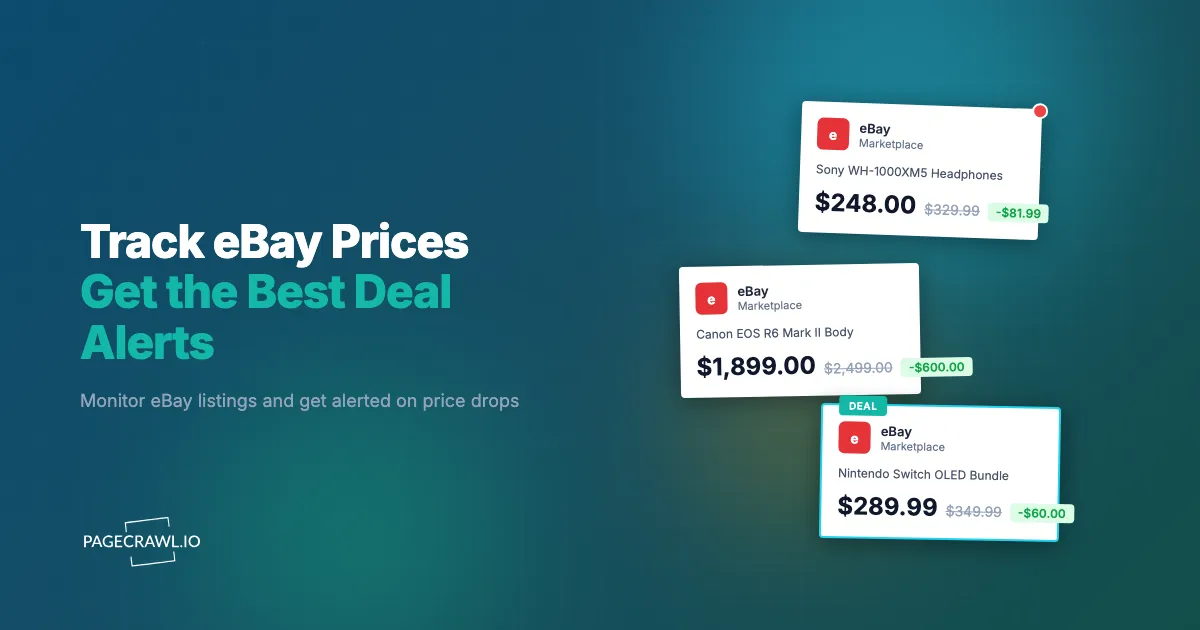
Unlike Amazon, where a single product page aggregates all sellers, eBay has separate listings for each seller. Searching for "Sony WH-1000XM5" returns dozens or hundreds of individual listings, each with different prices, conditions, and shipping terms.
Monitoring a single listing tells you about one seller. Monitoring search results tells you about market conditions. Both are useful for different purposes.
Dynamic Search Results
eBay's search results page changes frequently as listings start, end, and sell. The cheapest listing today might not appear tomorrow because it sold. New cheaper listings might appear. Search result monitoring captures these market-level changes.
International Listings
eBay is global. Search results often include international sellers with different currencies, shipping costs, and delivery timelines. A seemingly cheap listing from overseas might be expensive after shipping and import duties. Filtering by location or domestic sellers only affects what you monitor.
Method 1: eBay Saved Searches
eBay's built-in saved search feature is the simplest starting point.
How It Works
Search for a product on eBay, apply your filters (condition, price range, location, Buy It Now only), then save the search. eBay sends email notifications when new listings match your criteria.
Pros
- Free and built into eBay
- Filters for condition, price range, location, and listing type
- No setup beyond saving a search
- Works for both auction and Buy It Now listings
Cons
- Email notifications only, with unpredictable delivery timing
- No control over notification frequency
- Cannot track price changes on specific listings
- Limited to the filters eBay provides
- No webhook or API output
- Notifications may arrive hours after listings appear
Best For
Casual buyers who want basic awareness of new listings without any setup effort.
Method 2: Dedicated eBay Price Tracking Tools
Several services specialize in eBay price analysis and tracking.
Terapeak (eBay Market Research)
Now integrated into eBay Seller Hub, Terapeak provides historical sales data, average prices, and market trends. It is primarily designed for sellers analyzing market conditions rather than buyers tracking deals.
Terapeak shows what items sold for historically but does not send real-time alerts when new deals appear. It is useful for establishing target prices but not for catching specific listings.
Third-Party Tools
Various eBay-focused tracking tools offer features like price history charts, alert notifications, and market analysis. These vary in reliability, with some struggling to maintain access to eBay data consistently.
Pros
- Historical price data helps set realistic targets
- Some offer alerts for new listings or price drops
- Market analysis features useful for sellers
Cons
- Many tools are unreliable or discontinued
- Limited notification options (usually email only)
- Cannot customize what elements to track
- Data may lag behind real-time listings
- Most are designed for sellers, not deal-hunting buyers
Best For
eBay sellers who need market research and pricing intelligence.
Method 3: Web Monitoring for eBay
Web monitoring tools provide the most flexible approach to eBay tracking. Instead of relying on eBay's notification system or specialized tools, you monitor eBay pages directly and get alerts when anything changes.

How It Works with PageCrawl
PageCrawl monitors eBay pages using a real browser, which means it sees exactly what you see. This is critical for eBay, where prices, stock status, and listing details are often rendered dynamically.
Here is a detailed walkthrough for two common scenarios.
Scenario 1: Monitoring a Specific Listing
When you have found a Buy It Now listing and want to track its price for a drop:
Step 1: Copy the eBay listing URL. Make sure you are on the individual listing page, not search results. The URL should contain /itm/ followed by numbers.
Step 2: Add the URL to PageCrawl and select "Price" tracking mode. PageCrawl identifies the listing price and begins tracking it.
Step 3: Set your check frequency. For active Buy It Now listings, every 6 hours works well. The listing price does not change as frequently as Amazon, so very frequent checks are unnecessary. If the seller has indicated a sale is ending soon, increase to every 2 hours.
Step 4: Configure your notifications. For deal hunting, Telegram push reaches your phone quickly once a check detects the change, and the help-centre guide to Telegram change notifications covers connecting a chat, group, or channel. Email works as a backup. If you are feeding data into a spreadsheet or dashboard, configure a webhook to receive structured price data.
Step 5: Verify the initial detection. Check that the price PageCrawl detected matches what you see on the listing. The AI summary should show the current asking price.
Scenario 2: Monitoring Search Results for New Deals
When you want to know about new listings below a target price:
Step 1: Search for your product on eBay. Apply filters: Buy It Now only, condition (New, Used, etc.), price range (set the maximum at your target price), and location if relevant. Sort by "Price + Shipping: lowest first."
Step 2: Copy the filtered search results URL. This URL contains all your filter parameters. Any new listing matching these criteria will appear on this page.
Step 3: Add the URL to PageCrawl using "Full Page" tracking mode. This monitors the entire search results page for changes, catching new listings, removed listings, and price adjustments.
Step 4: Set check frequency to every 2 to 4 hours. Search results change more frequently than individual listings, and new deals can appear at any time.
Step 5: Enable AI summaries. When the search results change, PageCrawl's AI tells you what changed in plain language: "New listing appeared: Sony WH-1000XM5 in excellent condition for $189 with free shipping." This is far more useful than a raw text diff.
Step 6: Set up screenshot verification to see exactly what the page looks like at each check. This helps you quickly scan new results visually.
Why Web Monitoring Works Well for eBay
Handles dynamic content. eBay pages rely heavily on JavaScript rendering. PageCrawl loads pages in a full browser environment, so it sees prices, shipping costs, and listing details that basic HTTP request tools miss.
Flexible element targeting. Track the listing price, shipping cost, seller rating, number of watchers, time remaining on auctions, or any other visible element. Use CSS selectors to target exactly what matters to you.
Multiple notification channels. Get alerts via email, Slack, Discord, Telegram, Microsoft Teams, or webhook. Route different monitoring alerts to different channels based on urgency.
AI-powered summaries. Instead of deciphering what changed in a wall of text, the AI explains it: "Price dropped from $299 to $249. Seller now offering free shipping."
Screenshot with every check. Visual verification shows you the listing exactly as it appeared, helping you decide whether to act on an alert without visiting eBay immediately.
Tracking Multiple Listings Simultaneously
Serious eBay shoppers and resellers need to track many listings at once. Here is how to do it efficiently.
Organize by Category
Group your monitors by product category. If you are tracking vintage watches, camera lenses, and vinyl records, organize them in separate folders. This keeps your monitoring dashboard manageable and lets you adjust settings per category.
Use Search Result Monitoring as a Net
Instead of monitoring 50 individual listings, monitor 5 well-configured search result pages. A search for "Omega Seamaster 300" filtered to Buy It Now, price under $1,500, and condition "Pre-owned" captures all relevant listings in one monitor.
Individual listing monitoring complements this by tracking specific items you are seriously considering. The search catches new opportunities. The individual monitors track items you have shortlisted.
Leverage the PageCrawl API
For high-volume tracking, the PageCrawl API lets you create and manage monitors programmatically. Build a script that takes a list of eBay item numbers, constructs the URLs, and creates monitors for all of them. When a listing ends, delete the monitor and add new ones. The help-centre article on the REST API and webhooks for custom integrations covers authentication and the endpoints you will need.
Set Up Smart Notifications
Not all price changes deserve the same urgency. A $5 drop on a $500 item is noise. A $100 drop is actionable. Configure your notifications to alert only on significant changes. For search result monitoring, AI summaries filter signal from noise by telling you exactly what appeared or changed.
Each detected change also gets an AI importance score from 0-100, helping you triage alerts at a glance. A score of 85 on a listing price drop means something significant changed, while a score of 12 might just be a seller updating their item description formatting. When monitoring dozens of eBay listings simultaneously, this scoring system saves you from opening every notification manually.
For community-based deal hunting, post alerts to a Slack or Discord channel where your group can coordinate.
Tips for Vintage and Collectible Monitoring
Vintage items, collectibles, and rare finds have their own tracking requirements on eBay.
Establish Market Value First
Before monitoring, research completed listings (eBay's "Sold" filter) to understand current market prices. Vintage items do not have a fixed retail price. A "deal" is relative to what others have recently paid.
Check completed listings for your target item over the past 90 days. Note the range of sold prices and the average. This gives you a realistic target for your price alerts.
Monitor Multiple Search Terms
Vintage sellers do not always use standard product names. A vintage Polaroid camera might be listed as "Polaroid SX-70," "Vintage Polaroid folding camera," "Polaroid SX 70 Land Camera," or simply "vintage instant camera." Set up monitors for several search term variations to avoid missing listings that use different terminology.
Misspelled listings are another source of deals. "Poleroid" or "Polariod" listings attract fewer bidders because they do not appear in standard searches. Monitoring common misspellings can surface underpriced items.
Watch Seller Liquidation Patterns
When estate sales, store closures, or collection liquidations appear on eBay, much like the lots in government surplus auctions, they often involve a seller listing many items over a short period at below-market prices to clear inventory quickly. Monitoring specific seller stores can catch these opportunities.
If you find a seller with good inventory and fair prices, bookmark their eBay store page and monitor it for new listings.
Be Patient with Rare Items
Rare collectibles may appear on eBay only a few times per year. Set up search result monitoring with loose filters and leave it running. Unlike tracking commodity products where deals come daily, rare item monitoring is a long game. The payoff comes when the one listing you have been waiting for finally appears and you get notified on the next check instead of finding it months later.
Condition Assessment from Screenshots
For vintage items, condition is everything. PageCrawl's screenshot capture on every check shows you listing photos and descriptions as they appear on the page. This helps you quickly evaluate whether a newly listed item is worth pursuing before visiting eBay to inspect the full photo gallery.
Combining eBay Monitoring with Other Marketplaces
Smart shoppers compare prices across platforms, not just within eBay.
Cross-Platform Price Comparison
The same product might be cheaper new on Amazon than used on eBay, or vice versa. Monitor both platforms simultaneously with product page monitoring for specs, pricing and availability to find the best deal regardless of where it appears.
For new consumer electronics, compare eBay Buy It Now prices against Amazon, Best Buy, and Walmart. eBay sellers sometimes price below retail to move inventory quickly.
For used and refurbished items, eBay competes with Facebook Marketplace, Mercari, Poshmark, and specialized forums. eBay monitoring catches the largest marketplace, but combining with monitoring of other platforms gives complete coverage.
Arbitrage Opportunities
Resellers use cross-platform monitoring to identify price discrepancies. An item selling for $100 on Amazon that consistently sells for $150 on eBay represents a potential arbitrage opportunity. Monitoring both platforms with webhook output feeds structured data into analysis systems that identify these gaps automatically.
Advanced eBay Monitoring Strategies
Watching Best Offer Acceptance Rates
While accepted Best Offer prices are not public, you can infer seller flexibility from listing behavior. If a listing has been active for weeks with a Best Offer option, the seller may be willing to negotiate significantly. Monitoring listing duration helps time your offers.
Seasonal Price Patterns
Many eBay categories follow seasonal patterns. Outdoor gear drops in autumn. Winter sports equipment is cheapest in spring. Holiday collectibles peak in November and December, then drop sharply in January. Understanding these cycles helps you set monitoring periods and target prices strategically.
Snipe Preparation
For auction items, monitoring the listing page as the auction approaches its end gives you information about bidding activity. While PageCrawl is not an auction sniping tool, knowing that an item has few watchers and low bidding activity helps you decide whether to bid aggressively or wait for the next listing.
Troubleshooting eBay Monitoring
Listings Disappearing
eBay listings end when items sell, auctions complete, or sellers remove them. If a monitored listing disappears, PageCrawl detects the page change and alerts you. This is expected behavior, not an error.
For ended listings, remove the monitor and focus on search result monitoring to catch the next opportunity.
Regional and Currency Differences
eBay shows different results based on your location and currency settings. If you monitor a listing URL that includes international parameters, you may see different prices than your local eBay site. Use your local eBay domain's URLs for consistent results.
eBay Login Walls
Some eBay pages require login to view full details. PageCrawl monitors publicly accessible pages without authentication. Ensure the listings you monitor are visible to non-logged-in visitors. Most Buy It Now listings are publicly accessible. Some seller-restricted content may require monitoring password-protected pages with saved credentials.
Price Extraction Accuracy
eBay formats prices differently across listing types and regional sites. If the detected price does not match what you see, try switching to CSS selector-based element tracking and target the specific price element on the page. eBay's price elements are typically well-structured, making CSS selector targeting reliable.
Can you compare one item's price across every eBay seller and other marketplaces at once?
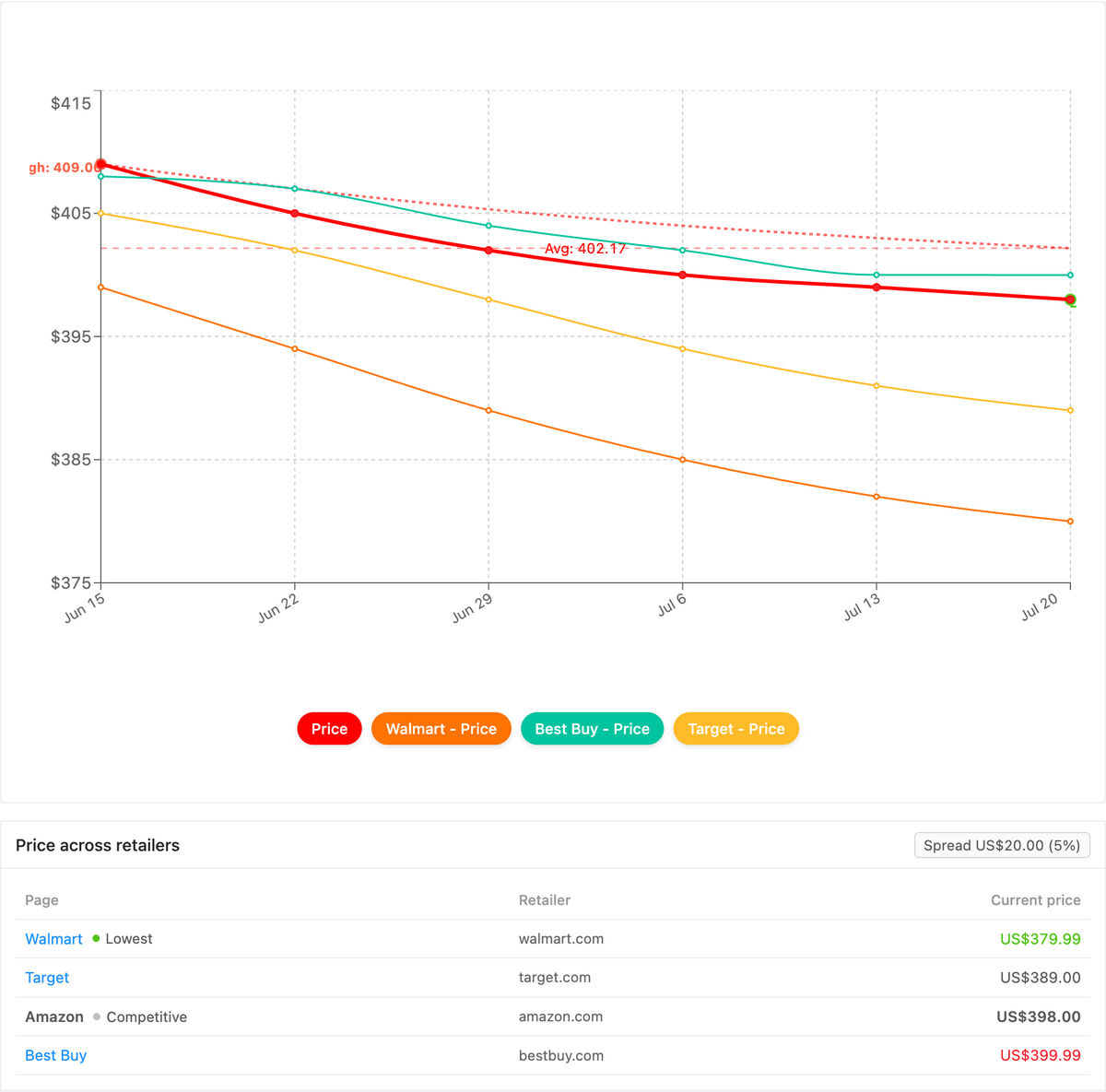
Yes. PageCrawl's Product Comparison capability groups the monitors for one product across every seller and marketplace into a single view, highlights the cheapest advertised price, and tracks the spread between the lowest and highest listing. On a marketplace where the same watch or lens can sell for a third more from one seller than another, that turns the best deal into an obvious row instead of a number buried across dozens of individual listings.
Once your per-listing price monitors are running, Product Comparison stitches together the ones that share a product (by GTIN, UPC, brand, or your own reference tag) into one grouped comparison. Every eBay seller for that Sony WH-1000XM5 or Omega Seamaster lines up beside your Amazon, Best Buy, Walmart, and Mercari monitors, the lowest advertised price is flagged, and the spread between cheapest and most expensive stays live. When a new listing undercuts the field, a cheapest-price or spread-threshold alert surfaces on the next check, routed to email, Slack, or a webhook, and you can export the whole grid as a spreadsheet. The full walkthrough lives in the cross-retailer price comparison guide, and Product Comparison is a custom capability we enable on request.
Choosing your PageCrawl plan
PageCrawl's Free plan lets you monitor 6 pages with 220 checks per month, which is enough to validate the approach on your most critical pages. Most teams graduate to a paid plan once they see the value.
| Plan | Price | Pages | Checks / month | Frequency |
|---|---|---|---|---|
| Free | $0 | 6 | 220 | every 60 min |
| Standard | $8/mo or $80/yr | 100 | 15,000 | every 15 min |
| Enterprise | $30/mo or $300/yr | 500 | 100,000 | every 5 min |
| Ultimate | $99/mo or $999/yr | 1,000 | 100,000 | every 2 min |
Annual billing saves two months across every paid tier. Enterprise and Ultimate scale up to 100x if you need thousands of pages or multi-team access.
The math is simple. Standard at $80/year covers 100 listings or product pages checked every 15 minutes. A single deal caught before the price jumps back, or one competitor price drop spotted in time to adjust your own listing, covers the annual cost. For sellers or serious deal hunters tracking a full category, Enterprise at $300/year monitors 500 pages at 5-minute frequency, which means you see price changes within minutes of them happening rather than hours.
Getting Started
Waiting for eBay deals by manually checking listings is a losing strategy on a marketplace with millions of active listings and constant turnover. Automated monitoring watches continuously and alerts you as soon as a check detects something worth your attention.
Start with one or two priorities. Pick a specific product you are shopping for, set up search result monitoring with your target price as a filter, and configure Telegram or Slack notifications for speed. Run this for a week to see the flow of deals and calibrate your filters.
PageCrawl's free tier includes 6 monitors, which is enough to track several eBay search result pages or individual listings simultaneously. For heavier usage, the Standard plan at $80/year supports up to 100 monitors, and the Enterprise plan at $300/year covers 500 monitors, suitable for resellers and businesses tracking inventory across the marketplace.
The combination of AI-powered summaries, screenshot verification, and flexible notification channels makes eBay monitoring practical rather than overwhelming. You spend less time browsing and more time acting on deals that matter.
Create a free PageCrawl account and set up your first eBay monitor today.