You planned a corporate retreat around a direct flight from Austin to Lisbon. Six weeks before departure, the airline quietly dropped the route from its winter schedule. No email. No notification. You found out when a colleague tried to book the same flight and got a "route not available" message. By then, alternative flights were $400 more per person, and the only options involved connections through Newark or Atlanta.
Airlines adjust their schedules constantly. Routes get added, reduced, suspended, or canceled based on demand forecasts, fuel costs, aircraft availability, and competitive dynamics. These changes appear on airline planning pages, DOT filings, airport authority announcements, and press releases, often weeks or months before they affect booking systems. The travelers and businesses that stay ahead of schedule changes are not checking these sources manually. They monitor them automatically and get notified as soon as a check picks up the change.
This guide covers who benefits from airline schedule monitoring, what sources to track, how to set up automated alerts for changes, and how to build a workflow that turns schedule intelligence into better travel decisions.
Why do airline schedules change more than you think?
Airlines rework schedules constantly, adding, reducing, suspending, and canceling routes based on demand forecasts, fuel costs, aircraft availability, and competition. Most travelers assume that if a flight exists in the booking system today, it will exist next month. That assumption costs people money and disrupts plans regularly.
Routes Get Canceled Without Notice
Airlines review route performance quarterly and seasonally. A route that does not meet revenue targets, load factor minimums, or strategic objectives gets downgraded or dropped. Seasonal routes are particularly volatile. An airline might operate Austin to Lisbon only from May through October, then quietly remove it from the schedule for winter without any announcement to passengers who were planning ahead.
Regional airlines and low-cost carriers cancel routes even more frequently. A budget carrier might launch a route with promotional fanfare, operate it for six months, and pull it when load factors disappoint. If you built travel plans around that route, you find out only when the booking page returns no results.
New Routes Create Opportunities
Airlines announce new routes weeks or months before they appear in booking systems. A new direct flight between your city and a frequent destination can save hours of travel time and significant money compared to connecting itineraries. But if you do not catch the announcement early, you miss the introductory fares that airlines typically offer on new routes.
New route announcements also signal competitive dynamics. When a second carrier enters a route, fares typically fall as incumbents respond, sometimes dramatically. Monitoring route announcements across multiple airlines gives you advance notice of these reductions.
Schedule Changes Affect Downstream Planning
Airlines adjust departure times, frequencies, and aircraft types throughout the planning cycle. A flight that departed at 8:00 AM might shift to 11:30 AM in the next schedule update, which breaks tight connection windows, hotel checkout timing, and meeting schedules. Frequency reductions from daily to four times per week eliminate specific travel days. Aircraft downgauges from widebody to narrowbody reduce seat availability and change the cabin experience.
These changes happen in schedule filings that most travelers never see. The first indication is often a rebooking email that arrives weeks later, leaving limited alternatives.
Who needs airline schedule monitoring?
Travel agencies, tour operators, corporate travel managers, frequent flyers, airport businesses, and tourism boards all depend on early awareness of schedule changes. Anyone whose plans, packages, or revenue are built around specific flights benefits from knowing about a route change weeks before it reaches booking systems.
Travel Agencies and Tour Operators
Agencies that build packages around specific flights need early warning when those flights change. A tour operator selling a "direct flight to Barcelona" package has a problem if the airline shifts that route to seasonal-only. Early detection allows rebooking, package restructuring, or proactive customer communication before clients discover the issue themselves.
Agencies monitoring competitor websites can also spot when rival operators adjust packages in response to schedule changes, revealing which routes are under pressure.
Corporate Travel Managers
Companies with regular travel patterns between specific city pairs need to know when service on those routes changes. A consulting firm that sends teams from Chicago to a client site in Phoenix every Monday morning needs to know immediately if the preferred 6:15 AM departure gets canceled or rescheduled. Travel managers who monitor schedule pages can renegotiate fares, adjust policies, and rebook travelers before disruptions cascade.
Frequent Flyers and Points Enthusiasts
Frequent flyers track new routes for award booking opportunities, positioning flights, and mileage run possibilities. A new route on your preferred airline means new award availability, often with wide-open saver-level inventory in the first weeks of sales. Points enthusiasts who catch new route announcements early can book premium cabin awards before availability evaporates.
Airport Businesses and Tourism Boards
Restaurants, shops, and service providers inside airports depend on passenger volume driven by airline schedules. A concession operator in Terminal B needs to know if the airline anchoring that terminal reduces frequencies or pulls routes, because that directly affects foot traffic and revenue.
Tourism boards track inbound air service as a leading indicator of visitor volume. A new direct route from a major market means a marketing opportunity. A route cancellation means a gap in air access that needs addressing through airline incentive programs or alternative carrier recruitment.
What to Track
Effective airline schedule monitoring covers multiple source types, each revealing different information at different stages of the planning cycle.
Airline Route Maps and Schedule Pages
Every major airline publishes a route map and a searchable schedule. These are the primary sources for understanding current service. Monitor route map pages for additions and removals. Monitor schedule search results for specific city pairs to catch frequency changes, time shifts, and seasonal adjustments.
For airlines that publish seasonal schedules in advance (most do, typically 330 days ahead for network carriers), monitoring the schedule page for your key routes reveals changes as they enter the system.
New Route Announcement Pages
Airlines maintain press rooms and news pages where they announce new routes, schedule expansions, and service changes. These announcements typically precede booking availability by days or weeks. Southwest Airlines publishes route announcements on its newsroom page. Delta, United, and American use their respective media pages. Low-cost carriers like Frontier, Spirit, and Allegiant announce routes through press releases and social media.
Monitor these announcement pages to catch new routes at the earliest possible moment, before booking opens and before introductory fares sell out.
DOT and FAA Filings
In the United States, airlines file schedule data with the Department of Transportation. The Bureau of Transportation Statistics publishes T-100 data on domestic and international routes. While this data has a reporting lag, DOT filings for new international routes and slot allocations at congested airports (JFK, LGA, DCA, ORD) reveal schedule intentions before public announcements, which is why they belong in any government and public records monitoring setup.
The FAA publishes slot allocation information for slot-controlled airports. Changes in slot holdings signal upcoming schedule adjustments.
Airport Authority Pages
Airport websites publish airline directories, route maps, and air service development updates. Many airports actively recruit new airline service and announce route additions through their own channels, sometimes before the airline's own announcement. Airport authority pages also reveal terminal assignments, gate changes, and facility updates that affect the travel experience.
Monitoring Airline Websites for Schedule Changes
Airline schedule pages present specific monitoring challenges and opportunities.
Tracking Specific Routes
The most actionable monitoring targets specific city pairs you care about. Rather than monitoring an airline's entire route map, focus on the routes that affect your travel. Search for your city pair on the airline's booking engine and monitor the results page for changes in available flights, departure times, and frequency.
For example, if you regularly fly Dallas to Seattle on American Airlines, monitor the search results page for that route. When a flight is added, removed, or retimed, you will see it reflected in the search results before any notification reaches your inbox. PageCrawl's change detection captures these differences and alerts you to the specific changes that occurred.
Monitoring Seasonal Schedule Transitions
Airlines publish seasonal schedules (summer and winter, typically aligned with IATA scheduling seasons) months in advance. The transition between seasons is when most route cancellations and frequency changes take effect. Monitor schedule pages for your key routes as the new season loads, typically in late spring for winter schedules and late fall for summer schedules.
Set up monitors to check these pages every few hours during schedule transition periods. A route that existed in the summer schedule but does not appear in the winter schedule search results is your signal that service has been suspended or canceled.
Watching for Aircraft Type Changes
Some airline schedule pages or third-party tools display the aircraft type assigned to each flight. A change from a Boeing 787 to an Airbus A321 on a transatlantic route signals a capacity reduction and potentially a route under performance review. Monitoring aircraft type assignments gives you a leading indicator of route health before any formal announcement.
Tracking New Route Announcements
New routes represent opportunities, but only if you catch them early enough to act.
Airline Newsroom Monitoring
Set up monitors on the newsroom or press release pages of airlines that serve your home airport or frequently used routes. Configure email alerts so a new announcement reaches you on the next check after it is published. Airline newsrooms are relatively low-noise sources, publishing perhaps a few updates per week, so alerts will not overwhelm your inbox.
For broader coverage, monitor aviation news aggregators that compile route announcements across all carriers.
Spotting Introductory Fares
Airlines almost always launch new routes with promotional introductory fares. These fares are available for a limited booking window (often just days) and sell out quickly on popular routes. By monitoring the announcement page and getting alerted on the next check, you can book introductory fares before they are gone.
The window between route announcement and booking availability is your preparation time. Use it to check dates, arrange schedules, and be ready to book the moment fares appear.
Monitoring for Cancellations and Service Reductions
Route cancellations rarely come with prominent announcements. Airlines prefer to quietly remove routes from schedules rather than issue press releases about service reductions.
Detecting Silent Schedule Removals
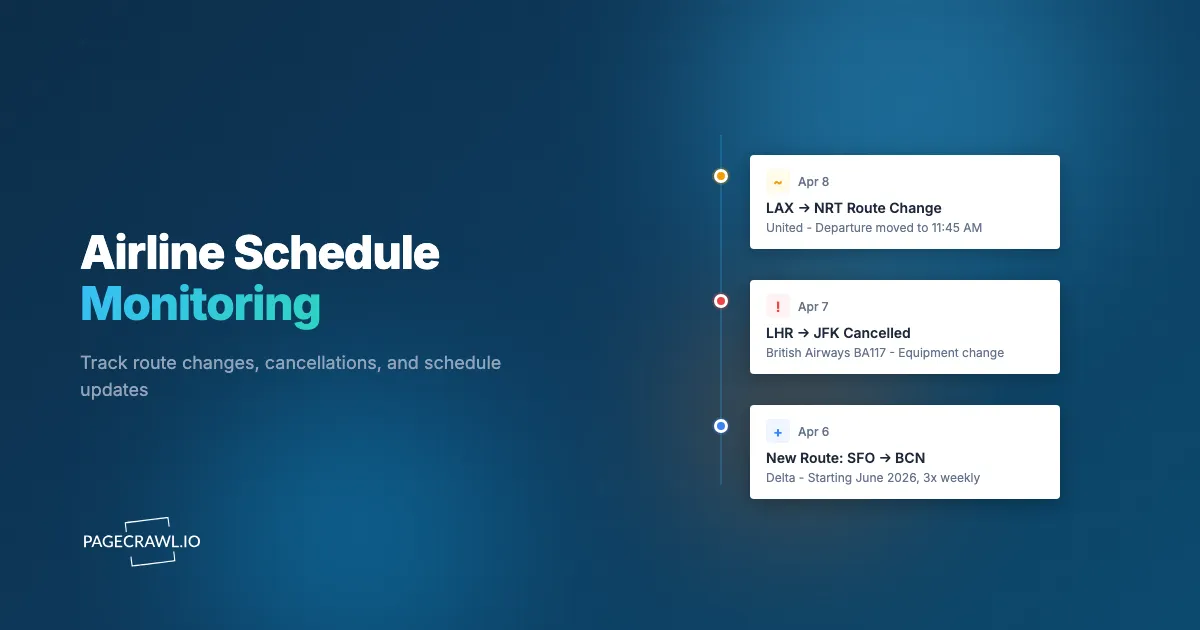
The most common cancellation pattern is a route simply disappearing from search results. A flight you could book last week returns no results this week. Automated monitoring catches this on the next scheduled check. If your monitor detects that a schedule page that previously showed six daily flights now shows four, or that a route page returns no results at all, you know something changed before the airline communicates it officially.
Reading the Warning Signs
Frequency reductions often precede full cancellations. A route dropping from daily service to three times per week is a warning sign. A shift from widebody to narrowbody aircraft on a long-haul route suggests declining demand. Monitoring these intermediate changes gives you time to adjust plans before a full cancellation occurs.
Airlines operating Essential Air Service routes in the US must file notices with the DOT before discontinuing service. These filings provide 90 days advance notice, making DOT pages valuable early warning sources for affected communities.
Setting Up Automated Monitoring with PageCrawl
Building an effective airline schedule monitoring system requires targeting the right pages with appropriate check frequencies.

Start by identifying your priority routes and the airlines serving them. For each route, add three types of monitors:
Schedule search results: Monitor the airline's booking search results for your specific city pair. Use PageCrawl's content tracking, one of several tracked element types available, to detect when flights are added, removed, or retimed. Check every 4-6 hours during normal periods, increasing to hourly during schedule transition seasons.
Airline newsroom pages: Monitor announcement pages for route news. These pages change less frequently, so checking every 6-12 hours provides adequate coverage without unnecessary resource use.
Airport route pages: Monitor your home airport's airline directory or route map for additions and removals. Check daily for routine monitoring or more frequently during air service development announcements.
Configure notifications through your preferred channel. Email alerts work well for individual travelers. Corporate travel teams might prefer Slack notifications for faster team-wide awareness. For integration with travel management systems, webhook automation pushes schedule change data directly into your existing tools.
Building a Travel Intelligence Workflow
Airline schedule monitoring becomes most valuable when combined with related information sources into a structured workflow.
Combining Schedule and Price Monitoring
Schedule changes and price changes are connected. A frequency reduction typically causes prices to rise on remaining flights as capacity decreases. A new competitor entering a route causes prices to drop. By pairing schedule monitoring with travel and flight price monitoring on your key routes, you can anticipate price movements and book at the right moment.
When a monitor detects a schedule change, immediately check pricing on affected and alternative routes. A route cancellation by one airline often triggers fare sales by competitors trying to capture displaced passengers.
Multi-Source Intelligence
Pair airline schedule monitoring with airport authority pages, aviation industry news, and regulatory filings. A single data point, like a route disappearing from a schedule page, tells you what happened. Multiple data points, like a DOT filing combined with airport board meeting minutes and local news coverage, tell you why it happened and whether service might return.
Acting on Schedule Intelligence
Define clear response protocols for different types of changes. A new route announcement triggers a booking review within 48 hours. A frequency reduction triggers a rebooking assessment within one week. A route cancellation triggers an immediate alternative routing search and, for business travel, a policy update to affected travelers. Over time, you will recognize patterns in which airlines cancel underperforming routes quickly and which seasonal routes are stable versus volatile.
Choosing your PageCrawl plan
PageCrawl's Free plan lets you monitor 6 pages with 220 checks per month, which is enough to validate the approach on your most critical pages. Most teams graduate to a paid plan once they see the value.
| Plan | Price | Pages | Checks / month | Frequency |
|---|---|---|---|---|
| Free | $0 | 6 | 220 | every 60 min |
| Standard | $8/mo or $80/yr | 100 | 15,000 | every 15 min |
| Enterprise | $30/mo or $300/yr | 500 | 100,000 | every 5 min |
| Ultimate | $99/mo or $999/yr | 1,000 | 100,000 | every 2 min |
Annual billing saves two months across every paid tier. Enterprise and Ultimate scale up to 100x if you need thousands of pages or multi-team access.
Finding out about a route cancellation six weeks early rather than six weeks after rebooking costs have spiked pays for Standard at $80/year on a single itinerary. Standard's 100 monitors cover schedule search pages, newsrooms, and airport authority pages across every airline and route that matters to your travel program, with 15-minute checks that surface a schedule change the same day it enters the system. Corporate travel managers and agencies with broader coverage needs fit well in Enterprise at $300/year, with 500 monitors and 5-minute checks to track dozens of carriers, routes, and DOT filings simultaneously without missing the quiet schedule removals that rarely come with any announcement.
Getting Started
Pick the two or three airline routes most critical to your travel or business and add them to PageCrawl. Monitor the airline's schedule search page for each route and the newsroom page for the carriers that serve them. Set check frequency to every 6 hours and configure email notifications with diffs and screenshots or Slack alerts.
Run the monitors for a few weeks to establish a baseline of how frequently your target routes see changes. Most people are surprised by how often schedule adjustments occur, even on established routes they assumed were stable.
PageCrawl's free tier includes 6 monitors, enough to cover a couple of key routes with schedule and newsroom pages. The Standard plan at $8/month for 100 pages scales to comprehensive monitoring across multiple airlines, airports, and regulatory sources. The Business plan at $30/month for 500 pages serves travel agencies, corporate travel departments, and aviation businesses tracking dozens of routes and carriers simultaneously.
Stop finding out about route cancellations after they disrupt your plans. Automated monitoring puts you weeks ahead of changes, giving you time to rebook, adjust, or act on new opportunities before everyone else catches up.