A residential solar installer in the Midwest sold eleven systems in a single week on the strength of a utility rebate that paid a flat amount per installed kilowatt. Her proposals quoted it. Her contracts referenced it. Eight days later a customer forwarded her a screenshot of the utility's program page with a grey banner across the top: the current program year was fully subscribed and applications were now being placed on a waitlist. Nobody emailed her. The page had simply changed.
She spent the next three weeks rewriting proposals, absorbing part of the gap on two jobs to keep the contracts alive, and explaining to nine households why the number on page four of their paperwork no longer existed. The rebate had not been cancelled. It had run out of money, which is a far more common way for a solar incentive to disappear, and it is the kind of change that shows up as a quiet edit to a web page rather than an announcement.
Solar is unusually exposed to this. The economics of a proposal are assembled from a stack of separate programs, a federal credit, a state credit or rebate, a utility program with its own annual funding pool, a net metering or net billing tariff set by a public utility commission, and sometimes a local property tax exemption. Each of those lives on a different page, run by a different body, changed on a different schedule, with no shared notification system tying them together.
This guide covers why solar incentive pages change so abruptly, exactly which pages to watch, how to set up monitoring that tells you what changed rather than just that something did, and how to keep an evidence trail when a customer asks why the number in their contract moved.
Why do solar incentive programs change without warning?
Most solar incentives are funded from a fixed annual pool or governed by a statute that can be amended. When the pool empties or the statute changes, the administering agency updates its program page and moves on. There is rarely a mailing list, and when there is one, it usually goes to registered contractors after the page has already been edited.
Funding pools empty on their own schedule
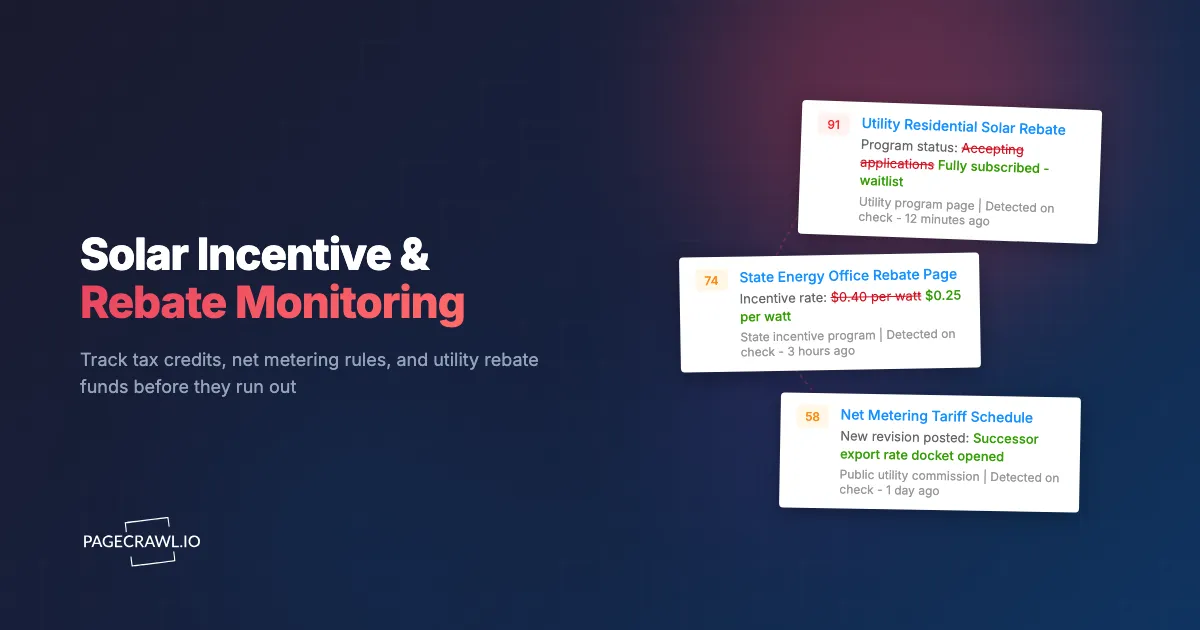
A utility rebate is not an open-ended promise. It is a budget line approved for a program year, and it stops when the money is claimed. Whether that takes eleven months or eleven days depends on how many installers are quoting it. The page then changes from "accepting applications" to "fully subscribed," "waitlist," or "closed for 2026." That is a two-word edit on a page most people load once a quarter, and it invalidates every proposal built on the old number.
Some programs publish a remaining-funds figure or a percentage-committed meter that ticks down in public. That turns a binary open-or-closed event into a countdown you can watch, and it is exactly the kind of small numeric change a human skimming the page will read past.
Legislation moves faster than page updates
Federal solar policy has changed direction more than once in recent years. The Congressional Research Service documents that the One Big Beautiful Bill Act, signed in July 2025, terminated the Section 25D residential clean energy credit for expenditures made after December 31, 2025, ending the 30% residential credit without a phase-down period. State legislatures do smaller versions of this constantly: capping a credit, tightening eligibility to a specific equipment list, or adding a labor requirement.
The gap that hurts is the lag between the law changing and the agency's public-facing page being rewritten. During that window the page is stale, and a proposal written from it is wrong. Monitoring the page tells you the day the correction lands, which is the day your sales collateral needs to change too. Our guide to legislative tracking for bills and laws covers watching the upstream bill text as well, so you see the change coming before the agency catches up.
Program administration is fragmented by design
Federal credits are administered by the IRS. State credits and rebates sit with an energy office, a revenue department, or a quasi-public authority. Utility rebates sit with the utility. Net metering rules sit with a public utility commission and change through docket proceedings. No single body has an obligation to tell you when a peer body changes something, and there is no combined feed.
Which solar incentive pages should you monitor?
Watch four layers: the federal credit guidance, your state's incentive and rebate pages, every utility program you quote in your territory, and the net metering or net billing tariff that determines export compensation. For most installers that is somewhere between eight and forty pages, which fits comfortably inside a single monitoring workspace.
The federal layer
Start with the IRS's own home energy tax credits page and the associated frequently asked questions, which is where the agency posts clarifications, fact sheets, and updated guidance. Add the Department of Energy's Home Energy Rebates program page, which tracks the state-by-state rollout of the rebate programs funded under the Inflation Reduction Act. DOE allocated $8.8 billion to those programs in total, split between home efficiency rebates and home electrification rebates, and states launch on their own timetables rather than together, so the status list on that page is the thing worth watching.
For commercial and utility-scale work, the relevant credits and their eligibility rules sit in different code sections with different timelines than the residential credit, so track the guidance pages that apply to the segment you actually sell into rather than assuming one federal answer covers both.
The state layer
Every state that offers anything has a page for it, usually on the state energy office site. The practical starting point for finding those pages is DSIRE, the Database of State Incentives for Renewables and Efficiency, operated by the N.C. Clean Energy Technology Center at North Carolina State University and running since 1995. Use DSIRE to enumerate the programs that apply to your territory, then monitor the underlying official program pages directly rather than only the database entry, because the administering agency's own page changes first.
The utility layer
This is where the money runs out fastest and where monitoring pays for itself soonest. For each utility in your service territory, watch:
- The residential solar rebate or incentive page, including any remaining-funds or program-status indicator.
- The battery storage or demand-response incentive page, which increasingly carries the larger dollar figure.
- The interconnection application page, where fees, forms, and queue timelines change.
- The tariff or rate schedule PDF that defines export compensation.
Tariff documents are usually PDFs rather than HTML, and they change through revision numbers that are easy to miss. Our guide to monitoring PDF documents for changes covers extracting and comparing the text inside a posted PDF so a new revision surfaces as a readable diff.
The net metering and tariff layer
Net metering determines what a customer earns for exported energy, and a change there can move a payback period by years without any incentive being touched. Track the public utility commission page for open dockets in your state alongside the utility's published tariff. When a commission opens a proceeding on successor tariffs, the outcome is months away but the signal is public on day one, and the installers who adjust their pipeline early are the ones who read the docket page rather than the trade press summary of it.
| Layer | Typical page owner | What changes | Practical check frequency |
|---|---|---|---|
| Federal credit | IRS, DOE | Guidance, FAQs, program status by state | Daily |
| State credit or rebate | State energy office, revenue dept | Amounts, caps, eligibility, application windows | Daily |
| Utility rebate | Utility company | Funding status, per-kW amounts, waitlist flags | Every 15 minutes to hourly |
| Interconnection | Utility company | Fees, forms, queue timelines | Daily |
| Net metering tariff | Public utility commission, utility | Export rates, successor tariff dockets | Daily |
How do you set up solar incentive monitoring in PageCrawl?
You add each program page as a monitor, choose a tracking mode that matches what is on the page (text for program status, number for a dollar figure or remaining-funds meter), set a check frequency proportional to how fast that layer moves, route alerts to the channels your team actually reads, and add keyword or threshold rules so only meaningful edits reach you.
Add the URL. Copy the exact program page you quote from, not a landing page that links to it. If the real detail lives on a "program requirements" or "current funding status" subpage, monitor that subpage. One monitor per program keeps alerts legible later.
Pick the tracking mode. For program pages that are mostly prose (eligibility rules, application instructions, status banners), use reader or content-only tracking so navigation, cookie notices, and rotating promo panels do not generate noise. For a page that publishes a specific dollar amount, a per-kilowatt rate, or a remaining-funds figure, use number tracking pointed at that value so you get a clean before-and-after rather than a paragraph diff.
Set the check frequency. Match it to the layer. Utility rebate funding status deserves the fastest cadence your plan allows, because that is the change that empties without notice. Statute-driven state and federal pages change rarely and are well served by daily checks. On the Free plan every monitor checks hourly, Standard checks every 15 minutes, Enterprise every 5, and Ultimate every 2, so put your fastest checks on the funding-status pages and let the guidance pages run slower.
Choose notification channels. Route alerts where the work happens. Email suits the compliance record and the daily digest. Slack, Discord, or Microsoft Teams put the change in front of the sales team in the channel they already watch. Telegram reaches a field crew that does not sit at a desk. Webhooks push the change into your CRM or proposal tool so a status flip can flag every open quote that references that program automatically.
Add keyword rules. Set conditions so an alert fires when the page gains words that signal the change you fear: "closed," "fully subscribed," "waitlist," "suspended," "no longer accepting," "program year," "expired." A conditional alert built on keyword and threshold rules turns a page that edits its footer weekly into a monitor that stays silent until a word that matters appears.
Add threshold rules on numeric pages. Where a program publishes a rate or a remaining-funds figure, set a threshold so you hear about it when it crosses a level you care about, for example a rebate dropping below the number your standard proposal assumes, or remaining funds falling under a percentage where you should stop quoting it as certain.
Turn on screenshot capture. A timestamped screenshot of the program page as it read on the day you wrote a proposal is the single most useful artifact you can have when a customer disputes a number six weeks later. It converts an argument into a document.
Group the monitors into folders. One folder per layer (Federal, State, Utility, Tariff) or one per utility territory, whichever matches how your team is organised. Folders make the change history readable when you review a quarter's worth of movement.
Choosing between text and number tracking
Text tracking answers "what did this page say differently today?" Number tracking answers "what is this figure now, and what was it before?" Program status is text. A per-kilowatt rebate amount, a cap, or a funds-remaining meter is a number. Split them into separate monitors and each alert becomes actionable from the notification itself.
How do you catch a utility rebate before the funds run out?
Watch the funding-status indicator rather than the program description, check it far more often than you check statutory pages, and set the alert to fire on the transition words a utility uses when a pool is drawing down. The transition from open to closed is usually a single edit, so the gap between checks is what determines whether you hear about it while you still have options.
Watch the meter, not the marketing
Utility program pages have two halves: a durable description of the program and a volatile status indicator. The description barely changes. The status indicator is the whole game. If the utility publishes remaining funds, a percentage committed, a step number in a declining-block structure, or a queue position, point a number monitor at that element specifically. You will see the drawdown as a trend across weeks rather than as a single unpleasant surprise.
Recognise the vocabulary of a closing program
Administrators reuse a small set of phrases. Build your keyword rules from them:
| Signal on the page | What it usually means | What to do |
|---|---|---|
| "Fully subscribed" | Current program year money is gone | Stop quoting it as committed |
| "Waitlist" | Applications accepted, funding not guaranteed | Quote it as contingent, disclose in writing |
| "Program year 2027 opens" | New pool with possibly new rules | Re-read the requirements, do not assume continuity |
| "Suspended pending review" | Regulatory or budget hold | Watch the commission docket, not just the page |
| "Step 4 of 6" | Declining-block incentive stepping down | Model the next step into current proposals |
Time your applications to program-year openings
The mirror image of a rebate running out is a rebate opening. Programs that empty in weeks are also programs where being ready on day one matters. Monitor the same page for the opposite transition, and when a new program year opens you can submit a queued batch of applications rather than discovering the opening a month in. Installers who treat program-year openings as a scheduled event rather than a surprise capture a disproportionate share of a limited pool. The same logic applies across the funding world generally, which our guide to grant and funding opportunity monitoring covers in detail for federal and foundation programs.
What does a net metering policy change actually look like?
It rarely arrives as an announcement. It arrives as a new tariff revision posted to a rate schedule page, a docket entry on a public utility commission site, or an edited sentence on a utility's interconnection page changing how exported energy is credited. The financial consequence is large and the textual footprint is small.
Export compensation is a sentence, not a headline
A shift from retail-rate net metering to an avoided-cost or time-differentiated export rate can change a customer's twenty-year value materially, and on the page it may read as a replaced clause and a new schedule reference. This is why text-level diffing matters more here than anywhere else in the stack: you need to see the sentence that changed, not a notification saying the page was modified. Our guide to reducing false positives in website monitoring covers teaching a monitor to ignore the boilerplate around a tariff so the substantive clause stands out.
Grandfathering rules decide who is affected
Most tariff changes include a legacy provision: customers interconnected before a cutoff date keep the old terms for a defined period. That cutoff date is the operative fact for your pipeline, because it determines whether jobs currently in permitting still qualify. When a tariff revision lands, extract two things: the cutoff date, and what "interconnected" means for the purpose of that date, application submitted or permission to operate granted. Those are different milestones and the distinction is worth real money.
Watch the docket, not only the outcome
Commission proceedings are public from the day they open. A docket page listing filings, comment deadlines, and hearing dates is a monitorable page, and it gives you months of warning before a tariff actually changes. Utilities and intervenors file positions early. If your business model depends on export compensation in a given territory, the docket page belongs in your fastest tier alongside the rebate status pages. Related rate movements on the retail side are worth tracking too, which our guide to electricity tariff and rate change monitoring walks through.
What mistakes make solar incentive monitoring unreliable?
The common failures are monitoring the wrong page, monitoring the whole page instead of the part that matters, treating every layer as equally urgent, and having no record of what a page said on the day a proposal was written. Each is straightforward to avoid once you know to look for it.
Monitoring a landing page instead of the program page
State energy offices and utilities love a hub page that links out to programs. The hub changes when marketing copy changes; the program page changes when the program changes. Always monitor the deepest page that carries the actual number or status. If you are unsure which page is authoritative, use the one an application form is served from.
Watching the whole page instead of the decisive element
A full-page monitor on a utility site will alert on rotating outage banners, seasonal promotions, and a footer copyright year. After a fortnight of noise, people stop reading the alerts, and then the real one lands in a channel nobody opens. Narrow each monitor to the element that decides something: the status banner, the rate figure, the eligibility list. Precision is what keeps alerts trusted.
Treating every layer as equally urgent
A federal guidance page that changes twice a year does not need a two-minute check, and a utility funding meter emptying over a fortnight is poorly served by a weekly one. Tier your monitors deliberately: fastest cadence on funding status and open dockets, daily on state and federal guidance, weekly on stable reference material. This also keeps your check budget pointed at the pages where speed converts into money.
Keeping no evidence of what the page said
When a customer disputes an incentive amount, or an auditor asks why a claim was filed under a particular set of rules, "the website said so at the time" is only useful if you can produce the page. Enable screenshot capture and keep the change history. Timestamped captures of a program page, alongside the diff showing exactly which sentence changed and when, is the record that ends the conversation. Consumer-facing rebate work has the same evidentiary problem, covered in our guide to rebate monitoring and cashback tracking.
Assuming a program that reopened is the same program
A rebate that returns for a new program year frequently returns with different rules: a lower per-kilowatt amount, a new equipment list, an income qualification, a labor standard, or a cap on system size. Re-read the requirements page every time a program reopens. Monitoring will tell you the page changed, but only reading it tells you whether your standard proposal still qualifies.
Choosing your PageCrawl plan
PageCrawl's Free plan lets you monitor 6 pages with 220 checks per month, which is enough to validate the approach on your most critical pages. Most teams graduate to a paid plan once they see the value.
| Plan | Price | Pages | Checks / month | Frequency |
|---|---|---|---|---|
| Free | $0 | 6 | 220 | every 60 min |
| Standard | $8/mo or $80/yr | 100 | 15,000 | every 15 min |
| Enterprise | $30/mo or $300/yr | 500 | 100,000 | every 5 min |
| Ultimate | $99/mo or $999/yr | 1,000 | 100,000 | every 2 min |
Annual billing saves two months across every paid tier. Enterprise and Ultimate scale up to 100x if you need thousands of pages or multi-team access.
Compliance monitoring is the cheapest insurance you can buy. A single missed regulatory change can trigger fines in the tens or hundreds of thousands, not to mention the audit overhead of proving you did not see it coming. Enterprise at $300/year covers 500 regulatory pages with unlimited history and timestamped screenshots, which is usually exactly what an assessor wants to see. All plans include the PageCrawl MCP Server, so your compliance team can ask Claude to summarize every change to a specific regulation over the last quarter and pull the exact diff, turning your monitoring history into a queryable audit trail. AI assistants can create monitors through conversation on every plan, including Free. Standard at $80/year is enough to cover 100 pages across your primary regulatory bodies if your program is smaller.
Getting Started
Start with the single page whose change would cost you the most money this quarter. For most installers that is the utility rebate funding-status page in their busiest territory. Add it as one monitor, point the tracking at the status banner or funds figure rather than the whole page, and set the fastest check frequency your plan allows.
Then build outward in the order the money moves:
- Add the remaining utility programs you quote, one monitor per program, with keyword rules on "closed," "fully subscribed," and "waitlist."
- Add your state energy office program pages and the IRS and DOE federal pages on a daily cadence.
- Add the net metering tariff and your public utility commission docket page, so a successor-tariff proceeding reaches you while it is still months from a decision.
- Turn on screenshot capture everywhere and route alerts to the Slack or Teams channel where your sales team writes proposals.
Run it for one program cycle. The first time a status flip reaches your team on the next check instead of via a customer's forwarded screenshot, you will have your answer about whether it was worth setting up.
Stop finding out about incentive changes from your customers. Watch the pages that set your prices.