Astrid runs competitive intelligence for a mid-market industrial supplier. On a Tuesday in March she read a trade-press story: a competitor was closing its Ohio finishing plant and cutting 240 roles. Her sales team had already lost two accounts to that competitor's aggressive quoting, and she had spent six weeks building a case that the pricing was unsustainable. The story confirmed everything. It was also five weeks old by the time it was written, because the closure had been filed with the state on the day the decision was made.
That filing was public the whole time. It sat on a state workforce agency page as a line in a table: employer name, site address, number of workers affected, effective date. Anyone who looked at the page that week could have seen it. Nobody on Astrid's team looked, because looking meant remembering to open a dozen state pages on a dozen different schedules, and no human does that reliably for months on end.
Layoff filings are one of the few genuinely early, genuinely public corporate distress signals. Federal law requires larger employers to give 60 days of advance notice before a plant closing or mass layoff, and states publish the notices they receive. The announcement lands in a public table roughly two months before the last employee walks out, usually before an earnings call, a press release, or a reporter picks it up.
This guide covers what a WARN notice contains, which state pages publish the list, what a filing tells you about a competitor, a customer, or a supplier, and how to monitor so a new row reaches your team on the next check instead of five weeks later in the trade press.
What is a WARN notice and why should you care about one?
A WARN notice is an advance written notification an employer must file before a mass layoff or plant closing. Under the federal Worker Adjustment and Retraining Notification Act, employers with 100 or more employees generally give at least 60 calendar days of notice to affected workers, the state dislocated worker unit, and local government. States publish what they receive.
What triggers a filing
The federal thresholds are specific, and knowing them tells you what your monitoring will and will not catch. According to the U.S. Department of Labor's guidance on plant closings and layoffs, notice is generally required when a covered employer closes a facility or operating unit affecting 50 or more full-time workers, when a reduction in force causes employment loss for 50 to 499 workers making up at least a third of the site's workforce, or when 500 or more workers at a single site lose their jobs. Smaller cuts stay invisible. A company quietly trimming 30 people will not appear.
What a filed notice actually contains
A typical published entry is short and unusually dense with useful facts: the legal employer name, the specific site address, the number of employees affected, the notice date, the effective date of separation, sometimes the union involved, and sometimes a contact. Several states publish the underlying notice letter as a PDF, which often names the operating unit and states the reason (closure, relocation, contract loss, restructuring). That is a level of operational detail companies otherwise never volunteer.
Why the 60-day lead is the whole point
The reason WARN data beats news coverage is timing, not novelty. The filing exists because the decision has already been made and the clock has started. By the time an earnings call mentions "footprint rationalization," the notice has been public for weeks. Several states also go further than the federal floor: New York's state law extends the notice period to 90 days, so filings there surface even earlier. If you are trying to reach a customer's procurement lead before a plant goes dark, weeks of warning is the difference between a planned transition and a scramble.
Which WARN pages should you actually monitor?
Monitor the state workforce agency page that publishes the running list of received notices, not the page explaining how to file one. Every state that publishes maintains a specific list, table, dashboard, or downloadable report. Pick the states where your competitors, customers, and suppliers actually have sites, then monitor those list pages directly.
Confirmed state list pages to start with
These are the published lists, not guidance pages. Each one shows the changing value you want to watch:
| State | Page | Format |
|---|---|---|
| New York | NYSDOL WARN Dashboard | Interactive dashboard plus notice table |
| Texas | Texas Workforce Commission WARN notices | Table with downloadable spreadsheet |
| Illinois | Illinois DCEO notices of layoffs and closures | Year-by-year list of filed notices |
| Washington | Employment Security Department WARN pages | Notice database linked from the requirements page |
| California | California EDD WARN information | Periodic report listing filed notices |
Note: state agencies reorganize their sites more often than you would expect, so when you add a monitor, confirm the URL you paste is the one showing the notice rows today rather than an archived report from a prior year.
Pick states by footprint, not by size
The instinct is to monitor California, Texas, and New York because they are large. That is usually wrong. If your three largest suppliers run plants in Indiana, Tennessee, and Alabama, those three boards matter more to you than California's, which will mostly deliver filings from employers you have no relationship with. Build the list from your own account and vendor records, not from population rankings.
Add the company's own pages alongside the state board
A WARN filing is one signal in a pattern. The same distress usually shows up as a hiring freeze, a quiet product line disappearing from the catalog, or a leadership page losing names. Pair each state board with the company pages that corroborate it. Our guide to monitoring competitor job postings for hiring signals covers the careers-page side, which typically moves before the WARN filing (postings vanish first, notices follow), and tracking customer wins and logo churn shows how a shrinking customer wall can confirm what the layoff numbers imply.
What business signals does a layoff filing actually reveal?
A filing tells you three different things depending on who filed it. From a competitor it signals cost pressure or a retreat from a segment. From a customer it signals credit and renewal risk. From a supplier it signals a capacity or continuity problem in your own supply chain. Same data, three separate playbooks.
Competitor filings: capacity, segments, and hiring pools
When a competitor closes a site, ask what that site made or served. A closure at a specialized facility narrows their capability, which is a concrete argument your sales team can carry into a deal previously decided on price. A large corporate-office reduction points at overhead cutting, which often precedes a price increase or a service-level decline your customers will feel. There is also a recruiting angle most teams ignore: the filing names the site and the effective date, so you know where a pool of experienced people becomes available, and when.
Customer filings: renewal and receivable risk
If a customer files a WARN notice, your account is riskier than your CRM thinks. Seat-based contracts shrink at renewal when headcount shrinks, payment terms slip, and budget owners leave. The filing is a dated, factual reason to have that conversation now rather than discovering the problem when a renewal is silently downgraded. Finance can use the same feed to reprioritize collections.
Supplier filings: continuity and single-source exposure
The supplier case is the most expensive one to miss. A closure notice at a plant you buy from is 60 days of warning to qualify an alternate source, place a bridge order, or renegotiate. Miss it and you find out when a shipment does not arrive. Pair layoff monitoring with the pricing side of the same relationship: our guide to supplier and distributor price list monitoring covers catching catalog and term changes from the same vendors, and the two signals together give you a much earlier read on a supplier under strain than either alone.
Reading scale and reason, not just the headline number
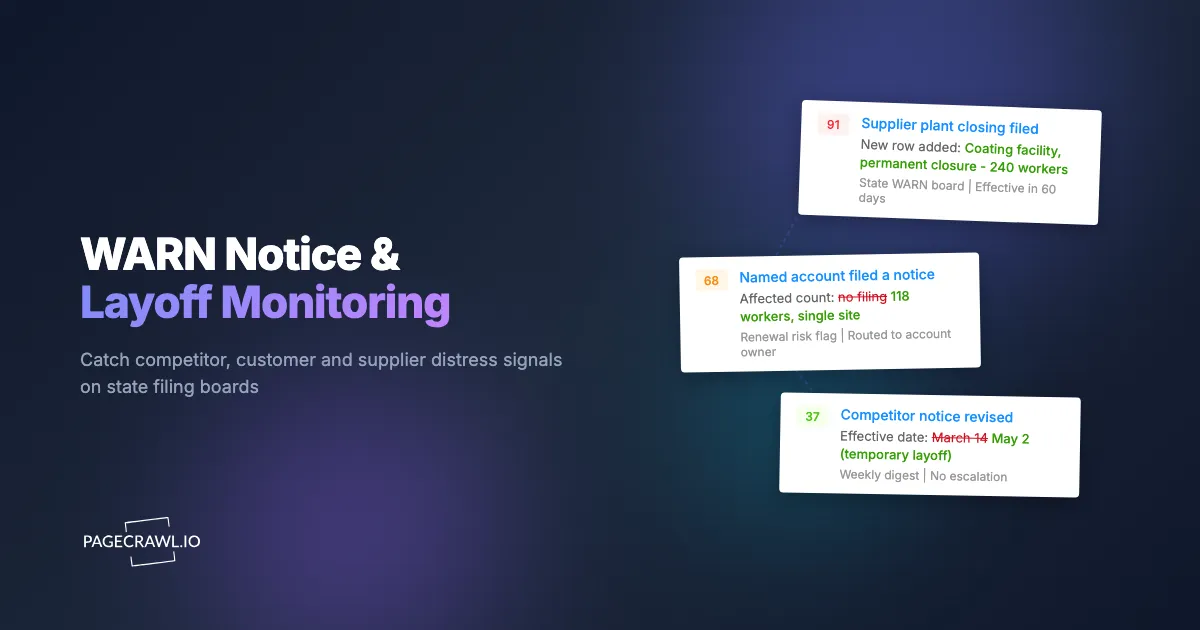
Two filings with the same worker count can mean opposite things. A 300-person cut at a 40,000-person company is routine restructuring. A 300-person cut at a 900-person company is existential. Read the affected count against the site and the company, and read the stated reason where the notice letter is published: "plant closure, permanent" and "temporary layoff, contract-related" belong in different buckets. A layoff tied to a lost contract also tells you a contract was lost, which is worth chasing on its own.
Why isn't the state's own notification or a news alert enough?
Most state workforce agencies publish a page or a spreadsheet without offering a subscription that pushes new filings to you, and the ones that offer any mailing list send on their own irregular schedule. News alerts only fire once a reporter writes the story, which is typically weeks after the filing. Neither gives you the 60-day lead the data is worth.
Publication is passive by design
State workforce agencies exist to serve dislocated workers, not to feed a competitive intelligence function. Their job ends when the notice is posted and rapid-response services reach affected employees. The page updates when it updates, sometimes daily, sometimes in weekly batches, with no announcement and no feed for most states. The data is public and useful. It is simply published rather than distributed.
Keyword news alerts fire too late and miss most filings
A search alert on a company name catches the story, not the filing. Most WARN notices never become a story at all, because a 60-person closure at a regional manufacturer is not news outside its county. The filings that do get covered are covered after a reporter finds them, which means you are consuming the same public record you could have read yourself, weeks later, minus the site address and effective date that made it actionable.
How do you set up WARN notice monitoring in PageCrawl?
You add each state's published notice list as a monitor, tell PageCrawl to watch the list content rather than the whole page, check daily, route alerts to the channel your team already reads, and add keyword rules so filings naming your competitors, customers, and suppliers stand out from the general flow.
Collect the URLs. Open each state list page you identified and copy the URL that actually shows the notice rows for the current year, for example the Texas Workforce Commission WARN notices table or the New York WARN dashboard. Where a state links a PDF or spreadsheet of the current year's report, capture that link too.
Add each URL as a monitor. Create one monitor per state page. Give each a name that reads well in an alert, such as "WARN: Illinois" or "WARN: Texas", because that name is what your team sees in Slack at 8am and it should be self-explanatory.
Pick the tracking mode. Use content tracking focused on the notice list region rather than full-page tracking, so the monitor watches the table of filings and ignores navigation, footers, and site-wide banners. For states that publish the current year as a PDF report, use document extraction so new rows inside the file are compared rather than the file's metadata.
Set the check frequency. Daily is the right default. WARN boards do not update minute to minute, and the value here is a 60-day lead, not a 60-second one. If you cover a state with a fast-moving board or you work in a sector where a single filing changes a deal, tighten it: Standard checks every 15 minutes, Enterprise every 5, and Ultimate every 2. The free tier's hourly checks are more than enough to prove the setup on your two or three highest-value states.
Choose notification channels. Route alerts where the people who act on them already are. Email works for a weekly digest. Slack, Discord, Microsoft Teams, and Telegram put the filing in front of the account team on the next check. A webhook lets you push new filings straight into your CRM so an affected customer's record carries the flag without anyone retyping it.
Add keyword rules for named accounts. This is the step that turns a noisy feed into intelligence. Add conditions so an alert escalates when the change contains a competitor, customer, or supplier name from your list, and stays quiet otherwise. Our walkthrough on conditional alerts using price, keyword, and threshold rules covers the rule syntax. Add a numeric threshold as well if you only want filings above a certain worker count.
Enable screenshot capture and history. A dated screenshot of the page as it looked when the filing appeared settles later questions about when you knew and whether the entry was revised, and it lets you read the affected count straight from the alert.
Review after two weeks. If a board is producing daily churn from a rotating footer or a "last updated" timestamp, narrow the tracked region. If a state produced nothing at all, confirm the URL is still the live list rather than an archived year.
What goes wrong when monitoring state WARN boards?
The three recurring problems are page churn that is not a real filing, state pages that reorganize or roll over to a new year without redirecting, and interpreting a filing too literally. All three are fixable, and none of them are reasons to skip the signal.
Timestamps, counters, and rotating content
Government pages carry the same noise as any other site: a "page last reviewed" date, a visitor counter, a rotating notice bar, a cookie prompt. Left alone these fire alerts that contain no filing. PageCrawl lets you click a detected change and mark that region as ignored on future checks, so after a couple of cycles the monitor only speaks when the notice list itself changes. Our guide to reducing monitoring false positives covers this narrowing process in more detail.
Year rollovers and site reorganizations
Many states publish per-year reports, so a URL that was correct in December can be an unchanging archive by February. Others rebuild their workforce sections and quietly move the list. The tell is a monitor that goes completely silent for a state you know is filing. Once a quarter, open each monitored URL and confirm you are looking at the current list. Adding a monitor on the parent workforce section as well gives you a nudge when the agency restructures its pages.
Filings are notices, not outcomes
A WARN notice announces an intention with a legal deadline attached, and intentions change. Layoffs get rescinded when a contract is renewed or a buyer appears. Effective dates get pushed. Some filings are formalities attached to a sale where the workforce is rehired by the acquirer the next day, which looks alarming in a table and means almost nothing operationally. Treat a filing as a strong prompt to investigate, not as a settled fact, and check whether the same employer files a revised or rescinding notice later.
Coverage is uneven across states
States publish at different speeds, in different formats, and with different levels of detail, and the federal thresholds mean smaller cuts never appear anywhere. Your feed will be comprehensive for large layoffs in states that publish well and patchy for everything else, so nobody should read an empty feed as proof a company is healthy. Combine WARN data with other public distress signals, including the funding and ownership changes covered in our guide to tracking private competitor funding and acquisitions.
How do you turn layoff alerts into something your team acts on?
Route each type of filing to the team that owns the response, attach a standing playbook to each type, and keep the feed narrow enough that people still read it in month six. An alert nobody has been told what to do with becomes an alert nobody opens.
Match the filing type to an owner
Build three routes rather than one channel everyone ignores. Competitor filings go to product marketing and sales enablement, with the job of updating battlecards and flagging accounts that were lost to that competitor on price. Customer filings go to the account owner and finance, with a renewal-risk flag and a receivables check. Supplier filings go to procurement, with a defined 60-day clock for qualifying an alternate. The alert is the trigger, not the work.
Write the playbook before the first alert
Decide in advance what a filing means you do. For a supplier: confirm which product lines the site supports, check inventory cover, start alternate qualification if cover is shorter than the notice period. For a customer: pull the seat count and renewal date, check open invoices, schedule an executive touch. For a competitor: identify open deals against them and review whether the closed site served a segment you can now credibly claim.
Keep the signal narrow
A state with hundreds of filings a year will bury you if every one pages the whole team. Use your named-account keyword rules as the escalation path and let everything else land in a weekly digest someone skims. If your intelligence program covers more than layoffs, our guide to tracking competitor websites end to end walks through running these sources as one program rather than a pile of separate feeds.
Choosing your PageCrawl plan
PageCrawl's Free plan lets you monitor 6 pages with 220 checks per month, which is enough to validate the approach on your most critical pages. Most teams graduate to a paid plan once they see the value.
| Plan | Price | Pages | Checks / month | Frequency |
|---|---|---|---|---|
| Free | $0 | 6 | 220 | every 60 min |
| Standard | $8/mo or $80/yr | 100 | 15,000 | every 15 min |
| Enterprise | $30/mo or $300/yr | 500 | 100,000 | every 5 min |
| Ultimate | $99/mo or $999/yr | 1,000 | 100,000 | every 2 min |
Annual billing saves two months across every paid tier. Enterprise and Ultimate scale up to 100x if you need thousands of pages or multi-team access.
One competitive signal caught early can swing a deal worth more than a decade of Enterprise. If you win one additional deal per year because you spotted a pricing change, a product launch, or a messaging shift before your competitors did, $300/year is a rounding error. Standard at $80/year handles 100 monitored pages, enough for a Tier 1 and Tier 2 competitor program. Enterprise adds 500 pages and SSO. All plans include the PageCrawl MCP Server for AI assistants like Claude and Cursor. Your sales and product teams can ask "summarize every change to Competitor X's pricing page over the last quarter" and get an answer pulled straight from your own archive. AI assistants can create monitors through conversation on every plan, including Free, turning the tracked pages into a living competitor database, not just an alert feed.
Getting Started
Start with three states, not fifty. Pull the site addresses of your five largest suppliers, your ten largest customers, and your top three competitors, and write down which states those sites sit in. The three states that appear most often are your first three monitors, and they will cover most of your real exposure.
Add those state list pages, set them to a daily check with content tracking on the notice table, and route alerts to the channel your account team already reads. Then add the keyword rules that make a filing naming one of your named accounts escalate while everything else stays in a digest.
Run it for a month and see what surfaces. The first time a supplier's plant closure reaches procurement with 60 days on the clock instead of a missed shipment, the program has paid for itself several times over. Public filings are only an advantage to the people who read them on time.