At 8:14 on a Tuesday in February, a competitive intelligence analyst at a mid-market software vendor opened her main competitor's /customers page for a routine quarterly review. Three new logos sat in the top row of the grid. One of them belonged to a marquee enterprise account her own sales team had been chasing for eight months, the kind of logo that anchors a board deck. She checked the page's snapshot history on the Wayback Machine: that logo had gone live 41 days earlier. The deal was already signed, the implementation was underway, and the renewal clock had started. By the time she saw it, there was nothing to do except explain to the VP of Sales why nobody had flagged a competitive loss that had been sitting in plain sight, on a public web page, for nearly six weeks.
A competitor's customer page is one of the most honest documents they publish. Legal and the customer's procurement team control which logos may appear, and a customer-success team controls when a reference account quietly asks to be taken down. Every logo that appears is a deal that closed; every logo that disappears is a relationship that soured, a contract that lapsed, an acquisition that changed the parent brand, or a reference pulled because the customer is unhappy. Both directions are signals your sales, product, and competitive teams can act on.
The problem is that nobody watches closely enough by hand. Customer pages get reviewed quarterly at best, logos shuffle, grids paginate, and a single removal in a wall of 80 logos is nearly invisible to the human eye. This guide shows how to turn a competitor's logo wall, case-study library, and testimonial pages into a continuous win-and-churn alert system using add-and-remove region detection, so the diff names the exact account that appeared or vanished and you hear about it the same day instead of the next quarter.
What does a competitor's customer page actually tell you?
A competitor's customer page is a public, frequently updated ledger of who they have won and, by omission, who they have lost. Logo walls list named accounts, case-study libraries describe deals deep enough to publish, and testimonial pages quote real users by title and company. Watching what gets added or removed converts that marketing asset into a sales-intelligence feed.
The reason this works is that customer pages are gated by more than marketing. Before a logo appears, the customer's own brand or procurement team has usually signed off on its use, so the relationship is real and contractually live. Before a case study publishes, a customer agreed to be quoted on record, which only happens when a deal is large or strategic enough to matter. So additions are confirmation that a specific named account chose your competitor and is willing to be seen doing it, and removals carry the inverse weight: a logo rarely vanishes by accident.
Treat three page types as one connected surface. The logo wall (often at /customers) is the densest, listing dozens of named brands. The case-study or success-story library (/case-studies, /customer-stories) is lower volume but higher signal, because each entry names an account and describes the use case. Testimonial and reference pages quote individuals and their employers. Monitoring all three, you catch a win whether it shows up first as a logo, a story, or a pull quote.
Why is a logo being added a sales signal worth chasing?
A logo appearing on a competitor's customer page is a confirmed, recent competitive loss or a newly public reference, and it is actionable in three ways at once: it names an account your team may have been pursuing, it tells your win-loss analysis which deals went the other way, and it reveals which segments your competitor is landing now.
The first move is account-level. Cross-reference every newly added logo against your open pipeline and closed-lost list. A logo that matches an account a rep was working tells you the deal is gone and why the follow-up went quiet. A logo for an account you never engaged tells you the competitor is reaching buyers you are not, a territory or outbound gap. This is the same logic behind account expansion signal detection, applied to the richest public source your competitor maintains about themselves.
The second move is pattern-level. After a few months of additions, the logos cluster. If eight of the last ten wins are healthcare companies between 200 and 1,000 employees, your competitor has found a repeatable motion in mid-market healthcare, and you see it forming in near real time. Pairing logo-wall additions with competitor hiring and job-posting signals sharpens the read: new vertical logos plus a burst of vertical-specific sales hires is a deliberate land-and-expand play, not a coincidence.
The third move is timing. Because the diff is timestamped, you know roughly when the relationship became public, which helps your win-loss interviews. A rep can call a champion at the lost account within days of the logo going live, while the decision rationale is still fresh, instead of months later.
Why does a logo disappearing matter even more?
A logo removal is the rarer and more valuable signal, because companies almost never take down a customer logo for innocent reasons. The common causes are all things your sales team wants to know: the contract lapsed, the customer churned, the reference relationship was pulled because the account is unhappy, or an acquisition retired the brand (public-company acquisitions are easy to confirm through SEC EDGAR filings, and SEC filing and M&A announcement tracking catches them as they post). Each is an opening.
Customer pages are sticky by design. Marketing wants them as long and impressive as possible, so logos accumulate and almost never get pruned for housekeeping. When one does come down, it usually means someone with authority insisted. A churned account that just signed elsewhere is a textbook re-engagement target. A still-active customer who pulled their reference rights is often a quietly dissatisfied account that has not yet shopped around, which is the best possible time to reach them.
Removals are also where manual review fails hardest. Spotting one logo gone from a grid of 80, where the rest may have reflowed into new positions, is nearly impossible by eye and trivial for add-and-remove detection that compares the named entities before and after. This subtle change gets buried in quarterly reviews, which is why an always-on alert beats a calendar reminder. It complements signals like executive and leadership departures, where a vanishing name on an about page tells a similar quiet story about instability.
Which pages and page elements should you actually monitor?
Monitor the customer logo wall, the case-study or customer-story index, and any testimonial or reference page, and within each one target the elements that name accounts: the logo grid (image alt text and brand names), case-study titles and the company named in each card, and quoted job titles plus employers. The named entity is the signal; everything else is noise.
Start with these surfaces in priority order:
- The primary logo wall at /customers, /customer-stories, or a "Customers" navigation link. This is your highest-volume add-and-remove feed.
- The case-study or success-story library index, where each new card is a named, on-record deal that describes the use case and often the deal size or outcome metrics.
- Testimonial and reference pages, including any "What our customers say" carousel, where pull quotes name a person and company.
- Segment or industry sub-pages, such as /customers/financial-services, which reveal vertical concentration faster than the all-customers wall.
- Press and newsroom indexes that announce new customers, often through wire services such as Business Wire or PR Newswire, which sometimes publish a win before the logo wall updates.
Within each page, the elements that matter are the named brands and companies, not the surrounding marketing prose. A redesign that changes the hero copy is not a customer event; a new company name in the grid is. Keeping the watch focused on account-naming elements separates a useful win/churn feed from a broader competitor content intelligence program that tracks every page edit.
How does add-and-remove region detection name the account?
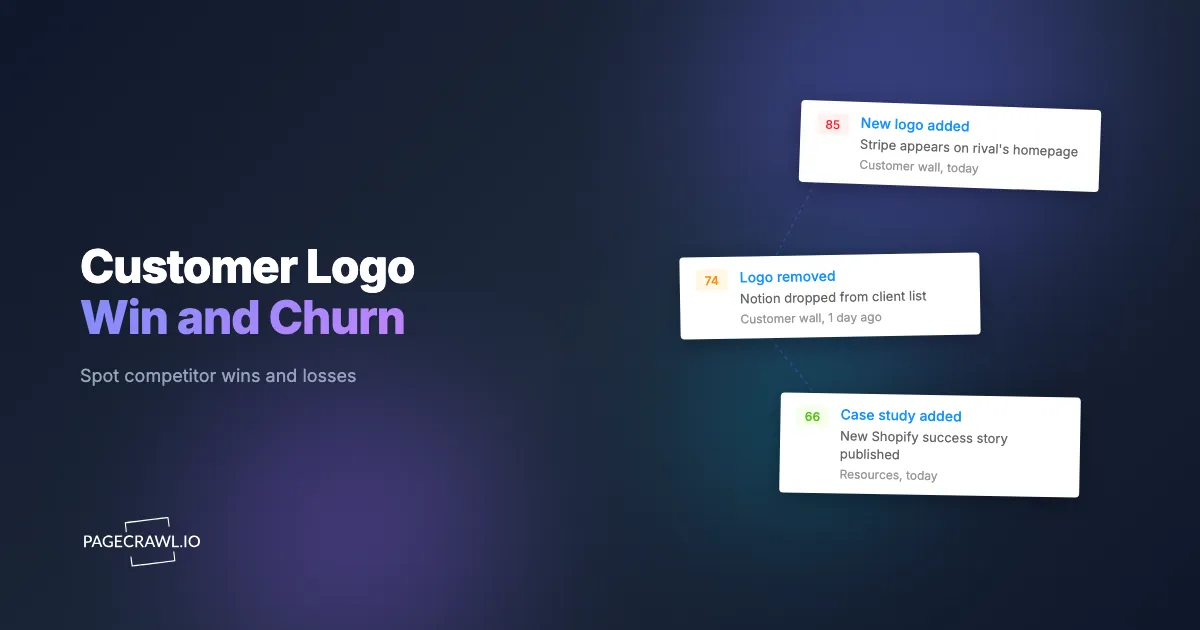
Add-and-remove region detection compares the set of named entities present on the page between two checks and reports exactly what entered and what left. Instead of "the page changed," you get the name of the customer whose logo was added and the one whose case study was removed, because the diff isolates the new and missing blocks and surfaces the company name inside each one.

The mechanics matter for accuracy. A naive whole-page comparison fails on customer pages because logos reflow, carousels rotate, and grids paginate, so almost any check looks "different." Region-level detection instead tracks the page as a collection of discrete items (each logo card, each case-study card, each testimonial) and compares the items themselves. When a card is added, the diff captures its content and labels it an addition; when a card present in the prior check is gone, it is labeled a removal. The before-and-after view shows both states side by side so a human can confirm the account name in seconds.
This is why the signal is so clean. You receive a short list that reads like "added: 2, removed: 1," with the named account attached to each line. For image-heavy logo grids, visual change capture preserves a before-and-after screenshot so you can confirm a logo you cannot read from text alone, while text and content tracking captures the company names and case-study titles the diff names explicitly. PageCrawl renders each page fully before comparing, so grids that load logos dynamically are captured completely rather than appearing empty.
How do you avoid false positives from carousels and reordered grids?
You suppress noise by tracking named entities rather than pixel position or source order, by setting a change threshold so a single shuffled logo does not alert, and by using conditional rules so only true additions and removals of account names fire. Carousels rotating and grids reflowing are expected motion, not customer events, and the watch should ignore them.
Three controls do the work. First, entity-level comparison means a logo moving from row one to row three is the same entity in both checks, so it produces no add and no remove; only a genuinely new or absent name registers. Second, a threshold lets you require a meaningful delta before alerting, which filters out trivial reorderings and the occasional alt-text tweak. Third, conditional logic narrows the trigger to the events you care about, the same approach described in conditional alerts with keyword and threshold rules, so you can alert on any removal (rare and high-value) but only on additions whose brand name is not already on your known-customer list.
For pages that load their customer list from a backend feed rather than static markup, JSON and API field tracking is the most precise option of all. Watching that field detects an added or removed account with zero rendering ambiguity, because you compare the underlying data rather than the laid-out page. When the list is purely visual, the screenshot-based capture (on by default for new monitors) gives you the human-verifiable before-and-after image.
What do you do once a win or churn alert fires?
Route the alert to the team that can act on it, attach the named account, and trigger a play: a re-engagement touch for a removed logo, a win-loss interview for an added logo that matches a lost deal, and a pipeline note for an added logo in a target segment. The alert starts a workflow, it does not end one.
A practical routing model looks like this:
- Logo or case study added, matches a closed-lost account: route to the rep who owned the deal and to win-loss analysis. Call the champion within days while the decision is fresh.
- Logo added, account never in your pipeline: route to the territory owner and demand-gen as an outbound target and coverage gap.
- Logo or case study removed: route to sales as a re-engagement candidate and to your competitive team. A pulled reference often precedes a public switch.
- Cluster of additions in one vertical: route to product marketing and competitive intelligence as a positioning shift, the kind of pattern that belongs alongside your competitor messaging and positioning tracker.
Delivering the alert into a shared channel keeps the whole go-to-market team aligned. Pushing each win/churn event into a Slack channel for website change alerts means a rep, an analyst, and a marketer see the same named account at once, with the before-and-after diff attached, and can claim the follow-up immediately.
How do you set up competitor customer-page monitoring with PageCrawl?
Setting up a win-and-churn monitor takes a few minutes per competitor. You point PageCrawl at the customer, case-study, and testimonial pages, choose a tracking mode that isolates named accounts, set a sensible check frequency, route the alert, and tune the threshold so only real additions and removals reach you. Here is the full sequence.
Step 1: Add the customer pages as monitors
Create one monitor for each surface: the logo wall, the case-study index, and the testimonial page. Use the page URL exactly as a visitor sees it. If the customer page is segmented (for example /customers/healthcare), add the segments you care about as separate monitors so vertical concentration is easy to read. For competitors with large libraries, bulk URL monitoring loads every customer-facing page in one pass.
Step 2: Choose the tracking mode
For a text-and-name logo wall or case-study index, use fullpage content tracking with keyword and text tracking focused on the company names and case-study titles, so the diff can name the account added or removed. The tracked element types available in PageCrawl cover each of these options. For an image-only logo grid, add visual change capture for a before-and-after screenshot of the wall. If the customer list loads from a backend feed, use JSON and API field tracking to compare the structured list directly, the cleanest possible signal. If a page sits behind a login or partner portal, login-gated monitoring lets PageCrawl reach it.
Step 3: Set the check frequency
Customer pages change slowly, so a daily check is plenty for most competitors and keeps your check budget free for faster-moving pages. For your two or three most important rivals, a check every few hours narrows the gap between a logo going live and your alert. The goal is to compress the 41-day blind spot from the opening story down to a single day.
Step 4: Route the notification
Send the alert to where your team already works. A Slack, Microsoft Teams, Telegram, or Discord channel keeps sales, product marketing, and competitive intelligence in the loop on the same named account. For automated routing, webhooks that send change data to any external service can push each win/churn event straight into your CRM, tagging the account and the direction (added or removed) so the right play fires without a human relaying it.
Step 5: Keep screenshots on
New monitors capture screenshots by default, and you should leave that on for customer pages. The before-and-after image lets a human confirm a logo the text diff cannot read, and it doubles as a dated record of when each account appeared or disappeared, useful evidence for win-loss reviews and board reporting.
Step 6: Tune the threshold and conditions
Set a change threshold so a single reordered logo does not alert, and add conditional rules so you fire on genuine additions and removals of account names rather than on carousel rotation or hero-copy edits. A good starting configuration: alert on any removal, and alert on any addition whose company name is not already on your known-customer list. Refine over the first few weeks.
Choosing your PageCrawl plan
PageCrawl's Free plan lets you monitor 6 pages with 220 checks per month, enough to validate the approach on your most critical pages before you upgrade.
| Plan | Price | Pages | Checks / month | Frequency |
|---|---|---|---|---|
| Free | $0 | 6 | 220 | every 60 min |
| Standard | $8/mo or $80/yr | 100 | 15,000 | every 15 min |
| Enterprise | $30/mo or $300/yr | 500 | 100,000 | every 5 min |
| Ultimate | $99/mo or $999/yr | 1,000 | 100,000 | every 2 min |
Annual billing saves two months across every paid tier.
Enterprise and Ultimate scale up to 100x if you need thousands of pages or multi-team access.
How do you start monitoring competitor wins and churn today?
Add your top three rivals' customer, case-study, and testimonial pages as monitors, choose a name-focused tracking mode, route the alerts to the channel your go-to-market team already uses, and turn screenshots on. Within a day you will catch the next logo that appears and the next one that quietly vanishes.
Your competitors publish their wins and bury their losses on pages anyone can read, yet those pages usually change for weeks before anyone notices. Start free, watch the first real signal land, and never explain a 41-day blind spot again.