The Classic Retro-X fleece you wanted came back in a discontinued natural-and-brown colorway at 5:40am Pacific on a Wednesday. By the time you opened the site after your morning meeting, the size medium was gone and only XS and XXL remained. This was the second time that exact colorway had slipped past you, and a quick search told you it now sells on resale sites for nearly double retail.
Patagonia operates differently from most apparel brands, and that difference is exactly why monitoring matters. The company runs deliberately conservative production, retires colors every season, refuses to flood the market with discounts, and feeds one-of-a-kind used items into Worn Wear that disappear within minutes. Demand for the Better Sweater, the Nano Puff, the Retro-X, and the R1 outpaces supply in the most popular sizes, and the inventory you want rarely waits.
This guide covers why Patagonia gear sells out, what is worth monitoring, where restocks actually happen, and how to set up automated alerts that reach you as soon as a check finds your size and color back in stock, whether it is a brand-new fleece or a single used jacket on Worn Wear.
Why does Patagonia gear sell out so fast?
Patagonia keeps production intentionally lean and retires colorways aggressively, so popular sizes in popular shades sell through quickly and restock on an unpredictable schedule. The brand's environmental positioning means it does not chase volume the way fast-fashion retailers do, which makes scarcity a permanent feature rather than an occasional event.
Discontinued colorways and seasonal palettes
Patagonia refreshes its color palette every season and quietly retires shades that will never be produced again. A Better Sweater in a specific heather, or a Nano Puff in a seasonal accent color, may exist for one production run and then vanish. Some colors return, but many are genuinely one-and-done.
That uncertainty is what makes monitoring worthwhile. You cannot assume a retired color will come back, so you want a check running while a small return-driven restock briefly puts it back on the shelf.
Core styles with permanent demand
A handful of Patagonia pieces sell out regardless of color or season:
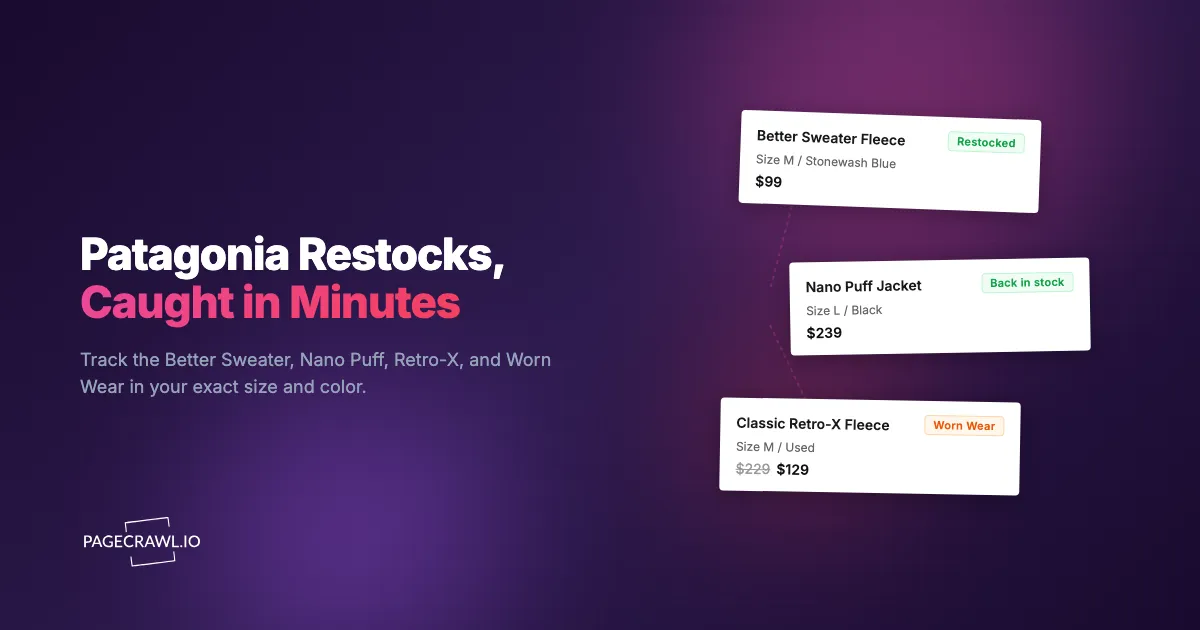
- Better Sweater Fleece: The brand's signature midlayer. Available in many colors, but the most popular neutrals sell out fast in medium and large.
- Nano Puff Jacket: A perennial best-seller in insulated layers. New colors disappear quickly, and classic black is chronically thin in mid sizes.
- Classic Retro-X Fleece: High-pile fleece with cult status. Seasonal colorways sell through on arrival and command resale premiums.
- R1 and R1 Air: Technical fleece beloved by hikers and climbers. Restocks are smaller and irregular.
- Down Sweater: Lightweight down staple with steady year-round demand.
- Houdini Jacket: Packable windbreaker that sells out every spring in popular colors.
- Baggies Shorts: A summer phenomenon. Specific colors and the 5-inch versus 7-inch inseam debate drive intense, size-specific competition.
These core styles restock more often than limited releases, but the high-demand middle sizes still vanish quickly.
Size distribution gaps
Patagonia allocates inventory along a bell curve. Sizes M and L (and women's 6 through 10) carry the highest demand and sell out first, while the extremes get smaller allocations and disappear unevenly. If your size sits in the busy middle, you are competing with the largest group of buyers for the smallest relative share, which is why size-specific monitoring matters so much.
No big sales, so inventory is the lever
Patagonia famously avoids Black Friday-style discounting and pledges 1% of sales to environmental causes through 1% for the Planet, the organisation it co-founded. Because the brand rarely marks gear down, the moment of opportunity is almost always an availability event, not a price event: the question is "is my size in stock right now," and that moves on its own schedule. For the broader playbook on tracking availability across any retailer, see our out-of-stock monitoring guide.
What should you monitor on Patagonia?
Monitor the specific product pages for the size and color you want, the Worn Wear used-gear listings, the Web Specials and Past Season sale sections, and the new-arrivals pages for fresh colors and limited drops. Each of these changes in a different way, so a complete strategy watches all four rather than relying on a single page.
Individual product pages by size and color
The most targeted approach watches the exact product page for the item, color, and size you want. When your size restocks, the page content shifts from unavailable to available and triggers an alert. Patagonia renders size availability as selectable buttons that grey out when sold out and reactivate on restock, and those visual states correspond to content changes that automated monitoring detects. Because Patagonia uses distinct URLs for each color variant, you can monitor precisely the shade you want. Create one monitor per color variant URL for each item on your list.
Worn Wear used gear
Worn Wear is Patagonia's resale program for used and repaired gear, and it is the most time-sensitive thing on the site. Every listing is one-of-a-kind, so there is exactly one of each item in each size and condition, and a clean used Retro-X in your size sells almost immediately. Watch the Worn Wear category or your filtered search results as a content change rather than a single-item availability check, because the inventory is a constantly rotating set of unique items. When the page content changes, a new listing has appeared and you can act before it is gone.
Web Specials and Past Season
Because Patagonia rarely discounts current-season gear, the Web Specials and Past Season sections are where prices actually drop. Items move here as they clear from the main line, and popular pieces sell out faster on sale than at full price. Monitor these category pages with content tracking to catch new additions, and pair them with availability monitors on the specific items you want at a discount.
New arrivals and limited drops
Patagonia adds new colors, seasonal styles, Provisions food items, and occasional collaborations throughout the year. The new-arrivals pages show the latest additions, and monitoring them surfaces a new colorway or limited drop on the first check after it goes live. For anything announced ahead of time, tightening the check frequency for that window gives you the best shot at your size before the most-wanted colors thin out. A sitemap monitor can also surface brand-new product and collection pages automatically as Patagonia publishes them.
Why isn't Patagonia's own "Email me when available" enough?
Patagonia offers an "Email me when available" option on out-of-stock items, but it is batched, slow, weak on size targeting, email-only, and does nothing for Worn Wear. For gear that sells out in under an hour, those limitations make the built-in alert unreliable as your primary strategy.
Batched, delayed emails
The built-in notification does not fire as soon as an item restocks. These emails are batched and sent on the retailer's own cadence, so by the time the message lands, you open it, and you navigate to checkout, the size may already be gone again. For a Better Sweater in medium or a popular Baggies color, even a 20-minute delay can mean missing the window entirely.
No reliable size targeting
The basic alert does not always distinguish between sizes. You can receive a "back in stock" message, rush to the page, and find that only the sizes you do not wear returned. Your size never actually restocked, but the notification went out anyway, training you to ignore the alerts that matter.
Email only, no push
Patagonia's notification is email and nothing else. There is no push to your phone, no Slack message for a buying team, and no webhook into an automation. Email is the slowest channel for a time-sensitive restock, so you usually find out after the people watching the page directly.
Nothing for Worn Wear
The built-in alert covers main-line products, not the constantly changing Worn Wear inventory. Because every Worn Wear listing is unique, there is no "notify me" to attach to, so the only way to catch a used item in your size is to watch the listings yourself or let external monitoring do it for you.
How do you set up Patagonia restock monitoring in PageCrawl?
PageCrawl monitors the actual Patagonia pages with stock availability tracking and restock alerts and reaches you through your fastest channel as soon as a check detects the change, which closes every gap in the built-in notification. The setup below takes a few minutes per item and works for main-line products, Worn Wear, and new-arrival pages.

Basic restock monitoring setup
Step 1: Open the Patagonia product page for the exact item and color you want, then copy the URL or add it straight from your browser bar with the PageCrawl bookmarklet. Confirm you are on the specific color variant's page, not a general page showing every color, so the monitor watches the right shade.
Step 2: Add the URL to PageCrawl using availability tracking mode. PageCrawl analyzes the page and identifies the stock status indicators automatically.
Step 3: Set your check frequency. For high-demand pieces (Better Sweater and Nano Puff in popular neutrals, Retro-X in seasonal colors, summer Baggies), check every 1-2 hours, since restocks can appear at any time and sell out within the hour. For less competitive items, every 4-6 hours is plenty.
Step 4: Configure notifications. Telegram or Discord push notifications deliver the fastest alerts for time-sensitive restocks, because you want the news in minutes, not hours. The walkthrough for sending change alerts to a Telegram group or channel covers the bot setup in a couple of minutes. For a buying team or shared channel, route alerts into Slack, and for phone-first speed see our guide to web push notifications.
Step 5: Enable screenshot capture. Patagonia shows size availability visually, so a screenshot in the alert lets you confirm which sizes actually returned before you open the site, saving the seconds that decide whether you check out in time.
PageCrawl's free tier includes 6 monitors and 220 checks per month, which is enough to cover a focused Patagonia shortlist of specific color variants and prove the approach works before you expand.
Monitoring Worn Wear
Worn Wear needs content monitoring rather than a single-item availability check, because the inventory is a rotating set of unique listings:
Step 1: Search Worn Wear for the style and size you want (for example, the Retro-X in your size), then copy the filtered results URL.
Step 2: Add that URL to PageCrawl using fullpage content monitoring mode so it watches the whole list of current listings.
Step 3: Set the check frequency high, every 1-2 hours, because used listings sell almost instantly once they appear.
Step 4: When you get an alert, PageCrawl shows you what changed on the page, so you can spot the new listing and buy it before anyone else notices. Pair this with a phone push channel so a one-of-a-kind find never waits in your inbox.
Tracking new arrivals and limited drops
To catch new colors, Provisions items, and collaborations on the first check after they go live:
Step 1: Identify the collection or product line you care about, such as the Better Sweater family or the new-arrivals page for jackets.
Step 2: Add that page to PageCrawl using fullpage content monitoring. When a new color or product is added, the page content changes and you get alerted.
Step 3: Set the frequency to every 2-4 hours, and tighten it on days when a drop has been announced. If you only want alerts when a specific keyword or price threshold appears, layer on conditional alert rules so you are not pinged for every minor edit.
When does Patagonia restock and drop new gear?
Patagonia restocks main-line items unpredictably, but a few patterns hold: small return-driven restocks tend to land in the early morning, seasonal transitions bring final restocks of retiring colors, and Web Specials get refreshed as gear is cleared from the main line. Knowing these rhythms helps you point high-frequency monitoring where it pays off.
Early-morning restocks
Sold-out items frequently flicker back in the early morning hours, roughly 4am to 8am Pacific, when inventory systems process returns and new shipments. A color unavailable at midnight may show as available at 6am and be gone again by mid-morning. Automated monitoring is most valuable precisely here, because it catches the restocks that happen while you are asleep.
Seasonal transitions
When Patagonia moves between seasons, outgoing colorways get their final, small restocks as returns are processed and warehouse stock is consolidated. These are the last realistic chances to grab a retiring color at retail, so watch your seasonal targets through the transition windows because the final restocks are tiny and disappear fast.
Web Specials timing
The Web Specials and Past Season sections refresh as items clear from the current line, and the best sizes go quickly once a popular piece is marked down. There is no single fixed day, so monitoring these category pages with content tracking every few hours beats checking manually. Because Patagonia discounts so rarely, an addition here is often the only time a given item sells below full price.
How should you structure a complete Patagonia monitoring strategy?
Organize your monitors into tiers by urgency, combine availability and price tracking where it matters, and treat community sightings as confirmation rather than your primary signal. A tiered structure keeps you focused on the pieces you truly want while still catching new releases and sale additions.
Tiered monitoring approach
Sort your monitors by priority:
Tier 1 (must-have): Specific product, color, and size combinations you want most, plus Worn Wear searches for grail items. Check every 1-2 hours with push notifications.
Tier 2 (nice-to-have): Pieces you would buy if they returned at the right price. Check every 4-6 hours.
Tier 3 (discovery): New-arrivals pages, Web Specials, and collection pages for spotting deals and fresh colors. Check every 4-6 hours.
This keeps your attention on the items that matter while still surfacing opportunities across the catalog.
Combining price and availability
Some Patagonia pieces are in stock at full price when you would rather wait for the Web Specials price. For those, run two monitors: an availability monitor on the product page for your size, and a content monitor on Web Specials for when the item is marked down. When both line up, you get the gear you want at the price you want. You can apply the same dual-monitor logic to track prices on Amazon or anywhere else you compare listings, and extend it to restocks and sales at REI.
Community intelligence
Patagonia has active communities on Reddit, Worn Wear forums, and outdoor-gear Discord servers where members share restock sightings. These are useful but reactive: by the time someone posts, the item may already be selling out. Automated monitoring puts the information in your hands first, and the community fills in context like which colorways are worth chasing.
What problems come up with Patagonia monitoring?
The common issues are dynamic page content, the rapid churn of one-of-a-kind Worn Wear listings, confusing seasonal color names, and short-lived cart-hold restocks. Each has a practical workaround, and once your monitors are tuned you get alerts only for genuine availability and price changes.
Dynamic page content
Patagonia loads product details and availability after the initial page renders. PageCrawl loads each page with a full browser engine, so dynamically loaded size availability, pricing, and stock indicators are fully present before the page state is captured, exactly as in your own browser. Product pages also include elements that change without reflecting real stock, like recommendation carousels and recently-viewed items. PageCrawl's noise filtering lets you click any detected change to ignore it going forward, so after a check or two you only hear about real restocks. The complete guide to reducing false positives covers the other levers, including excluding page sections and blocking cookie banners.
Worn Wear one-of-a-kind churn
Worn Wear listings rotate constantly, and because every item is unique, the page content changes often. That is the point of monitoring it, but it also means you want a tight keyword or size filter in your search URL so you are alerted to relevant listings rather than every inventory shuffle. Monitor a filtered results URL (your style and size), not the entire Worn Wear catalog.
Color name confusion
Patagonia color names shift across seasons, and a similar-looking shade may carry a different name in a different year. Always monitor by product URL rather than color name, because the URL uniquely identifies the exact variant and avoids chasing a name that has quietly been reassigned.
Cart holds versus actual availability
Patagonia holds items in carts for a period after a shopper adds them, so a size can read "out of stock" while units sit in abandoned carts. When those holds expire, the item briefly becomes available again. These micro-restocks are real but extremely short-lived, and hourly checks on your Tier 1 items give you the best odds at these unpredictable windows.
Choosing your PageCrawl plan
PageCrawl's Free plan lets you monitor 6 pages with 220 checks per month, which is enough to validate the approach on your most critical pages. Most teams graduate to a paid plan once they see the value.
| Plan | Price | Pages | Checks / month | Frequency |
|---|---|---|---|---|
| Free | $0 | 6 | 220 | every 60 min |
| Standard | $8/mo or $80/yr | 100 | 15,000 | every 15 min |
| Enterprise | $30/mo or $300/yr | 500 | 100,000 | every 5 min |
| Ultimate | $99/mo or $999/yr | 1,000 | 100,000 | every 2 min |
Annual billing saves two months across every paid tier. Enterprise and Ultimate scale up to 100x if you need thousands of pages or multi-team access.
Patagonia pieces run roughly $100 to $300 each, and retired colorways resell for well above retail, so catching one restock before it sells out again pays for a year of monitoring outright. Standard at $80/year covers 100 pages, enough for a full shortlist of color variants alongside Worn Wear searches, Web Specials, and a new-arrivals tracker checked every 15 minutes. If you also follow outdoor gear at other retailers, the same plan handles those monitors too, mirroring what we cover for Patagonia and Arc'teryx restocks and sales. Enterprise at $300/year handles 500 pages, which suits resellers tracking broad catalogs and the most volatile Worn Wear inventory at five-minute frequency.
Getting Started
Pick the one Patagonia piece you want most right now. Find the product page for your exact color, copy the URL, and set up an availability monitor in PageCrawl. Add a Worn Wear search monitor for the used version in your size, then configure Telegram or Discord notifications so restocks reach your phone on the check that spots them.
Run it for a week and watch what happens. You will almost certainly see at least one early-morning restock or a fresh Worn Wear listing appear, and seeing that pattern firsthand makes the case better than any guide can: manual checking loses, automated monitoring wins. The same approach covers everything from a Lululemon wishlist to your full Patagonia shortlist.
Then expand. Add your complete list of color variants, a Web Specials monitor for your favorite category, and a new-arrivals tracker for the next seasonal drop.
Stop refreshing the Patagonia page at dawn. Let the gear come to you.