
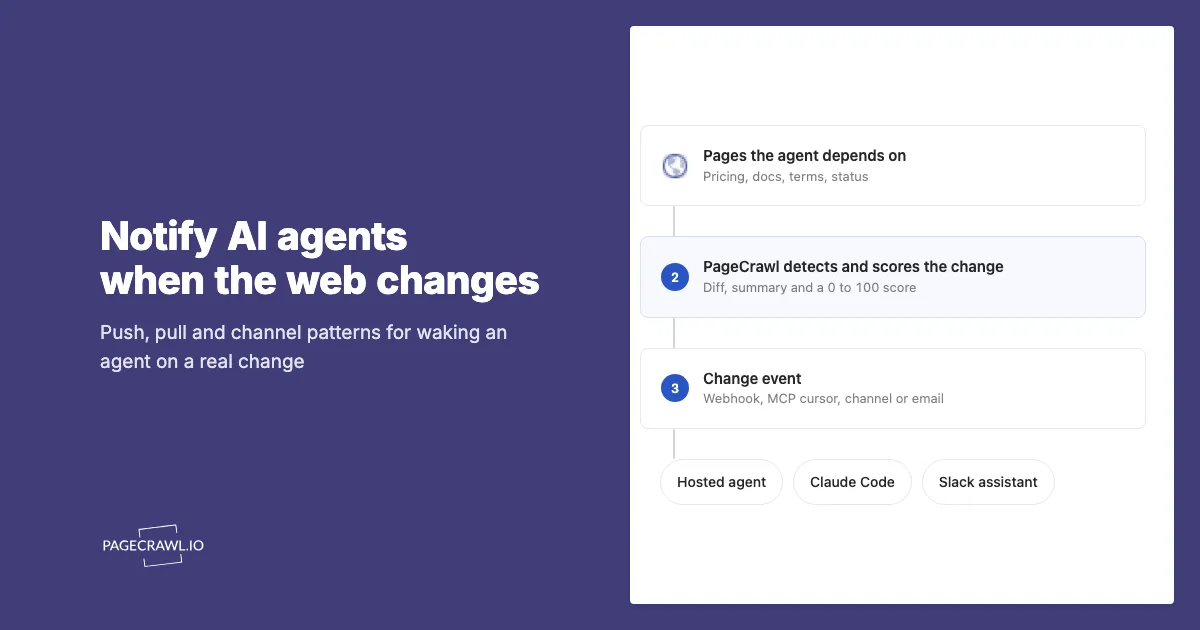
An agent that runs on a fixed schedule reads the same pricing page, the same changelog and the same terms page most days and finds nothing new. The tokens are spent either way. The interesting run is the one that happens because something on the page actually moved, and most agent setups have no way to know when that is.
The fix is to separate detection from reasoning. A web monitor watches the pages, decides whether a change is real and how much it matters, and hands the agent a compact event. The agent only wakes when there is something to reason about, with the diff and a summary already in hand instead of a raw HTML fetch it has to compare against a copy it may not have kept.
This guide covers the four delivery patterns for getting a change event to an agent, what the event should contain, how to avoid duplicate and missed changes, and where a person belongs in the loop. It assumes you already have monitors set up; the webhook agent guide covers creating them through the API, and the MCP server guide covers creating them in conversation.
Why should agents be notified instead of scraping on a schedule?
A scheduled agent that re-fetches pages pays for every run, including the ones where nothing changed, and it has to store its own previous copies to know what moved. A notified agent runs only when a monitor has confirmed a real change, and it starts with the diff, a plain-language summary and an importance score already computed.
There are three practical differences:
- Cost scales with change, not with time. A monitor checking 200 pages every hour finds a handful of real changes a day. An agent triggered by those changes runs a handful of times a day. The same agent on an hourly cron would run 24 times whether or not anything happened.
- The comparison is already done. The monitor keeps the previous version and produces the diff. The agent does not need its own snapshot store, and it cannot get the comparison wrong by fetching a slightly different rendering of the page.
- Noise is filtered before the model sees it. PageCrawl scores every change from 0 to 100 and can ignore cosmetic edits such as dates in footers, rotating banners and reordered lists. A threshold on that score means the agent never wakes for a copyright year.
Timing is honest here: the agent learns about a change when the next check detects it. Checks run as often as every 2 minutes depending on plan, so the delay is the check interval plus a few seconds of delivery, not a live stream of the page.
Pattern 1: Webhook into an agent runtime (push)
The push pattern is a PageCrawl webhook pointed at an endpoint you run. The endpoint receives the change event and starts an agent turn with the summary and diff as its input. This is the right pattern when the agent should act within minutes and you already run a small service to host it.
PageCrawl webhooks send a JSON payload with the fields you choose. For an agent, the useful ones are ai_summary, ai_priority_score, markdown_difference, contents, the page object with the monitor name and URL, and optionally a signed screenshot URL. Delivery is retried with backoff if your endpoint returns a non-2xx status, so a short outage on your side does not lose the event.
A minimal receiver in TypeScript that hands the event to Claude and posts the result wherever you need it:
import express from "express";
import Anthropic from "@anthropic-ai/sdk";

const app = express();
app.use(express.json());
const client = new Anthropic();

app.post("/pagecrawl", async (req, res) => {
  const event = req.body;
  res.sendStatus(200); // acknowledge first, reason after

  if ((event.ai_priority_score ?? 0) < 60) return; // below threshold, ignore

  const response = await client.messages.create({
    model: "claude-opus-5",
    max_tokens: 16000,
    system:
      "You review website changes for the product team. Decide whether this " +
      "change needs action, and if so, draft the internal note.",
    messages: [
      {
        role: "user",
        content:
          `Monitor: ${event.page?.name} (${event.page?.url})\n` +
          `Summary: ${event.ai_summary}\n` +
          `Score: ${event.ai_priority_score}\n\n` +
          `Diff:\n${event.markdown_difference}`,
      },
    ],
  });

  for (const block of response.content) {
    if (block.type === "text") await postToTeam(block.text);
  }
});

app.listen(3000);
Two details matter. Return the 2xx before you call the model, or a slow agent turn looks like a failed delivery and gets retried. And filter on the score in the receiver as well as in the monitor's notification rules, so a webhook created without a threshold does not flood the agent.
The same shape works for any runtime that accepts an HTTP trigger: a serverless function, an n8n or Make scenario that calls a model node, or a queue that a worker drains. The n8n guide and the webhook automation guide show those variants.
Pattern 2: MCP polling with a cursor (pull)
The pull pattern is an agent that asks the monitor what changed since its last run. It suits agents that already run on their own schedule, coding agents such as Claude Code or Codex that start from a terminal, and any setup where you would rather not expose an inbound endpoint.
The PageCrawl MCP server speaks the Model Context Protocol, the open standard most agent clients now use for tools, and exposes a get-changes-since tool for exactly this. The first call takes a date. Every response includes a next_cursor, the highest check ID seen, and the next call passes it back as after_check_id. The cursor is exact: check IDs only go up, so "everything newer than this one" cannot repeat a change or drop one that landed while the previous request was running. Moving a timestamp forward can do both.
A polling agent's loop, in prose:
- Load the saved cursor. If there is none, call
get-changes-sincewith a date such as "24 hours ago". - Pass
min_priorityso only changes above your threshold come back. A value of 60 is a reasonable start for most watchlists. - For each change, call
get-check-diffif the summary is not enough to act on, andget-screenshotwhen the change is visual. - Do the work: draft the note, open the ticket, update the knowledge base.
- Save
next_cursorfor the next run.
In Claude Code, the whole loop is a prompt once the server is connected. Something like "check for PageCrawl changes above priority 60 since the cursor in .pagecrawl-cursor, handle each one, then write the new cursor back" is enough for a nightly run. The MCP server connects over OAuth on every plan, including Free, and the natural-language monitor setup guide covers the connection steps. Installing the PageCrawl plugin with /plugin install pagecrawl --marketplace pagecrawl/skills also gives Claude Code PageCrawl's skills, which already describe this cursor loop, so the agent follows it without being told.
Pull has one cost: the agent still has to run to find out nothing happened. Keep those idle runs cheap by checking the cursor first and stopping early when the change list is empty.
Pattern 3: A channel the agent already reads
Many agents now live in a team channel. A Slack assistant, a Teams bot or a Telegram bot receives messages, decides whether they need a response and acts. If your agent already works this way, the simplest integration is to send change alerts to that channel and let the agent treat them like any other message.
PageCrawl sends to Slack, Discord, Microsoft Teams and Telegram natively, with the AI summary and score in the message. A dedicated channel per topic (competitor pricing, vendor status, regulatory pages) keeps the agent's context clean and lets people follow along in the same place.
The advantage over a webhook is that humans and the agent see the same event, and a person can reply in the thread to redirect what the agent does next. The disadvantage is that the agent gets the rendered alert text rather than the structured payload, so it may need to follow the link back to the change for the full diff.
Pattern 4: Email to an agent inbox
Email is the least glamorous pattern and the most portable. Every monitoring tool can send it, every agent platform can read it, and it works for agents hosted by someone else where you cannot register a webhook or install an MCP server.
Point a monitor's email notification at the address an agent watches. PageCrawl's change emails carry the summary, the score, the diff and a link to the check, so the agent has enough to decide whether to open the page. Email is also the fallback for an agent whose main trigger is Slack or a webhook: if the endpoint is down, the email still arrives.
Which pattern should you use?
Choose by how the agent runs, not by which sounds most modern. Push when the agent is a service you host and latency matters. Pull when the agent runs on its own schedule or from a developer's machine. Channel when a person should see and steer the same event. Email when you control neither the runtime nor the integrations.
| Webhook (push) | MCP polling (pull) | Team channel | ||
|---|---|---|---|---|
| Latency after the check | Seconds | Next agent run | Seconds to the channel, then the bot's cadence | Seconds to the inbox, then the reader's cadence |
| Needs an inbound endpoint | Yes | No | No | No |
| Payload | Full structured JSON | Structured tool results, diff on demand | Rendered alert text plus a link | Rendered text plus a link |
| Duplicate protection | Retries deliver the same event again; dedupe on check ID | Cursor guarantees each change once | Channel history | Inbox history |
| Human can steer | Only if you build it | Only if you build it | In the thread | By reply, if the agent reads replies |
| Best for | Hosted agents, serverless functions, automation tools | Claude Code, Codex, scheduled scripts | Assistants that already live in Slack, Teams or Telegram | Hosted agents you cannot integrate with directly |
Most teams end up with two: a webhook or cursor for the agent, and a channel so people can see what it is reacting to.
What should the change event contain?
The agent needs enough to decide and act without re-fetching the page, and no more. In practice that is the monitor name and URL, the AI summary, the priority score, the diff in a text form the model can read, and a link back to the check. Add the screenshot only when the change is visual or a person may need to verify it.
A few things to leave out:
- The full page content. It inflates the prompt and rarely helps. The diff and the current value of the tracked element cover almost every case.
- Low-scored changes. Set the threshold on the monitor or the webhook, not only in the agent's prompt. A model asked to ignore trivia still pays to read it.
- Per-check IDs as stable keys. In the payload,
element_idis stable across checks and identifies the tracked element. Theidon each reading changes every check. Use the former to match an element to something in your own system.
For monitors that track a number, the previous value and the current value together are worth more than the diff. A price that moved from 49 to 54 is a one-line fact the agent can act on directly.
How do you avoid duplicate and missed changes?
Webhooks are delivered at least once. If your endpoint times out after processing, the retry delivers the same event again. Record the check ID from the payload before you start the agent turn, and skip events whose ID you have already seen. A small key-value store or a database table with a unique index is enough.
Polling with after_check_id has the opposite property: each change is returned exactly once, because the cursor is a monotonic ID and not a timestamp. Save the cursor only after the agent has finished with the batch. If the run fails halfway, the next run picks up the same batch from the same cursor rather than losing it.
If an agent both receives webhooks and polls, treat the check ID as the single identity of a change across both paths.
Where does a person belong in the loop?
Agents that act on web changes should mostly propose rather than commit. A price change that triggers a repricing is a decision someone should be able to review; a policy change that updates a knowledge base is easier to reverse but still worth a glance.
PageCrawl's review board is a useful seam here. The monitor sends the change to the agent, the agent drafts the response, and the change stays in "To Review" until a person marks it reviewed. The agent can call mark-changes-seen through MCP once a person confirms, or the person can do it in the app. Either way there is a record of what the agent saw, what it proposed and who signed off.
For teams that need that record to hold up later, web archiving captures the page as evidence at the time of the change. It is available on request.
Getting Started
Pick one agent and one trigger. If the agent is a script or a Claude Code session, connect the MCP server and give it the cursor loop from Pattern 2. If the agent is a hosted service, add a webhook to five monitors with a score threshold of 60 and the receiver from Pattern 1. Send the same five monitors to a Slack channel so you can watch what the agent reacts to.
Run it for two weeks. Tune the threshold: if the agent is waking for changes nobody cares about, raise it; if a change you needed was scored below the line, use the feedback link on that change so scoring learns from it. Once the trigger is trustworthy, expand the watchlist and let the agent take on more of the response.
PageCrawl's REST API, webhooks and MCP server are available on every plan, including the free tier with 6 monitors, so the whole loop can be prototyped without a subscription.


