Your medical device company got its Japanese approval eighteen months ago. The regulatory affairs lead, a team of one, keeps a browser folder with eleven bookmarks: PMDA notifications, an MHLW ordinance index, two METI category pages, a PPC guidance list. Every Monday morning she opens all eleven, scans them for anything new, and closes them again. It takes forty minutes and she has been doing it for two years.
Then a distributor emails her a Japanese-language notification she has never seen. It was posted six weeks earlier on a page she does check, in a section she does not read, because the English version of that page had not been updated. Her Monday routine was never actually covering the thing that mattered. It was covering the English-language subset of the thing that mattered, on a weekly cadence, with a human deciding from memory whether a page looked different from last week.
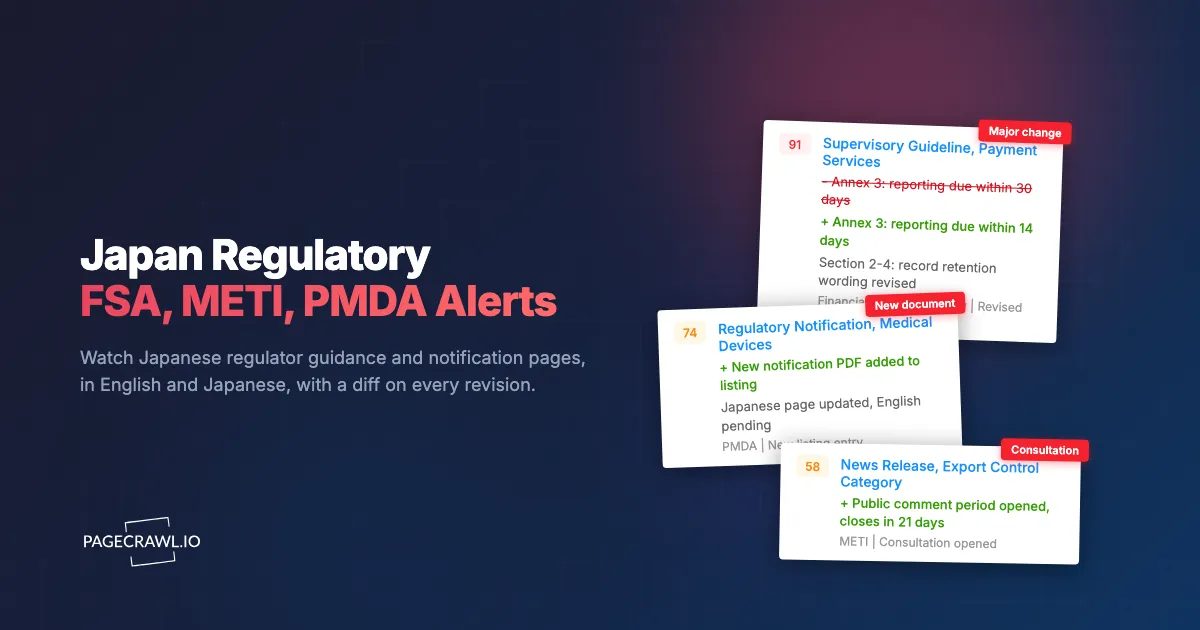
This is the specific failure mode of Japanese regulatory monitoring, and it is not about diligence. Japanese regulators publish continuously across many separate index pages, the English translations lag the Japanese originals or never appear, and much of the actual substance lives inside linked PDFs rather than on the page you bookmarked.
This guide covers which Japanese regulator pages compliance teams should watch, why the English and Japanese versions diverge, how to handle the PDF problem, and how to set up monitoring so a new FSA guidance document or a PMDA notification reaches your team on the next check instead of six weeks later through a distributor.
Which Japanese regulators should a compliance team monitor?
Start with the regulator that licenses or approves your product, then add the horizontal ones that apply regardless of sector. For most foreign companies selling into Japan that means the Financial Services Agency for financial services, METI for industrial and trade policy, PMDA for drugs and devices, and the Personal Information Protection Commission for data.
Japan has no omnibus regulator whose feed you can subscribe to and be done. Authority is split across ministries and agencies. A payments product can be touched by the FSA (licensing and conduct), METI (industrial policy and settlement systems), and the PPC (personal data) in the same quarter, and none of those three will tell you about the other two.
Financial Services Agency (FSA)
The FSA regulates banks, insurers, securities firms, payment services, and crypto-asset businesses. Its English site publishes press releases, strategic priorities documents, supervisory guidelines, and a regular newsletter. Watch the press release index, the applicable laws and regulations section, and any consultation page relevant to your licence category. FSA guidance frequently arrives as a supervisory guideline revision rather than a headline law change, exactly the update a weekly manual scan misses because the index entry looks routine.
Ministry of Economy, Trade and Industry (METI)
METI covers industrial policy, energy, export control, trade measures, standards, and subsidy programmes. Its English news release index is organised both chronologically and by category, including economic and industrial policy and external economic policy. If your exposure is export controls or a subsidy programme, the category pages are a tighter monitor than the firehose index. For trade measures affecting your supply chain, watch the chronological index, because measures land there first.
Pharmaceuticals and Medical Devices Agency (PMDA)
PMDA handles reviews, consultations, compliance inspections, and post-marketing safety for pharmaceuticals, medical devices, and regenerative medicine products, operating under the Ministry of Health, Labour and Welfare. Its English site carries a regulatory information section covering ministerial ordinances and regulatory notifications, plus safety information and review guidance. Two things make PMDA hard to monitor by hand: a lot of the operative content is in linked PDFs, and the English pages are a curated subset of what MHLW and PMDA publish in Japanese.
Personal Information Protection Commission (PPC)
The PPC administers the Act on the Protection of Personal Information (APPI) and publishes guidelines, Q&A documents, enforcement statements, and consultation materials. The APPI runs on a periodic review cycle, and those reviews move through interim reports and public comment procedures before anything binding appears. Watching the PPC's laws and policies pages gives you months of warning on a change that will eventually force you to rewrite a privacy notice or renegotiate a transfer arrangement.
Cross-cutting sources
Depending on your business, add the Japan Fair Trade Commission for competition matters, the Ministry of Health, Labour and Welfare for anything clinical or employment related, the Consumer Affairs Agency for labelling and advertising, and the Japan Exchange Group if you are listed or planning to be. Our guide to regulatory horizon scanning covers ranking sources by impact so the list stays finite.
Why do English and Japanese versions of Japanese regulator pages differ?
Because the Japanese page is the legal original and the English page is a translation published as a courtesy, on a slower cycle, and often selectively. A notification can be in force in Japanese for weeks before an English summary appears, and some items are never translated at all. Monitoring only the English site guarantees a lag.
This misunderstanding is easy to make precisely because the English sites are good. The FSA, METI, PMDA and PPC all maintain substantial English sections with real content, not token landing pages. That quality creates false confidence. The English section is a communication product aimed at foreign stakeholders, not a mirror of the regulatory record.
Three consequences for your monitoring design:
- The change you care about may appear first on a Japanese URL. Monitor the Japanese index page in parallel with the English one. You do not need to read Japanese to benefit, because you are detecting that something new was posted, then deciding whether to get it translated.
- English pages can be updated silently. A translated document is sometimes replaced with a revised translation without a new dated entry. Content-level change detection catches this. A human scanning a list of headlines does not.
- The English item can be a summary, not the document. An English press release may describe a change while the operative ordinance text exists only in Japanese, inside a PDF, behind a link.
Pair each priority source: one monitor on the English index, one on the Japanese equivalent. When the Japanese monitor fires and the English one stays quiet, that gap is itself the signal. A change is live and you do not yet have an official English version, which is your cue to route it to a translator or to Japanese counsel rather than waiting.
To read the detected change without a separate translation step, our walkthrough on monitoring pages through a translation proxy covers watching a machine-translated view of a foreign-language page so the diff arrives in a language your team can triage.
What exactly should you monitor on each regulator site?
Watch index and listing pages for new items, and watch individual document pages for revisions to text you already rely on. Index pages answer "is there something new?" Document pages answer "did the thing I built my compliance position on change?" A serious programme needs both, and they use different tracking settings.
Index and listing pages
These are the pages that accumulate entries: the FSA press release index, METI's news release index and its category pages, PMDA's regulatory information listings, the PPC's laws and policies section. Here you are detecting a new row. Set the monitor to watch the list region and ignore surrounding furniture such as banners, counters, and rotating notices. A new entry with a date and a title is the alert you want.
Specific guidance and ordinance pages
Once a document underpins a control you have implemented, monitor that document's page directly. Supervisory guidelines, Q&A documents, and technical standards get revised in place, and a revision to a paragraph your internal policy cites is far more actionable than a new item on an index. That is the difference between horizon scanning and change management, covered in our guide to regulatory change management software.
Consultation and public comment pages
Japanese rulemaking generally runs draft text through a public comment procedure before it becomes binding. The PPC's periodic APPI review, for example, has moved through interim reports opened for public comment. Monitoring consultation pages gives you the longest possible lead time, and it is the only stage at which you can influence the outcome rather than just comply with it.
Linked PDFs
Ordinances, notification texts, guideline annexes, and review reports are frequently PDFs. Monitoring only the HTML page detects that a PDF link appeared, not that the PDF behind an unchanged link was replaced. Monitor the PDF URL itself with text extraction so a revision inside the document triggers an alert. Our guide to monitoring PDF documents for changes covers this pattern, which matters more in Japan than in most jurisdictions.
A worked table
| Source | Page type to monitor | What a change means | Suggested frequency |
|---|---|---|---|
| FSA | English and Japanese press release index | New guidance, enforcement, consultation | Every 15 min to hourly |
| FSA | Specific supervisory guideline page | Your licensed activity's rules moved | Daily |
| METI | News release index plus your category page | Trade measure, export control, subsidy | Every 15 min to hourly |
| PMDA | Regulatory information and safety pages | New notification, ordinance, safety action | Every 15 min to hourly |
| PMDA | A specific guidance PDF | Document you rely on was revised | Daily |
| PPC | Laws and policies, consultation pages | APPI review stage, new guideline or Q&A | Daily |
How do you set up Japanese regulator monitoring in PageCrawl?
You add each regulator index page as a monitor, choose a tracking mode that suits the page type, set frequency by how much a delay costs you, route alerts to the channel your compliance team actually reads, and add keyword rules so only relevant items break through. A first working setup takes about twenty minutes.
Collect your URLs first. Copy the exact URL of each regulator page you check by hand, including the English and Japanese versions of the same index where both exist. Use the stable public address of the index or document, not a search results URL.
Add the URL to PageCrawl. Give the monitor a name your colleagues will understand at 8am, for example "FSA press releases (EN)" or "PMDA regulatory information (JA)". Naming discipline is what stops a 40-monitor programme from becoming unreadable.
Pick the tracking mode. For index and listing pages, content tracking on the list region works well because it ignores navigation and footers. For long guidance documents, reader mode extracts the main body text and drops the chrome. For PDFs, use PDF text extraction so the document's contents are compared rather than the file's bytes. For a page where you only care about one figure or one status line, specific text or specific number tracking keeps the monitor silent otherwise.
Set the check frequency by consequence. Ask what a delay actually costs. An index page where a new notification could start a compliance clock deserves the fastest frequency your plan allows, which is every 15 minutes on Standard, every 5 minutes on Enterprise, and every 2 minutes on Ultimate. A stable guidance document that gets revised twice a year is fine on a daily check. The free tier's hourly checks are enough to prove the setup works across your whole bookmark folder before you commit.
Choose notification channels. Email works for a documented audit trail, and most compliance teams also want the alert where they already talk: Slack, Microsoft Teams, Discord, or Telegram. Webhooks push the change into your GRC tool, ticketing system, or a spreadsheet so a regulatory alert becomes a tracked task rather than an unread message. Send high-consequence monitors to two channels so an alert cannot die in one person's inbox.
Add keyword and threshold rules. A METI news index publishes far more than affects you. Attach conditions so an alert fires only when the change contains terms that matter to your business, for example your product category, a licence type, or a statute name. Our walkthrough on conditional alerts using keyword and threshold rules shows how to turn a noisy index monitor into a short, high-signal feed.
Turn on screenshots and keep the history. A timestamped screenshot plus a stored diff is the artefact an auditor or a regulator asks for when you need to show when you became aware of a change and what you did next. This is the part of monitoring that quietly pays for itself during an assessment.
Group the monitors into folders. Create a folder per regulator or per obligation area. When someone asks what you are watching for data protection in Japan, the answer should be a folder, not a memory.
How often do Japanese regulators actually publish changes?
Frequently and unevenly. METI and the FSA post news releases most working days, with clusters around fiscal year boundaries and policy package announcements. PMDA safety and regulatory information updates arrive throughout the month. The PPC publishes in bursts tied to its review cycle. There is no schedule you can safely check against.
The unevenness defeats manual routines. A weekly Monday review assumes changes are evenly distributed, so a week is a tolerable sampling interval. In practice, Japanese regulatory publishing is bursty: quiet stretches punctuated by days where a ministry posts a policy package, a set of ordinance revisions, and the accompanying guidance at once. If your review lands the day before a burst, you carry a nearly full week of blindness.
Two timing features are worth designing around:
- The Japanese fiscal year ends 31 March. Measures, budgets, subsidy programmes, and rule changes cluster around the fiscal year boundary and around the start of the new fiscal year in April. Expect volume in that window and make sure your monitors are running and your alert routing is staffed before it arrives.
- Public comment windows are short and dated. When a draft is opened for comment, the window is finite. Finding out about it after it closes means you had an opportunity to shape the rule and missed it entirely. This is the case that most justifies frequent checks on consultation pages.
A monitor checking every 15 minutes turns a bursty publication pattern into a flat one from your side. You are no longer sampling. You are being told.
What makes Japanese regulator sites hard to monitor?
Four things: index pages that mix your topic with everything else, English and Japanese versions that drift apart, page furniture that changes without meaning anything, and notices published as images rather than text. Each has a specific fix, and none require you to read Japanese to get value from the alerts.
Index pages are undifferentiated
A ministry news index carries everything the ministry does. If you are a medical device importer, most METI entries are irrelevant, and if every entry pings you the alerts get muted within a fortnight. The fix is keyword conditions plus, where the regulator offers them, the narrower category index pages rather than the top-level firehose. Our guide to reducing monitoring false positives covers training a monitor to ignore regions and patterns that change without meaning.
Translation drift
The Japanese page is authoritative and the English page follows. Monitor both versions of your priority sources, treat a Japanese-only change as a live change, and route it for translation rather than waiting for the official English version. Machine translation is enough to triage relevance; commission a proper translation only for the items that pass.
Page furniture and rendering noise
Government sites carry banners, rotating announcements, "last updated" stamps, and session artefacts that change without regulatory meaning. Left alone, these produce alerts nobody reads. Watch the content region rather than the whole page, and mark noisy regions to be ignored after the first couple of false alerts. Two or three rounds of tuning per monitor is normal, and it is the difference between a system your team trusts and one they mute.
Content published as images
Japanese regulator sites occasionally publish notices as images of text rather than as extractable text. Visual comparison of that page region is the fallback, with a screenshot attached to the alert so a human can read what changed even when there is nothing to extract.
How do you prove to an auditor that you were watching?
Keep timestamped evidence of what each page said and when it changed, tie each detected change to a decision, and be able to produce both on request. Automated monitoring generates the first half by default: a dated diff plus a screenshot for every change on every monitored page, retained as long as your plan's history allows.
Assessors rarely ask whether you had a monitoring tool. They ask how you knew about a specific change, when you knew, and what you did about it. A folder of browser bookmarks and a person's recollection of their Monday routine answer none of those questions. A monitoring history answers the first two exactly, with a timestamp you did not author yourself.
To turn detection into defensible evidence:
- Record the decision alongside the alert. Route regulatory alerts through a webhook into your GRC platform or ticket system so every change opens a record that must be closed with an assessment, even if the assessment is "not applicable to us, here is why".
- Keep the screenshot. A stored image of the regulator's page as it appeared on a given date settles arguments about what the guidance said before it was revised. Regulators do replace documents in place.
- Document your source list and review it. Being able to show which pages you watch, why you chose them, and when you last reviewed the list demonstrates a designed programme rather than an ad hoc habit. Our guide to tracking multiple regulatory websites covers structuring a watchlist that survives an assessor's questions.
- Show coverage of the Japanese originals. Demonstrating that you monitor the Japanese-language source, not only the English translation, is a materially stronger position, because it shows you understood which version is authoritative.
Choosing your PageCrawl plan
PageCrawl's Free plan lets you monitor 6 pages with 220 checks per month, which is enough to validate the approach on your most critical pages. Most teams graduate to a paid plan once they see the value.
| Plan | Price | Pages | Checks / month | Frequency |
|---|---|---|---|---|
| Free | $0 | 6 | 220 | every 60 min |
| Standard | $8/mo or $80/yr | 100 | 15,000 | every 15 min |
| Enterprise | $30/mo or $300/yr | 500 | 100,000 | every 5 min |
| Ultimate | $99/mo or $999/yr | 1,000 | 100,000 | every 2 min |
Annual billing saves two months across every paid tier. Enterprise and Ultimate scale up to 100x if you need thousands of pages or multi-team access.
Compliance monitoring is the cheapest insurance you can buy. A single missed regulatory change can trigger fines in the tens or hundreds of thousands, not to mention the audit overhead of proving you did not see it coming. Enterprise at $300/year covers 500 regulatory pages with unlimited history and timestamped screenshots, which is usually exactly what an assessor wants to see. All plans include the PageCrawl MCP Server, so your compliance team can ask Claude to summarize every change to a specific regulation over the last quarter and pull the exact diff, turning your monitoring history into a queryable audit trail. AI assistants can create monitors through conversation on every plan, including Free. Standard at $80/year is enough to cover 100 pages across your primary regulatory bodies if your program is smaller.
Getting Started
Open the browser folder you check by hand and pick the three pages that would hurt most if you learned about them six weeks late. For most teams selling into Japan that is the index page of your licensing regulator, its Japanese-language equivalent, and the one guidance document your internal policy cites by name.
Add those three as monitors, use content tracking on the index pages and PDF text extraction on the document, set the fastest frequency your plan allows on the two index pages, and route the alerts to a Slack or Teams channel where more than one person will see them. Three monitors fit inside the free tier with room to spare.
Run it through one publishing burst. You will get an alert for something your Monday scan would have caught a week later, or for a Japanese-language item with no English version yet, and the value of the pairing becomes obvious. Then expand: add METI category pages, PPC consultation pages, and the specific PDFs your compliance positions rest on, and put each group in a folder named after the obligation it covers.
Retire the bookmark folder. Let the regulators tell you when they move.