
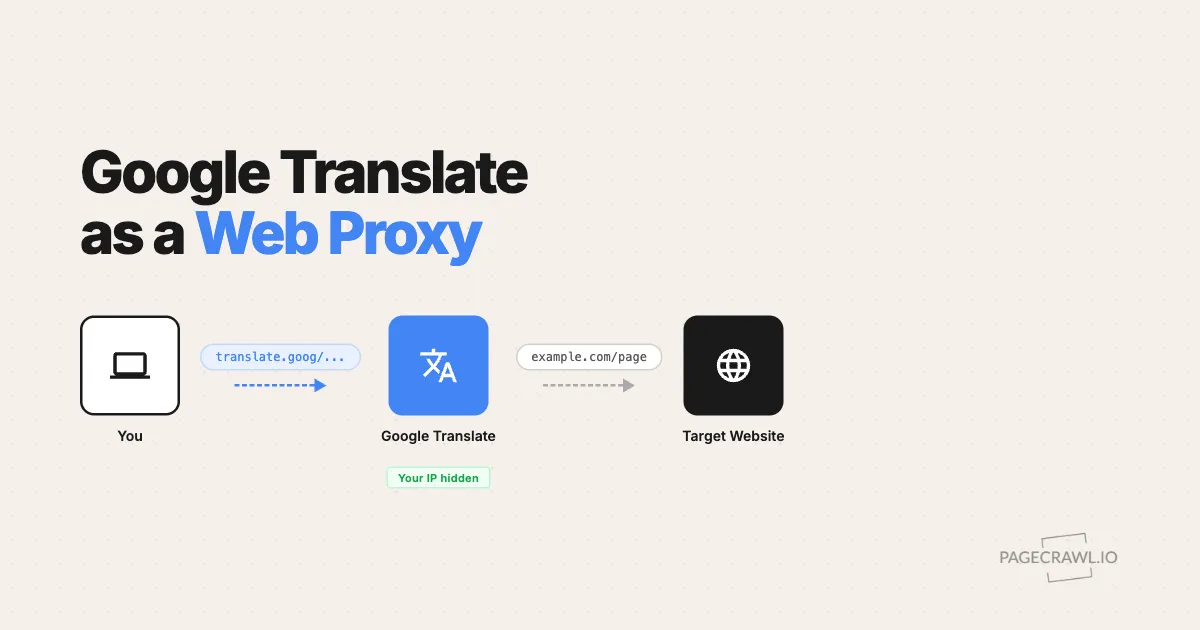
There is a well-known trick: you can use Google Translate as a free web proxy. By feeding any URL into Google Translate's website translation feature, Google's servers fetch the page on your behalf and serve it back through their domain. Your IP address never touches the target server.
It is clever, it is free, and it works in many cases. But it has significant limitations, especially if you need reliable, repeated website monitoring.
How does the Google Translate proxy work?
It works because Google's servers, not your browser, fetch the target page and then re-serve it from a translate.goog subdomain. The site sees a Google IP address and a Google request, while you see the page through Google's translation wrapper. The URL structure looks like this:
https://www-example-com.translate.goog/?_x_tr_sl=auto&_x_tr_tl=en&_x_tr_hl=en&_x_tr_pto=wappThe key parts:
www-example-com.translate.goog- The target domain with dots replaced by hyphens, hosted on Google's translate.goog domain_x_tr_sl=auto- Source language (auto-detect)_x_tr_tl=en- Target language. Set this to the same language as the source to avoid actual translation_x_tr_hl=en- Interface language_x_tr_pto=wapp- Translation mode (web app)
| Original URL | Google Translate Proxy URL |
|---|---|
https://www.bbc.com/news |
https://www-bbc-com.translate.goog/news?_x_tr_sl=auto&_x_tr_tl=en&_x_tr_hl=en&_x_tr_pto=wapp |
https://www.lemonde.fr/international/ |
https://www-lemonde-fr.translate.goog/international/?_x_tr_sl=auto&_x_tr_tl=en&_x_tr_hl=en&_x_tr_pto=wapp |
URL Generator
Use the tool below to convert any URL into a Google Translate proxy URL:
Why do people use Google Translate as a proxy?
People reach for it because it is free, needs no software, and puts a trusted intermediary between them and the target site. Four reasons come up again and again:
- Bypass IP blocks - The target website sees Google's IP, not yours
- Access geo-restricted content - Google's servers are distributed globally
- Avoid simple bot detection - Websites generally trust Google's IP ranges
- No setup required - Works in any browser, no extensions or VPNs needed
For downloadable files, a document viewer is a more relevant starting point. See using online viewers as proxies for PDF, Excel, and PowerPoint files for a viewer link generator and the limits of this approach.
What are the limitations of the Google Translate proxy?
The trick breaks down on anything modern or repeated: Google rewrites the page, JavaScript apps fail to render, sessions do not carry through, and frequent requests hit Google's own rate limits. Five limits matter most.
Content gets modified. Google injects its own toolbar, JavaScript, and translation widgets. Page layouts break, CSS shifts, and interactive elements stop working.
JavaScript-heavy sites fail. SPAs, React and Vue apps, and dynamically loaded content often break completely. The proxy was designed for static HTML, not modern web apps.
Rate limiting. Google applies its own rate limits. Frequent checks will get you blocked by Google itself.
No authentication. Cookies and sessions don't work reliably through the proxy, so anything behind a login wall is inaccessible. A dedicated monitor can instead sign in with stored credentials and watch the page from inside the session.
No reliability guarantee. Google can change the URL format or service behavior at any time. There is no API or SLA, and automated scraping through the translation endpoint sits awkwardly against Google's Terms of Service.
Do you need the Translate proxy to monitor a blocked page?
No. A purpose-built monitor lets you use the original page URL, choose what to track, and review captured content without a translation wrapper. PageCrawl.io supports JavaScript rendering and different connection options, though the website may still restrict access:

- Connection options let you start with Auto or choose another Location, including Residential options and Web Unblocker on Enterprise and Ultimate.
- Browser rendering loads JavaScript-based page content.
- Track specific elements with visual point-and-click selection, not just full pages.
- Fast notifications as soon as a check detects the change, via email, Slack, Discord, Teams, Telegram, or webhooks.
- AI-powered change summaries and visual screenshot comparisons.
Just paste the original URL, pick what to track, and set up notifications. The free plan includes browser rendering and proxy support.
For personal monitoring on a budget, try PageCrawl Relay if the public page works through your own connection. It has no additional fee on any plan, including Free, and uses a computer you keep online. You supply the bandwidth, and your usual monitor and check limits still apply. For business monitoring, we recommend Enterprise or Ultimate and their included managed connection options, which do not depend on your computer staying online.
Choosing your PageCrawl plan
PageCrawl's Free plan lets you monitor 6 pages with 220 checks per month, which is enough to validate the approach on your most critical pages. Most teams graduate to a paid plan once they see the value.
| Plan | Price | Pages | Checks / month | Frequency |
|---|---|---|---|---|
| Free | $0 | 6 | 220 | every 60 min |
| Standard | $8/mo or $80/yr | 100 | 15,000 | every 15 min |
| Enterprise | $30/mo or $300/yr | 500 | 100,000 | every 5 min |
| Ultimate | $99/mo or $999/yr | 1,000 | 100,000 | every 2 min |
Annual billing saves two months across every paid tier. Enterprise and Ultimate scale up to 100x if you need thousands of pages or multi-team access.
For personal monitoring, Free or Standard may cover your needs, with Relay available when a public page works better through your own connection. For business monitoring, choose Enterprise or Ultimate for their included managed connection options and team features. Compare the current plans against your page count and check frequency, and test the pages you need before committing.
All plans include the PageCrawl MCP Server, so you can query your full monitoring history directly from Claude or Cursor rather than digging through alert emails. The guide to connecting AI assistants over MCP covers the one-time setup. AI assistants can create monitors through conversation on every plan, including Free.


