A competitor files a patent application covering a feature your product already uses. The application publishes 18 months later. Your legal team discovers it during a routine quarterly review, nine months after publication. The window for filing a prior art submission has closed. The competitor's patent issues, and now you face a licensing negotiation that could have been prevented with earlier awareness.
Intellectual property monitoring is one of the highest-value applications of web monitoring, yet most organizations do it poorly or not at all. Patent applications, trademark filings, and opposition proceedings are all published on government websites at predictable URLs. The information is public. The problem is not access. It is awareness. Changes happen on these sites daily, and manually checking them is tedious enough that it rarely happens with the consistency required.
For organizations just getting started, PageCrawl's automatic page discovery can help map out the pages you need to monitor. Point it at a USPTO search results page or a competitor's known patent portfolio, and it identifies linked pages (individual application pages, related filings, referenced documents) that you may want to add as monitors. This is particularly useful when setting up competitor patent surveillance, where a single assignee search can lead to dozens of individual application pages worth tracking individually.
This guide covers what IP-related web pages are worth monitoring, the limitations of existing tools, how to set up automated monitoring for USPTO and other IP databases, and how to build an IP intelligence workflow that surfaces filings relevant to your business on the first check after they publish.
Why does patent and trademark monitoring matter?
Because IP filings are public months or years before the product they protect, and because the response windows are short and start whether you noticed or not. Monitoring buys you the time to gather prior art, oppose a confusing mark, or adjust a roadmap while those options are still open.
Competitive Intelligence
Patents and trademark applications are public declarations of strategic intent. When a competitor files a patent, they are signaling their R&D direction. When they file a trademark, they are signaling upcoming products, services, or brand changes. This information is available months or years before the actual product or service launches.
Monitoring competitor IP filings gives you early intelligence about their roadmap. A competitor filing patents around a specific technology tells you they are investing in that area. A new trademark application reveals upcoming brand names, product lines, or geographic expansion plans.
Infringement Early Warning
If someone files a patent that covers technology your product uses, you need to know as early as possible. Early discovery gives you time to:
- Assess whether the claims actually cover your technology
- Gather prior art that might invalidate the patent
- File a third-party submission during the patent prosecution process
- Adjust your product roadmap if necessary
- Prepare a licensing or design-around strategy
The earlier you discover a potentially problematic filing, the more options you have and the lower the cost of responding.
Brand Protection
Trademark monitoring protects your brand from dilution and confusion. If someone files a trademark application for a name similar to yours, you have a limited window to oppose the application. Missing that window means a potentially confusing mark gets registered, and removing it becomes significantly more expensive and uncertain.
Trademark opposition proceedings at the USPTO's Trademark Trial and Appeal Board (TTAB) have strict deadlines. The initial 30-day opposition window begins when the mark is published for opposition. Extensions are available, but the clock starts whether you know about the publication or not.
Portfolio Management
If your organization owns patents or trademarks, monitoring helps you manage your own portfolio. Track the status of your pending applications (office actions, rejections, allowances), monitor maintenance fee deadlines, and stay aware of third-party challenges to your registrations.
What should you monitor on the USPTO and WIPO?
Four page types carry most of the signal: patent search results filtered by keyword, assignee, or classification; trademark search results for marks close to yours; the status page for any individual application you care about; and the docket for any TTAB proceeding you are party to. Note: the USPTO has retired its legacy PatFT, AppFT, and TESS interfaces in favour of newer search tools, so start from the search tools listed on uspto.gov and copy the results URL from whichever interface is live today.
USPTO Patent Full-Text Database (PatFT)
PatFT contains the full text of all granted US patents. Monitoring PatFT search results for keywords relevant to your technology catches newly issued patents in your field. This is useful for competitive intelligence and for identifying patents that might affect your freedom to operate.
Key monitoring approaches for PatFT:
- Keyword searches: Monitor search results for technology-specific terms. For example, a company working in machine learning might monitor searches for "neural network" combined with their specific application domain.
- Assignee searches: Monitor patents assigned to specific competitors. When Competitor X receives a new patent, you want to know.
- Classification searches: Monitor specific patent classification codes (CPC or USPC) that cover your technology area.
Each of these searches has a stable URL on the USPTO website. When new patents matching your criteria are issued, the search results page changes, and your monitor detects the change.
USPTO Patent Application Full-Text Database (AppFT)
AppFT contains published patent applications. Applications publish 18 months after filing (unless the applicant opts out of publication). Monitoring AppFT is arguably more valuable than monitoring PatFT because you see competitor filings before they become enforceable patents. This gives you the maximum window to respond.
The same search approaches work for AppFT: keyword searches, assignee searches, and classification searches. Monitor both PatFT and AppFT for comprehensive coverage.
USPTO Trademark Electronic Search System (TESS)
TESS is the primary search tool for US trademark registrations and applications. Monitor TESS search results for:
- Marks similar to yours: Catch applications for confusingly similar names, logos, or slogans before they proceed to registration.
- Competitor trademark activity: Track new trademark applications from specific companies to learn about their upcoming products and brands.
- Industry-specific terms: Monitor trademark applications in your goods and services classes to stay aware of new entrants and branding trends.
TESS search results pages update as new applications are filed and existing applications change status. Automated monitoring catches these changes on the next scheduled check.
Trademark Status and Document Retrieval (TSDR)
TSDR provides detailed status information for individual trademark applications and registrations. If you are tracking a specific application (your own or a competitor's), monitoring the TSDR page for that application catches status changes: publication for opposition, registration, office actions, and cancellation proceedings.
This is particularly important for applications you may want to oppose. The status change from "Examined" to "Published for Opposition" triggers your 30-day window to file an opposition or request an extension.
TTAB Proceedings
The Trademark Trial and Appeal Board handles opposition and cancellation proceedings. If someone opposes your trademark or you oppose theirs, monitoring the TTAB proceeding page catches new filings, orders, and deadlines, the same docket and legal proceeding monitoring pattern used for court opinions and enforcement pages.
TTAB proceedings have strict deadlines. Missing a response deadline can result in default judgment. Automated monitoring of proceeding pages ensures you never miss a filing or order.
International Filings (WIPO)
The World Intellectual Property Organization (WIPO) administers international patent and trademark filing systems. The Patent Cooperation Treaty (PCT) system publishes international patent applications. The Madrid System handles international trademark registrations.
For companies with international operations, monitoring WIPO databases alongside USPTO databases provides global IP intelligence. WIPO's PATENTSCOPE database and the Madrid Monitor tool both have web interfaces with searchable, monitorable result pages.
Why aren't USPTO email alerts and watch services enough?
USPTO email alerts are batched, email-only, and cover a narrow slice of the databases, while commercial watch services bundle the detection you need with an expensive analytical layer you may already have in-house. Page monitoring fills the gap: broad coverage, your own search queries, and your own delivery channels.
USPTO Email Alerts
The USPTO offers email notification services for some of its databases. These alerts have significant limitations:
- Limited search flexibility compared to the full TESS and PatFT search interfaces
- Email-only delivery with no webhook, API, or push notification options
- Batch delivery on schedules set by the USPTO, not real-time
- No coverage of status changes on individual applications
- No monitoring of TTAB proceedings
For basic awareness, USPTO email alerts are a starting point. For professional IP monitoring, they are insufficient.
Commercial Trademark Watch Services
Professional trademark watch services (CompuMark, TrademarkNow, Corsearch) provide comprehensive monitoring with legal analysis. They offer value through their analytical capabilities and legal expertise. However, they come with significant costs, often thousands of dollars per mark per year.
For organizations that need the full analytical service, these tools are appropriate. For organizations that need awareness of filings without the analytical layer, web monitoring provides the core intelligence at a fraction of the cost.
Patent Analytics Platforms
Services like PatSnap, Orbit Intelligence, and Google Patents provide patent search and analytics. Some include alerting features. These platforms are powerful for deep patent analysis but are typically priced for large organizations with dedicated IP teams.
Web monitoring complements these platforms by covering the monitoring gap: catching changes to specific pages and search results within a check cycle, then feeding that intelligence into whatever analytical workflow you prefer.
Setting Up USPTO Monitoring with PageCrawl
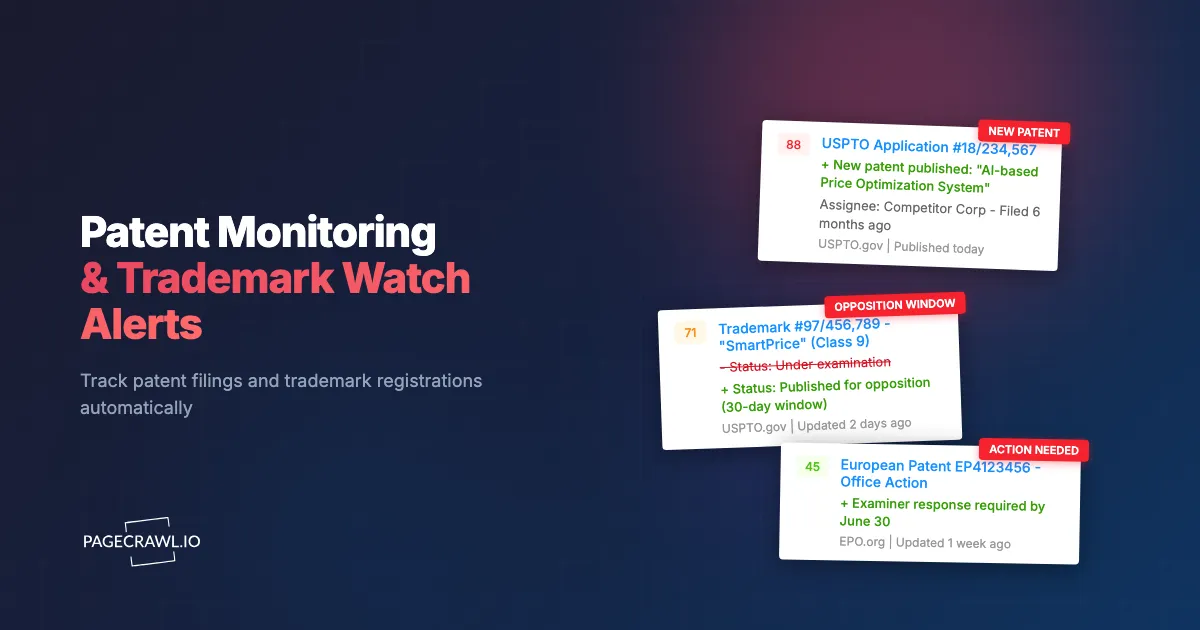
PageCrawl monitors the web pages where IP information is published. When a search result page changes (new patents issued, new applications filed, status changes), you receive an alert through your preferred channel.

Monitoring Patent Search Results
Step 1: Conduct your patent search on the USPTO PatFT or AppFT database. Refine your search query until it returns results relevant to your technology or competitors.
Step 2: Copy the URL of the search results page. USPTO search results have stable URLs that can be bookmarked and monitored.
Step 3: Add the URL to PageCrawl using fullpage content monitoring mode. This detects any changes to the search results, including new patents appearing or existing entries being updated.
Step 4: Set your check frequency. Patent publications happen weekly (Tuesdays for patents, Thursdays for applications). Checking daily ensures you catch new publications within 24 hours of their appearance. For less time-sensitive monitoring, twice-weekly checks aligned with publication schedules are efficient.
Step 5: Configure notifications. For IP legal teams, email notifications with full change details work well for incorporating into existing legal workflows. For faster awareness, Slack or Teams notifications put the alert where the team already collaborates. See our guides for Slack alerts and webhook automation for integration options.
Monitoring Specific Patent Applications
To track the status of a specific patent application through the prosecution process:
Step 1: Find the application on USPTO's Patent Application Information Retrieval (PAIR) system or PatentsView.
Step 2: Copy the URL for the application's status page.
Step 3: Add the URL to PageCrawl using fullpage content monitoring. Status changes (office actions, responses, allowances, rejections) appear as page content changes.
Step 4: Set check frequency to daily or twice weekly. Patent prosecution moves slowly, but office action response deadlines are firm. Early awareness of office actions on competitor applications tells you whether their claims are being narrowed or broadened.
Monitoring Trademark Applications
Step 1: Search TESS for trademarks similar to yours or filed by specific competitors.
Step 2: Copy the search results URL.
Step 3: Add to PageCrawl with fullpage monitoring. New applications matching your search criteria trigger alerts.
Step 4: For individual trademark applications you are tracking, add the TSDR page URL. Monitor for status changes, especially the "Published for Opposition" status that starts your opposition deadline.
Step 5: Set check frequency based on urgency. For trademark opposition monitoring, daily checks ensure you catch publication dates promptly. For general competitive monitoring, twice-weekly is sufficient.
Monitoring WIPO Databases
Step 1: Conduct your search on WIPO's PATENTSCOPE (for patents) or Madrid Monitor (for trademarks).
Step 2: Copy the search results URL.
Step 3: Add to PageCrawl. International databases update on their own schedules. Daily checks provide comprehensive coverage.
Step 4: Configure notifications to reach the appropriate team members. International IP monitoring often involves different team members than domestic monitoring.
Monitoring Competitor Patent Activity
Building a systematic picture of competitor IP activity requires ongoing patent filing monitoring across multiple dimensions.
Assignee-Based Monitoring
Monitor patent and application databases filtered by competitor company names as assignees. When Competitor X files a new patent application or receives a new patent grant, your monitor detects the change.
Note that company names in patent databases can vary. "Apple Inc." might appear as "Apple Inc," "Apple, Inc.," or "Apple Computer, Inc." in older filings. Set up monitors for common name variants to ensure coverage.
Inventor-Based Monitoring
Key researchers and engineers at competitor companies file patents under their personal names. Monitoring patent databases for specific inventor names catches filings even when the assignee name is different (such as when a competitor uses a subsidiary or shell company for sensitive filings).
Identify the key technical leaders at competitor companies through LinkedIn, conference presentations, and existing patent records. Monitor their names in AppFT to catch new filings early.
Technology-Based Monitoring
Monitor patent classification codes that cover your technology area. The Cooperative Patent Classification (CPC) system organizes patents by technology. Monitoring all new filings in your CPC codes catches competitor activity you might miss with company-specific searches, including filings from companies you are not currently tracking.
This broader approach also catches new entrants to your technology space. A startup you have never heard of filing patents in your CPC codes is competitive intelligence worth having.
Building an IP Intelligence Workflow
Monitoring is the first step. The real value comes from turning alerts into actionable intelligence.
Triage Process
When a patent or trademark alert arrives, someone needs to assess its relevance and urgency:
Relevance check: Does this filing actually relate to our products, technology, or brand? Many alerts will be false positives (similar keywords but different technology domains).
Impact assessment: If relevant, what is the potential impact? A competitor patent application with broad claims in your core technology area is higher priority than a narrow improvement patent in an adjacent space.
Action determination: Based on relevance and impact, what action is needed? Options range from "file for reference" to "engage patent counsel immediately."
Deadline tracking: If action is needed, what are the deadlines? Trademark opposition windows, prior art submission deadlines, and response periods all have firm due dates. Always confirm status and dates against the official USPTO record before relying on them; this article is informational, not legal advice.
Integrating with Legal Workflows
For organizations with legal teams or outside counsel, IP monitoring alerts should feed into existing legal management workflows. PageCrawl's webhook automation can send structured alert data to legal management systems, creating tracked matters automatically when new filings are detected.
For smaller organizations, email alerts sent to a shared legal inbox and a tracking spreadsheet provide adequate workflow management. The critical requirement is that alerts are reviewed promptly and actions are tracked to completion.
Archiving and Evidence
Website changes detected by monitoring can serve as evidence of publication dates, filing dates, and status changes. PageCrawl's website archiving capabilities capture page snapshots alongside change detection, creating a timestamped record of what appeared on government IP databases and when. If that record may end up in front of opposing counsel, the guide to verifying a PageCrawl web archive explains how anyone can independently check the signature and timestamp.
This archive can be valuable in IP disputes where the timing of publication or awareness is relevant.
Tips for Patent Attorneys and In-House Counsel
Prioritizing Monitoring Resources
Not every technology area or competitor needs the same monitoring intensity. Focus your highest-frequency monitoring on:
- Direct competitors in your primary market
- Technology areas where you have active products or near-term product plans
- Trademarks that are core to your brand identity
- Applications where opposition deadlines are approaching
Lower-frequency monitoring covers broader technology surveillance and secondary competitors.
Client Reporting
For patent attorneys serving clients, automated monitoring provides a steady stream of relevant filings to report. Monthly or quarterly IP landscape reports built from monitoring data demonstrate ongoing value to clients and justify retainer relationships.
Structure your monitoring by client and technology area. Use PageCrawl folders to organize monitors by client engagement. When preparing reports, review the detected changes from the reporting period for relevant filings to highlight.
Cost Comparison with Watch Services
Commercial trademark watch services typically charge hundreds to thousands of dollars per mark per year for comprehensive monitoring, and patent watch services can run higher still. Check current quotes directly with the provider rather than relying on published figures. Web monitoring through PageCrawl provides the detection layer at a fraction of the cost.
For a small portfolio (up to 6 marks or technology areas), PageCrawl's free tier covers basic monitoring at no cost. For comprehensive monitoring across multiple marks, competitors, and technology areas, the Standard plan at $80/year provides 100 monitors. The Enterprise plan at $300/year covers 500 monitors for large portfolios or firms managing multiple clients.
The tradeoff is that web monitoring provides detection without the analytical layer that premium watch services include. For organizations with in-house IP expertise, the detection layer is what they need. The analysis happens internally.
International Considerations
IP monitoring should extend beyond US databases for companies with international operations or competitors. Key international databases to monitor include:
- WIPO PATENTSCOPE: International PCT applications
- Madrid Monitor: International trademark registrations
- Espacenet: European Patent Office database
- CIPO: Canadian Intellectual Property Office
- UKIPO: UK Intellectual Property Office
Each database has its own web interface with searchable result pages. The monitoring approach is the same: conduct your search, copy the results URL, add it to PageCrawl, and receive alerts when new results appear.
Common Challenges with IP Monitoring
Search Query Refinement
Patent and trademark databases use specialized search syntax. Getting your search query right is critical for monitoring effectiveness. Too broad, and you receive alerts for irrelevant filings. Too narrow, and you miss relevant ones.
Start with broader searches and narrow based on the false positive rate. If you receive too many irrelevant alerts, add additional keywords or classification filters to refine your search. Review and adjust your queries quarterly.
Database Interface Changes
Government databases periodically update their web interfaces. When the USPTO redesigns TESS or PAIR, URLs and page structures may change. Monitor your IP monitors themselves: if a monitor stops detecting changes for an extended period, the underlying page may have changed location.
When a database redesign occurs, update your search URLs and recreate monitors as needed. For tracking competitors, our guide on how to track competitor websites covers strategies for maintaining monitoring through site redesigns.
Name Variations and Assignment Chains
Companies acquire other companies. Patents get reassigned. Subsidiary names differ from parent company names. A comprehensive competitor monitoring strategy accounts for these variations:
- Monitor the parent company name and all known subsidiaries
- Check patent assignment records periodically for transfers involving competitors
- Update your monitored company name list when acquisitions occur
Volume Management
Active technology areas can generate dozens of new filings weekly. For high-volume monitoring, configure alerts to deliver digests rather than individual notifications for each change. Daily email digests summarize all new filings detected in the past 24 hours, making it manageable to review even high-volume search results. Setting this up takes a few minutes with scheduled reports that bundle change notifications into digests.
For compliance-oriented monitoring where you need to monitor regulatory changes alongside IP filings, see our guide to compliance monitoring software.
Choosing your PageCrawl plan
PageCrawl's Free plan lets you monitor 6 pages with 220 checks per month, which is enough to validate the approach on your most critical pages. Most teams graduate to a paid plan once they see the value.
| Plan | Price | Pages | Checks / month | Frequency |
|---|---|---|---|---|
| Free | $0 | 6 | 220 | every 60 min |
| Standard | $8/mo or $80/yr | 100 | 15,000 | every 15 min |
| Enterprise | $30/mo or $300/yr | 500 | 100,000 | every 5 min |
| Ultimate | $99/mo or $999/yr | 1,000 | 100,000 | every 2 min |
Annual billing saves two months across every paid tier. Enterprise and Ultimate scale up to 100x if you need thousands of pages or multi-team access.
Missing a conflicting trademark application during the opposition window, or failing to spot a competitor's patent filing before it issues, can cost far more than any monitoring subscription. Standard at $80/year covers 100 pages, enough to watch USPTO, WIPO, and several competitor assignee searches simultaneously. Enterprise at $300/year handles 500 pages with 5-minute checks for operations monitoring a full portfolio across multiple jurisdictions.
All plans include the PageCrawl MCP Server, so your IP counsel can ask an AI assistant to summarize every new filing from a specific assignee over the past three months and get a digest without manually reviewing USPTO's search results page by page. AI assistants can create monitors through conversation on every plan, including Free.
Getting Started
Identify your highest-priority monitoring need. If you are most concerned about trademark infringement, start with a TESS search for marks similar to yours and set up a monitor. If competitive patent intelligence is your priority, search AppFT for your primary competitor's name as assignee and monitor those results.
Set up 2-3 monitors covering your most critical IP concerns. Configure daily email notifications to your legal team or the person responsible for IP matters. Run the monitors for a month to calibrate your search queries and assess the alert volume.
Then expand based on what you learn. Add competitor monitoring across multiple dimensions (assignee, inventor, technology classification). Set up trademark monitors for your full mark portfolio. Add WIPO monitoring for international coverage.
PageCrawl's free tier includes 6 monitors, enough to set up initial monitoring for a few trademarks and a couple of competitor patent searches. The Standard plan at $80/year provides 100 monitors for comprehensive IP surveillance across domestic and international databases. The Enterprise plan at $300/year covers 500 monitors for IP-intensive businesses or law firms managing monitoring for multiple clients.
Start monitoring today. The next filing that matters to your business could publish tomorrow.