In late 2023, a B2B analytics company quietly added a help center article titled "Migrating from Looker" to their Intercom help docs. The article appeared a full eleven days before any blog post, press release, or sales-enablement update referenced the migration capability. A competing analytics company's product marketing lead had a daily monitor on the help center index and saw the new article the morning it landed. The team built a competitive battlecard against the migration tool, briefed sales, and updated the comparison page on their own marketing site. By the time the public launch landed eleven days later, the competitor was fully prepared and turned what could have been a defensive moment into an inbound lead-generation campaign.
Public help centers are one of the most under-utilized sources of competitive intelligence on the open web. New articles often precede product changelog entries by days. Pricing FAQ edits hint at upcoming price changes. Cancellation and refund policy revisions telegraph strategy shifts. Help centers update on a quiet cadence with no announcement, no email, and no RSS that surfaces every change. The companies that monitor them gain a leading signal that competitors who only read the marketing site, the blog, and the changelog never see.
This guide covers why help centers carry strategic signal, how the major platforms (Help Scout, Intercom, Zendesk, Notion) structure public docs, and how to set up knowledge base and content change alerts that surface every meaningful help center change in your competitive watchlist.
Why do help centers carry strategic signal?
Because help center editorial decisions sit downstream of product, pricing, and partnership decisions but upstream of marketing. The support team documents a feature the day it ships, edits the refund policy when strategy shifts, and deletes articles when a product dies, all before any announcement. That makes the docs a leading indicator.
New Articles Often Precede Product Changelogs
When a company ships a new feature, the support team writes the help article first because customers will ask about it. The article goes live the day the feature ships, often before the changelog entry, the blog post, or the marketing page. Reading the help center catches new features ahead of the formal announcement cycle.
Pricing And Policy Edits Telegraph Strategy
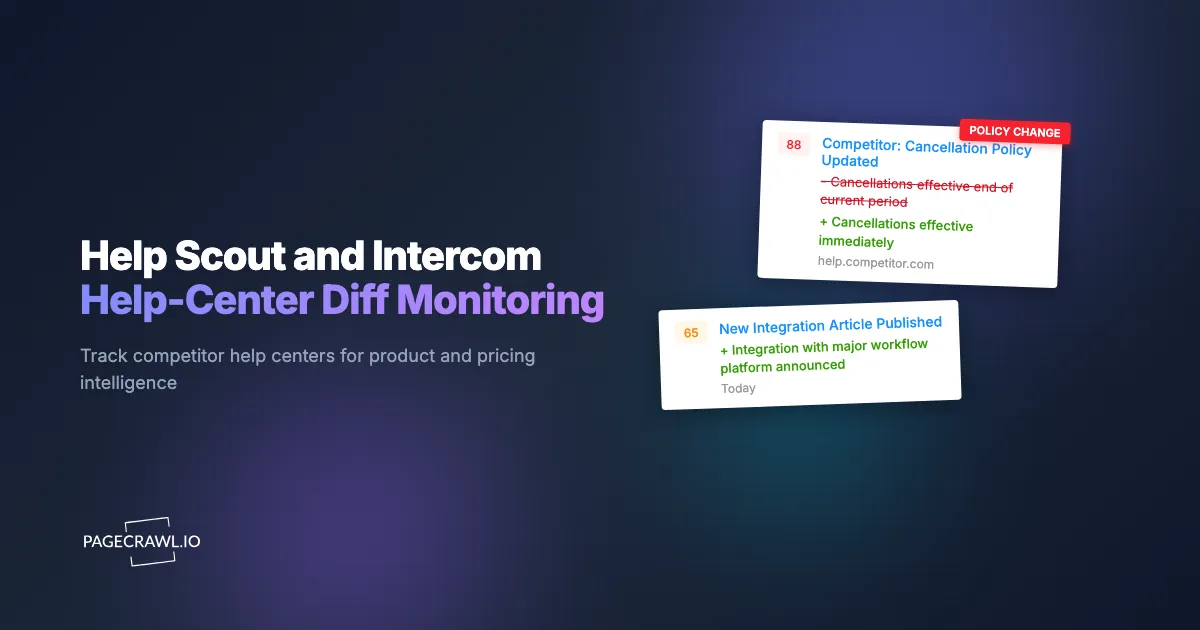
Refund policies, cancellation policies, subscription pause mechanics, and billing FAQ language all change in response to operational reality. A tightening cancellation policy often precedes a quarter of focus on retention. A loosening refund policy often precedes a quarter of focus on growth. Edits to these articles are unusually high-signal.
Removed Articles Signal Deprecations
When a feature gets deprecated or a product line gets quietly killed, the help center articles disappear before anyone announces it publicly. Monitoring catches the disappearance and lets your team interpret the strategic implication.
Integration Documentation Reveals Partnerships
New integration docs (Slack, HubSpot, Salesforce, custom webhooks) often appear weeks before the partnership announcement. The help center is the technical-writing surface that has to exist before the partnership is operational. Monitoring catches the new docs and lets your team brief sales or product on the upcoming partnership.
Article Revision Patterns Reveal Customer Friction
When a single article gets edited repeatedly, that is signal. The team is responding to a wave of customer questions or complaints. Reading the revisions tells you what is breaking, what is confusing, or what just shipped.
How do help center platforms structure public docs?
The four most common platforms, Help Scout, Intercom, Zendesk, and Notion, each publish public docs at a predictable URL pattern, with a category index, an article list per category, and individual article pages.
https://help.{competitor}.com/                           (custom domain, most platforms)
https://intercom.help/{competitor}/                       (Intercom default)
https://{competitor}.helpscoutdocs.com/                   (Help Scout default)
https://{competitor}.zendesk.com/hc/                      (Zendesk default)
https://{competitor}.notion.site/                         (Notion-based docs)
Each platform renders a category index, article list within each category, and individual article pages. The index page changes when articles are added, removed, or reorganized. Individual article pages change when content is edited. PageCrawl monitors the index for new-article and removed-article signals, and individual high-value articles for content edits.
For high-priority watching, monitor both the index and the specific articles in pricing, billing, refund, cancellation, and integration categories. Those are the highest-signal articles.
Comparing Approaches
| Approach | Cost | Latency | Coverage | Best For |
|---|---|---|---|---|
| Manual help center refresh | Free | Weeks | Per article | Casual research |
| Wayback Machine inspection | Free | Days to weeks | Historical only | Retrospective analysis |
| Klue, Crayon, Kompyte | $5K-$50K/year | Hours | Full CI stack | Enterprise CI programs |
| Custom scraping | Engineering time | Hours | Any URL | Technical teams |
| PageCrawl on help centers | Free tier to $80/year | 1-24 hours | Any help center | Active CI for any team size |
Enterprise CI platforms cover help centers among many other sources and price accordingly. For a focused watchlist of your top competitors' help centers, monitoring directly delivers the same signal at a small fraction of the cost.
Setting Up Help Center Monitoring

Step 1: Identify the help center URL for each competitor
For each competitor on your CI watchlist, find the public help center. It will typically be at help.brand.com or one of the platform default URLs above. If a competitor does not have a public help center, that itself is a useful data point.
Step 2: Add the help center index as a content monitor
Add the top-level index URL to PageCrawl. Choose content monitoring so the category structure and article list are tracked. New articles add entries to the index, which PageCrawl flags as changes.
Step 3: Add specific high-value article pages
Pricing FAQ, refund policy, cancellation policy, billing help, and integration setup articles deliver the highest signal. Add each as its own monitor for content-level diff tracking.
Step 4: Set daily check frequency
Help center updates are not minute-sensitive. Daily checks catch new articles and content edits within a day of publication. For active launch windows or known competitive moments, bump to every 6 hours.
Step 5: Tag and group by competitor
Create a "Competitive Intel" folder with subfolders per competitor. Each subfolder contains the help center index plus the 3-5 high-value article pages. The folder view rolls up all recent activity across the competitor set on one page, and labels, folders, and workspaces let you slice the same watchlist by team.
Step 6: Route alerts to the CI channel
For competitive intelligence, a #ci Slack channel or a weekly CI digest email is the standard pattern. Alerts include PageCrawl's AI summary describing what changed, so the team can triage quickly.
Worked Example: A 5-Competitor B2B CI Watchlist
A B2B SaaS product marketing lead wants continuous awareness of help center activity across five direct competitors. The setup:
- Identify each competitor's help center URL.
- Add the help center index for all five (5 monitors).
- Add the pricing, refund, and integration articles for each competitor (15 more monitors).
- Tag everything
ci-help-center. - Set daily checks and route to a weekly digest in the
#product-marketingSlack.
Six weeks in, the digest surfaces: one specific competitor has added 12 new articles in the integration category, all related to a CRM-adjacent partner ecosystem. The product marketing lead briefs leadership on the apparent ecosystem strategy, the partnerships team accelerates a competing partner program, and the eventual public launch by the competitor lands without surprising the team. Total cost: $80/year for Standard plan, vs $20K-$50K/year for an enterprise CI platform covering the same surface.
Patterns Worth Watching
New articles in pricing or billing categories. Often precede pricing changes or billing model shifts by 1-4 weeks. Highest-signal category for SaaS competitive intelligence.
Cancellation and refund policy edits. Telegraph retention strategy. Tightening signals retention focus, loosening signals growth focus.
New integration documentation. Signal upcoming partnerships, often before the partnership announcement. Watch the integration category specifically.
Bulk article additions in a single category. A new feature category appearing with 5-10 articles is a product line launch. Worth flagging.
Article removals. Deprecations and product killings. Less common but high-signal when they happen.
Article revision frequency. A single article being edited repeatedly indicates active customer friction. Worth reading.
Combining Help Center Alerts With Other Signals
Pair with changelog and release notes. Most companies publish a public changelog at changelog.brand.com or brand.com/changelog. Help center articles often precede changelog entries, so pair the docs watch with changelog and release notes monitoring. Cross-referencing both surfaces gives you the upstream signal.
Pair with pricing page monitoring. Pricing FAQ edits in the help center are often the leading indicator. The pricing page change is the lagging indicator. Both together is the complete picture.
Pair with G2 and Capterra review monitoring. Customer friction articles in the help center often correlate with negative reviews on the same topic. See the Trustpilot, G2, and Capterra review velocity alerts guide.
Pair with ad library monitoring. New help center articles for a feature often precede the campaign launching that feature. The Meta and TikTok ad library monitoring guide covers the campaign side.
Pair with LinkedIn jobs monitoring. Hiring patterns reveal product direction. A spike in job postings for a specific category often precedes feature launches that get documented in the help center.
Who benefits from help center monitoring?
Competitive intelligence and product marketing teams get the most obvious value, but sales enablement, customer success, product management, and partnerships all act on the same feed. The common thread is that each of them needs to know about a competitor or partner change before it reaches the marketing site.
Competitive intelligence. Help center updates often precede formal announcements by days or weeks. CI teams that integrate help center monitoring into their watchlist are running 1-2 weeks ahead of teams that rely only on official channels.
Product marketing. New feature documentation supports rapid positioning response. The team that sees a competitor ship a feature the day the help article goes live can have a positioning brief ready before the competitor's marketing site even reflects the launch.
Sales enablement. Competitor pricing and refund policy changes inform deal conversations. A sales rep who knows a competitor just tightened their refund policy has a fresh talking point that hasn't yet made it into any battlecard.
Customer success. Partner help center updates inform integration support. When your CS team sees a partner platform document a new integration mechanic, they can preemptively brief customers.
Product management. Reading competitor help centers is one of the cheapest product research methods available. The articles that get the most internal edits reveal the features customers actually use.
Partnerships. New integration docs telegraph partnership announcements. The partnerships team that monitors competitor and partner help centers gets early signal on ecosystem moves.
Frequently Asked Questions
Will alerts include the full diff of what changed? PageCrawl's AI summary describes the change in natural language and surfaces the modified text. For full diff inspection, click through to the source page.
How long do articles take to appear in the help center after a feature ships? Same day or one to two days, in most cases. The support team writes the article in parallel with the feature shipping because customer questions arrive immediately.
What if a competitor's help center is behind a login? You need credentials you are entitled to use, and then PageCrawl can sign in for you: see monitoring password-protected pages. For competitor watching, most companies keep the public-facing help center open anyway, including all the highest-signal categories.
Can I monitor specific categories only? Yes. Each category typically has its own URL within the help center. Add the category page as a monitor for category-specific alerts.
Will PageCrawl detect minor copy edits vs major rewrites? Yes. The AI summary distinguishes scale of change. A typo fix gets a short alert; a major rewrite gets a detailed summary.
Do I need a paid plan for help center monitoring? No. A typical 3-5 competitor watchlist with category indexes plus 2-3 high-value articles per competitor fits within Standard's 100-monitor limit easily. The free tier covers 3-5 indexes if budget is tight.
Choosing your PageCrawl plan
PageCrawl's Free plan lets you monitor 6 pages with 220 checks per month, which is enough to validate the approach on your most critical pages. Most teams graduate to a paid plan once they see the value.
| Plan | Price | Pages | Checks / month | Frequency |
|---|---|---|---|---|
| Free | $0 | 6 | 220 | every 60 min |
| Standard | $8/mo or $80/yr | 100 | 15,000 | every 15 min |
| Enterprise | $30/mo or $300/yr | 500 | 100,000 | every 5 min |
| Ultimate | $99/mo or $999/yr | 1,000 | 100,000 | every 2 min |
Annual billing saves two months across every paid tier. Enterprise and Ultimate scale up to 100x if you need thousands of pages or multi-team access.
One competitive signal caught early can swing a deal worth more than a decade of Enterprise. If you win one additional deal per year because you spotted a pricing change, a product launch, or a messaging shift before your competitors did, $300/year is a rounding error. Standard at $80/year handles 100 monitored pages, enough for a Tier 1 and Tier 2 competitor program. Enterprise adds 500 pages and SSO. All plans include the PageCrawl MCP Server for AI assistants like Claude and Cursor.
Getting Started
Add the help center indexes for your top 5 competitors plus high-value articles within each to PageCrawl on a daily check. Create a free account and the next article change will arrive in your CI channel the day it lands.