Last reviewed: August 20, 2026. Prices and plan details reflect each vendor's public pages at the time of review and can change, so confirm on the vendor's site before buying.
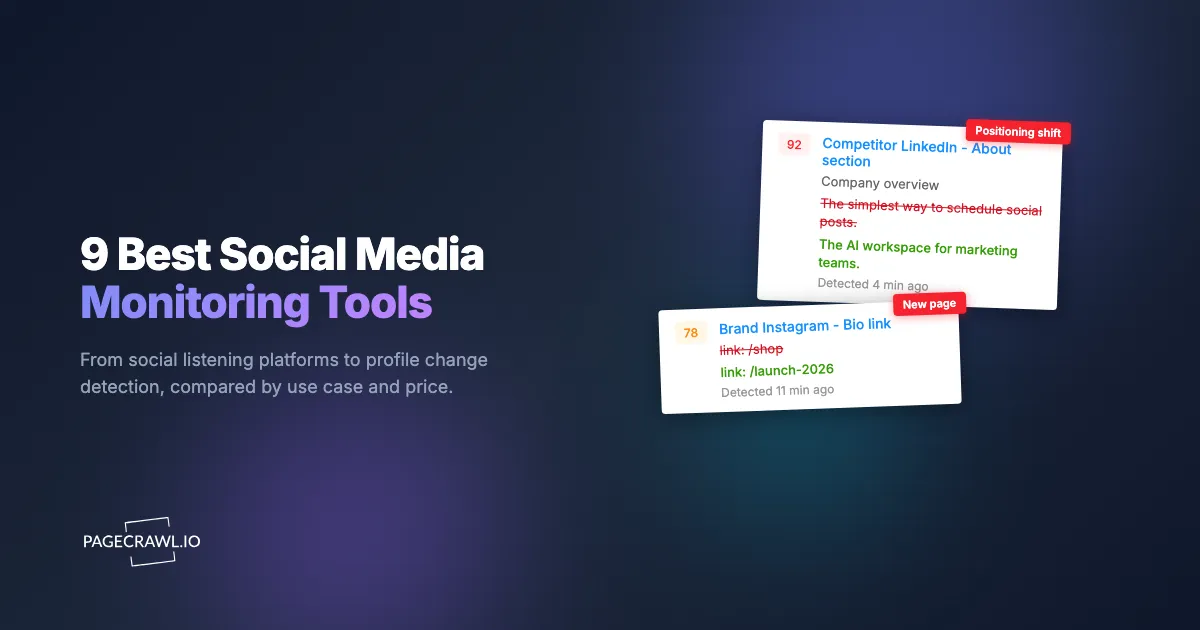
A competitor changes the link in their Instagram bio at 11pm. By morning it points to a brand-new product page that has not been announced anywhere else. Their pinned post now teases a launch date. Their LinkedIn "About" section, untouched for two years, has been quietly rewritten around a market they are clearly moving into. None of this shows up in a press release. None of it trips a news alert. It is all sitting in plain sight on public profiles, and almost nobody is watching.
That is the gap social media monitoring is supposed to close. The trouble is that "social media monitoring" actually describes two different jobs. One is social listening: catching every mention of your brand, your competitors, and your category across millions of posts, then scoring sentiment. The other is profile and page monitoring: detecting when a specific account, bio, pinned post, or policy page actually changes. Most teams buy a tool for the first job and never realize the second one exists.
This guide compares the 9 best social media monitoring tools of 2026, free and paid, organized by what you are actually trying to do (protect a brand, watch competitors, or catch a crisis early), and it covers the profile, link, and policy changes that pure listening tools routinely miss.
Top picks by job:
- PageCrawl: tracking what competitors and brands change on their profiles and policy pages, on a flexible budget.
- Brandwatch: large brands and agencies running serious consumer research and reputation programs.
- Sprout Social: publishing, engagement, and listening in a single tool.
- Brand24: credible listening for SMBs and agencies on a startup budget.
- Awario: Boolean listening for founders and lean teams at the lowest price.
What does a social media monitoring tool actually do?
A social media monitoring tool watches social platforms on your behalf and alerts you to activity that matters: mentions of your brand, posts from competitors, spikes in conversation, and shifts in sentiment. The strongest tools also track the profiles, bios, and pages themselves so you catch quiet edits, not just loud conversations.
Social listening: mentions, sentiment, and volume
Listening tools ingest a firehose of public posts and filter it down to what mentions your keywords. They tell you how often you are talked about, whether the tone is positive or negative, which posts are driving the conversation, and how that compares to rivals. This is the core of most platforms in this list and it is excellent for reputation and campaign tracking. For the broader reputation picture beyond social, our guide to online reputation monitoring covers review sites, search results, and news together.
Profile and page monitoring: the change nobody alerts on
Listening tools watch what people say about an account. They are far weaker at watching what the account itself does: a renamed page, a swapped bio link, a deleted post, a rewritten "About," or an updated community guidelines page. These are deliberate, high-signal moves, and because no third party "mentions" them, they slip past keyword-based listening entirely. Page-change monitoring closes that gap by checking the profile directly and alerting on the diff.
What should you look for in a social media monitoring tool?
Look for four things: the data sources and platforms it covers, the quality of its sentiment and AI analysis, how fast it alerts you, and whether the price scales with your needs. The right balance depends on whether you are protecting a brand, watching competitors, or bracing for crises.
Coverage and data sources
The first question is which platforms a tool can actually see. Access to X (Twitter), Instagram, TikTok, and LinkedIn varies wildly by vendor and price tier. Enterprise suites pay for historical data and broad coverage; cheaper tools cover the big networks well but thin out on TikTok, Reddit, forums, and newer networks like Bluesky, Mastodon, and Threads. Confirm coverage for the specific networks you care about before you commit.
Sentiment and AI analysis
Volume without meaning is noise. Good tools score sentiment, cluster topics, summarize spikes in plain language, and flag posts that need a human now. AI quality is the differentiator in 2026: the best platforms summarize "what changed and why it matters" instead of dumping a raw feed on you. Be skeptical of sentiment accuracy claims, though. Sarcasm, slang, and mixed-language posts still trip up every engine.
Alerting speed and channels
A crisis at 2am is only useful if it reaches you at 2am. Check how fast a tool detects and pushes alerts, and where those alerts land. Email-only alerting is a dealbreaker for crisis work. You want real-time pushes to Slack, Teams, Discord, Telegram, mobile, or a webhook into your own systems. See our walkthrough on Slack website change alerts for the pattern.
Price and scale
Social media monitoring spans an enormous price range, from free trackers to enterprise contracts north of $1,000 per month. Listening suites charge for data volume, seats, and history, while lightweight monitoring is cheap or free. Match the spend to the job: a founder watching three competitors does not need an enterprise listening contract, and a global brand managing crises cannot run on a free tool.
How did we review these tools?
We reviewed each tool against four criteria: the platforms and data sources it covers, the quality of its sentiment and AI analysis, how it delivers alerts and to which channels, and whether its price scales with your needs. Pricing and features come from each vendor's public pages, and every entry notes the team it fits best.
What are the 9 best social media monitoring tools in 2026?
We have grouped these by what they do best. The list runs from a flexible change-monitoring tool through affordable listening apps up to full enterprise intelligence suites, so there is a fit whether you have a $0 budget or a six-figure one.
1. PageCrawl
Type: Website and profile change monitoring Starting price: Free (6 monitors), $8/month (100 monitors), $30/month (500 monitors)
PageCrawl is not a social listening firehose. It is a change-detection platform that watches specific pages, including public social profiles, and alerts you as soon as a check detects a change. That makes it the strongest tool on this list for the job listening platforms ignore: catching a competitor's quiet bio edit, a new pinned post, a renamed page, a swapped link, or an updated policy.
Monitoring features:
- Tracks public profile pages directly: Instagram business profiles, Facebook competitor pages, LinkedIn company pages, X (Twitter) profiles, and YouTube competitor channels
- AI summaries that describe what changed ("bio link now points to /launch-2026") instead of raw diffs
- Visual and text monitoring, with screenshot history at every check
- Full alert stack: Slack, Discord, Telegram, Teams, email, and webhooks
- Notification conditions and filters so you only get pinged on the changes you defined as important
Strengths: Works on any public page, not a fixed list of supported networks, so it covers smaller platforms and forums other tools skip. Catches deliberate profile and policy changes that keyword listening cannot see, and the free tier is genuinely usable for competitor watching.
Limitations: It is not a sentiment or mention-volume tool. If you need to measure how often your brand is discussed across millions of posts, pair PageCrawl with a listening suite below.
Best for: Teams who want to track exactly what competitors and brands do on their profiles and policy pages, on a flexible budget.
2. Brandwatch
Type: Enterprise social listening and consumer intelligence Starting price: Custom (enterprise)
Brandwatch is one of the most established enterprise listening platforms, with deep historical data, image recognition, and rich audience analytics. It is built for large brands and agencies that analyze conversation at massive scale and slice it by demographics, influencers, and topics.
Strengths: Huge historical archive, powerful query builder, strong demographic and image analysis, polished dashboards.
Limitations: Enterprise pricing and a learning curve that is overkill for small teams. Like all listening tools, it tells you what people say about an account, not when the account itself is edited.
Best for: Large brands and agencies running serious consumer research and reputation programs.
3. Sprout Social
Type: Social management with listening Starting price: From around $199 per seat per month
Sprout Social blends publishing, engagement, and listening in one famously clean suite. Its listening add-on surfaces trends, sentiment, and share of voice, while the core product handles scheduling and inbox management.
Strengths: Excellent UX, strong reporting, unified inbox plus listening, good team workflows.
Limitations: Per-seat pricing climbs fast, and the most useful listening features sit in higher tiers or paid add-ons.
Best for: Marketing teams that want publishing, engagement, and listening in a single tool and will pay for polish.
4. Hootsuite
Type: Social management with monitoring streams Starting price: From around $99 per month
Hootsuite is the long-running dashboard for scheduling posts and monitoring streams across networks. Its monitoring is built around keyword and account streams rather than deep AI listening, which keeps it approachable.
Strengths: Mature, multi-network publishing, customizable monitoring streams, big app ecosystem.
Limitations: Listening and analytics are lighter than dedicated suites, and advanced sentiment is a paid upgrade.
Best for: Teams that primarily need to schedule and lightly monitor across several accounts from one dashboard.
5. Mention
Type: Real-time mention and media monitoring Starting price: From around $41 per month
Mention is a mid-market favorite for real-time web and social monitoring. It tracks brand and keyword mentions across social and the wider web, with sentiment and competitive comparison built in, fast alerting, and quick setup.
Strengths: Affordable entry point, real-time alerts, decent competitor comparison, web plus social coverage.
Limitations: Historical depth and analytics trail the enterprise suites, and volume limits on lower tiers fill up fast for busy brands.
Best for: Small and mid-size teams that want real-time mentions without an enterprise contract.
6. Brand24
Type: Affordable social listening and reputation tracking Starting price: From around $149 per month
Brand24 punches above its price with sentiment analysis, an "influence score" for sources, and a clean discussion volume chart across social, news, blogs, and forums. It is a popular pick for SMBs and agencies who want real listening without enterprise overhead.
Strengths: Strong value, easy setup, AI-driven insights and anomaly detection, good source breakdown.
Limitations: Coverage and history are thinner than the top-tier suites, and very high-volume brands can hit limits.
Best for: SMBs and agencies that want credible listening on a startup budget.
7. Talkwalker
Type: Enterprise listening with visual and AI analytics Starting price: Custom (enterprise)
Talkwalker is an enterprise suite known for image and video recognition, broad channel coverage, and AI-driven analytics. It detects logos in images, tracks visual brand exposure, and offers crisis detection for large organizations.
Strengths: Image and video recognition, wide coverage, strong crisis and trend detection, enterprise-grade reporting.
Limitations: Enterprise pricing and complexity. Most small teams will never use a fraction of it.
Best for: Global brands that need visual listening and structured crisis monitoring at scale.
8. Meltwater
Type: Media intelligence and PR monitoring Starting price: Custom (enterprise)
Meltwater bridges social listening and traditional PR and media monitoring. It tracks social conversation alongside news, broadcast, and print, which makes it a fit for communications teams that report on earned media as well as social. That combined view of press coverage and social is its main selling point.
Strengths: Broad media plus social coverage, strong PR workflows, influencer and journalist databases.
Limitations: Enterprise pricing, and the breadth can feel diffuse if you only need social.
Best for: Comms and PR teams that monitor earned media and social conversation together.
9. Awario
Type: Affordable social and web listening Starting price: From around $29 per month
Awario is a budget-friendly listening tool built on a Boolean search engine that gives you precise control over what you track. It covers social, news, blogs, and forums, scores sentiment, and surfaces sales "leads" where people ask for recommendations in your category.
Strengths: Low price, flexible Boolean queries, sales-lead detection, solid coverage for the cost.
Limitations: Smaller data archive and lighter analytics than premium suites; dashboards are functional rather than fancy.
Best for: Founders and lean teams who want real Boolean listening at the lowest price.
How do the tools compare?
Here is an honest side-by-side. "Profile change tracking" means catching edits to the account itself (bio, links, pinned posts, policy pages), which is where most listening tools fall short.
| Tool | Type | Profile change tracking | Sentiment / AI | Starting price | Free tier |
|---|---|---|---|---|---|
| PageCrawl | Page change monitoring | Yes | AI summaries | Free | 6 monitors |
| Brandwatch | Enterprise listening | No | Advanced | Enterprise | No |
| Sprout Social | Management + listening | No | Yes | ~$199/seat | Trial |
| Hootsuite | Management + streams | Limited | Add-on | ~$99/mo | Trial |
| Mention | Real-time mentions | No | Yes | ~$41/mo | Trial |
| Brand24 | Affordable listening | No | Yes | ~$149/mo | Trial |
| Talkwalker | Enterprise + visual AI | No | Advanced | Enterprise | No |
| Meltwater | Media + PR | No | Yes | Enterprise | No |
| Awario | Budget listening | No | Yes | ~$29/mo | Trial |
Which tool fits which use case?
The right tool depends on the job. For brand reputation, you want broad listening and sentiment. For competitor intelligence, you want profile and page change tracking. For crisis work, you want speed and reliable real-time alerting. Most mature teams run one listening tool plus one change monitor.
Brand monitoring
If your goal is to know what people say about you and how the tone shifts, lead with a listening suite: Brand24 or Awario at the affordable end, Brandwatch, Talkwalker, or Meltwater at enterprise scale. Layer in brand and reputation change monitoring on your own profiles and policy pages so you also catch when your account or a fake impersonator account changes.
Competitor monitoring
For competitive intelligence, profile change tracking beats mention volume. You want to find out fast when a rival swaps a bio link, pins a launch teaser, renames a page, or rewrites their positioning. PageCrawl is built for exactly this, and our guide to tracking competitor websites shows how to extend it beyond social into their pricing, blog, and product pages.
Crisis monitoring
For crisis detection, speed and alert reliability win. Enterprise suites like Talkwalker and Brandwatch offer dedicated crisis features and anomaly detection. Whatever you choose, route alerts to a real-time channel (Slack, Teams, mobile, webhook), never email-only, and set thresholds so a spike in negative volume escalates as soon as it is detected instead of sitting in a daily digest.
What do listening tools miss that page monitoring catches?
Listening tools miss anything that does not generate a mention. A competitor can rewrite their LinkedIn "About," swap their Instagram bio link to an unannounced product page, delete an embarrassing post, change their pricing page, or quietly update their community guidelines, and a keyword-based listener sees none of it because nobody posted about it.
These silent edits are often the highest-signal moves a company makes. A new bio link is a launch you can prepare for. A rewritten "About" is a strategic pivot. A deleted post is a story worth saving, and because every check stores a timestamped snapshot, the evidence survives even after the original is gone. Page-change monitoring checks the profile itself on a schedule, compares each version, and alerts on the diff, so the quiet moves are the ones you catch first.
How do you monitor social profiles and pages with PageCrawl?
You can set up profile change monitoring in a few minutes, and the free tier (6 monitors, 220 checks per month) is enough to track a handful of competitor accounts before you pay anything.

Step 1: Collect the URLs. Gather the public profile URLs you want to watch: competitor Instagram, Facebook, LinkedIn, X, and YouTube pages, plus their pricing and terms, privacy, and policy pages. Public profiles work without any login.
Step 2: Create a monitor for each. Paste a URL into PageCrawl and create a monitor. For text-heavy pages like a LinkedIn "About" or community guidelines, use content tracking. For visually busy profiles, add a screenshot so you can see exactly what changed at each check.
Step 3: Narrow what you track. Use AI focus or element selection that tracks several parts of a page independently to target the bits that matter (the bio, the pinned post, the link, the headline) so you are not alerted on every like count ticking up. This is the single biggest factor in keeping alerts clean.
Step 4: Set a sensible frequency. For competitor profiles, hourly is plenty on the free tier. For crisis-sensitive pages, paid plans check as often as every 5 or 2 minutes.
Step 5: Route the alerts. Send changes to Slack, Teams, Discord, Telegram, email, or a webhook. Put competitor changes in a shared channel so the whole team sees a launch teaser as soon as a check catches it.
Step 6: Review the history. Every check stores a screenshot and diff, so when a competitor deletes a post or quietly reverts a price, you still have the receipt. The same approach extends to any public page that shapes how customers see you.
Choosing your PageCrawl plan
PageCrawl's Free plan lets you monitor 6 pages with 220 checks per month, which is enough to track your top competitors' profiles and validate the approach before you spend anything. Most teams upgrade once they see how often those profiles quietly change.
| Plan | Price | Pages | Checks / month | Frequency |
|---|---|---|---|---|
| Free | $0 | 6 | 220 | every 60 min |
| Standard | $8/mo or $80/yr | 100 | 15,000 | every 15 min |
| Enterprise | $30/mo or $300/yr | 500 | 100,000 | every 5 min |
| Ultimate | $99/mo or $999/yr | 1,000 | 100,000 | every 2 min |
Annual billing saves two months across every paid tier. Enterprise and Ultimate scale up to 100x if you need thousands of pages or multi-team access.
Standard at $80/year covers 100 pages at 15-minute checks, enough to track every social profile, pricing page, and policy page across a dozen competitors. Enterprise at $300/year extends that to 500 pages at 5-minute intervals, the right tier for an agency watching many client and competitor accounts at once.
Getting Started
Pick your three closest competitors. Add their main social profile and their pricing page as monitors, target the bio, pinned post, and headline, and route changes to Slack. Run it for two weeks and watch how much moves that no listening tool would have flagged.
The conversation about your brand lives in social listening tools. The decisions your competitors make live on their profiles, and almost nobody is watching those. Start watching today, on the free tier, and never get surprised by a launch you could have seen coming.