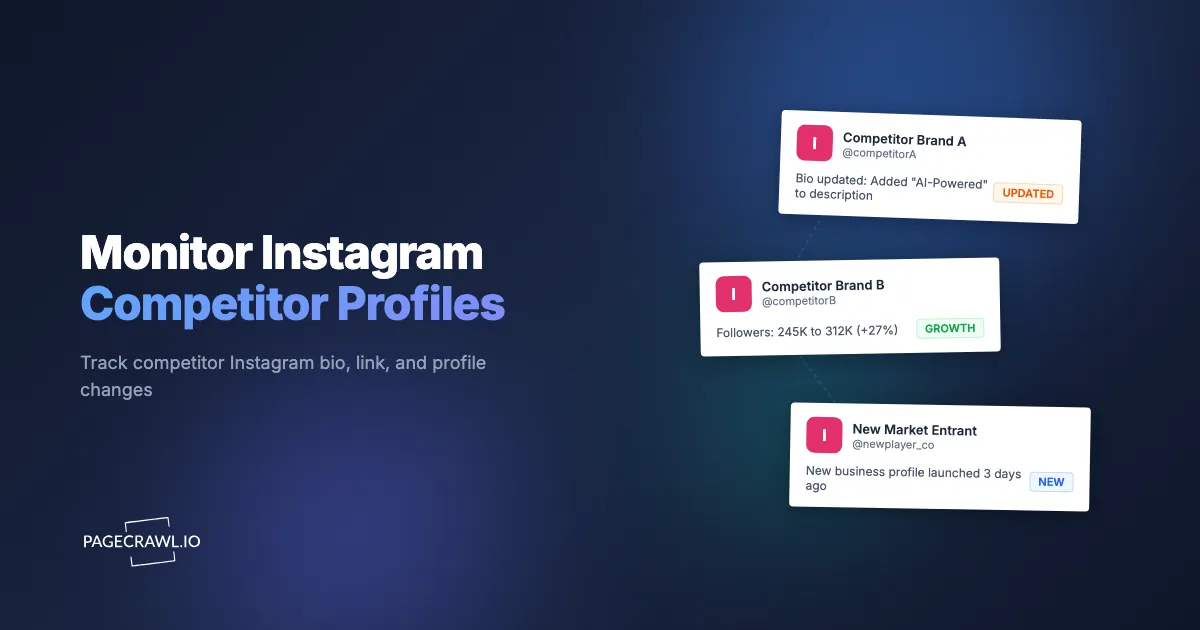
Your main competitor quietly changes their Instagram bio from "Premium handmade candles" to "Sustainable home fragrance for the modern home." They update their link-in-bio to a new product launch page. Their follower count jumps 15,000 in a week, suggesting a successful campaign or paid promotion. You find out three weeks later during a routine competitive review, long after the strategic shift became visible to everyone but you.
Instagram is where brands communicate positioning in real time. Bio text signals brand strategy. Link updates reveal new products, campaigns, and partnerships. Follower growth and content patterns indicate market traction. For businesses in competitive markets, these signals matter, but manually checking competitor profiles is tedious and easy to neglect.
Automated monitoring changes this by re-checking competitor Instagram profiles on a schedule and alerting you when a check finds a difference. Instead of periodic manual reviews that miss most changes, you get an alert on the next check after a competitor makes a move.
This guide covers what to monitor on Instagram competitor profiles, the challenges of monitoring Instagram, how to set up automated tracking with PageCrawl, and how to turn Instagram changes into actionable competitive intelligence.
Why should you monitor Instagram competitors?
Because a profile edit is usually the first public trace of a strategy change. Instagram is not just a social platform. For many businesses, it is the primary public-facing representation of their brand, so bio rewrites, link swaps, and shifts in posting cadence tend to arrive before the website, the ads, and the press release.
Positioning and Messaging Shifts
A competitor's Instagram bio is a compressed version of their brand positioning. When the bio changes, it often reflects a strategic shift. A skincare brand changing from "Clean beauty for sensitive skin" to "Dermatologist-recommended skincare" signals a move toward clinical credibility. A SaaS company adding "AI-powered" to their bio reflects a trend response.
These positioning changes do not happen in isolation. They typically coincide with website updates, ad campaign changes, and product launches. Catching the Instagram bio change early gives you a signal before the full strategic shift becomes obvious.
Link-in-Bio Updates
The link in an Instagram bio is valuable real estate. Brands update it to promote new products, seasonal campaigns, partnership landing pages, and lead generation funnels. Monitoring link changes reveals:
- New product launches (link changes to a product page)
- Campaign launches (link changes to a promotional landing page)
- Partnership announcements (link points to a co-branded page)
- Tool or platform changes (link switches from Linktree to a custom page, or vice versa)
Many brands use link-in-bio tools such as Linktree that aggregate multiple links. Even the change from one link tool to another signals a strategic decision worth noting.
Follower Growth as a Market Signal
Sudden follower growth on a competitor's profile usually indicates one of several things: a successful campaign, paid promotion, influencer partnership, viral content, or media coverage. Each of these is a competitive intelligence signal.
Gradual, steady growth indicates effective organic strategy. Spikes indicate specific events or investments. Declines might signal audience dissatisfaction or platform algorithm changes affecting the competitor.
While exact follower counts fluctuate (Instagram periodically removes fake accounts), the trend over time is meaningful.
Content Strategy Patterns
How often a competitor posts, what type of content they share (Reels vs. carousels vs. single images), and what topics they cover reveal their content strategy. Changes in posting frequency or content mix often precede broader marketing strategy changes.
A competitor that suddenly starts posting three Reels per week after months of primarily static images is responding to a strategic decision. A brand that stops posting for two weeks might be going through internal changes.
What should you monitor on an Instagram profile?
Six public elements carry almost all the signal: the bio text, the profile link, the display name and handle, the Story Highlight covers, the follower count, and the verification badge. Everything else on a business profile is either private or too noisy to be useful.
Bio Text
The biography section, which Instagram caps at 150 characters, is the most important element to monitor. It contains the brand's self-description, often including:
- Brand positioning statement
- Key product or service description
- Tagline or slogan
- Hashtags (which reveal campaign participation)
- Contact information or calls to action
Any change to the bio text is worth reviewing. Even small word changes can signal meaningful strategic shifts.
Profile Link
The URL in the profile (visible on the public profile page) changes when brands shift campaigns, launch products, or update their marketing funnel. Track this link to catch promotional changes.
Profile Name and Username
Less common but significant when it happens. A brand changing its display name or handle usually indicates a rebrand, acquisition, or major strategic shift. These changes are rare but consequential.
Highlight Covers and Names
Instagram Story Highlights appear as circles below the bio. Brands use these to organize key content: "Products," "Reviews," "About Us," "Sale." Changes to highlight names or the addition/removal of highlights signal changes to what the brand wants visitors to see first.
Follower Count
While exact follower counts are just one metric, tracking the displayed count over time reveals growth trends, campaign impact, and competitive positioning. A competitor crossing milestones (10K, 50K, 100K) often coincides with strategic changes.
Verified Status
The addition or removal of Instagram's verification badge (blue checkmark) is a significant event. Gaining verification signals growing credibility. Losing it (which happens occasionally) is notable.
What makes Instagram hard to monitor?
Four things: the profile content is rendered by JavaScript rather than served as HTML, Instagram pushes anonymous visitors toward a login wall, the web interface is redesigned often enough to break rigid selectors, and mobile and desktop show different layouts. Understanding these constraints helps you choose the right social media monitoring tools.
JavaScript-Rendered Content
Instagram is a single-page application. The content you see in your browser is rendered by JavaScript after the initial page load. Simple HTTP requests that fetch the HTML source get very little useful information. Monitoring tools need to render the page fully (executing JavaScript) to see the actual profile content.
PageCrawl handles this automatically. It renders pages completely before extracting content, so you see the same information a human visitor would see.
Login Walls and Rate Limiting
Instagram requires login to view most profile content. Instagram aggressively pushes visitors to log in. After viewing a few profiles or scrolling a bit, you often encounter a login prompt that blocks further viewing. Public profiles are viewable without logging in, but Instagram limits how much anonymous users can see.
PageCrawl can monitor the publicly visible metadata on business profiles (profile name, bio text, profile picture, and follower count shown in search results or embedded widgets), but detailed post content, stories, and full follower lists require authentication that automated monitoring cannot reliably maintain. This means monitoring is limited to publicly visible information rather than the full profile experience you see when logged in.
Frequent Layout Changes
Instagram updates its web interface frequently. CSS selectors that work today may not work next month. Monitoring tools that rely on rigid selectors break when Instagram redesigns elements.
PageCrawl's approach of analyzing full page content rather than depending solely on fixed selectors provides more resilience against layout changes. However, because of Instagram's login requirements, the amount of content visible to automated monitoring is limited compared to what a logged-in user sees.
Mobile vs Desktop Differences
Instagram's mobile app and desktop website show different layouts and sometimes different information. Web-based monitoring sees the desktop version. Most profile information (bio, link, follower count) appears on both, but some elements may display differently.
Setting Up Instagram Monitoring with PageCrawl
Here is how to configure effective Instagram competitor monitoring.

Monitoring Public Business Profiles
Step 1: Navigate to the competitor's Instagram profile in your browser. The URL format is https://www.instagram.com/username/. Make sure this is a public profile (you can see the bio and posts without logging in).
Step 2: Copy the profile URL.
Step 3: Add the URL to PageCrawl. Use "Full Page" tracking mode to capture all visible profile content, including bio text, follower count, and link information.
Step 4: Review the initial capture. PageCrawl shows you the content it detected on the page. Verify that the bio text, follower count, and other key information are captured.
Step 5: Set check frequency. For competitive intelligence, checking every 12-24 hours is appropriate. Instagram profiles do not change as frequently as e-commerce pages, so daily checks provide good coverage without over-monitoring.
Step 6: Configure notifications. Email works well for Instagram monitoring since changes are not typically time-sensitive. You want to know within a day, not within minutes. For more active competitive monitoring programs, Slack notifications keep your marketing team informed.
Monitoring Specific Elements
If you want to focus on particular profile elements rather than the entire page:
Bio text only: Monitor for changes in the profile description. This filters out noise from other page elements changing and focuses your alerts on the most meaningful changes.
Follower count: Track the displayed follower count to monitor growth trends. This creates a time series of competitor follower growth visible in your PageCrawl dashboard, and the number tracker with charts and statistics turns those readings into a trend line rather than a stream of one-off alerts.
Link monitoring: Focus specifically on the profile URL to catch campaign and product launch signals.
Setting Up a Competitor Dashboard
For systematic competitive intelligence monitoring, monitor multiple competitors in an organized structure:
- Create a folder in PageCrawl called "Instagram Competitors" or organize by market segment, using labels, folders, and workspaces to keep each competitor set separate
- Add each competitor's Instagram profile as a monitor
- Set consistent check frequencies across all competitors
- Configure a single notification channel (e.g., a dedicated Slack channel) for all Instagram changes
This gives you a centralized view of all competitor Instagram activity. When any competitor makes a profile change, you see it in one place alongside changes from other competitors for easy comparison. PageCrawl's AI importance scoring helps prioritize these alerts by ranking changes based on significance. A bio text rewrite or link swap scores higher than a minor follower count fluctuation, so the most strategically relevant updates surface first in your dashboard and notifications rather than getting buried under routine noise.
For a broader competitive monitoring strategy that includes Instagram alongside other channels, see our guide to tracking competitor websites.
Combining Instagram with Other Social Monitoring
Instagram monitoring is most valuable when combined with tracking across other platforms. Competitors communicate through multiple channels, and cross-referencing changes reveals the full picture.
LinkedIn Company Pages
LinkedIn page monitoring reveals professional positioning changes, hiring patterns, and company milestone announcements. When a competitor updates both their Instagram bio and LinkedIn headline in the same week, you are seeing a coordinated rebrand.
Facebook Business Pages
Facebook pages contain different information than Instagram profiles: reviews, events, service listings, and about page details. Monitoring both Instagram and Facebook for the same competitor catches changes that appear on one platform but not the other.
Twitter/X Profiles
Twitter profile changes (bio, pinned tweet, header image) complement Instagram monitoring. Some brands update Twitter first, others update Instagram first. Monitoring both catches the earliest signal.
Website Changes
The most comprehensive competitive intelligence approach monitors competitor websites alongside all social profiles. Website changes (pricing, messaging, product pages) often correlate with social profile updates. Seeing both gives you the complete picture.
Turning Instagram Changes into Actionable Intelligence
Monitoring is only useful if you act on what you learn. Here is how to turn Instagram change alerts into business decisions.
Bio Changes: Messaging Analysis
When a competitor changes their bio, analyze what shifted:
- Added keywords: What terms did they add? This often reflects SEO or audience targeting changes.
- Removed keywords: What did they stop emphasizing? This may indicate a pivot away from certain markets.
- Tone shifts: Did the bio become more professional, more casual, more technical? Tone reflects target audience changes.
- Added credentials: "Award-winning," "Featured in," or other social proof additions suggest a credibility push.
Document bio changes over time. A series of small bio updates often adds up to a significant strategic shift that is not obvious from any single change.
Link Changes: Campaign Tracking
When a competitor's Instagram link changes:
- Visit the new link to understand what they are promoting
- Note the timing (seasonal campaign? product launch? partnership?)
- Compare with their ad activity if visible
- Check if the link change coincided with content changes
Link changes are among the most actionable signals because they directly reveal what a competitor is currently prioritizing for conversions.
Follower Milestones: Market Position Assessment
Track competitor follower counts alongside your own to understand relative market positioning:
- Competitors growing faster may have found an effective strategy worth studying
- Sudden growth spikes warrant investigation (what campaign or event caused it?)
- Growth across all competitors suggests market expansion
- Your growth outpacing competitors validates your strategy
Responding to Competitor Moves
Not every Instagram change requires a response. But some changes warrant action:
- Competitor repositions toward your niche: Review your own positioning to ensure differentiation
- Competitor launches a new campaign: Assess whether it targets your audience
- Competitor's follower growth accelerates: Study their recent content and tactics
- Competitor adds new product lines: Evaluate whether you should address the same market need
The goal is informed decision-making, not reactive copying. Understanding what competitors do helps you make better strategic choices.
Monitoring Instagram Business Directory Pages
Beyond individual profiles, Instagram has business directory and category pages that list businesses in specific industries or locations. Monitoring these pages reveals:
- New competitors entering your market on Instagram
- Changes in how Instagram categorizes businesses in your industry
- Trending businesses gaining visibility
This is a broader signal that complements individual profile monitoring.
Use Cases by Industry
Different industries benefit from Instagram competitor monitoring in different ways.
E-Commerce and Retail
For online stores and retail brands, Instagram competitor monitoring reveals:
- Product launch timing and messaging
- Seasonal campaign strategies
- Influencer partnership announcements (visible in bio or tagged content)
- Pricing signals embedded in promotional language
Combine Instagram monitoring with competitor price tracking for a complete competitive picture.
Restaurants and Food Service
Restaurant Instagram profiles announce menu changes, special events, new locations, and seasonal offerings. Monitoring competitor restaurants reveals market trends before they show up in formal business data.
Professional Services
Law firms, consulting companies, and agencies use Instagram to showcase culture, highlight wins, and attract talent. Profile changes signal practice area shifts, new service offerings, and growth.
Personal Brands and Influencers
For influencers and personal brands operating in competitive niches, monitoring peer profiles reveals content strategy shifts, brand partnership changes, and audience growth tactics.
Is monitoring competitor Instagram profiles ethical?
Yes, when you stick to public business profiles and reasonable check frequencies. Automated monitoring of a public profile sees exactly what any visitor sees, just consistently rather than occasionally. Private profiles are off limits because the content is not publicly accessible.
Public Information Only
Web monitoring only accesses publicly available information. Public business profiles on Instagram are designed to be viewed by anyone. Monitoring public profiles is no different from visiting them manually, just automated and consistent.
Private profiles cannot be monitored because the content is not publicly accessible. PageCrawl only accesses public pages.
Frequency and Intent
Monitoring competitor profiles for business intelligence is a standard practice in competitive analysis. The intent is to understand market positioning and make informed business decisions, not to harass or stalk individuals.
Set reasonable check frequencies. Checking a competitor's Instagram profile once or twice daily is appropriate for business monitoring. There is no need for minute-by-minute monitoring of social profiles.
Platform Terms of Service
Be aware that social platforms have terms of service regarding automated access. Using monitoring tools that render public pages is a common practice, but staying informed about platform policies is prudent.
Monitoring Beyond the Profile Page
Instagram monitoring can extend beyond just the profile page:
Hashtag Pages
Monitor Instagram hashtag pages relevant to your industry. New posts using your branded hashtag or industry hashtags indicate market activity. This is useful for online reputation monitoring and brand awareness tracking.
Location Pages
For local businesses, monitoring Instagram location pages shows what people are posting about locations relevant to your business (your locations, competitor locations, event venues).
Tagged Content
While monitoring tagged posts requires profile access, the public tagged tab on business profiles shows content that others have created featuring the brand. Changes in tagged content volume indicate brand activity and customer engagement.
SEO and Instagram Monitoring
Instagram monitoring connects to broader SEO strategy in several ways:
- Instagram profile changes often precede website SEO changes
- Bio keywords indicate what terms a brand is targeting
- Link changes reveal landing page strategy
- Instagram presence and engagement influence brand search volume
Monitoring competitor Instagram profiles alongside SEO and meta tag change monitoring on their website provides early indicators of marketing strategy shifts.
Choosing your PageCrawl plan
PageCrawl's Free plan lets you monitor 6 pages with 220 checks per month, which is enough to validate the approach on your most critical pages. Most teams graduate to a paid plan once they see the value.
| Plan | Price | Pages | Checks / month | Frequency |
|---|---|---|---|---|
| Free | $0 | 6 | 220 | every 60 min |
| Standard | $8/mo or $80/yr | 100 | 15,000 | every 15 min |
| Enterprise | $30/mo or $300/yr | 500 | 100,000 | every 5 min |
| Ultimate | $99/mo or $999/yr | 1,000 | 100,000 | every 2 min |
Annual billing saves two months across every paid tier. Enterprise and Ultimate scale up to 100x if you need thousands of pages or multi-team access.
Catching a competitor's bio rewrite or link change the same day it happens is worth multiples of the $80/year Standard cost, particularly when it signals a product launch or campaign before it becomes obvious elsewhere. With 100 monitors you can track every direct competitor's Instagram profile alongside their Facebook page and website for a complete picture. Enterprise at $300/year suits agencies or brands running intelligence programs across large competitor sets, with 500 pages, 5-minute checks, and SSO support.
All plans include the PageCrawl MCP Server, so you can ask "which competitors changed their bio or link this week?" and get a consolidated summary drawn from your monitoring history. AI assistants can create monitors through conversation on every plan, including Free.
Getting Started
Begin by identifying 3-5 direct competitors whose Instagram presence you want to track. Visit their profiles to confirm they are public business profiles with visible bio, follower count, and link information.
Add each profile URL to PageCrawl using "Full Page" tracking mode. Set check frequency to every 24 hours and configure email or Slack notifications. Run monitoring for two weeks to establish baselines for each competitor's profile.
After two weeks, review what you have learned. Some competitors will have made changes (even small bio tweaks or link updates), and you will see how the alerts look and feel. Adjust check frequency if needed. Add more competitors or expand to monitoring LinkedIn and website changes alongside Instagram.
PageCrawl's free tier (6 monitors) covers a focused competitive set. If you are monitoring Instagram, LinkedIn, Facebook, and website changes for multiple competitors, the Standard plan ($80/year, 100 monitors) provides enough capacity. The Enterprise plan ($300/year, 500 monitors) supports comprehensive competitive intelligence programs across many competitors and platforms.
Competitors are constantly evolving their Instagram presence. The only question is whether you see those changes when they happen or weeks later during a manual review. Automated monitoring ensures you are always current.