In August 2023, a clause in Zoom's Terms of Service granting the company rights to use customer content for training AI models surfaced publicly and drew immediate backlash. The language had been added in an earlier routine TOS update that most customers accepted without reading. Zoom eventually rewrote the clause, but by then it had been in effect for months.
This is not an isolated incident. SaaS vendors update their terms of service, privacy policies, and data processing agreements regularly. Most of these updates are minor: formatting changes, clarification of existing terms, or legal language adjustments. But some contain material changes that affect how your data is used, what the vendor's liability is, how disputes are resolved, or what happens to your data if the service shuts down.
A mid-sized business typically runs dozens of SaaS applications, and large organizations run well over a hundred. Each one has a terms of service page, a privacy policy, and potentially a data processing agreement, acceptable use policy, and service level agreement. That is hundreds of policy documents that can change at any time, usually with nothing more than an email notification that most people delete without reading. This guide covers which vendor policy pages to monitor, how to set up automated terms of service and privacy policy change tracking, and how to build a review workflow that catches concerning changes before they take effect.
Why do TOS changes matter if nobody reads them?
Because acceptance is passive. Most agreements state that continued use after an update means you accept the new terms, so a clause your legal team never saw can still bind you. The risks cluster in five areas: automatic acceptance, data usage expansions, liability shifts, service level degradation, and dispute resolution.
Automatic Acceptance
Most SaaS terms of service include a clause stating that continued use of the service after a TOS update constitutes acceptance of the new terms. Some vendors provide a 30-day notice period. Others make changes effective immediately upon posting. Either way, if your team continues using the software (which they will, because they did not read the TOS update email), you have accepted the new terms.
This mechanism means you are bound by terms your legal team never reviewed. A vendor could add an indemnification clause, modify their liability cap, change the governing jurisdiction, or grant themselves new data usage rights, and your acceptance happens passively.
Data Usage Expansions
The most consequential TOS changes in recent years have involved data usage. Vendors expanding how they use customer data is a recurring pattern:
- AI training clauses. Multiple SaaS vendors have added language permitting the use of customer data to train machine learning models. Some are explicit about this, others use broader language like "to improve our services" that encompasses AI training without saying so directly.
- Aggregated data sharing. Vendors adding rights to share "anonymized" or "aggregated" data with third parties. Anonymization techniques vary in effectiveness, and "aggregated" data can sometimes be de-anonymized.
- Expanded analytics. New terms allowing vendors to analyze customer usage patterns, content, and metadata for purposes beyond direct service delivery.
- Third-party data sharing. Changes to subprocessor lists, partnership agreements, or data-sharing provisions that expand who has access to your data.
Liability and Indemnification Changes
Vendors sometimes modify the sections that define their responsibility when things go wrong:
- Reduced liability caps. Lowering the maximum amount the vendor is liable for in the event of a breach, outage, or data loss
- Expanded indemnification. Broadening the circumstances under which you (the customer) must indemnify the vendor
- Limitation of remedies. Restricting what recourse you have in the event of service failures
- Force majeure expansions. Broadening the definition of events that excuse the vendor from their obligations
Service Level Degradation
SLA changes are often separate from the main TOS but equally important:
- Reduced uptime guarantees. Moving from 99.99% to 99.9% uptime commitment
- Changed credit calculation. Modifying how service credits are calculated for outages
- Narrowed scope. Excluding certain features or services from uptime guarantees
- Response time changes. Modifying support response time commitments
Dispute Resolution Changes
How disagreements are resolved matters:
- Mandatory arbitration. Adding clauses that prevent you from filing lawsuits and require binding arbitration
- Class action waivers. Preventing customers from joining class action suits
- Jurisdiction changes. Moving the governing law to a jurisdiction more favorable to the vendor
- Shortened claim periods. Reducing the time window in which you can raise disputes
Which vendor policy pages should you monitor?
Six documents per vendor, in priority order: terms of service, privacy policy, data processing agreement, acceptable use policy, service level agreement, and subprocessor list. Most vendors publish at least the first two, and the remaining four matter most for vendors that touch personal or regulated data.
Terms of Service / Terms of Use
The primary legal agreement governing your use of the service. This is the most important document to monitor because it defines the overall relationship between you and the vendor. TOS pages are typically found at URLs like:
/terms/legal/terms-of-service/tos
Privacy Policy
Governs how the vendor collects, uses, stores, and shares personal data. Privacy policy changes are particularly important for organizations subject to GDPR, the California Consumer Privacy Act, HIPAA, or other data protection regulations. Common URLs:
/privacy/legal/privacy-policy/privacy-policy
Data Processing Agreement (DPA)
For vendors processing personal data on your behalf, the DPA defines the vendor's obligations as a data processor. DPA changes can affect your own compliance with data protection regulations. DPAs are often published as PDFs or on dedicated legal pages:
/legal/dpa/privacy/data-processing
Note: PageCrawl can monitor PDF documents, so even if the DPA is published as a PDF file, you can track changes to it.
Acceptable Use Policy (AUP)
Defines what you are and are not allowed to do with the service. AUP changes can restrict previously permitted uses or add new obligations. Common locations:
/legal/acceptable-use/aup
Service Level Agreement (SLA)
Defines uptime commitments, support response times, and remedies for service failures. SLA pages are often part of the vendor's documentation or legal section:
/legal/sla/docs/sla
Subprocessor List
GDPR-compliant vendors publish a list of subprocessors (third parties that process your data). Changes to this list, such as adding a new cloud provider in a different jurisdiction, can affect your data protection compliance. For detailed subprocessor monitoring, see our guide on monitoring privacy policies and terms of service.
/legal/subprocessors/privacy/subprocessors
Setting Up Vendor TOS Monitoring with PageCrawl
Monitoring TOS pages is straightforward because these are typically static content pages that change infrequently but meaningfully. The help centre walkthrough on monitoring terms of service and privacy policy pages for compliance covers the recommended settings end to end.

Choosing the Right Tracking Mode
Content-only mode works best for most policy documents. Legal pages are text-heavy with minimal dynamic content. Content-only mode strips out navigation, footers, and other non-content elements, focusing on the actual policy text. This reduces false alerts from layout or design changes that do not affect the legal content.
Reader mode is an alternative that further simplifies the page to its readable content. This works well for policy pages that have sidebars, CTAs, or marketing elements alongside the legal text.
Full page mode captures everything on the page, including formatting. Use this when you want to know about any change to the policy page, including how information is organized and presented. Presentation changes can be significant: a vendor moving a controversial clause to a less prominent position is worth knowing about.
For PDF-based policy documents, PageCrawl monitors the PDF file directly and detects text changes within the document.
Setting Up a Single Vendor
For each SaaS vendor, the setup process takes about two minutes:
Step 1: Identify all policy URLs. Visit the vendor's website and locate their legal section. Find the URLs for their TOS, privacy policy, DPA, AUP, and SLA. Not every vendor publishes all of these, but most have at least TOS and a privacy policy.
Step 2: Create monitors for each policy page. Add each URL to PageCrawl. Select content-only mode for text-focused tracking. This typically means 2 to 5 monitors per vendor.
Step 3: Set check frequency. TOS changes do not happen hourly. Daily checks are sufficient for most vendors. Weekly checks work for low-risk vendors. For your most critical SaaS providers (those handling sensitive data or supporting core business operations), daily monitoring ensures you detect changes within 24 hours.
Step 4: Configure notifications. Route TOS change alerts to your legal team, compliance team, or IT governance team. Email works well for this use case because TOS changes are not time-sensitive the way stock alerts or competitive pricing changes are. You need to know within a day, not within seconds.
Monitoring at Scale: 20 to 50+ Vendors
Enterprise organizations using dozens of SaaS applications need a systematic third-party risk management approach.
Step 1: Build your vendor inventory. List every SaaS application your organization uses. Most companies have more than they realize. Check with IT, procurement, and departmental managers. Software asset management tools can help identify the full list.
Step 2: Prioritize vendors into tiers.
Tier 1 (Critical, daily monitoring): Vendors that handle sensitive data, support core business processes, or have large financial commitments. Examples: CRM, email platform, cloud infrastructure, HR system, financial software, communication tools.
Tier 2 (Important, twice-weekly monitoring): Vendors that handle some business data or support significant workflows but are not business-critical. Examples: project management tools, analytics platforms, marketing automation, design tools.
Tier 3 (Standard, weekly monitoring): Vendors with limited data access or supporting non-critical functions. Examples: utility tools, productivity apps, niche departmental software.
Step 3: Create monitors systematically. For Tier 1 vendors, monitor TOS, privacy policy, DPA, and SLA (4 monitors per vendor). For Tier 2, monitor TOS and privacy policy (2 monitors per vendor). For Tier 3, monitor TOS only (1 monitor per vendor). PageCrawl's templates make this process fast even at scale. Create a template with the ideal settings for TOS monitoring (content-only mode, daily check frequency, legal team notification routing) and apply it every time you add a new vendor's policy page. Instead of configuring each monitor's settings individually, you select the template and just provide the URL. When you need to adjust settings across all TOS monitors later (changing notification channels or check frequency), update the template and the changes propagate to all monitors based on it.
A typical scale:
- 10 Tier 1 vendors x 4 monitors = 40 monitors
- 15 Tier 2 vendors x 2 monitors = 30 monitors
- 25 Tier 3 vendors x 1 monitor = 25 monitors
- Total: 95 monitors
This fits within PageCrawl's Standard plan (100 monitors at $80/year). For larger vendor portfolios, the Enterprise plan supports 500 monitors at $300/year.
Step 4: Organize with tags and folders. Tag monitors by vendor tier and vendor name. Create folders by policy type (TOS, Privacy, DPA, SLA) or by vendor category (Infrastructure, Productivity, Marketing, Finance). See organizing monitored pages with labels, folders, and workspaces for how the hierarchy works at this scale.
Building a TOS Review Workflow
Detecting a change is the first step. What happens next determines whether monitoring translates to risk management. For organizations that need broader compliance tracking beyond vendor policies, our compliance monitoring software guide covers additional tools and strategies.
Step 1: Automated Detection and Triage
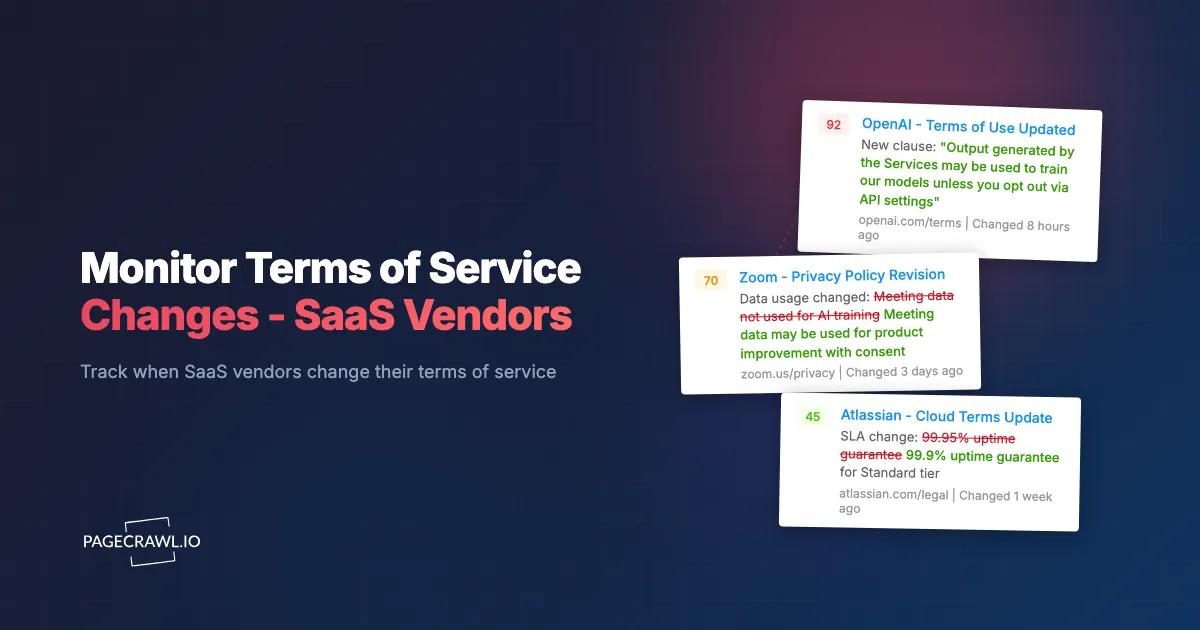
When PageCrawl detects a change, the AI summary provides an initial assessment of what changed. A summary might read: "Updated Section 7.3 regarding data usage rights. Added language permitting the use of customer content for product improvement and machine learning model training." That up-front context lets the receiving team assess severity before opening the full document.
Step 2: Severity Classification
Classify each detected change:
Material changes (requires legal review):
- Any modification to data usage rights, liability, indemnification, or dispute resolution
- New restrictions on customer rights
- Changes to data handling, storage location, or subprocessor lists
- Modified SLA commitments or credit calculations
Minor changes (requires acknowledgment but not review):
- Formatting or reorganization without substantive content changes
- Clarification of existing terms without expanding scope
- Updated contact information or entity names
- Typographical corrections
Informational (no action required):
- Date stamp updates without content changes
- Style or design changes to the policy page
- Addition of section headers or navigation without new content
Step 3: Legal Review for Material Changes
When a material change is detected, route it to your legal team or outside counsel for review; this article is informational and not legal advice. Include:
- The PageCrawl change summary and diff (showing exactly what was added, removed, or modified)
- The vendor name and which policy document changed
- Your current contract terms with the vendor
- The vendor tier (critical, important, or standard) for prioritization
Step 4: Response Decision
After legal review, your organization has several options:
- Accept the change. Most changes, even material ones, may be acceptable or unavoidable for a vendor you depend on. Document the decision and any implications.
- Negotiate. For enterprise contracts, material TOS changes may be negotiable. Contact the vendor's account team to discuss the change and request modifications.
- Opt out or switch vendors. For changes that create unacceptable risk (data sovereignty violations, excessive liability shifts), begin evaluating alternative vendors. Having monitoring in place means you detect the change early enough to make a thoughtful transition rather than a rushed one.
- Document and escalate. For regulated industries, material TOS changes may need to be reported to compliance or risk management committees. See our regulatory compliance monitoring guide for more on compliance workflows.
How do AI summaries speed up TOS triage?
They turn a raw diff into one or two plain-language sentences describing what actually changed, so a reviewer can decide in seconds whether a change is material or cosmetic. That matters most for TOS monitoring, because legal documents are dense, long, and full of subtle edits.
How AI Summaries Help
When a 15,000-word TOS changes, manually comparing versions is tedious and error-prone. PageCrawl's AI summary describes the substance of the change in plain language:
- "Added a new subsection under Data Rights permitting the vendor to use customer data for training artificial intelligence models, subject to an opt-out mechanism"
- "Removed the 99.99% uptime commitment from Section 5 and replaced it with a 99.9% commitment"
- "Changed the governing jurisdiction from Delaware to California"
- "Added a mandatory arbitration clause requiring all disputes to be resolved through binding arbitration in San Francisco"
These summaries let your team grasp the significance of a change without reading the full legal document. Obvious non-issues can be filed away at a glance. Concerning changes can be escalated the same day.
Combining AI Summaries with Full Diffs
For changes flagged as potentially material, review the full text diff alongside the AI summary. The diff shows exactly which words were added, removed, or changed. The AI summary explains what those changes mean in practical terms. Together, they provide both precision (the exact language) and context (the practical implications).
Combining TOS Monitoring with Subprocessor Tracking
For organizations subject to GDPR and EU data residency requirements, CCPA, or other data protection regulations, TOS changes are only part of the picture. Subprocessor list changes can also affect your compliance posture.
Why Subprocessor Changes Matter
When your SaaS vendor adds a new subprocessor, your data may now flow to an organization you did not evaluate. The new subprocessor might be in a different jurisdiction, have different security practices, or process data for purposes you did not consent to.
GDPR, as interpreted in guidance from the European Data Protection Board, requires that data controllers be informed of changes to data processors' subprocessor lists. Many DPAs include a mechanism for this notification, but relying on vendor emails alone creates risk: emails get filtered, missed, or delayed.
Monitoring Subprocessor Pages
Most GDPR-compliant vendors publish their subprocessor list on a dedicated web page. Monitor this page alongside the TOS and privacy policy. When a new subprocessor appears, your data protection team can:
- Review the subprocessor's security practices and certifications
- Verify the subprocessor's jurisdiction is acceptable under your data protection framework
- Assess whether the subprocessor's role raises any concerns
- Exercise objection rights within the contractual timeframe if needed
For a comprehensive approach to subprocessor monitoring, see our privacy policy and TOS monitoring guide.
Real Examples of Concerning TOS Changes
Understanding what has happened in the past helps you know what to watch for and which keywords to set alerts on.
AI Training Data Clauses
Multiple vendors added AI training clauses between 2023 and 2025. Some were explicit ("we use your content to train AI models"), while others used broad language ("to improve our services and develop new features"). Organizations that detected these changes early could negotiate opt-outs, switch vendors, or limit the data shared with affected platforms.
Data Sharing Expansions
A project management tool added language permitting sharing of "usage analytics and aggregated insights" with business partners. The change was framed as anonymized data sharing, but the breadth of "usage analytics" was vague enough to concern organizations handling sensitive project data.
Liability Cap Reductions
A cloud storage vendor reduced their liability cap from 12 months of fees to 3 months of fees. For organizations storing critical data, this change significantly reduced the vendor's financial accountability in the event of data loss or a vendor data breach.
Jurisdiction Changes
An HR software vendor changed their governing law from the UK to Delaware. For European customers, this change had implications for data protection and contract enforcement under different legal systems.
Service Level Downgrades
A communication platform changed their SLA from guaranteeing specific response times for critical issues to "commercially reasonable efforts." The practical difference is significant: a guaranteed 1-hour response time for critical issues is enforceable, while "commercially reasonable efforts" is subjective and difficult to hold a vendor to.
Automating TOS Change Tracking with Webhooks
For organizations with vendor management systems, compliance platforms, or custom tracking tools, webhook integration automates the entire workflow.
When PageCrawl detects a TOS change, the webhook delivers structured data including:
- Which vendor and which policy document changed
- The AI summary of the change
- A link to the full diff
- A timestamp of detection
This data can be automatically ingested into:
- Vendor management platforms: Create a vendor review task automatically
- Compliance tracking systems: Log the change and trigger the review workflow
- Ticketing systems: Create a ticket assigned to the legal or compliance team
- Spreadsheets or databases: Maintain a historical log of all TOS changes across all vendors
Website Archiving for Legal Records
TOS monitoring generates records that may have legal significance. Website archiving preserves the exact content of each policy version as it appeared when detected, and for contractual disputes PageCrawl can capture web archives that hold up as evidence, each one sealed with an independent timestamp.
This archive serves as:
- Evidence of change timing. Demonstrates when a change was published and when your organization became aware of it
- Version history. Maintains a complete record of every version of every vendor's TOS, even if the vendor does not publish their own version history
- Dispute documentation. In the event of a contractual disagreement, archived versions show exactly what terms were in effect at any point in time
- Audit support. For regulated industries, demonstrates that your organization has a systematic process for tracking vendor terms
Choosing your PageCrawl plan
PageCrawl's Free plan lets you monitor 6 pages with 220 checks per month, which is enough to validate the approach on your most critical pages. Most teams graduate to a paid plan once they see the value.
| Plan | Price | Pages | Checks / month | Frequency |
|---|---|---|---|---|
| Free | $0 | 6 | 220 | every 60 min |
| Standard | $8/mo or $80/yr | 100 | 15,000 | every 15 min |
| Enterprise | $30/mo or $300/yr | 500 | 100,000 | every 5 min |
| Ultimate | $99/mo or $999/yr | 1,000 | 100,000 | every 2 min |
Annual billing saves two months across every paid tier. Enterprise and Ultimate scale up to 100x if you need thousands of pages or multi-team access.
Vendor policy monitoring is one of the cheapest forms of risk management available. Missing a data usage clause that an auditor later flags costs far more in remediation time than a year of monitoring. Standard at $80/year covers 100 policy pages, which is enough for a full TOS, privacy policy, DPA, and SLA watch across roughly 25 vendors. Enterprise at $300/year supports 500 pages for organizations with larger vendor portfolios and higher frequency checks.
All plans include the PageCrawl MCP Server, so your compliance team can ask Claude or Cursor to summarize every TOS change detected across all vendors in the last quarter and pull the exact diffs, turning your monitoring history into a queryable audit trail. AI assistants can create monitors through conversation on every plan, including Free.
Getting Started
You do not need to monitor every vendor on day one. Start with your most critical SaaS providers and expand systematically.
Week 1: Identify your top 5 SaaS vendors by data sensitivity and business criticality. Find their TOS and privacy policy URLs. Create 10 monitors (2 per vendor) with daily check frequency. Route notifications to your legal or compliance team via email.
Week 2: Add your next 10 vendors. Expand to include DPAs and SLAs for your Tier 1 vendors. You are now at roughly 30 monitors.
Week 3 and beyond: Work through the rest of your vendor list at whatever pace is comfortable. Tag and organize monitors as you go.
PageCrawl's free tier with 6 monitors covers your 3 most critical vendors (TOS and privacy policy for each). The Standard plan at $80/year supports 100 monitors, handling a full enterprise vendor monitoring program for most organizations. The Enterprise plan at $300/year with 500 monitors covers organizations with extensive vendor portfolios and the need to monitor all policy document types across every vendor.
The goal is not to read every TOS change yourself. The goal is to have a system that watches for you and surfaces the changes that matter, so your team can focus on assessment and response rather than detection. Set up monitoring once, and you will never be surprised by a vendor policy change again.
Create a free PageCrawl account and start tracking your SaaS vendors' terms of service today.