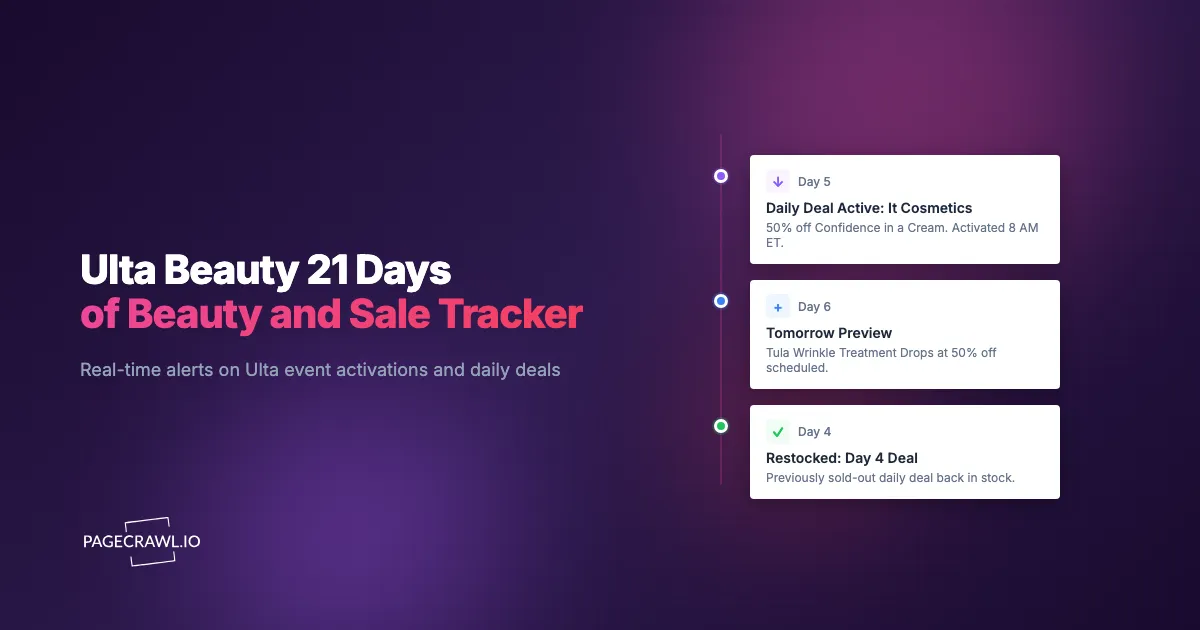
A recent 21 Days of Beauty day at Ulta featured the IT Cosmetics Bye Bye Under Eye concealer at 50% off, alongside a Tarte mascara and a Pureology shampoo. The deals activated at 12:01am Central. The popular shades of the concealer were gone before most shoppers had breakfast, and the rest followed during the morning. Shoppers who had set up monitoring on the daily deal preview page (which usually previews tomorrow's deal the evening before) had been queued up at midnight with the right shade in their cart. Shoppers who saw the day's featured tile in the morning newsletter found three of the four shades already sold out.
Ulta's tentpole events (21 Days of Beauty in spring and fall, Gorgeous Hair Event in summer, Love Your Skin Event in January) feature rotating 24-hour 50% off deals on individual SKUs. The featured deals sell out fast because the prices are genuinely market-low and Ulta's footprint pulls heavy traffic. The pattern is predictable enough that monitoring pays off reliably each cycle: preview pages appear the evening before, deals activate at midnight Central, and the most popular shades or sizes sell out within hours.
This guide covers how Ulta publishes event and deal data, what patterns make the difference between catching the deal and missing it, and how to set up monitors that surface every deal activation and restock within minutes.
Why are Ulta event pages worth monitoring?
Because the headline 50% off deals rotate every 24 hours, activate at midnight Central, and sell through in the popular shades and sizes long before the morning marketing email lands. The event hub also previews the next day's lineup the evening before, which is the cheapest lead time available to a shopper.
Daily 50% Off Deals Sell Out Within Hours
The headline daily deals on 21 Days of Beauty, Gorgeous Hair Event, and Love Your Skin Event are the most popular and the first to sell out. Most days feature one or two "lust-after" SKUs (cult products at 50% off) plus several supporting deals. The cult products often sell out the same day, sometimes within a few hours.
Sneak Peek Previews Often Go Live The Night Before
Ulta frequently previews the next day's lineup on the event hub page the evening before, often around 9-11pm Central. Catching the preview lets you queue the product page in advance and check out as soon as the deal activates at midnight Central.
Restocks Happen On Sold-Out Daily Deals
Ulta sometimes restocks daily deals that sold out, either later the same day or in a small overnight batch. Monitoring the product page catches the restock on the next check after it lands.
Multi-Day Brand Spotlight Activations Add A Second Layer
Beyond the rotating 24-hour deals, events typically include multi-day brand spotlight promotions (e.g., 30% off all Tarte during a 3-day window). These activations land on brand pages and category tiles separately from the daily deal lineup.
How are Ulta event pages structured?
Ulta splits event data across four page types: the master sale hub, the event hub that carries the daily deal lineup and previews, brand pages that host multi-day spotlights, and product detail pages that carry per-shade availability. Each has a stable, monitorable URL:
https://www.ulta.com/sale                                 (master sale hub)
https://www.ulta.com/beauty-event                         (event hub)
https://www.ulta.com/brand/{brand-slug}                   (brand pages)
https://www.ulta.com/p/{product-slug}                     (product detail)
The event hub renders the daily deal lineup, the multi-day spotlights, and any active promo codes. The master sale hub renders ongoing sales and seasonal markdowns. Brand pages render brand-specific promotions and product catalogs. Product detail pages render per-shade availability with an Add to Bag button.
For event-window monitoring, the event hub plus 5-10 specific product pages on your shopping list plus 1-2 brand pages for spotlight watching is the standard setup.
How do Ulta deal tracking approaches compare?
Ulta's own email is free but arrives after the midnight activation, community threads on Reddit and Discord are unpredictable, and manual refreshing only works if you are awake. Monitoring the event hub and your shortlist of product pages is the approach that scales past a single deal.
| Approach | Cost | Latency | Coverage | Best For |
|---|---|---|---|---|
| Ulta native email | Free | Hours | Subscribed members | Light users |
| Manual refresh at midnight | Free | Within session | One page | Active deal shoppers |
| Beauty community on Reddit/Discord | Free | Hours | Crowd-sourced | Community shoppers |
| Browser extensions | Free / Paid | Variable | Limited | Tech-comfortable shoppers |
| PageCrawl on event pages and products | Free tier to $80/year | 15 minutes to hours | Any URL | Active beauty shoppers |
Ulta's marketing email is good, but the daily deal email arrives in the morning, by which time some shades on cult SKUs are already gone. Beauty subreddits and Discord channels surface most deals but with variable latency. Direct monitoring of the event hub plus product pages, with price drop alerts on the exact SKUs you want, is the fastest and most reliable approach for active event shoppers.
Setting Up Ulta Event Monitoring
Step 1: Add the event hub page
https://www.ulta.com/beauty-eventAdd as a content monitor. The hub updates with daily previews and activations.
Step 2: Add the master sale hub
https://www.ulta.com/saleAdd as a sibling monitor. Catches sale activations outside the event window.
Step 3: Add product detail pages for previewed deals
When daily deals are previewed (typically the evening before), add the product detail pages for the items you want. This is the lowest-latency path to deal activation alerts.
Step 4: Set hourly checks during event windows
During 21 Days of Beauty and other tentpole events, hourly checks catch activations within an hour. For the deal-of-the-day pages you have set up specifically, every 15 minutes (Standard plan) catches activations and restocks in time.
Step 5: Use web push for the fastest delivery
Beauty deals are mobile and time-sensitive. Web push notifications reach your phone as soon as a check detects the activation, which supports same-minute add-to-cart. For users who want both, route email plus web push.
Step 6: Tag and group into a folder
Create a "Ulta Events" folder containing event hub, master sale, and the rotating set of daily-deal product pages, using labels, folders, and workspaces. The folder view is the morning ritual during event windows.
Worked Example: 21 Days Of Beauty Setup
A Diamond Ulta member with a Q3 21 Days of Beauty shopping list of 8 specific items builds the watchlist a week before the event. The setup:

- Add the event hub and master sale pages (2 monitors, hourly checks during the event).
- As each daily preview lands the evening before, add the product detail page for any item on the list (rotating set of 1-3 monitors at a time).
- Tag everything
21-days. - Route alerts to web push for the fastest mobile delivery.
The IT Cosmetics concealer deal previews at 10pm Central one evening. The product detail page alert fires at 10:04pm. The member adds the concealer in their target shade to the cart, sets a phone alarm for 11:59pm, and checks out as soon as the deal activates. The shade arrives. Across the event, the member catches 6 of 8 items they wanted. Total cost: free, because the rolling watchlist fits inside the 6-monitor free tier.
Patterns Worth Watching
Daily deal activations. The headline event signal. Activates at 12:01am Central. Monitoring catches the activation within the check window.
Daily deal previews. Often appear on the event hub the evening before the deal activates. Catching the preview lets you queue product pages in advance.
Restocks of sold-out daily deals. Ulta sometimes restocks sold-out daily deals later in the day or overnight. Monitoring the product detail page catches the restock.
Multi-day spotlight activations. Brand-spotlight promotions activate on brand pages. Monitoring brand pages during the event catches these.
Promo code applicability. Sometimes a daily deal stacks with a sitewide promo code; sometimes it doesn't. The applicability text on the product page or hub page reveals which.
Surprise restocks of cult products. Outside event windows, cult products restock on opaque schedules. Monitoring the product detail page with stock availability and restock alerts catches the restock.
Combining Ulta Alerts With Other Beauty Signals
Pair with Sephora monitoring. Sephora's Beauty Insider Sale and Ulta's events have overlapping but distinct calendars. The Sephora sale and restock alerts guide covers Sephora's parallel setup.
Pair with brand DTC sites. Some brands (IT Cosmetics, Tarte) sell direct and sometimes run concurrent or competing promos. Monitoring the DTC site alongside Ulta provides cross-channel comparison.
Pair with help center and policy monitoring. Ulta's Ultimate Rewards program rules and pricing policies change periodically. The help center diff monitoring guide covers policy monitoring approaches.
Pair with the Ulta Rewards bazaar. Rewards redemption catalog changes periodically. Worth monitoring if you actively redeem points.
Who uses Ulta sale monitoring?
Beauty enthusiasts working a 21 Days shopping list, salon owners and pros buying professional lines at half price, resellers watching cult SKUs, content creators who want to cover the daily deal first, and gift shoppers stacking deals across the event window.
Beauty enthusiasts. 21 Days of Beauty is one of the highest-value beauty sales of the year. Catching the cult deals in your shades makes the difference between full-priced and 50%-off purchases on items you would have bought anyway.
Salons and pros. Bulk-purchase planning during professional brand events. 50% off on professional supplies during 21 Days adds up to hundreds of dollars in savings on routine inventory.
Resellers. Limited daily deals on cult products sometimes hold resale value, especially on shades or sizes that run out across multiple retailers.
Beauty content creators. Real-time deal tracking supports timely affiliate and review content. The creator who covers the daily deal at 12:05am earns the affiliate click before the audience even sees the morning email.
Gift shoppers. 21 Days deals are gift-set fodder. Monitoring lets gift shoppers stack daily deals into a curated holiday or birthday gift over the event window.
Cross-retailer comparison. Pair Ulta monitoring with Sephora, Nordstrom Beauty, and Amazon to catch the rare moments when the same product is cheaper at a different retailer.
Frequently Asked Questions
How accurate are daily deal previews? Ulta's previews on the event hub are reliable in practice. Last-minute changes happen occasionally, so treat the preview as a strong signal rather than a guarantee.
Can I monitor for specific shades or sizes? Yes, as long as the product detail page renders the per-shade or per-size selector with stock status. Most Ulta product pages do.
Does Ulta's mobile app have the same data as the website? The app and website share the same backend inventory. Monitoring ulta.com pages captures the same stock events.
Will alerts work for in-store inventory or store pickup? PageCrawl monitors web pages. For per-store inventory, you would need a store-specific product URL if Ulta exposes one, or you would use the store pickup interface manually.
What about Ulta's Diamond and Platinum exclusive offers? Some tier-specific offers appear only when logged in. PageCrawl monitors the public version. For logged-in monitoring, session capture is required.
Do I need a paid plan for Ulta monitoring? No. A focused event-window watchlist fits within the 6-monitor free tier. Active multi-event shoppers move to Standard at $80/year for 100 monitors and 15-minute checks.
Choosing your PageCrawl plan
PageCrawl's Free plan lets you monitor 6 pages with 220 checks per month, which is enough to validate the approach on your most critical pages. Most teams graduate to a paid plan once they see the value.
| Plan | Price | Pages | Checks / month | Frequency |
|---|---|---|---|---|
| Free | $0 | 6 | 220 | every 60 min |
| Standard | $8/mo or $80/yr | 100 | 15,000 | every 15 min |
| Enterprise | $30/mo or $300/yr | 500 | 100,000 | every 5 min |
| Ultimate | $99/mo or $999/yr | 1,000 | 100,000 | every 2 min |
Annual billing saves two months across every paid tier. Enterprise and Ultimate scale up to 100x if you need thousands of pages or multi-team access.
The math is straightforward. Standard at $80/year covers 100 product pages. If monitoring catches one $20 price drop, one mispriced competitor SKU, or one restock you would otherwise miss each month, the plan has paid for itself roughly four times over in the first year.
Getting Started
Add the Ulta event hub plus your target product pages to PageCrawl on an hourly check during events. Create a free account and the next daily deal activation reaches your channel on the first check after it goes live.