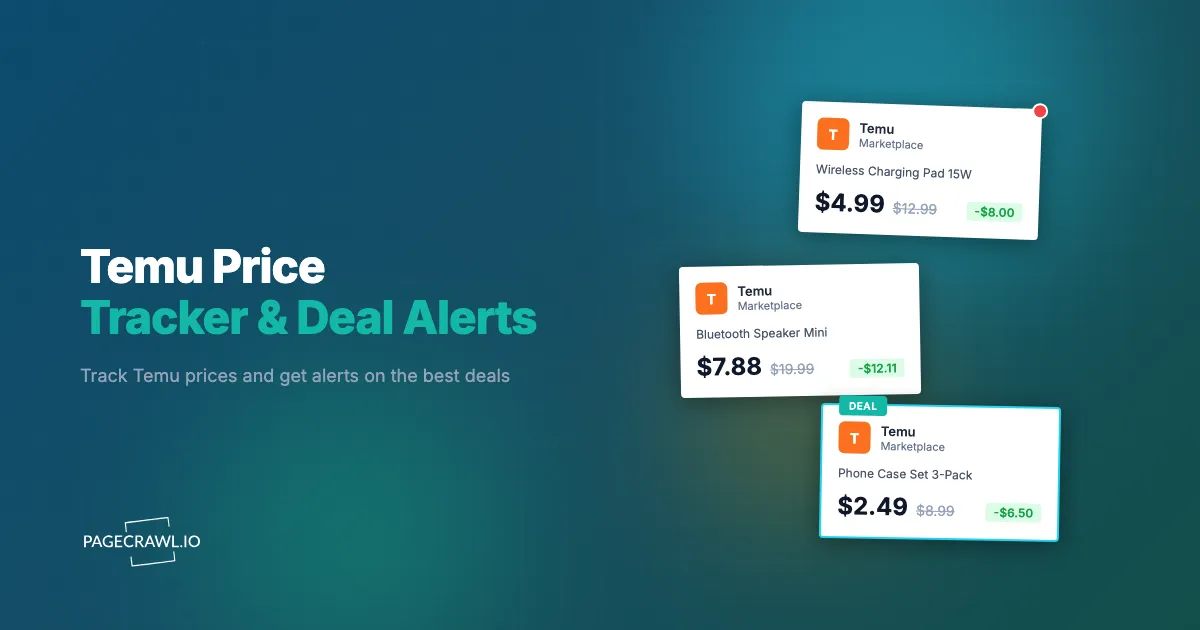
Temu prices shift constantly. A product priced at $14.99 in the morning might show $8.49 by afternoon during a flash sale, then return to $12.99 by evening with a different coupon applied. The platform runs overlapping promotions, rotating coupons, limited-time offers, and new-user discounts that make it nearly impossible to know whether you are getting the best deal at any given moment.
This matters whether you are a consumer looking for the lowest price, a seller tracking competitor sourcing costs on Temu, or a reseller monitoring wholesale pricing trends. Without automated tracking, you are relying on luck and manual checking to catch the best prices.
This guide covers how Temu pricing works, every method available for tracking Temu prices in 2026, and step-by-step instructions for setting up automated price drop alerts.
How does Temu pricing work?
Temu prices move through six overlapping mechanisms: dynamic repricing, stacked coupons, short flash sales, new-user-only discounts, app-versus-web differences, and inflated crossed-out "original" prices. Understanding which one is moving a number tells you whether a deal is genuine.
Dynamic Pricing and Constant Fluctuation
Temu uses dynamic pricing that adjusts based on demand, inventory levels, promotional campaigns, and user behavior. A single product can see multiple price changes in a single day. Unlike Amazon's gradual algorithmic adjustments, Temu's price changes are often dramatic, with large swings tied to promotional cycles.
Coupon Stacking
Temu runs multiple coupon programs simultaneously. You might see a site-wide percentage discount, a category-specific coupon, a shipping discount, and a bundle deal all available for the same item. The displayed "sale" price often reflects some but not all available coupons. The actual lowest price requires stacking multiple discounts, which makes the real price harder to track from the product page alone.
Flash Sales and Lightning Deals
Temu features time-limited flash sales throughout the day. These sales run on short timers (often 2-8 hours) and offer deeper discounts than the standard sale price. Flash sale inventory is limited, and products rotate in and out of flash sales unpredictably. Missing a flash sale by a few hours can mean paying substantially more for the same item.
New User Discounts
Temu offers aggressive discounts for new accounts, including welcome coupons, first-purchase bundles, and reduced pricing that only appears for accounts that have not yet placed an order. These prices are not available to returning customers, which means the price you see may differ from what a new user sees on the same product page.
App vs Web Pricing
Temu sometimes displays different prices on their mobile app versus the desktop website. App-exclusive deals and app-only coupons create price discrepancies between platforms. The web version is the most consistent for automated monitoring, but it may not always reflect the lowest available price if an app-only promotion is active.
Inflated "Original" Prices
Temu frequently displays high "original" prices alongside discounted sale prices. A product listed as "$49.99, now $12.49 (75% off)" may never have actually sold at $49.99. Reference-price claims like these are exactly what the Federal Trade Commission targets in its guidance on deceptive pricing, and historical price tracking is the practical way to test one: it reveals whether the sale price is genuinely low or just the product's normal price presented with inflated savings numbers.
Why track Temu prices?
Three groups benefit: shoppers who want to know whether today's price is a genuine low, sellers who need to see the floor price consumers can find for a competing product, and resellers whose margin depends on a sourcing cost that can move several dollars in a day.
Consumer Savings
Temu's constant price fluctuation means timing your purchase matters more than on most other platforms. A product that costs $18 today might be $9 during a flash sale next week. Price tracking tells you whether the current price is a genuine low or whether you should wait. Over multiple purchases, this adds up to significant savings.
Seller and Competitor Monitoring
If you sell products that compete with Temu listings (on Amazon, your own store, or other marketplaces), tracking Temu prices gives you insight into the lowest price point consumers can find. When a competitor product appears on Temu at a fraction of your price, you need to know about it. Folding Temu prices into your competitive intelligence monitoring helps you adjust your own pricing and marketing strategy.
Reseller Sourcing
Resellers who source products from Temu for resale on other platforms need to track costs carefully. A product that is profitable to resell at $8 sourcing cost becomes unprofitable if the price jumps to $14. Price tracking ensures you source at the right price and alerts you when costs change.
Method 1: Manual Price Checking
The simplest approach. Visit the Temu product page, note the current price, and check back periodically.
Pros
- No tools or setup required
- You see the exact page the customer sees
- Free
Cons
- Time-consuming and easy to forget
- You will miss flash sales that start and end between your checks
- No price history to identify trends
- Impractical for more than a few products
- Coupon availability changes between visits, making comparison difficult
Best For
Tracking one or two specific products you plan to buy soon, where the savings do not justify setting up automated monitoring.
Method 2: Browser Extensions
Most price tracking browser extensions are built for Amazon and major US retailers. Temu support among browser extensions is limited.
Current State of Extension Support
Popular price tracker extensions like Keepa and CamelCamelCamel do not support Temu. Honey (PayPal) may show some Temu coupon codes but does not maintain reliable price history for Temu products. Capital One Shopping similarly focuses on major US retailers.
Some general-purpose coupon extensions detect Temu checkout pages and attempt to apply codes, but they do not provide price history charts, price drop alerts, or historical tracking for individual Temu products.
Pros
- Free to use
- Might find active coupon codes at checkout
- No technical setup
Cons
- No Temu price history or trend data
- No price drop alerts for specific products
- Limited or no Temu support from major extensions
- Only works when your browser is open
- Coupon code databases for Temu are often outdated or incomplete
Best For
Catching the occasional coupon code at checkout. Not a viable solution for systematic Temu price tracking.
Method 3: Automated Price Monitoring with PageCrawl
Automated price monitoring and stock alerts provide the most reliable approach to Temu price tracking. Instead of depending on an extension that may or may not support Temu, you monitor the actual product page directly and extract the price data yourself.

How It Works
PageCrawl loads the Temu product page in a real browser, rendering all JavaScript, dynamic pricing, and promotional overlays exactly as a real visitor would see them. It then extracts the price element, records it, and compares it against previous checks.
Step-by-Step Setup
Step 1: Get the Temu product URL
Copy the product URL from your browser address bar while viewing the product on Temu's website. Use the desktop web version (temu.com), not a shortened link or app share link. Temu URLs typically follow this pattern: https://www.temu.com/product-name-g-XXXXXXXXX.html
Step 2: Create the monitor
In PageCrawl, create a new monitor and paste the Temu product URL. Select "Price" as the tracking mode. This automatically detects the price element on the page and begins tracking it.
Step 3: Set your check frequency
For Temu, checking every 2-4 hours is a good baseline. Temu runs flash sales throughout the day, so more frequent checks catch more short-lived deals. During major sale events, increase to every 1 hour. For stable products where you are just watching for a general price trend, every 6 hours or daily is sufficient.
Step 4: Configure alerts
Set up notifications for price changes:
- Email: Receive a message with the old price, new price, and percentage change
- Slack or Discord: Get the alert in your workspace channels as soon as a check detects the change
- Telegram: Push notifications to your phone
- Webhook: Receive structured JSON for processing in your own systems or automation tools
For a full walkthrough on setting up email notifications, see the email alerts setup guide.
Step 5: Enable page actions
Enable "Remove cookie banners" and "Remove overlays" actions on your monitor. Temu's site displays promotional pop-ups, cookie consent dialogs, and app download prompts that can interfere with price extraction. These actions clean up the page before the price is captured, and the help centre article on hiding popup overlays when monitoring pages explains what each action removes.
Step 6: Verify the first check
After your first check runs, review the screenshot and extracted data in PageCrawl. Confirm that the price shown matches what you see on the product page. If the monitor picks up the wrong element (for example, a shipping cost instead of the product price), switch to "Element" tracking mode and specify the correct CSS selector for the price.
Tips for Monitoring Temu Products
Use the canonical product URL. Temu URLs sometimes include campaign parameters or tracking codes. Strip these down to the base product URL to avoid redirects or inconsistent page loads.
Watch for currency display. Temu shows prices in your local currency based on your detected region. If prices appear in an unexpected currency, check the monitoring region settings.
Monitor the "sale" price, not the "original" price. Temu pages display both a crossed-out original price and a current sale price. The sale price is what you actually pay and what matters for tracking. The Price tracking mode targets the current price by default.
Pros
- Works with Temu regardless of extension support
- Tracks any visible element on the page (price, availability, shipping time)
- Custom check frequencies from every 30 minutes to daily
- Multiple notification channels including webhooks
- AI-powered change summaries explain what changed
- Screenshot archive provides visual proof of every price point
- Full price history retained for trend analysis
Cons
- Requires initial setup per product
- Free tier limited to 6 monitors
- Cannot access app-only pricing (monitors the web version)
Tracking Temu Flash Sales and Coupons
Beyond individual product prices, you can monitor Temu's deal pages and coupon pages to catch broader promotions.
Monitoring Flash Sale Pages
Temu has dedicated flash sale and daily deals pages that rotate featured products. Set up a PageCrawl monitor on Temu's deals page using "Full Page" tracking mode. This captures the entire page content and alerts you when new products are added to the flash sale rotation. You will not get price data for individual items this way, but the first check after a new flash sale starts will tell you it is live.
Tracking Coupon Pages
Temu's coupon center page shows currently available site-wide and category coupons. Monitor this page to get alerts when new coupons appear. Combine this with individual product price tracking to stack coupon savings on top of sale prices.
Monitoring Category Sale Pages
If you are interested in a product category (electronics, home goods, clothing), monitor the category sale page rather than individual products. When Temu runs a category-wide promotion, you will be alerted and can then check your specific products.
Comparing Temu Prices with Other Marketplaces
Many products available on Temu also sell on Amazon, AliExpress, Wish, and other marketplaces. The same factory product might be listed under different brand names at different prices across platforms.
Cross-Retailer Price Monitoring
Set up monitors for the same product on multiple platforms. Track the item on Temu, Amazon, and AliExpress simultaneously. PageCrawl's cross-retailer price comparison feature groups related products and shows you a side-by-side view of pricing across stores, with the Product Comparison view highlighting the cheapest seller and the live spread. You can see at a glance which retailer currently offers the best price.
This is particularly useful for generic products (phone cases, cables, kitchen gadgets) that are available from multiple sellers across platforms. A phone case listed at $5.99 on Temu might be $3.49 on AliExpress with slower shipping, or $12.99 on Amazon with Prime delivery. Tracking all three lets you make informed decisions based on price, shipping time, and platform trust.
For more on comparing prices across stores, see the cross-retailer price comparison guide. For a broader overview of marketplace monitoring tools, see our ecommerce monitoring tools roundup.
Temu vs Amazon Price Comparison
Amazon and Temu frequently carry identical or near-identical products. The Amazon listing might cost 2-3x more but includes faster shipping and easier returns. Tracking both helps you decide whether the Temu savings justify the longer shipping time. If the Amazon price drops during a sale to within a few dollars of Temu, Amazon becomes the better value.
For details on setting up Amazon tracking, see the Amazon price tracker guide.
Temu vs Walmart
Some Walmart Marketplace sellers list products sourced from the same factories as Temu. Track both to compare pricing. Walmart often offers faster US shipping, making it the better choice when the price gap is small.
For Walmart monitoring setup, see the Walmart price tracker guide.
What makes Temu prices hard to track?
Six things trip up Temu monitoring: session and campaign parameters in URLs, region-based pricing, app-only deals that never appear on the web, aggressive pop-ups covering the price, sellers relisting or renaming products, and shipping costs that sit outside the displayed price. Each has a workaround except app-only pricing.
Dynamic and Session-Dependent URLs
Temu generates URLs that sometimes include session tokens, campaign parameters, or region codes. These parameters can cause the URL to load differently across checks or redirect to a different page. Always strip tracking parameters from the URL and use the canonical product URL format when setting up your monitor.
Region-Specific Pricing
Temu adjusts prices based on the visitor's detected region. A product might cost $8.99 in the US but EUR 9.49 in Europe. If you are comparing prices across regions, set up separate monitors and note which region each monitor targets. Prices that appear to change might simply reflect a different region being detected.
App-Only Deals and Exclusive Pricing
Some Temu deals are exclusive to the mobile app and do not appear on the website. Web-based monitoring tools, including PageCrawl, monitor the desktop web version. If Temu runs an app-exclusive flash sale, it will not be captured by web monitoring. There is no reliable automated solution for app-only deals. Check the app manually during major sale events if you want to catch these.
Promotional Pop-ups and Overlays
Temu's website displays aggressive promotional pop-ups, including new user offers, app download prompts, and spinning wheel promotions. These overlays can block the underlying product content. PageCrawl's overlay removal actions handle most of these, but if you notice the monitor capturing a pop-up instead of the product page, review and adjust the page actions.
Product Listing Volatility
Temu sellers occasionally remove and re-list products, change product titles, or merge listings. When a product is removed, your monitor will detect the page change (typically a 404 or redirect to a different page). Set up alerts for these changes so you know when a listing disappears and can find the new URL if the product is re-listed.
Shipping and Total Cost Tracking
The displayed product price on Temu does not always include shipping. Shipping costs can change based on order value, promotions, and destination. If total cost matters for your tracking, note that the price monitor tracks the displayed product price, not the final checkout total. Temu frequently offers free shipping thresholds that affect the total cost calculation.
Choosing your PageCrawl plan
PageCrawl's Free plan lets you monitor 6 pages with 220 checks per month, which is enough to validate the approach on your most critical pages. Most teams graduate to a paid plan once they see the value.
| Plan | Price | Pages | Checks / month | Frequency |
|---|---|---|---|---|
| Free | $0 | 6 | 220 | every 60 min |
| Standard | $8/mo or $80/yr | 100 | 15,000 | every 15 min |
| Enterprise | $30/mo or $300/yr | 500 | 100,000 | every 5 min |
| Ultimate | $99/mo or $999/yr | 1,000 | 100,000 | every 2 min |
Annual billing saves two months across every paid tier. Enterprise and Ultimate scale up to 100x if you need thousands of pages or multi-team access.
Given how aggressively Temu prices fluctuate, the plan pays for itself quickly: a single flash sale alert that saves you 40% on a $25 order covers more than two months of the Standard fee. Standard at $80/year monitors 100 pages with checks every 15 minutes, which means you can track dozens of Temu products alongside the same items on Amazon, AliExpress, and Walmart for true cross-platform price comparison. Enterprise at $300/year handles 500 pages with 5-minute checks, the right tier for resellers tracking sourcing costs across large product catalogs or sellers monitoring how Temu pricing is undercutting their own listings category-wide.
Getting Started
Pick one Temu product you are considering buying. Copy the product URL from the Temu website, create a PageCrawl monitor with "Price" tracking mode, and set up email alerts. Within 48 hours, you will have price data showing how the price moves through Temu's promotional cycles. If the product enters a flash sale, the next check picks it up and sends the alert.
Once you see how the tracking works, expand to more products. Add items from other marketplaces alongside your Temu monitors to compare pricing across platforms. Use webhook integrations to feed price data into spreadsheets or automation workflows.
PageCrawl's free tier includes 6 monitors, enough to track a handful of Temu products alongside items from Amazon, Walmart, or AliExpress. Paid plans start at $8 per month for 100 pages and $30 per month for 500 pages when you need to scale up your monitoring.