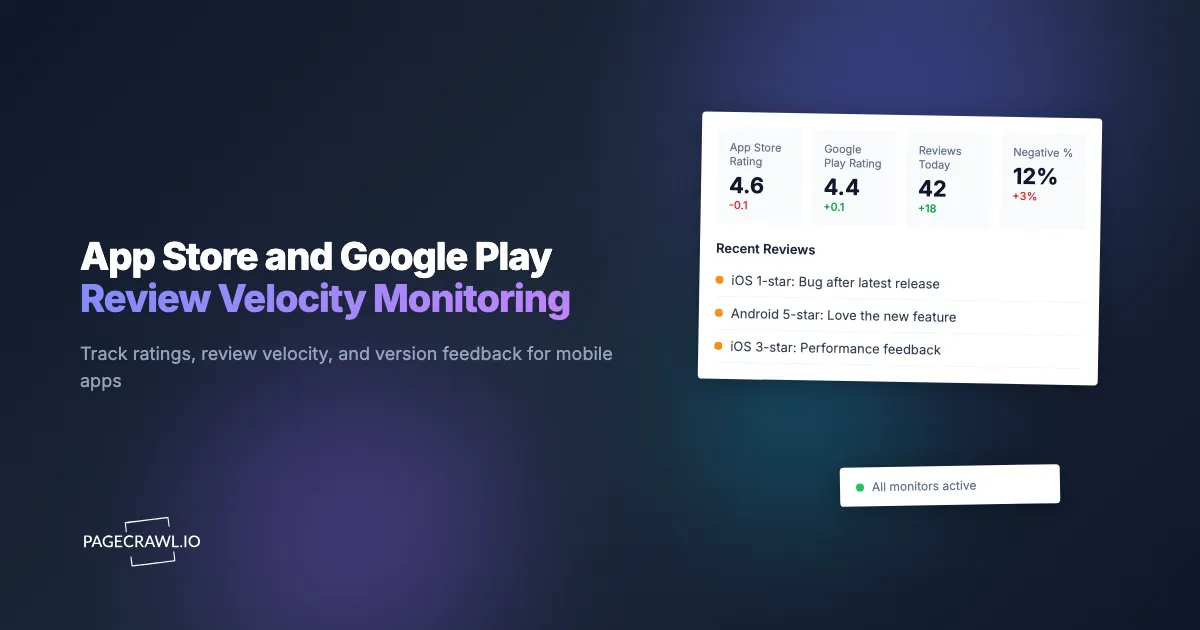
A mobile product team shipped version 4.2 of their iOS app on a Wednesday morning. The release included a refactored onboarding flow that, in QA, had passed every test. Within 6 hours of public release, the App Store rating had dropped from 4.7 to 4.4 across the new reviews. The reviews were all variations of the same complaint: the new onboarding flow had broken sign-in for users with social-auth tokens older than 12 months. The bug existed for 11 days before the team noticed because the QA test accounts had fresh tokens, the customer support inbox lagged, and nobody was actively watching the App Store reviews page. Eleven days of negative review velocity translated to a measurable drop in install conversion and a category ranking shift that took 4 weeks to recover.
This is the practical mobile-team blind spot. App Store and Google Play reviews are the leading indicator on release quality, customer satisfaction, and competitive perception, but the stores don't push real-time review notifications to product or support teams. The native developer dashboards lag (App Store Connect shows reviews on a delay of hours to days) and the third-party review aggregators (data.ai/Sensor Tower, AppFollow) are useful but priced for enterprise budgets. For most product teams, fast awareness of a fresh release's review wave is the difference between catching a regression in hours versus discovering it in days.
This guide covers what's monitorable on the App Store and Google Play, why direct page monitoring works as a low-cost layer over native dashboards, and how to set up alerts that surface new reviews and rating shifts within the hour they appear.
Quick Setup
Pick a store and app, we'll alert you on rating changes and review-velocity spikes within the hour.

Why does monitoring app store pages matter?
Store reviews are the earliest public signal of release regressions, rating drift, and competitor movements. The dynamics for own-app monitoring and competitor monitoring are different, but both reward same-day awareness.
Post-Release Negative Reviews Surface Regressions Fastest
After a release ships, the App Store and Play Store reviews page is the highest-signal channel for surfacing regressions. Negative reviews mentioning a specific feature, screen, or user flow point directly at the bug. QA tests are designed to catch known failure modes; production reviews surface the failure modes you didn't think to test.
Rating Drift Affects Store Rankings
Both App Store and Google Play factor recent rating into category ranking algorithms. A 0.2-point drop in rating over a week can shift category position meaningfully, which compounds into reduced organic install volume. Catching the drift early supports recovery action (fix the issue, prompt happy users to review, address support requests).
Competitor Rating Shifts Inform Category Health
Tracking direct and adjacent competitor apps surfaces category-wide satisfaction shifts. When multiple competitors see rating drops in the same window, the category likely has a systemic issue (platform change, third-party API change) worth investigating.
Featured Reviews Shape First Impressions
The featured reviews that appear on the app product page are the first thing a prospective user sees, the same first-impression surface that brand and reputation monitoring on review sites tracks. When the featured reviews shift (whether because new high-engagement reviews replaced older ones, or because review surfacing algorithm changes), prospects see different first impressions. Monitoring catches this.
How do App Store and Google Play pages work?
Both stores expose stable URL patterns for app product pages, and each page publicly shows the current rating, total review count, and a preview of recent reviews.
App Store. App URLs follow apps.apple.com/us/app/[slug]/id[app-id]. The product page shows current rating, total review count, featured reviews, and recent reviews (limited preview).
Google Play. App URLs follow play.google.com/store/apps/details?id=[package-name]. The product page shows current rating, total review count, and recent reviews (limited preview).
Region-specific URLs. Both stores have region-specific pages with different review pools. Use the /us/ path on App Store and the &gl=US parameter on Play Store for US-specific monitoring; substitute country codes for other regions.
What's not exposed. Full review export and per-user review history aren't accessible via public pages. For full review pull, the App Store Connect API and Play Console API are the official channels. Public-page monitoring catches the visible-on-product-page sample, which is sufficient for rating-shift detection and featured-review change detection.
A typical App Store URL looks like this:
https://apps.apple.com/us/app/[app-slug]/id[app-id]When the rating or featured reviews change, the page content reflects the change.
Comparing Monitoring Approaches
| Approach | Cost | Latency | Coverage | Best For |
|---|---|---|---|---|
| App Store Connect / Play Console | Free (own apps only) | Hours to days | Own apps only | Developers checking native dashboards |
| AppFollow, Sensor Tower (which acquired data.ai/App Annie) | $$$ | Real-time | Full review pull | Enterprise teams with budget |
| Manual review checking | Free | Whatever you check | Spotty | Casual checking |
| RSS via third-party review feeds | Free / Paid | Variable | Per-app | Power users |
| PageCrawl on app product URLs | Free tier to $80/yr | 15-60 minutes | Any public app page | Mobile teams without enterprise budget |
The enterprise tools are excellent and cost orders of magnitude more than PageCrawl. For teams that want post-release rating monitoring and competitor tracking without a $500+/month tool, PageCrawl is the practical option.
Setting Up App Store and Play Store Monitoring in PageCrawl
Step 1: Identify the apps you want to monitor
Your own apps (one URL per platform, region), 5-10 direct competitor apps (one URL per platform), and 5-10 adjacent or category-relevant apps for broader category awareness.
Step 2: Add each app URL as a monitor
Use the canonical store URLs. Add each as a content monitor, one of the tracked element types PageCrawl offers.
Step 3: Pick the right check frequency
App monitoring works best at hourly-to-daily frequency. A reasonable layering:
- Own apps during release windows: 15-30 minutes for the first 72 hours after a release ships.
- Own apps in steady state: Hourly. Catches rating drift and new featured reviews.
- Top competitor apps: Daily checks.
- Adjacent category apps: Daily checks.
Step 4: Use AI summaries to filter the noise
App store pages contain dynamic elements (download counts, rating distributions) that update continuously. PageCrawl's AI summary of what changed distinguishes between rating changes, new featured reviews, version-update events, and trivial UI shifts.
Step 5: Route alerts to a product / support channel
For own-app rating drops and new negative reviews, route alerts to a shared product or customer support Slack channel where the team can triage and assign action. For competitor monitoring, route to a CI channel.
Step 6: Track post-release windows tightly
For each release, create a tight-frequency monitor for the first 72 hours after release ships. Negative review velocity in the first 48 hours is the most reliable signal of a regression.
Worked Example: A Mobile Product Team's Release Monitoring
A mobile product team shipping bi-weekly iOS and Android releases set up the following:
- Own iOS and Android app URLs on 15-minute checks for 72 hours after each release, hourly otherwise
- Six direct competitor app URLs across both stores on daily checks
- Eight adjacent category app URLs on daily checks
- AI summaries enabled to surface specific review content in alerts
- Release-window alerts routed to a shared #release-watch Slack channel
- Steady-state alerts routed to the product channel; competitor monitoring routed to a CI channel
Over a 90-day period, the team caught two regressions within 4 hours of release (vs the 11-day historical average), one competitor app's rating drop that surfaced an opportunity for a comparison content piece, and ongoing category-health awareness that informed roadmap discussions.
Patterns Worth Watching
Post-release rating drops in the first 48 hours. A rating drop of 0.1+ points within 48 hours of release is a strong signal that the release introduced a regression. Investigate immediately.
Review velocity spikes. A sustained increase in new-review volume (positive or negative) signals attention, sometimes from press coverage, sometimes from a viral social moment, sometimes from a competitor-driven prompt cycle.
Featured review changes. When the featured reviews on your product page rotate, the new selection affects prospect first impressions. If new featured reviews are negative, prompt happy users for fresh reviews to rebalance the surfacing.
Version-specific feedback patterns. When multiple reviews reference the same version number with the same complaint, the regression is confirmed. Quick code attention required.
Competitor rating recoveries. When a competitor that had been losing rating begins recovering, they likely shipped a fix or successfully responded to negative feedback. Worth understanding what they did.
Advanced Patterns: Beyond Store Pages
A complete mobile-feedback monitoring workflow extends past the store product pages.
Combine with App Store Connect / Play Console API. Native APIs give full review export and developer-specific data. Pair page monitoring with periodic API pulls for completeness.
Combine with social media monitoring. Mobile bugs frequently surface on Twitter, Bluesky, and Reddit before the app store reviews catch up. The Bluesky monitoring pattern applies.
Combine with crash reporting tools. Sentry, Bugsnag, Firebase Crashlytics surface technical issues. Correlating crash spikes with review sentiment shifts confirms the cause.
Combine with customer support monitoring. Support ticket volume and category typically track with review-velocity shifts.
Use Cases
Mobile product teams. Post-release regression detection through review monitoring is the highest-value use case. The monitoring pays for itself the first time it catches a regression in hours versus days.
Customer success teams. New negative review awareness supports proactive customer outreach.
Competitive intelligence teams. Multi-competitor rating and review tracking surfaces category health and competitive positioning signals.
ASO (App Store Optimization) teams. Rating velocity directly affects category ranking. Monitoring informs ASO action.
Customer marketing teams. Rating drops and review-content patterns inform user-acquisition strategy and creative.
App startup founders. Solo founders and small teams shipping mobile apps benefit from low-cost monitoring layer over the native dashboards.
Frequently Asked Questions
Can I see full review content via page monitoring? Both stores show a limited preview of recent reviews on the product page. For full review export, use the native developer APIs (App Store Connect, Play Console).
Does monitoring work across regions? Yes. Add separate monitors for region-specific URLs (/us/, /gb/, /de/, etc.). Each region has its own review pool and rating.
What about TestFlight and Play Internal Testing builds? Pre-release testing builds use internal channels and aren't exposed on public store pages. Monitoring catches public-release content only.
Can I monitor in-app reviews vs store reviews? PageCrawl monitors store pages. In-app review prompts (App Store Connect prompts, Play Store in-app review API) generate store reviews; both flow through the public product page.
Do I need a paid plan? For a 3-4 app setup (own iOS and Android + 2 competitors), the free plan works. For a complete mobile-team monitoring program covering own apps, 10+ competitors, and category-adjacent apps, Standard at $80/year is the right tier.
Will I get noise alerts on rating distribution shifts? With AI summaries enabled, no. PageCrawl distinguishes between meaningful rating changes, new featured reviews, version updates, and trivial UI shifts.
Choosing your PageCrawl plan
PageCrawl's Free plan lets you monitor 6 pages with 220 checks per month, which is enough to validate the approach on your most critical pages. Most teams graduate to a paid plan once they see the value.
| Plan | Price | Pages | Checks / month | Frequency |
|---|---|---|---|---|
| Free | $0 | 6 | 220 | every 60 min |
| Standard | $8/mo or $80/yr | 100 | 15,000 | every 15 min |
| Enterprise | $30/mo or $300/yr | 500 | 100,000 | every 5 min |
| Ultimate | $99/mo or $999/yr | 1,000 | 100,000 | every 2 min |
Annual billing saves two months across every paid tier. Enterprise and Ultimate scale up to 100x if you need thousands of pages or multi-team access.
Catching a brand impersonation, a defamatory review, or a negative social post in hours instead of weeks is worth multiples of a Standard subscription. $80/year is enough to monitor 100 pages across your name, your products, and the top-volume places people talk about your brand. Enterprise at $300/year fits larger brand protection programs with dedicated ownership.
Getting Started
Add your own iOS and Android app pages to PageCrawl on hourly checks (15-minute during release windows). Add the top 3 competitor app pages on daily checks. Create a free account and route own-app alerts to a #release-watch channel and competitor alerts to a CI channel.
Over the first month, you'll see how often rating shifts and new featured reviews surface and develop a feel for what's noise (rating distribution micro-shifts, count updates) and what's signal (rating drops, featured-review changes, version-specific complaints). Once you see the value, expand to cover adjacent category apps and additional regions. The Standard plan at $80/year handles a complete mobile-monitoring program with room for category-level coverage.