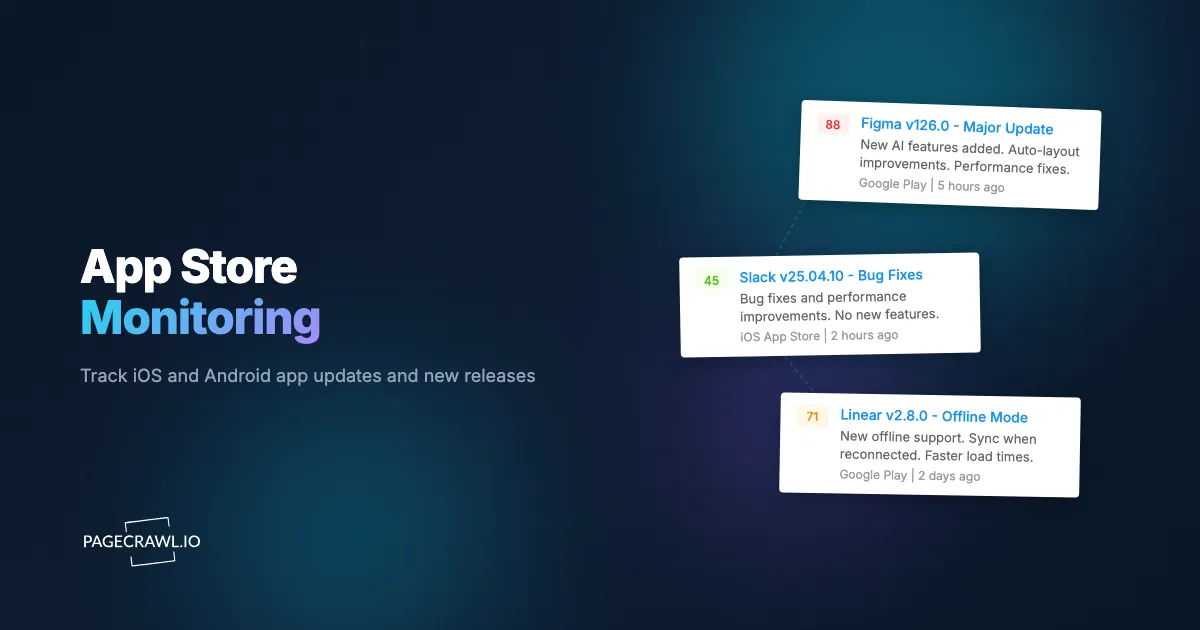
Your competitor just shipped a major feature update. Their app description now targets your keywords. Their pricing changed from free to freemium. You found out two weeks later from a customer who asked why your app does not have the same capability.
This happens more often than most product and marketing teams realize. App stores are public storefronts where competitors broadcast their strategy in real time: feature launches, pricing experiments, keyword shifts, screenshot redesigns, and positioning changes. But most teams treat app stores as something they check manually once a quarter, if they check at all.
The problem is not access. Apple App Store and Google Play listings are publicly accessible web pages. The problem is consistency. No one has time to check 15 competitor app listings every day. Important changes slip through, and by the time you notice, the competitive window has closed.
This guide covers what to monitor on app store listings, how to set up automated tracking for both iOS and Android apps, and how to build an app intelligence workflow that feeds competitive insights directly to your team. If you are already familiar with web-based competitor tracking, see the complete guide to tracking competitor websites for broader context.
Why should you monitor app stores?
App store listings are one of the most underused sources for competitive intelligence monitoring. They contain dense, structured information that changes frequently, and every change reflects a deliberate decision by the competitor's product, marketing, or pricing team.
Competitive Intelligence
When a competitor updates their app description to emphasize a new feature, that tells you what they think the market wants. When they change their app subtitle from "Project Management" to "AI Project Management," that tells you how they are repositioning. These are public strategic decisions, and they accumulate into a detailed picture of a competitor's product direction. For a broader framework, see the guide to competitive intelligence sources.
Feature and Version Tracking
Every app update includes release notes (or should). Monitoring version histories and changelogs lets you track the pace of a competitor's development, identify which features they prioritize, and spot when they fix bugs that might indicate deeper product issues.
A competitor releasing three updates in a month focused on performance improvements suggests stability problems. A competitor adding API integrations suggests a move upmarket toward enterprise customers. These patterns become visible only with consistent tracking. For more on changelog monitoring across SaaS tools, see the changelog monitoring guide.
Pricing and Monetization Changes
App pricing changes are high-signal events. A competitor moving from a one-time purchase to a subscription model reshapes the competitive landscape. A new in-app purchase tier reveals monetization strategy. A paid app going free often signals a pivot to ad-supported or freemium revenue.
These changes happen quietly. Apple and Google do not send notifications when a competitor changes their pricing. Without monitoring, you find out when a customer mentions it or when you happen to check.
ASO and Keyword Strategy
App Store Optimization (ASO) is the mobile equivalent of SEO. Competitors adjust their app titles, subtitles, keyword fields, and descriptions to rank higher for specific search terms. Monitoring these changes reveals which keywords competitors are targeting.
If a competitor adds "budget tracker" to their finance app's subtitle, they are making a deliberate play for that search term. If they rewrite their first paragraph to mention "small business" five times, they are shifting their target audience.
Review and Rating Trends
Rating changes and review volume shifts indicate product health. A sudden drop in average rating after an update suggests the update introduced problems. A surge of negative reviews mentioning a specific feature tells you exactly what went wrong. Tracking review velocity across the App Store and Google Play also surfaces feature requests from competitors' users, which is free market research for your own roadmap.
Security and Compliance (Your Own Listings)
App store monitoring is not only about competitors. Monitoring your own app listings catches unauthorized changes and verifies that your descriptions, screenshots, and metadata remain consistent across regions. Regulated industries that require documentation of public-facing product information benefit from the automated audit trail.
What can you track on an app store listing?
App store listings expose seven trackable elements: the description, screenshots and preview videos, pricing and in-app purchases, version notes, ratings and review counts, developer information, and category placement. Each is worth monitoring for different reasons.
App descriptions: Where competitors explain their value proposition, list features, and target keywords. Changes reflect positioning shifts and feature additions.
Screenshots and preview videos: Visual assets showing the product UI and the features competitors want prospects to see first. New screenshots often accompany major updates.
Pricing and in-app purchases: Both the base app price and in-app purchase options are visible on the listing page. Pricing tiers, subscription options, and free trial availability are all trackable.
Version notes and changelogs: The "What's New" section shows release notes for the latest version, often the fastest way to learn about new features and bug fixes.
Ratings and review counts: The average star rating and total review count. Tracking these over time reveals trends in user satisfaction.
Developer information: The developer name and their full app catalog. Monitoring a developer page lets you detect when they launch entirely new apps.
App category and ranking: Category placement and featured status change based on store editorial decisions or keyword adjustments.
How do you monitor Apple App Store (iOS) listings?
Every iOS app has a public web listing on apps.apple.com that mirrors the information shown in the App Store app. These web pages are what you will monitor.
Finding the URL
App Store web URLs follow this pattern: https://apps.apple.com/app/[app-name]/id[numeric-id]. You can find the URL by searching for the app on the web, or by using the "Share" button in the App Store app and copying the link.
For a developer's full catalog, the URL looks like: https://apps.apple.com/developer/[developer-name]/id[numeric-id].
What to Monitor on iOS Listings
The web listing shows the description, screenshots, ratings, version history, in-app purchases, and developer information. Elements worth targeting specifically:
- Full description: Track the entire text block for wording changes, feature list updates, and keyword additions
- What's New section: Track version notes to catch every update as it ships
- Price display: Track the price badge for changes from "Free" to a paid tier, or price adjustments
- In-App Purchases section: Track the list of available purchases for new subscription tiers or pricing changes
- Rating and review count: Track the numeric rating value and review count
Setting Up iOS App Monitoring in PageCrawl
Add the apps.apple.com URL as a new monitor in PageCrawl. For broad tracking, use fullpage monitoring to detect any text change on the listing. This catches description edits, version notes, rating shifts, and pricing changes in a single monitor.
For targeted tracking, set up multiple tracked elements on the same page, each with its own selector. Use a content-only monitor focused on the description section to filter out noise from rating fluctuations. Add a separate monitor targeting the "What's New" section for clean version update alerts.
Daily checks work well for most app monitoring. For high-priority competitors in fast-moving markets, every 6 or 12 hours ensures you catch changes quickly.
How do you monitor Google Play Store (Android) listings?
Google Play listings are available at play.google.com and contain similar information to iOS listings, with a few differences in structure and available data.
Finding the URL
Google Play URLs follow this pattern: https://play.google.com/store/apps/details?id=[package.name]. The package name is the app's unique identifier (for example, com.spotify.music). You can find it by searching for the app on the Google Play website.
For a developer's full catalog: https://play.google.com/store/apps/developer?id=[developer-name].
Differences from iOS Monitoring
Google Play listings show some data that iOS listings do not. Google Play displays the download count range (1M+, 10M+), the "Data safety" section detailing data collection practices, and the "What's new" section prominently near the top. Google Play descriptions also tend to be more keyword-dense because Google uses the full description text for search ranking, while Apple relies on a separate keyword field not visible on the web listing.
Google Play web pages sometimes render content dynamically. PageCrawl handles this automatically, rendering the full page content including dynamically loaded sections.
Setting Up Google Play Monitoring in PageCrawl
The setup process is the same as iOS. Add the play.google.com URL as a monitor. Fullpage monitoring captures everything. For targeted tracking, focus on specific sections.
If you are in a regulated industry, pay particular attention to the "Data safety" section. Changes to data collection disclosures can signal new tracking, new third-party integrations, or compliance adjustments.
Tracking Competitor App Updates
Version tracking is one of the highest-value forms of app store monitoring. Every release tells a story about what the competitor's engineering team is working on.
Monitoring Version History
Set up a PageCrawl monitor targeting the "What's New" section of the app listing. Each time the competitor pushes an update, the version notes change and you receive an alert. Over time, this builds a complete timeline of their release history.
Look for patterns: how frequently they release, whether they batch features into large releases or ship incrementally, and whether their notes are detailed or vague. Competitors with vague notes like "Bug fixes and improvements" on every release are likely hiding feature launches they do not want to telegraph.
Detecting Feature Additions
When a competitor adds a significant feature, it usually appears in three places at once: the version notes, the description, and the screenshots. Monitoring all three gives you a complete picture of how they are positioning the new feature.
Compare feature launches to your own roadmap. If a competitor ships something you have planned, the market has validated that direction but you have lost the first-mover advantage. If they ship something you had not considered, evaluate whether your users need it too.
Monitoring App Pricing Changes
Pricing is one of the most sensitive competitive signals, and app stores make it publicly visible.
Tracking Price Changes
Monitor the price display element on each competitor's app listing. PageCrawl detects changes whether the app moves from free to paid, changes its base price, or adjusts the pricing label text.
For apps with in-app purchases, monitor the purchase list separately. New subscription tiers, changed prices, or removed options all appear as changes. This is especially valuable for SaaS apps that sell subscriptions through the app store, where the in-app purchase list effectively serves as their pricing page.
Detecting Monetization Strategy Shifts
The biggest pricing signals are structural changes. Watch for:
- Free to paid: The competitor has enough traction to charge, or is moving away from ad revenue
- Paid to free: Often signals a shift to in-app purchases, subscriptions, or ads
- New subscription tiers: Indicates market segmentation, often a move upmarket
- Removed tiers: Suggests simplification, possibly in response to customer confusion
- Free trial additions: Testing conversion rate optimization
Each of these signals reveals something about the competitor's business model evolution. For broader context, see the competitive marketing intelligence guide.
ASO and Keyword Monitoring
App Store Optimization is a continuous process, and your competitors' keyword changes are directly relevant to your own search visibility, the mobile counterpart to SEO monitoring of meta tags and page content on the web.

Tracking Title and Subtitle Changes
The app title and subtitle (iOS) or short description (Android) are the most heavily weighted elements for app store search. When a competitor changes these, they are making a calculated bet on which keywords will drive the most downloads.
Set up a focused monitor on the app title and subtitle elements. Even small changes matter. A competitor changing their subtitle from "Simple To-Do Lists" to "To-Do Lists and Habit Tracker" is expanding into adjacent search territory.
Monitoring Description Keyword Shifts
Full description changes are noisier but still valuable. Competitors rewrite descriptions to target new keyword clusters, address different audience segments, or highlight different features. PageCrawl shows a side-by-side diff view of old and new descriptions, so you can see exactly what was added, removed, or rephrased.
Track description changes monthly as part of your ASO review process. Note which keywords competitors are adding and test whether those terms represent search volume you should pursue.
Building a Keyword Change Log
Over time, your monitors accumulate a history of every change to every competitor's listing. Review the change history to identify trends: which keywords competitors are converging on, which terms they are abandoning, and which new terms are emerging across the market.
Building an App Intelligence Workflow
App store monitoring is most valuable when changes flow into your existing team workflows rather than sitting in a separate dashboard.
Connecting to Team Communication
Route app store change alerts to the channels where your team already works. PageCrawl integrates with Slack, Discord, Microsoft Teams, Telegram, and email. Set up a dedicated channel like "#competitor-app-updates" so alerts are visible but do not clutter other conversations.
Different changes deserve different routing. Version update alerts go to your product team. Pricing changes go to sales and marketing. Keyword changes go to your ASO or growth team. Use separate monitors with different notification targets to route each type of change to the right people.
Using Webhooks for Custom Integrations
PageCrawl's webhook support sends structured change data to any endpoint. Pipe app listing changes into a database, spreadsheet, or competitive intelligence tool. Each webhook payload includes what changed, when, and the before/after content, making it straightforward to generate weekly or monthly competitive intelligence summaries automatically.
Building a Complete Competitive View
Combine app store monitoring with website monitoring for full visibility into competitor activity. Track their marketing site, blog, app store listings, and social profiles. When all these signals feed into one workflow, you spot coordinated launches: a new feature in the app store version notes, on their website, and in a blog post, all on the same day.
App store data fills the mobile-specific gaps that website monitoring alone misses. Pair it with competitive intelligence sources and tactics for a comprehensive picture, and use custom dashboards to centralize everything.
Choosing your PageCrawl plan
PageCrawl's Free plan lets you monitor 6 pages with 220 checks per month, which is enough to validate the approach on your most critical pages. Most teams graduate to a paid plan once they see the value.
| Plan | Price | Pages | Checks / month | Frequency |
|---|---|---|---|---|
| Free | $0 | 6 | 220 | every 60 min |
| Standard | $8/mo or $80/yr | 100 | 15,000 | every 15 min |
| Enterprise | $30/mo or $300/yr | 500 | 100,000 | every 5 min |
| Ultimate | $99/mo or $999/yr | 1,000 | 100,000 | every 2 min |
Annual billing saves two months across every paid tier. Enterprise and Ultimate scale up to 100x if you need thousands of pages or multi-team access.
For product and marketing teams, Standard at $80/year pays for itself the first time monitoring surfaces a competitor feature launch or ASO keyword shift that you can respond to before the window closes. 100 pages is enough to cover your top competitors across both iOS and Android, with version notes, descriptions, and pricing tracked separately for clean routing to the right teams. Enterprise at $300/year handles 500 pages for broader competitive sets.
All plans include the PageCrawl MCP Server, which connects your monitors to AI assistants like Claude, Cursor, and other MCP-compatible tools. Your team can ask questions like "what did our top three competitors ship in their iOS apps this month?" and get a summary drawn from your own monitoring history, making competitive review meetings faster to prepare and easier to act on. AI assistants can create monitors through conversation on every plan, including Free.
Getting Started
Pick one competitor. Find their iOS and Android app listing URLs. Add both to PageCrawl with fullpage monitoring and daily checks. Route the alerts to Slack or email.
Run it for two weeks. You will see how often they update their listing, what kinds of changes they make, and what competitive signals you have been missing. Most teams discover at least one meaningful change within the first week.
From there, expand. Add your top three to five competitors across both platforms. Set up separate monitors for version notes and pricing sections if you want cleaner alerts. Build routing rules that get the right changes to the right people.
PageCrawl's free tier includes 6 monitors, enough to cover one competitor on both platforms with room for targeted section tracking. The Standard plan at $8/month provides 100 monitors for comprehensive coverage across your competitive set. The $30/month plan supports 500 monitors for teams tracking large numbers of competitors and their full developer catalogs.
Create a free PageCrawl account and start tracking the app store changes your competitors do not want you to notice.