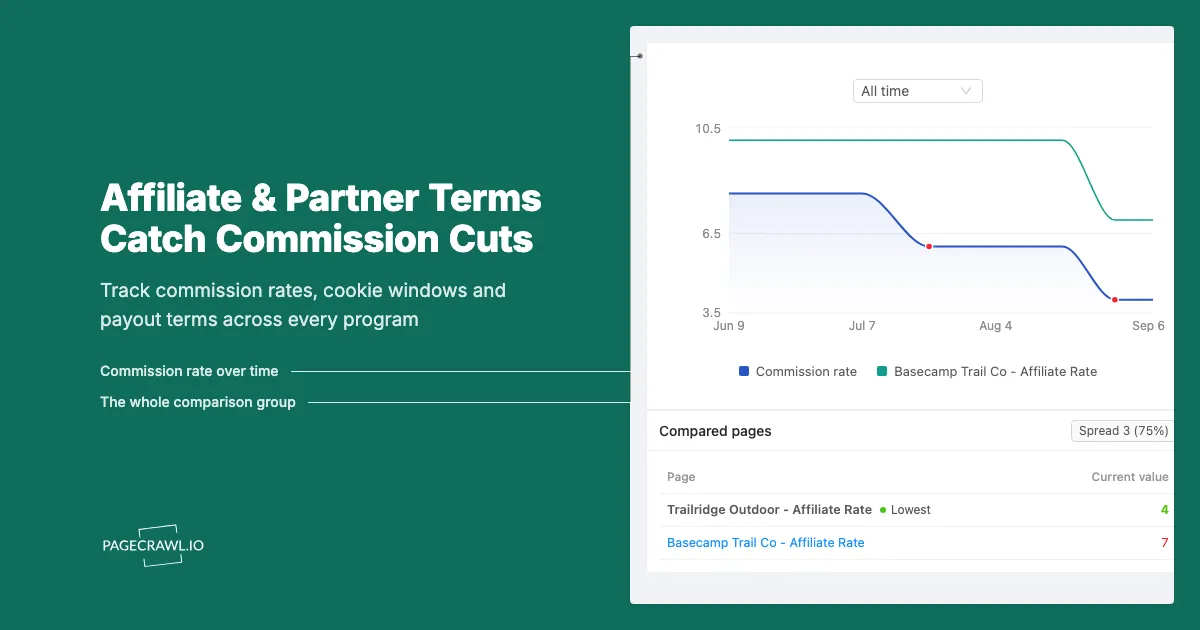
The publisher who runs a six-figure review site opened her network dashboard on the first Monday of the quarter and found the number she had built a business on was wrong. Her top merchant, responsible for roughly a third of her revenue, had moved its home category from a healthy rate to a fraction of it. The change had been live on the program's public terms page for eleven days. Nobody emailed her. The network's newsletter mentioned "program updates" without naming the merchant. She had spent those eleven days commissioning new content, buying photography, and pushing traffic at a category that no longer paid what her spreadsheet said it did.
Two weeks later the same merchant quietly shortened its cookie window. The old terms gave her thirty days of attribution. The new terms gave her seven. Her audience researches for weeks before buying expensive gear, so the shorter window did not reduce her commission rate at all. It simply stopped counting most of her sales. Revenue fell without a single line item explaining why, and it took a support ticket and two escalations before anyone confirmed the window had moved.
That is the shape of the problem. Affiliate and partner terms are published on ordinary web pages that change whenever the merchant feels like changing them. Rate tables get edited. Cookie durations shrink. Categories get carved out. Payout thresholds rise. New exclusions appear in the fine print. The changes are public, they are unannounced, and the first signal most partners get is a payout that does not match the forecast.
This guide covers why commission terms change silently, exactly which pages carry the signal, what to track on each one, how to set up monitoring in PageCrawl, and how to turn a stack of program terms into a comparison you can actually act on before the next content cycle.
Why do affiliate commission terms change without notice?
Commission rates and cookie windows sit in the merchant's own terms document, which the merchant can edit unilaterally. Most program agreements reserve the right to change rates at any time, with continued participation counting as acceptance. Notification is a courtesy, not an obligation, so the public page updates and the email never arrives.
The agreement is written to allow it
Read almost any program agreement and you will find two clauses working together: one saying the operator may modify the terms at its discretion, and another saying your continued promotion after the change constitutes acceptance. The Amazon Associates program is the best-known example, and the pattern repeats across in-house and network-hosted programs alike. The published page is the contract. When the page changes, your deal has changed, whether or not you noticed.
Notification is inconsistent by design
Some networks send a program-update email. Some post a dashboard notice that expires after a week. Some do nothing, because the merchant edited its own terms page and never told the network account manager. Even the good notifications tend to say only that a program has updated its terms, without naming the rate that moved. Manage fifteen programs and you inherit fifteen notification standards, with the weakest one setting your real risk.
The change is often subtractive, not announced
An added bonus gets a press release. A removed category gets a quiet table edit. The most damaging changes are deletions: a product family disappearing from a rate table, a country dropping out of an eligible-geography list, or a sentence being added that excludes discounted purchases from qualifying revenue. Nobody markets a subtraction, so the only reliable way to see one is to compare today's page against yesterday's.
Which partner program pages should you monitor?
Monitor the merchant's public program terms page, the commission rate table, the network-hosted program description, and the payout or fee schedule. Those four page types carry nearly every economically meaningful change. Add the program's policy or compliance page if your traffic comes from paid search, coupon, or email placements.
The program terms and conditions page
This is the primary monitor and the one you should set up first for every program that matters. It contains the modification clause, the attribution rules, the definition of a qualifying sale, and the exclusions. A single added sentence here can be worth more than a headline rate change, because exclusions apply retroactively to traffic you are already sending. Our guide to monitoring terms of service changes at SaaS vendors covers the same discipline applied to software contracts, and the mechanics transfer directly.
The commission rate table
Rate tables are the highest-signal page in the whole stack because they are structured, numeric, and easy to diff. A category moving from one percentage to another is unambiguous. Some merchants publish the table publicly, some put it behind a partner login, and some, including Amazon's standard commission income statement, keep the live version inside the signed-in dashboard. Where the table is gated, set the monitor up as an authenticated page using the steps in our guide to monitoring pages behind a login form so the check sees the same table you do.
The network program description
Networks such as Awin and the program hubs run by large merchants publish a program summary that includes the cookie duration, the commission structure, and the approval rules. Merchants frequently update the network-facing summary and the on-site terms page at different times, which means the two can disagree for days. Monitoring both is how you catch the discrepancy and raise it while it is still in your favour.
The payout, threshold and fee schedule
Minimum payout thresholds, payment currencies, holding periods, and deduction rules all live on a separate page in most programs, and all of them affect real cash. A threshold rising from a low figure to a much higher one can strand a small publisher's balance for months. A longer holding period changes your working capital. These pages change less often than rate tables, which is exactly why nobody checks them.
The compliance and promotional-methods page
If you run paid search, email, coupon, or extension traffic, the promotional-methods policy is as economically important as the rate. Programs routinely add brand-bidding restrictions, subaffiliate rules, or coupon-attribution carve-outs. Shopify's affiliate program pages, for example, publish separate guidance on compliance and on operating as a subaffiliate, which means a publisher has two documents to keep an eye on rather than one. Separately, US publishers should track the FTC's endorsement and review guidance, because disclosure obligations sit on the regulator's side and change independently of any merchant.
What exactly should you track on each page?
Track the numbers and the named entities: percentage rates per category, cookie or attribution duration in days, payout thresholds, holding periods, eligible geographies, and the list of excluded product categories. Everything else on a terms page is boilerplate that changes without changing your economics.
| What to track | Where it lives | Why it matters | Suggested alert rule |
|---|---|---|---|
| Category commission rate | Rate table | Directly multiplies revenue | Alert on any numeric change |
| Cookie or attribution window | Terms page, network summary | Decides which sales count as yours | Alert on any change in days |
| Excluded categories or SKUs | Terms page fine print | Silently zeroes out traffic | Keyword alert on "excluded", "not eligible" |
| Payout threshold and currency | Payment schedule | Strands balances, changes cash flow | Alert on any numeric change |
| Holding or locking period | Payment schedule | Delays cash, hides reversals | Alert on any change in days |
| Eligible countries | Terms page | Kills geo-heavy traffic overnight | Keyword alert on country names |
| Brand bidding and coupon rules | Compliance policy | Can void commissions retroactively | Alert on any change |
Numbers deserve a numeric monitor, not a text one
A rate table is best watched as a number rather than as a block of prose. Tracking the extracted figure means you get an alert that says a value moved from one number to another, with the direction and size of the move visible in the notification itself, rather than a wall of highlighted text you have to read. That difference matters when you manage thirty programs and want to triage alerts in ten seconds.
Fine print deserves a keyword rule
Exclusion language is where the damage hides, and it is rarely numeric. Watch for the arrival of words like "excluded", "not eligible", "does not qualify", "at our sole discretion", and any country or category name you depend on. Our walkthrough on conditional alerts using price, keyword and threshold rules shows how to make a monitor stay quiet unless one of those phrases appears in the change.
Effective dates are the detail everyone forgets
Terms pages usually carry a "last updated" or "effective from" line. That date is the single most useful thing to capture, because it tells you whether a change applies to traffic you have already sent or only to traffic from a future date. Capture the date in the same monitor as the body text so the alert arrives with the evidence attached.
How do you set up partner commission monitoring in PageCrawl?
You add each program page as its own monitor, choose a tracking mode that matches whether the page is a rate table or a prose contract, set a check frequency proportional to how much revenue depends on it, route the alerts to the channel your team actually reads, and add keyword or threshold rules so only economically meaningful edits break the silence.
- Add the URL. Copy the exact program terms or rate table URL from the merchant or network, not a summary blog post about it. If the page requires a partner login, add it as an authenticated monitor so the check loads the signed-in view instead of a sign-in wall.
- Pick the tracking mode. Use reader or content-only tracking for prose contracts so navigation, cookie banners, and footer promos are stripped out. Use number tracking for a single headline commission rate or payout threshold you want expressed as a value. Use full-page or visual tracking when a program publishes its rates inside an image or a heavily styled table.
- Set the check frequency. Match the cadence to the money. A merchant driving a third of your revenue justifies the fastest frequency your plan allows. The free tier checks hourly, Standard every 15 minutes, Enterprise every 5, and Ultimate every 2. For a long tail of small programs, a daily check is plenty, because contract edits do not need second-level speed. They need to be caught before the next content sprint, not within seconds.
- Choose notification channels. Send program alerts to email for the record and to a shared channel for the team. PageCrawl pushes to email, Slack, Discord, Microsoft Teams, Telegram, and outbound webhooks. Most affiliate teams put terms alerts in a dedicated Slack or Teams channel so the content lead, the paid lead, and finance all see the same message. Webhooks let you post the change straight into a partner-tracking sheet or a revenue model.
- Add keyword and threshold rules. Attach a keyword condition on exclusion language and a numeric threshold on the rate itself, so a formatting tweak stays silent while a rate cut or a shortened cookie window fires. Set the threshold low, since a one point rate move on a large program is real money.
- Turn on screenshots and keep the history. A timestamped capture of the terms page as it read on a given date is the evidence you need when you dispute an underpayment. It also makes the difference between "I think the window used to be longer" and showing the previous version.
- Group by program, tag by revenue tier. Keep terms, rate table, payment schedule, and compliance policy for one merchant in a single folder, then label programs Tier 1, Tier 2, and long tail. Tier 1 gets the fastest checks and the noisiest channel. The long tail gets a daily check and a weekly digest, so alert volume stays proportional to the money at stake.
How do you compare programs across different networks?
Build a single table of the variables that decide your revenue, one row per program, and let monitoring keep the cells current. Comparing programs by headline rate alone is misleading, because a high rate with a seven-day window and heavy exclusions frequently pays less than a modest rate with a long window and clean terms.
| Variable | Why the headline rate hides it |
|---|---|
| Cookie or attribution window | A short window discards slow-research purchases entirely |
| Attribution model | Last click, first click, and shared attribution pay very differently |
| Excluded categories | The category you actually promote may not qualify |
| Return and reversal handling | High-return categories claw back a large share of accrued commission |
| Payout threshold and holding period | Determines when the money is actually yours |
| Geography eligibility | International traffic may be worth nothing on some programs |
The window matters as much as the rate
Cookie durations across retail programs commonly cluster in the seven to ninety day range depending on the merchant, and networks such as Awin document the per-advertiser nature of the setting rather than applying one global figure. The practical consequence for a publisher is straightforward: if your audience takes three weeks to decide on a purchase, a seven-day window silently discards most of your influence, no matter how attractive the percentage looks in the pitch deck. Track duration as a first-class number, not as a footnote.
Watch the competitor programs too
Merchant terms are competitive artefacts. When one merchant in a category cuts rates, its rivals often either follow within a quarter or advertise their unchanged terms as a recruiting pitch. Monitoring your own programs and the two or three obvious alternatives in the same category gives you leverage: you can go into a rate conversation with a dated record of what the alternative pays. This is the same approach described in our guide to monitoring partner programs and integration marketplaces, applied to commercial terms rather than to ecosystem positioning.
What problems come up when monitoring affiliate terms?
The recurring issues are rate tables locked behind a partner login, agreements distributed as PDFs, legal boilerplate that changes without meaning anything, and merchant and network pages that state different terms for the same program. Each has a fix that does not involve rechecking pages by hand.
Rate tables behind a partner login
Many programs publish only a marketing summary publicly and keep the real table inside the dashboard. Set those up as authenticated monitors so the check sees the signed-in view. Capture the session once, and refresh it if the program eventually expires it. The alternative, checking manually each month, is exactly the habit that let the original change go unnoticed for eleven days.
Terms published as a PDF
Plenty of programs, especially in travel and finance, distribute their partner agreement as a downloadable PDF rather than a web page. Booking.com's affiliate partner documentation, reachable from its partnerships hub, is a well-known example of the pattern. PageCrawl can extract and compare the text of a PDF between checks, so a revised clause in a new version of an agreement shows up as a text diff rather than as a file you have to open and read against the last one.
Legal boilerplate that changes without meaning anything
Terms pages carry session identifiers, rotating footer promotions, dynamic year stamps, and reformatted whitespace. Left alone, these produce alerts that mean nothing, and a week of meaningless alerts trains a team to ignore the channel. Exclude those regions after the first couple of checks. Our guide to reducing monitoring false positives covers how to narrow a monitor down to the part of the page that carries the contract.
Alerts arrive on the next check, so pick the cadence deliberately
Monitoring does not stop a merchant from changing its rates. It closes the gap between the change going live and you finding out about it. On the next check after the page changes, the alert lands with the diff attached. For a Tier 1 program that gap can be a couple of minutes on the higher plans. For a long-tail program a daily check is entirely sufficient, because the decision it feeds, whether to keep commissioning content for that merchant, is a weekly decision, not a per-minute one.
Choosing your PageCrawl plan
PageCrawl's Free plan lets you monitor 6 pages with 220 checks per month, which is enough to validate the approach on your most critical pages. Most teams graduate to a paid plan once they see the value.
| Plan | Price | Pages | Checks / month | Frequency |
|---|---|---|---|---|
| Free | $0 | 6 | 220 | every 60 min |
| Standard | $8/mo or $80/yr | 100 | 15,000 | every 15 min |
| Enterprise | $30/mo or $300/yr | 500 | 100,000 | every 5 min |
| Ultimate | $99/mo or $999/yr | 1,000 | 100,000 | every 2 min |
Annual billing saves two months across every paid tier. Enterprise and Ultimate scale up to 100x if you need thousands of pages or multi-team access.
One competitive signal caught early can swing a deal worth more than a decade of Enterprise. If you win one additional deal per year because you spotted a pricing change, a product launch, or a messaging shift before your competitors did, $300/year is a rounding error. Standard at $80/year handles 100 monitored pages, enough for a Tier 1 and Tier 2 competitor program. Enterprise adds 500 pages and SSO. All plans include the PageCrawl MCP Server for AI assistants like Claude and Cursor. Your sales and product teams can ask "summarize every change to Competitor X's pricing page over the last quarter" and get an answer pulled straight from your own archive. AI assistants can create monitors through conversation on every plan, including Free, turning the tracked pages into a living competitor database, not just an alert feed.
Getting Started
Start with the single program that pays you most. Add its public terms page and its rate table as two monitors, set the check frequency to the fastest your plan allows, and route alerts to the channel where your content and paid teams already talk.
Then add the payment schedule and compliance policy for the same merchant, so a threshold change or a new brand-bidding restriction cannot reach your payout before it reaches your inbox. Four monitors on one program is a better starting point than one monitor on four.
Once the first real alert lands, and it will, expand to your Tier 2 programs and to the two obvious alternatives in the same category. Tag each monitor by revenue tier, keep the screenshots, and let the archive accumulate.
Stop discovering rate cuts on your payout statement. Put the terms pages under watch today.