Dmitri runs software asset management for a 6,000-employee manufacturer. In March he signed a three-year agreement with a comfortable buffer: 4,200 seats against a headcount of 3,900, an overage rate he had negotiated down, and an annual true-up every January. He filed the contract and moved on to the next vendor.
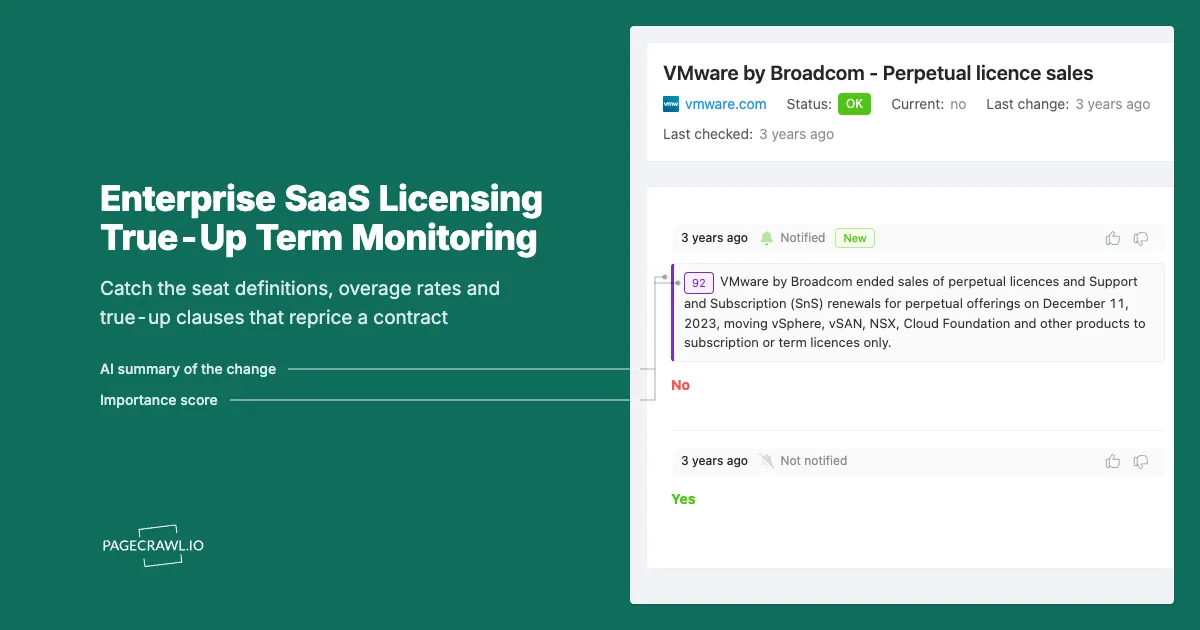
In November the vendor's published product terms quietly changed how one product counted users. External collaborators, previously covered by the general subscription, now required their own licence. Dmitri's headcount had not moved. His licensed seat count had not moved. But the definition underneath both of them had, and at the January true-up the vendor produced a number 900 seats higher than his own count, backdated to the effective date of the terms change. Nobody had emailed him. The change had been sitting on a public page for eight months.
This is the most expensive kind of contract risk because it does not look like a change at all. The agreement you signed usually incorporates the vendor's product terms, service descriptions and licensing guides by reference, and those documents are published on the web and revised on the vendor's schedule, not yours. A seat definition, a core factor, a minimum, an overage rate or a single sentence about retroactive true-ups can reprice a multi-year commitment without a single amendment crossing your desk. This guide covers what changes, where those values live, why nobody tells you, and how to put an automated watch on the exact documents your contract points at.
What actually reprices an enterprise SaaS agreement between renewals?
Four things: the definition of a licensed unit, the metric used to count it, the rate applied to anything above the commitment, and the true-up mechanics that decide whether an overage is billed forward or backdated. All four usually live in documents incorporated by reference, not in the signature page you filed.
The definition of a licensed unit
A "user" is not a fixed concept. Depending on the vendor and the product it can mean a named individual, an authenticated identity, a concurrent session, an API principal, a service account, or an external guest. When a vendor narrows the definition, for example by carving external collaborators, contractors or machine identities out of the general subscription, your consumption jumps overnight without anyone at your company doing anything. The same applies on the infrastructure side, where processor-based licensing depends on published core factors. Oracle's licensing rules and definitions are published under Oracle's corporate contracts and licensing documents, and a change to how a processor family is counted directly multiplies the number of licences a workload requires.
The metric underneath the count
Even when a definition holds, the measurement can change. Storage counted per user versus pooled across the tenant, API calls counted per app versus per organisation, records counted at peak versus at month end. Metric changes are the hardest to spot because the contract number stays the same and only the measurement moves. They are also the ones that generate the largest surprise invoices, because a metric change applies to everything you have already deployed.
The overage rate
Most enterprise agreements set a rate for consumption above the commitment. If that rate is expressed as "the vendor's then-current list price" rather than a fixed number in the contract, your exposure is whatever the vendor publishes on the day you exceed the commitment. That published number is a live value on a public page, and it can move between the day you signed and the day you true up. Fixing the overage rate in the contract is the negotiation win. Monitoring the published rate is what tells you whether the win still holds.
The true-up mechanics
The single most consequential sentence in a licensing document is usually the one describing when an overage is measured and from what date it is charged. Forward-looking true-ups bill you from the next anniversary. Retroactive true-ups bill you from the date consumption first exceeded the commitment, which can mean eleven months of backdated seats plus the difference in unit price. Some vendors also operate automatic band escalation, where crossing a user threshold moves the whole account to the next pricing band rather than charging for the incremental seats.
Which pages should you monitor for licensing and true-up changes?
Monitor the documents your contract incorporates by reference: the vendor's product terms or service description, the licensing guide or metric definitions, the published price list or pricing page, and the master agreement itself. These are public pages that carry contractual weight, and they are revised on a schedule you do not control.
Vendor product terms and change logs
Some vendors publish a formal, dated change record, which makes them the easiest and most rewarding pages to watch. Microsoft maintains a public Product Terms site with a change history for licensing terms, updated on a regular cadence and covering the terms that govern products licensed through its commercial programs. If your agreement incorporates those terms, that page is effectively an amendment feed for your contract. Watching it is not optional diligence. It is reading the contract you are already bound by.
Licensing guides and metric definitions
Product terms tell you what you may do. The licensing guide tells you how the vendor counts. Processor tables, user type matrices, edition comparison grids and "what counts as a transaction" tables are the documents that translate your deployment into an invoice. Many are published as PDFs, which is why PDF text extraction matters here: the number that changes is often a single cell in a table inside a 90-page document.
Published price lists and pricing pages
If your overage rate, your renewal uplift or your expansion pricing references list price, the vendor's public pricing page is a contractual input. It also tells you when a vendor restructures editions, introduces a new tier, or moves a feature you rely on behind a higher SKU. For the competitor-facing version of the same discipline, our guide to monitoring SaaS pricing pages for competitor changes covers how to structure that watch. The vendor-facing version is the same mechanic pointed at the companies you buy from.
Master agreements and terms of service
The umbrella agreement carries the audit rights, the notice periods, the auto-renewal window and the assignment and change-of-control language. Vendors revise these too, and a shortened cancellation notice window can cost you an entire renewal year if you find out about it in month eleven. Our guide to monitoring terms of service changes for SaaS vendors covers the general practice, and software licence terms and EULA change monitoring goes deeper on the licence text itself.
Product-specific terms directories
Large vendors split their terms across dozens of product-specific documents. Salesforce, for example, publishes its main services agreement and product-specific terms through its legal agreements directory, where each product carries its own user definition and usage limits. Your contract may incorporate five of those documents and nothing else. Identify which five, and you have a monitoring list rather than a monitoring project.
Why don't vendors tell you when the licensing terms change?
Because the contract usually does not require them to. Standard enterprise agreements incorporate the vendor's published terms as amended from time to time, with publication itself serving as notice. The vendor satisfies its obligation by updating a public page. There is no email, no account-manager call, and no entry in your admin console.
Publication is the notice
The "as amended from time to time" or "then-current" construction is doing enormous work in most enterprise agreements. It means the vendor can revise the incorporated document, and the revised version binds you from its effective date, without any individual notification. This is not a loophole the vendor is hiding. It is a term you agreed to, and it puts the burden of watching squarely on your side.
Account teams are not incentivised to flag it
Your account manager is compensated on growth. A terms change that increases your consumption is a favourable event for the vendor's forecast, and it will surface in the true-up conversation rather than in a proactive warning eight months earlier. That is not malice, it is structure. The people who would tell you are the people who benefit from you finding out late.
Admin consoles show usage, not entitlement rules
Vendor dashboards are good at telling you how many seats are assigned today. They are silent about the fact that the definition of an assigned seat changed last quarter. Usage telemetry answers "how many," never "counted how." No mainstream free tool watches contract-bearing documents across a vendor portfolio and tells you which sentence moved, which is why teams either check manually (rarely, and then not at all) or find out at true-up. The distance between a revision and your discovery of it ends up being the distance to your next true-up, and every month in that gap is exposure accruing against a definition you have not read.
How do you set up licensing and true-up monitoring in PageCrawl?
Point a monitor at each document your contract incorporates by reference, extract the text rather than the layout, check daily, and route alerts to the people who own the vendor relationship. Setup for a full vendor portfolio takes an afternoon and then runs without you.
Pull the incorporation clauses out of your contracts first. Search each signed agreement for "incorporated by reference," "then-current," "as amended," "Product Terms," "Service Description" and "Licensing Guide." Every URL you find is a monitor. This step is the whole job, and it is the step most teams skip.
Add each URL to PageCrawl. Use the exact document URL, not the vendor's legal landing page. If the document is a PDF, add the PDF link directly so the text inside it is extracted and compared rather than the page that links to it.
Pick the tracking mode. Use reader or content-only tracking for terms pages and service descriptions, so navigation, banners and footers are excluded and only the contractual body text is compared. Use PDF extraction for licensing guides, processor tables and price lists published as documents. Use number or price tracking where you want a single value watched, such as a published list rate or a per-unit overage price.
Set the check frequency. Daily is the right default for terms and licensing guides, which change on monthly or quarterly cadences. Move to the higher frequencies on your paid tiers for published price lists during an active negotiation or in the eight weeks before a renewal, when a mid-negotiation list price change is a live commercial fact.
Choose notification channels. Route alerts where the responsible people already work: email for the SAM and procurement inbox, Slack, Microsoft Teams or Discord for the vendor management channel, Telegram for the person on call during a negotiation, and webhooks to push the change straight into your contract lifecycle system or ITSM tool as a ticket. A licensing change with no owner is a licensing change nobody reads.
Add keyword and threshold rules so only material changes fire. Set keyword conditions on the vocabulary that carries money: "true-up," "overage," "then-current," "per user," "named user," "core factor," "minimum," "retroactive," "audit," "termination for convenience," "auto-renew" and "notice period." Add numeric thresholds on published rates so a rounding change stays quiet and a rate increase does not. Our walkthrough of conditional alerts using price, keyword and threshold rules covers the syntax.
Turn on screenshots and keep the history. When you challenge a true-up calculation, the argument is about what the document said on a specific date. A timestamped capture of the terms page as it read on the day you signed, and on every day since, is the evidence that turns a dispute into a conversation. Alerts arrive on the next check after the document changes, and the archive is what you use months later.
Group monitors by vendor and by contract. Put every document a single agreement incorporates into one folder named for the contract. When a change fires, you want to know which contract it amends, not just which vendor published it.
What does a true-up clause actually cost when a definition shifts?
The cost is the gap between your assumed count and the vendor's recalculated count, multiplied by the overage rate, multiplied by the number of months the change is backdated. A retroactive clause turns a modest definitional shift into a five or six figure invoice, because the same delta is charged for every month since the effective date.
The mechanics are worth laying out, because the difference between clause types is where the money is:
| Clause type | When consumption is measured | What you are billed | Practical exposure |
|---|---|---|---|
| Forward true-up | At the anniversary | Additional seats from the anniversary forward | Lowest. You pay for what you will use. |
| Retroactive true-up | At the anniversary, backdated | Additional seats from the date you first exceeded | High. Up to a full year of backdated seats. |
| Automatic band escalation | Continuously | The whole account reprices to the next band | High and non-linear. One seat can move every seat. |
| Then-current rate overage | At the anniversary | Overage at published list price on the true-up date | Uncapped. The rate is not fixed in your contract. |
Two of these four are directly driven by values published on public pages. Then-current rate overage depends on the vendor's published price list. Band escalation depends on the published band thresholds, and vendors do move them. Atlassian, for example, prices its cloud products in user bands with edition-level minimums published on its cloud pricing pages, so the threshold that triggers a reprice is a public number you can watch rather than a number you discover at invoice time.
Note: the highest-value monitor in most portfolios is not a price. It is a single clause. A change from "Customer will be invoiced for additional Users at the next Anniversary Date" to the same sentence with "from the date such Users were first provisioned" appended is a few words on a public page and a material change to your liability.
How do you keep licensing alerts useful instead of noisy?
Watch the contractual body text rather than the whole page, gate alerts on the vocabulary that carries money, review with a diff rather than a rewritten document, and accept a daily rhythm instead of chasing minutes. Licensing documents change on a slow clock. The discipline is precision, not speed.
Exclude everything that is not the contract
Terms pages carry navigation, cookie notices, region selectors, "last reviewed" stamps and marketing modules that change without the contract changing. Reader or content-only tracking strips those and compares the body text, which is the part with legal effect. If a specific element keeps producing meaningless alerts, exclude that region and the noise stops. Our guide to reducing monitoring false positives covers the technique in general.
Separate a version bump from a substantive edit
Vendors reissue documents for formatting, branding and effective-date updates far more often than they change substance. A diff view lets you see in seconds whether the delta is a reissued date line or a rewritten definition. Reading the diff, rather than rereading the document, is what makes a daily cadence sustainable for a portfolio of thirty documents.
Route by materiality, not by vendor
Not every change needs the same audience. A price list movement goes to procurement. A definitional change goes to SAM and to whoever owns the deployment. An audit-rights or notice-period change goes to legal. Configure the channel per monitor so each alert lands with the person who can act, and none of them learn to ignore the feed.
What should a software asset management team monitor first?
Start with your three largest agreements by annual spend and monitor only the documents those contracts incorporate by reference, typically three to six URLs each. That is ten to twenty monitors covering the majority of your licensing exposure, and it is achievable in a single afternoon.
Rank by exposure, not by vendor size
The right first monitor is the contract where a definitional change costs the most, which is a function of spend, seat volume and clause type together. A mid-size agreement with a retroactive true-up and a then-current overage rate is riskier than a larger one with a forward true-up and fixed rates. Read the clauses before you rank the vendors.
Cover the renewal calendar next
Every agreement has a notice window, and missing it costs you a year. Monitor the master agreement of any contract renewing in the next two quarters, specifically for changes to the notice period and auto-renewal language, and put a calendar reminder at the notice date regardless. Terms monitoring tells you if the window moved. The calendar tells you the window is closing.
Then extend to the wider vendor surface
Once the licensing documents are covered, the same monitors extend naturally to the rest of the vendor relationship: deprecation and sunset notices that force an upgrade to a higher SKU, subprocessor lists that carry compliance obligations, and trust centre pages that carry your security commitments. Our guide to monitoring SaaS API deprecation and sunset notices covers the engineering-facing half of the same problem, where a retired endpoint quietly forces a paid edition upgrade. Keep the capture history for the full contract term plus your audit window, because both vendor audits and true-up disputes turn on what a document said on a particular date.
Choosing your PageCrawl plan
PageCrawl's Free plan lets you monitor 6 pages with 220 checks per month, which is enough to validate the approach on your most critical pages. Most teams graduate to a paid plan once they see the value.
| Plan | Price | Pages | Checks / month | Frequency |
|---|---|---|---|---|
| Free | $0 | 6 | 220 | every 60 min |
| Standard | $8/mo or $80/yr | 100 | 15,000 | every 15 min |
| Enterprise | $30/mo or $300/yr | 500 | 100,000 | every 5 min |
| Ultimate | $99/mo or $999/yr | 1,000 | 100,000 | every 2 min |
Annual billing saves two months across every paid tier. Enterprise and Ultimate scale up to 100x if you need thousands of pages or multi-team access.
In event-driven strategies, minutes matter. One actionable signal surfaced before the broader market reacts can return more than a year of Ultimate. Standard at $80/year covers the core IR, press, and filings pages for a handful of positions. Enterprise at $300/year scales to a full watchlist. All plans include the PageCrawl MCP Server, so you can ask Claude to summarize every material change across a company's IR, press, and filings over any period you care about and get the evidence pulled straight from your monitoring archive. AI assistants can create monitors through conversation on every plan, including Free. Ultimate at $999/year adds 2-minute frequency and web archiving, which matters if you need provable timestamps for a thesis.
Getting Started
Open your single largest SaaS agreement and search it for "incorporated by reference" and "then-current." Copy out every URL it points at. That list, usually three to six documents, is your first set of monitors and it covers more contractual risk than any dashboard your vendor gives you.
Add those URLs to PageCrawl with reader or PDF extraction tracking, set a daily check, and route alerts to your procurement channel with keyword conditions on "true-up," "overage," "then-current" and "named user." Then repeat for your next two largest agreements and stop. Twenty monitors covering three contracts is a working programme. Two hundred monitors covering everything is a project that never ships.
The first time an alert tells you a seat definition changed while you still have three quarters to respond, the exercise pays for itself several times over. Find the clauses, point the monitors at them, and stop discovering your contract at true-up.