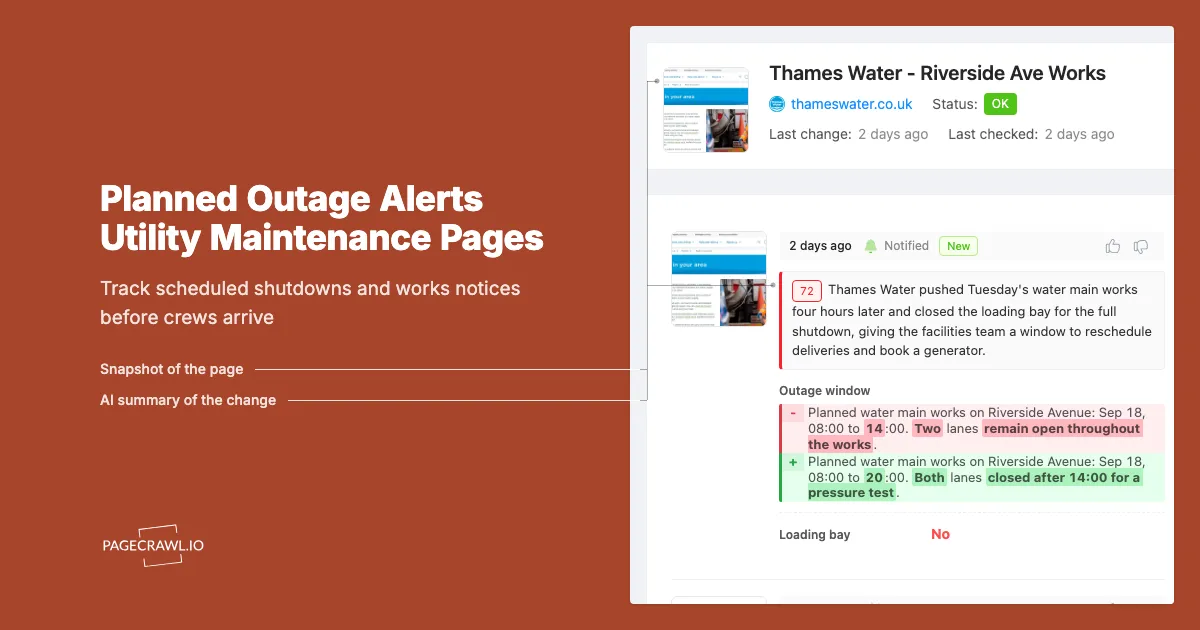
The first anyone at the property knew about it was the traffic cones. A crew from the water utility had blocked the loading bay at 7:40am to tie in a new main, and the notice explaining that had been posted to the utility's "work in your area" page nine days earlier. Nobody was watching that page. The building's chiller loop was drained for six hours, two tenant labs lost a morning of sample work, and the facilities manager spent the afternoon writing an incident note that boiled down to one sentence: the information was public and we did not read it.
That is the shape of almost every planned outage problem. It is rarely a surprise from the utility's side. Water companies, electric utilities, district energy operators and municipal public works publish scheduled shutdowns, road closures and pressure tests on public pages, often with a week or more of lead time. Then they revise them. A date slips, a street list grows by two blocks, a four-hour window becomes an overnight one, and each revision is a silent edit that no email ever announces.
Facility and property teams are punished hardest by that gap, because a planned outage is a scheduling problem if you find out early and an incident if you find out late. Six days of warning means you reschedule a lab run, top up a water tank, book a generator, and send one calm tenant email. Six minutes means you are on the phone to a fire marshal about a dead sprinkler riser.
This guide covers where planned outage information lives, what notice periods utilities commit to, how to turn those scattered pages into alerts, and the limits worth knowing before you rely on them.
Why do planned utility outages catch facility teams by surprise?
Because the notice usually arrives on paper, to one address, weeks before the work, and every later revision happens silently on a web page instead. Utilities post schedules publicly and then quietly amend dates, street lists and time windows. Nobody re-sends a letter for a revision, so the current truth only exists on a page nobody is watching.
Notice goes to the billing address, not the operations team
Utilities notify the account holder. For a commercial building that is often a landlord's finance address, a managing agent's post room, or a mailbox nobody in operations reads. The letter about a Thursday shutdown gets scanned into an accounts payable folder while the engineering team, the tenants and the security contractor hear nothing.
The published schedule is a moving target
The first posting is a plan, not a commitment. Crews get pulled to an emergency repair, permits land late, the ground opens and reveals something unexpected, and the work moves. A shutdown announced for the 12th becomes the 19th, and the street list quietly picks up two more blocks. Each revision matters more than the original notice, and each one is an edit to a live page rather than a fresh mailing.
Nobody owns the checking, and there is no single feed
A building can depend on an electric utility, a water and sewer utility, a gas distributor, a district energy provider and the local highways authority for closures that block deliveries. That is five or more publishers, each with its own page and its own idea of advance notice. Reading them is a two-minute job nobody is scheduled to do, on pages that change maybe twice a month, which is exactly the task humans are worst at: low frequency, low salience, high consequence.
Which utility pages should a facility manager monitor?
Monitor the planned works or service alerts page of every operator your site depends on: water, electricity, gas, district energy, telecoms, and the local roadworks or street closure register. Add your tenants' and your own vendors' status pages. For most single sites that is five to ten pages, comfortably within one monitoring folder.
Water and wastewater planned works
Water utilities are the richest source of planned outage detail because shutdowns are geographically specific and scheduled in advance. Seattle Public Utilities publishes planned water outage information alongside guidance on preparing for one, and Thames Water lists work in your area across its region. In the UK, the regulator Ofwat sets out customer rights around supply interruptions, including the written notice due before a planned interruption. Watch the page covering your postcode, borough or service area, not a national landing page that changes constantly for reasons unrelated to your building.
Electricity planned and maintenance outages
Electric utilities vary widely in how much they publish. Some post a public map or list of scheduled maintenance outages. Others deliberately do not: PG&E's maintenance outage page states that the utility does not post upcoming scheduled maintenance outages publicly and instead notifies affected customers directly. Where a public schedule exists, monitor it. Where it does not, monitor the outage centre and service alerts pages, which still surface area-wide programmes and safety shutoff notices. Municipal utilities are often more forthcoming: Pasadena Water and Power maintains a planned outages page with the notice period it commits to for non-emergency work.
Combined municipal service alert pages
City-run utilities frequently consolidate everything on one page. The San Francisco Public Utilities Commission publishes service alerts covering water, power and sewer in a single place, which makes an efficient monitor: one URL, three utilities. If a municipal utility serves your site, look for that consolidated page before setting up three monitors that mostly duplicate each other.
Roadworks registers and vendor status pages
An outage you can work around is different from an outage that also blocks your loading bay. Street works registers publish closures and excavation permits that often precede a utility shutdown by days, so watch the register filtered to your area rather than the whole jurisdiction. Building systems on hosted services (access control, BMS dashboards, lift telemetry) publish maintenance windows the same way, and our guide to monitoring cloud and vendor status pages covers those. Keep both sets in the same folder, because they land on the same duty phone.
How much notice do utilities actually give before a planned shutdown?
It depends on the operator and the service, and it is usually shorter than the plan you need. Published commitments commonly range from 48 hours to about a week for non-emergency work. Pasadena Water and Power states it provides at least seven days notice before a non-emergency outage, and UK water customers are entitled to written notice before longer planned interruptions.
Typical published notice commitments
| Service type | Common notice practice | What it means for you |
|---|---|---|
| Water, planned interruption | Written notice, often 48 hours or more ahead for longer shutdowns | Enough to move a delivery, rarely enough to book a water bowser |
| Water, larger scheme or main replacement | Days to weeks, published on a works page | The window where rescheduling tenant work is still possible |
| Electricity, maintenance outage | Direct notice to affected customers, public posting varies by utility | You may get nothing public at all, so watch alerts pages |
| District energy or steam | Operator bulletin, seasonal shutdown calendars | Often the longest lead time and the most predictable |
| Street closure or excavation permit | Permit issued days ahead, public register | Frequently the earliest available signal |
Treat the table as the shape of the problem, not a guarantee. The specific commitment that binds your utility is published on its own site, and confirming it once per operator is a worthwhile half hour. Note also that notice periods shrink as the date approaches: a shutdown confirmed a week out can gain an extra street or extend past midnight inside the final 48 hours, and those late edits almost never trigger a fresh mailing.
Why the emergency category dissolves the notice
None of those notice periods apply when a main bursts or a cable fails, and unplanned events are not rare. The US Energy Information Administration reported that in 2024, power interruptions attributed to major events averaged nearly nine hours per customer, against an average of roughly four hours a year over the preceding decade, while interruptions outside major events routinely run about two hours a year. Monitoring a planned works page does not prevent an emergency, but the same monitor catches the emergency bulletin when the utility posts it, and the outage centre update usually beats any letter.
How do you set up planned outage alerts with PageCrawl?
Point a monitor at each operator's planned works or service alerts page, track the notice area rather than the whole page, check often enough to catch late revisions, and route alerts to the channel your duty team actually reads. Setup for a full site takes under half an hour.
Collect the URLs. Open the planned works, service alerts or outage centre page for each operator serving your site. Where the utility offers an area-filtered view (by postcode, borough, ZIP or service area), use that filtered URL, because it produces far fewer irrelevant changes than the national page.
Add each URL to PageCrawl. Create a folder named for the site, for example "Riverside Campus utilities." Grouping by site rather than by utility keeps alerts legible across several properties, because during an incident you ask what is happening at this building, never what is happening at this water company.
Pick the tracking mode. For a text-heavy notices page, choose reader or content-only tracking so the monitor watches the notice text and ignores navigation, cookie prompts and footers. If outages appear as a table for a specific region, use text tracking scoped to that section. If the utility publishes a PDF bulletin, use PDF text extraction so the monitor reads the document rather than just noticing that a file link changed.
Set check frequency by consequence. Water and electricity pages for a site with critical loads justify the fastest cadence your plan allows, because late revisions land inside the final 48 hours. The free tier checks hourly, which is adequate for a page revised weekly. Standard checks every 15 minutes, Enterprise every 5 and Ultimate every 2, and alerts arrive on the next check after the page changes.
Choose notification channels. Route to where your duty team lives, not a shared inbox nobody owns. PageCrawl delivers to email, Slack, Discord, Microsoft Teams, Telegram and webhooks. A practical facilities pattern is Teams or Slack to the operations channel, plus Telegram or push to the on-call phone for pages you have marked critical.
Add keyword and threshold rules. Set keyword conditions on your street name, postcode, building number or district so an alert only fires when the change text mentions your area, using the syntax in our walkthrough on conditional alerts using price, keyword and threshold rules. Add a second rule for words that matter regardless of area: "shutdown," "no water," "planned interruption," "road closure," "emergency."
Send outage alerts into your work management system. A webhook lets a detected change open a ticket in your CMMS or helpdesk automatically, with the diff text in the body, so the outage becomes a tracked job rather than a message someone remembers.
Turn on screenshots and keep the history. A timestamped capture of the notice as it appeared on a given day is the artefact you want when a tenant asks why they were not told, or when you need to show a utility that the published window changed twice.
How do you keep outage monitors from flooding you with noise?
Scope each monitor to the notice region, filter on your own area keywords, and train out the parts of the page that change without meaning anything. A utility works page that is edited daily for other neighbourhoods should still be quiet for you, and if it is not, the monitor is watching too much of the page.
Scope the monitor to the notices, not the page
Utility sites are busy. Carousels rotate, live customer-count tickers move, weather banners appear, campaign panels swap. Track the notices region specifically and those elements stop generating changes. In PageCrawl you can click a detected change and mark that region as ignored, and the page settles within a couple of checks. The techniques in our guide to reducing monitoring false positives apply directly.
Filter to your geography
A regional works page might list forty active schemes, of which one touches your site. Keyword conditions on street name, postcode or district turn forty alerts a month into one that matters. Include the surrounding streets, because a shutdown two roads away can still close your access route or drop pressure at your riser.
Separate the critical monitors from the awareness monitors
Not every page deserves a phone push. Tier one is anything that can stop the building: water supply, primary electrical feed, district energy, and the street closure register for your access route. These get the fastest checks and push notifications. Tier two is awareness (regional programme pages, vendor status pages, capital works announcements) and gets a daily or weekly email digest. Mixing the tiers is how teams end up muting the channel entirely.
Once a quarter, open each monitored URL and confirm it still loads the notices you expect. Utilities redesign sites and move works pages, and a monitor that has reported nothing for six months on a page that publishes monthly is telling you something.
What should you do when a planned outage alert arrives?
Confirm the scope, check whether it changed from a previous version, and convert it into scheduled work rather than a note. The value of an early alert is entirely in what happens in the next hour, so a fixed short sequence beats improvising each time.
Read the diff, not just the page. The change view shows what was added or amended, which tells you whether this is a new notice or a revision to one you already planned around. A revision is the more urgent item, because your existing plan is now wrong.
Confirm scope against your assets. Which risers, which floors, which tenants, which systems. A water shutdown affects sprinklers, cooling, catering and toilets on different timelines, and the sprinkler answer is the one that involves the fire authority.
Notify tenants with the actual window and book the mitigations that have lead times. Send the date, window, affected services and your plan, with the screenshot attached. Then book generators, water bowsers, temporary pumps, out-of-hours engineers and fire watch cover, all of which get scarce when one scheme affects many buildings. This is the value of finding out on day nine instead of day one.
Keep the monitor running through the outage window. Late revisions are common, and the last edit is the one that decides whether your team turns up on the right day.
What are the limits of monitoring utility outage pages?
Monitoring tells you what a utility has published, and nothing more. If an operator does not post planned outages publicly, no monitor can invent that information. Pages behind an account login need authenticated monitoring, map-only interfaces can be awkward to track, and an emergency repair will always outrun any notice period.
Some utilities publish nothing in advance
As PG&E's own maintenance outage guidance makes clear, a utility can choose to notify affected customers directly rather than publish a schedule. When that is the case, your monitor covers the outage centre, service alerts and news pages as a backstop for area-wide announcements, and the direct notice stays your primary channel. Make sure it goes to an address the operations team reads.
Account-gated and map-only pages
Some commercial account portals hold the useful detail behind a login. Those pages can be monitored, but they need an authenticated setup so the check sees the logged-in view rather than a sign-in screen. Separately, some utilities present outages only on an interactive map. Where the map has a list view or an area-filtered page behind it, monitor that. Where it does not, the achievable outcome is detecting that the underlying data changed rather than reading the street name.
Emergencies have no notice period, and alerts still need an owner
A burst main or a failed cable is announced after it happens, and no page-watching setup converts an emergency into a planned event. The realistic promise is that every outage that was ever going to be predictable becomes predictable, and the rest reaches you sooner and with the details written down. That only holds if someone is accountable for the channel the alerts land in, so name the person who triages utility alerts, name their backup, and put both in the routing.
Choosing your PageCrawl plan
PageCrawl's Free plan lets you monitor 6 pages with 220 checks per month, which is enough to validate the approach on your most critical pages. Most teams graduate to a paid plan once they see the value.
| Plan | Price | Pages | Checks / month | Frequency |
|---|---|---|---|---|
| Free | $0 | 6 | 220 | every 60 min |
| Standard | $8/mo or $80/yr | 100 | 15,000 | every 15 min |
| Enterprise | $30/mo or $300/yr | 500 | 100,000 | every 5 min |
| Ultimate | $99/mo or $999/yr | 1,000 | 100,000 | every 2 min |
Annual billing saves two months across every paid tier. Enterprise and Ultimate scale up to 100x if you need thousands of pages or multi-team access.
At an engineering hourly rate, Standard at $80/year pays for itself the first time you catch a breaking API change, a deprecated endpoint, or a silent config change before it takes down production. 100 monitored pages is enough to cover the changelogs and docs of every third-party API your stack depends on. Enterprise at $300/year adds 5-minute checks and 500 pages. All plans include the PageCrawl MCP Server, which plugs directly into Claude, Cursor, and other MCP-compatible tools. Developers can ask "what changed in the Stripe API docs this month?" and get a summary pulled from your own monitoring history. AI assistants can create monitors through conversation on every plan, including Free, turning your tracked pages into a living knowledge base instead of a pile of alert emails.
Getting Started
Start with one page and one building. Open your water utility's planned works page, filtered to your area if it offers that, and add it as a monitor with reader tracking and a keyword rule on your street name. That covers the outage type most likely to shut a building down, and it takes about five minutes.
Then widen it. Add the electricity outage centre, the gas distributor, the street closure register and any district energy operator, group them in a folder named for the property, and route the tier-one pages to your operations channel with push to the on-call phone. Turn on screenshots so every notice is archived with a timestamp you can show a tenant later.
Run it through one real planned outage. The first time an alert reaches your team nine days out instead of nine minutes out, the argument for keeping it is already made.
Stop finding out about the shutdown from the traffic cones.