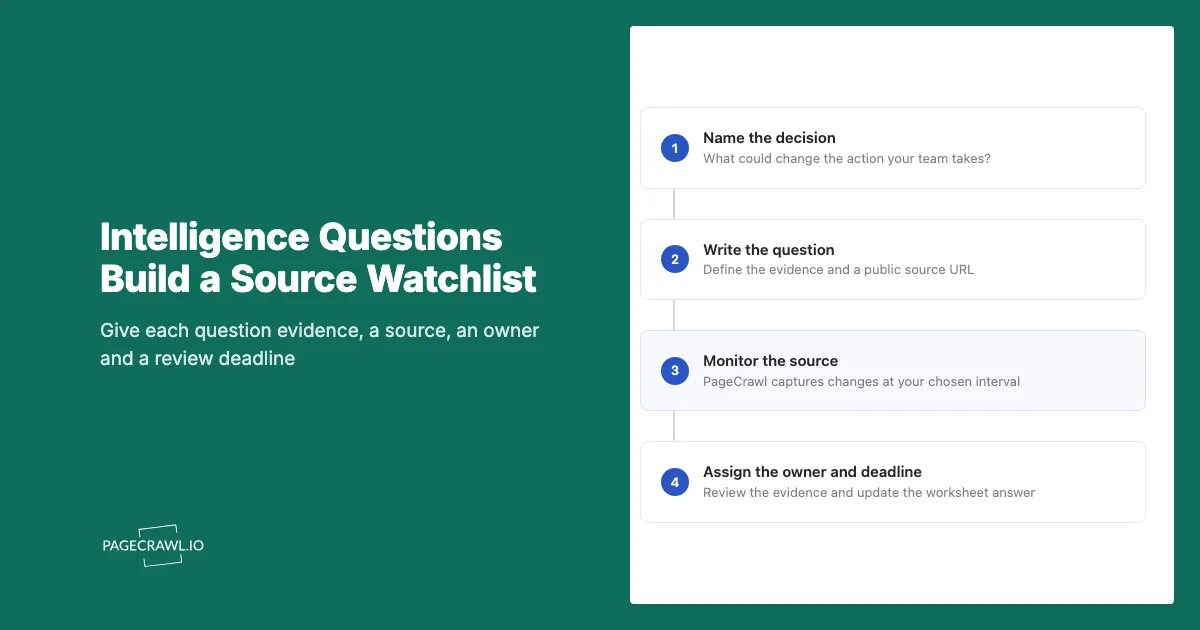
A key intelligence question gives a competitive intelligence program something specific to answer. Instead of collecting every update from a rival, you identify a decision, write the question that could change it, and choose evidence that would support an answer.
For example, a product marketer updating a sales comparison needs to know whether a named feature is still included in a competing plan. A homepage redesign might be irrelevant. A changed row in the plan table needs review. Both are website changes, but only one answers that question.
This guide includes 12 illustrative questions mapped to six real public pages. Download the Excel worksheet, which includes a blank working sheet and worked examples. For another spreadsheet application, use the examples CSV and blank CSV. The examples are collection plans, not findings about those companies.
What makes a good key intelligence question?
A good key intelligence question names something observable that could change a business decision. It has a defined subject, evidence to inspect, a source, an owner, and a review deadline. Someone should be able to explain both how they would answer it and what they would do differently after learning the answer.
Consider three versions of the same concern:
| Question | Why it needs work or is useful |
|---|---|
| What is our competitor doing? | It has no boundary or decision attached. |
| Is our competitor moving upmarket? | It is a useful hypothesis, but one page edit cannot establish intent. |
| Did the enterprise page add a named industry or change the service commitments we compare? | It identifies evidence a reviewer can inspect and a comparison they may need to update. |
The third question can start a review. It does not establish that an entire business strategy changed. The reviewer may need pricing, product documentation, customer interviews, or other evidence before drawing that conclusion.
Write the decision first. "Should we revise the entry-plan comparison before next month's campaign?" gives the collection a purpose. The corresponding question might be: "Did the published price or included usage change for the plan and billing period we compare?"
If no possible answer would change the decision, remove the question from the active list. A smaller list with accountable reviewers is easier to maintain than an extensive catalogue nobody reads.
How do intelligence topics, questions, and metrics differ?
An intelligence topic defines the area you want to understand, such as competitor packaging. A key intelligence question defines what you need to establish within that area. A metric measures a specified quantity. Connect them through the decision they support, while keeping observations about a source separate from conclusions about a competitor.
| Level | Example |
|---|---|
| Topic | Entry-level product packaging |
| Decision | Whether to revise our comparison for small teams |
| Question | Did the competing plan's published feature limits change? |
| Evidence | The relevant plan-table row under the same billing and regional settings |
| Internal metric | Number of comparison claims awaiting review |
Counting detected website changes does not answer the packaging question. A page could change ten times because of promotions or navigation while the included features stay the same. Conversely, one changed footnote might alter the comparison materially.
Use the competitive intelligence sources guide to find possible evidence. Use this worksheet to decide which sources deserve an ongoing place in your program.
What are useful examples of key intelligence questions?
Useful questions connect pricing, product availability, or market positioning to a specific review task. The examples below pair each question with a public source and the evidence to inspect. They illustrate how to design collection. They do not assert that a company changed its prices, features, positioning, or partner program.
The six source pages were checked for this resource on November 8, 2026. Their content can change. Verify the page, the relevant section, and the captured result when configuring your own monitors.
Pricing and packaging
| Question | Decision it supports | Source and evidence |
|---|---|---|
| Did the published team-plan price change? | Recheck our entry-plan comparison. | GitHub pricing: same plan, currency, billing period, and seat count. |
| Did a feature move between plan tiers? | Review our feature comparison. | GitHub's plan table: feature name and the column that includes it. |
| Did the monthly versus annual offer change? | Revise a matched-cost example. | Slack pricing: billing choice, regular price, and promotional conditions. |
| Did free-plan limits change? | Review our free-plan positioning. | Slack's plan descriptions: published retention, usage, and integration limits. |
Two questions can share a source. Keep both worksheet rows when they serve different decisions, but avoid creating duplicate monitors unless each needs different capture or alert settings. For pricing tables, preserve the surrounding plan labels and conditions rather than collecting an isolated number.
Product releases and availability
| Question | Decision it supports | Source and evidence |
|---|---|---|
| Was a relevant feature released or moved to preview? | Update the product comparison after verification. | GitHub Changelog: announcement, availability stage, and linked documentation. |
| Was a relevant capability retired? | Check whether a comparison still describes an available feature. | GitHub Changelog: retirement notice, affected capability, and effective date. |
| Was a capability announced for a new market? | Review the regional feature matrix. | Shopify Changelog: named country, product, eligibility, and availability date. |
| Did an update affect the workflow we compare? | Prepare a focused product review. | Shopify Changelog: release description and linked setup or eligibility documentation. |
Read the linked announcement before updating a claim. An item in a release index can announce a private preview, a limited rollout, or a feature available only to a particular customer group. The headline alone may not answer the question.
Positioning and partner programs
| Question | Decision it supports | Source and evidence |
|---|---|---|
| Did the enterprise page emphasize a different buyer? | Review our enterprise messaging. | Shopify Enterprise: headline, named audience, and repeated use cases. |
| Did enterprise service or support wording change? | Recheck a sales objection response. | Shopify Enterprise: service description and linked scope or eligibility terms. |
| Did partner opportunities or eligibility wording change? | Review the partner-program comparison. | Shopify Partners: partner categories and linked program terms. |
| Did the partner page add a new service category? | Review the agency offer map. | Shopify Partners: named category and its supporting documentation. |
These questions start with public claims. They cannot establish a company's revenue mix, customer satisfaction, or private roadmap. Keep those unanswered questions visible and assign an appropriate research method, such as an authorized customer interview, instead of treating a website summary as a complete answer.
How do you use the KIQ worksheet?
Start on the worksheet's Your questions tab with one upcoming decision and the question that could change it. Add the evidence, source URL, check interval, review interval, owner, and decision date. After inspecting a capture, record the answer with its evidence link and review date. Leave unresolved answers explicitly unconfirmed.
The workbook separates examples from your active work. The examples leave owners, answers, and review dates empty because no review has been completed on your behalf. Their daily checks and weekly reviews are illustrative starting points, not recommendations for every decision.
Use the status dropdown consistently:
- Unreviewed: the question has not yet received a documented answer.
- Confirmed: the linked evidence supports the recorded answer within its stated scope.
- Unconfirmed: the available evidence leaves a material question open.
- Source unavailable: the source could not be inspected or captured successfully.
- Retired: the question no longer supports an active decision.
A confirmed answer can be "No relevant change found in the captures reviewed." Include the observation period and limitations. An inaccessible source cannot support that answer. A successful capture also does not prove that no brief change happened between checks.
Put one person's name in Owner. A department name makes handoff ambiguous. Put any backup reviewer and unresolved follow-up in the answer field alongside the evidence link. Use Decision due for the actual business deadline, which may differ from the next routine review.
How do you turn questions into PageCrawl monitors?
Create a monitor for each distinct source and capture the section that contains your evidence. Configure its check schedule and alert destination, then inspect the first captured result before relying on it. Keep the worksheet question alongside the monitor's purpose so a reviewer understands why the next detected change needs attention.
- Choose your sources. The source URL list contains the six unique pages used in the examples, one per line. Replace them with sources relevant to your competitors before using the list. It contains URLs only, not owners, schedules, or monitoring instructions.
- Add a source. Use Track New Page for a single URL. For several sources, the bulk-add options accept a pasted URL list or a file. Configure the monitoring settings separately.
- Select the evidence. For a plan table, include plan names, prices, and the conditions needed to interpret them. For a release index, capture the entries that lead to the detailed announcements. If one section cannot answer the question, add the supporting source to the worksheet.
- Describe what matters. A text monitor's AI focus could say: "Prioritize changes to plan names, feature inclusion, usage limits, and regular or promotional pricing. Ignore navigation edits." Tailor this to the question and validate the result. See AI-powered change detection.
- Set the schedule and destination. Route the relevant changes to the owner and select a frequency within the plan's check budget. Use labels to connect monitors to the questions they support.
- Review the baseline. Verify that the captured section contains the intended evidence. Record an initial answer and source capture before treating later differences as meaningful.
A pricing question often needs text around the number. If every tracked element in a monitor is numeric, PageCrawl does not generate an AI summary or importance score for that monitor. Choose the capture that answers the question rather than expecting a numeric value to explain packaging conditions.
How often should you check sources and review answers?
Choose the collection interval from the delay your decision can tolerate and the checks available. Choose the human review interval from the decision deadline and reviewer capacity. These are separate schedules. An hourly monitor can feed a weekly review, while an urgent captured change may need attention before that routine meeting.
The example workbook uses 1,440 minutes between checks and seven days between reviews. Six distinct sources checked daily over 30 days imply about 180 scheduled checks. Twelve question rows do not imply twelve monitors when pairs use the same source and capture settings.
At hourly frequency, those six sources imply about 4,320 scheduled checks over 30 days. Initial checks, retries, and your actual settings can affect usage. Use the check-scheduling help when configuring the plan, and leave room for sources that require a different cadence.
Alerts are sent after a scheduled check detects a qualifying change. Processing, failed checks, and delivery can extend the time before a reviewer sees it. A short-lived update may appear and disappear between successful checks. For a decision with a strict deadline, include a direct source review close to that deadline.
What should happen after a relevant change is detected?
Open the captured difference, compare it with the question's evidence requirement, and check any linked conditions before revising the answer. Record what the source establishes, what remains uncertain, and which decision needs attention. Then update the relevant comparison, briefing, or product-review task through your team's normal approval process.
For an illustrative packaging change, the sequence might be:
- A plan-table row changes from "included" to "add-on."
- The reviewer confirms the same plan, region, and billing setting were captured.
- Linked documentation explains whether the change affects new customers, existing customers, or both.
- The worksheet answer records the supported scope and links the capture and documentation.
- The owner proposes a specific update to the sales comparison and records any remaining uncertainty.
The example describes a review process, not an event at one of the companies in the worksheet. It shows why a change alert is a reason to inspect evidence before publishing a claim.
For distribution, the weekly competitor watch report provides a useful briefing structure. For the final sales artifact, use the battlecard template. Keep the evidence link and review date close to the claim so the next owner can check its basis.
Start with one question tied to a real decision. Once the source, capture, and review path work, add the next question that someone has capacity to own.