When us-east-1 had its major network device impairment incident in December 2021, the first reports on Twitter appeared minutes before AWS's status page acknowledged the issue. The status page eventually turned red, and stayed red, for hours. Teams that were monitoring the status page directly saw the acknowledgment on their next check after the green-to-yellow flip. Teams that relied on AWS Health Dashboard email subscriptions saw it well after that. By then, on-call engineers had been triaging customer-reported impact for the better part of an hour.
The first signal that a cloud provider is degraded is almost never the provider's own status page. Customer reports on Twitter, Hacker News, and Reddit routinely arrive well before the official status banner flips from green to yellow. But once it does flip, you want the shortest possible delay before your team knows, especially if the affected service is on the critical path of your application. The provider's own subscription mechanisms (the AWS Health Dashboard, GCP RSS, Azure email) work, but they are coarse, lag the page update, and force you to triage which alerts are actually relevant to your stack.
The big four at least offer something to subscribe to. Most of the other vendors on your dependency list do not: regional hosts, payment processors, telcos, university IT portals, and internal platform dashboards publish a page and stop there. This guide covers how AWS, GCP, Azure, and Cloudflare publish status, why their native subscriptions miss the mark, how to set up a single cross-provider monitor that surfaces region-specific incidents shortly after the official acknowledgment, and how to alert on a status page that has no subscribe button at all.
Quick Setup
Pick the providers and regions you depend on and preview the incident alerts you would receive when new incidents post.
Why monitor cloud provider status pages directly?
Direct page monitoring gives you finer granularity, faster awareness, cross-provider aggregation, and a searchable incident history. Cloud provider native status pages do support email and RSS, but they suffer from well-known limitations that compound when you operate on multiple providers.
Subscription Granularity Is Coarse
Provider subscriptions are typically all-or-nothing per service. You can subscribe to every AWS service in every region, or to specific services that produce a noisy stream when you only care about your two regions. There is no clean middle ground. Page monitoring lets you filter at the alert layer.
Status Page Posts Lag the Actual Incident
Status updates often lag the actual incident by 20 or more minutes. The status page is the official acknowledgment, and acknowledgment is typically the last thing in the incident-response chain. Monitoring the page gives you the earliest unambiguous signal that the provider has acknowledged the issue.
Multi-Cloud Aggregation Is Painful
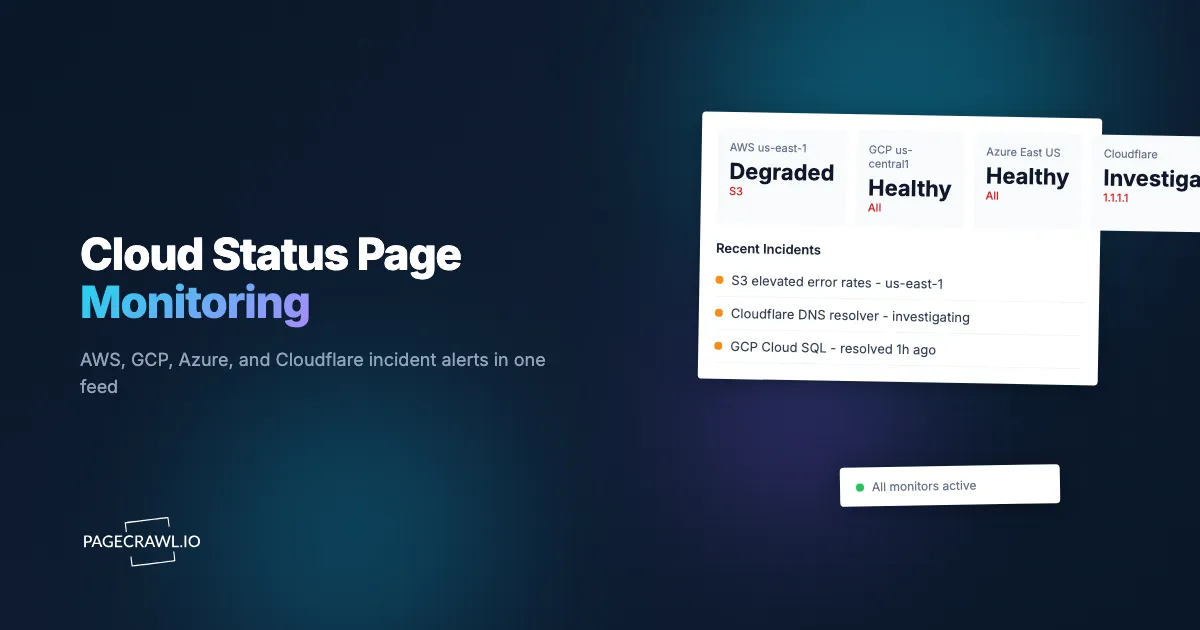
Teams running on two or three providers want one alert stream, not three different inboxes. A single PageCrawl folder containing AWS, GCP, Azure, and Cloudflare alerts produces a unified incident channel that matches how on-call rotations actually work.
History and Correlation Are Limited
Provider status pages do not retain long history. Monitoring them yourself builds a searchable archive of incidents that you can correlate against your own metrics, customer reports, and architectural reviews.
How are cloud status pages published?
Each major provider publishes a public status URL with a regional service breakdown: the AWS Health Dashboard, Google Cloud Service Health, Azure status, and Cloudflare status:
https://health.aws.amazon.com/health/status
https://status.cloud.google.com/
https://azure.status.microsoft/en-us/status
https://www.cloudflarestatus.com/
https://status.digitalocean.com/
https://status.fastly.com/
Each page renders the current state of every service by region. Most also expose RSS or JSON for individual services, though the RSS feeds often lag the page itself by minutes. The CloudFlare status page (Statuspage.io-hosted) is the most structured; AWS Health is the most fragmented.
For multi-cloud setups, the four major-provider pages plus your CDN and any specialty services (DataDog, Stripe, Twilio) cover the vast majority of typical SaaS dependency surfaces.
How do you monitor a status page that has no notifications?
Point a tracked element at the part of the page that carries the status and let the monitor become the notification. A keyword element that flips to yes when "degraded" or "outage" appears, or a text element scoped to a single component row, turns any status page into an alert stream, including one with no subscribe button, no feed, and no API.
This is the common case once you leave the top ten providers. Some pages offer a subscribe form that only posts to X. Some hide subscriptions behind a vendor account you do not have. Some send email so rarely that nobody on the team trusts it any more. In every one of those cases the page itself is still the authoritative surface, and a page is something you can monitor directly.
Pick the tracked element that matches the question you want answered:
| What you want to know | Tracked element | How to configure it |
|---|---|---|
| Anything on the page left the operational state | Keyword (yes/no) | Keywords: degraded, partial outage, major outage, service disruption, increased error rates. The element reads no while the page is clean and flips to yes on the first check after any of those words appears |
| The all-clear wording disappeared | Keyword (yes/no) | NOT:All Systems Operational, which flips to yes on the first check where that exact phrase is no longer on the page. Useful for pages whose incident vocabulary you cannot predict |
| One specific service in one specific region | Text | A CSS selector on that component's row (the EC2 us-east-1 row, the Workers row). The diff reads Operational to Degraded Performance and nothing else on the page can produce a change |
| A new incident post was published | Feed | The page's RSS or Atom incident history where it has one. Each new incident arrives as a new item rather than as a page-wide diff |
| A structured status value | JSON | Statuspage-hosted pages expose a JSON summary at /api/v2/summary.json. A JMESPath expression such as components[?name=='Workers'].status extracts one component's state and nothing else |
| The vendor publishes no status page at all | HTTP status | Monitor a documented health or API endpoint and alert when the response code changes. Not a substitute for a status page, but it beats waiting for a customer to tell you |
Two practical notes. The keyword element is the workhorse here: it reads the whole rendered page, so it works on a JavaScript-rendered dashboard where you cannot write a stable CSS selector, and its history renders as a clean up/down strip instead of a wall of text diffs. And if the status page sits inside a vendor portal, PageCrawl can hold an authenticated session so checks see the same view you do, the same approach as monitoring a website behind a login form.
How do you keep status-page alerts from turning into noise?
Scope each monitor to the components you actually depend on, then describe in plain language what deserves an alert. A full-page monitor on a large provider dashboard changes on every timestamp refresh and every marketing tweak, which is how status monitoring earns a reputation for noise it does not deserve.
- One element per service and region, not one monitor per page. A monitor for AWS with three text elements (EC2 us-east-1, S3 us-east-1, RDS us-east-1) tells you which of the three moved. A full-page monitor tells you the page changed.
- Add one keyword element as the catch-all. Narrow selectors can miss an incident on a service you did not list. A single yes/no keyword element on the same page covers the gap without adding volume, because it only changes twice per incident.
- Describe the regions you care about. PageCrawl's AI reads the diff against your description, so "alert me about us-east-1 and eu-west-1, ignore other regions and ignore wording edits to resolved incidents" removes most of what is left. The help centre article on AI-powered change detection and smart filtering explains how the summaries and importance scores are produced.
- Set an importance threshold rather than muting. Low-scoring changes stay recorded in the monitor's history for the postmortem, they just do not page anyone at 3am.
- Route the resolved update somewhere quieter. The "all clear" post matters for the incident timeline but rarely needs to wake the on-call. A Slack channel is the right destination for it; PagerDuty is not.
Comparing Monitoring Approaches
| Approach | Cost | Latency | Cross-Provider | Best For |
|---|---|---|---|---|
| AWS Health Dashboard email | Free | 5-30 minutes after page update | AWS only | Pure-AWS shops |
| GCP RSS | Free | Variable | GCP only | Pure-GCP shops |
| StatusGator / IsDown | $50-300/month | Real-time | Multi-provider | Teams without engineering time |
| PagerDuty Status Pages | Subscription | Real-time | Configurable | Mature on-call programs |
| Internal RSS / scrapers | Free + engineering | Variable | Custom | Teams with engineering capacity |
| PageCrawl on status pages | Free tier to $80/year | 2-5 minutes | Configurable per page | Most teams, SRE rotations, multi-cloud |
StatusGator and IsDown are dedicated cross-provider status aggregators and are the right product for teams that want a turnkey solution at a higher price point. PageCrawl gives you the same kind of cross-provider coverage at lower cost, plus the option to plug status-page alerts into the same channel as your security, deployment, and API-change monitors.
Setting Up Cloud Status Monitoring in PageCrawl

Step 1: Identify the services and regions you actually use
Most teams use a small slice of each provider. Build a short list per cloud: AWS (EC2 us-east-1, S3 us-east-1, RDS us-east-1, CloudFront), GCP (Cloud Run us-central1, Cloud Storage, Firestore), Azure (App Service East US), Cloudflare (Workers, CDN). Make this list explicit before you build monitors.
Step 2: Add each provider's status page URL
For each cloud, add the main status page URL as a monitor. Status dashboards render their component tables in the browser, so the monitor reads the same table you see rather than the empty shell an HTTP-only fetch would get.
Step 3: Add one tracked element per service you listed
Use the visual selector to pick the row for each service and region from Step 1, and add a yes/no keyword element (degraded, partial outage, major outage, service disruption) on the same monitor as the catch-all. That combination is what turns "the page changed" into "S3 us-east-1 went from Operational to Degraded Performance".
Step 4: Use AI summaries to filter by region
PageCrawl's AI change summaries can be tuned to focus on specific services or regions. This converts a page-wide change into a focused alert: "S3 us-east-1 elevated error rates (was Operational)." Without AI summaries, the raw diff against a multi-page provider status table is hard to read at glance.
Step 5: Set 2-minute checks for production paths
Cloud incidents are minute-sensitive. The Ultimate plan offers 2-minute checks; for most teams Standard at 15-minute checks is the right balance of cost and latency. If you have specific high-criticality dependencies, run Ultimate.
Step 6: Route to fast incident channels
PagerDuty, a Slack incident channel, or Opsgenie are the right targets for status-page alerts, all reachable through PageCrawl's webhook integration. The on-call rotation should see the alert as soon as a check detects the page change. See our Slack alerts setup guide.
Step 7: Add upstream and downstream dependencies
Beyond the four big clouds, add Statuspage.io pages for the SaaS providers in your critical path: Stripe, Twilio, DataDog, Segment, Sentry, Auth0. A folder named dependencies-status with all of these covers most surprise-failure modes. The vendors worth the most attention in that folder are the ones with no subscription option: the regional host, the payments partner, the identity provider whose status page is a single green banner and nothing else. Give each of those a yes/no keyword element so the folder carries a uniform signal regardless of what the vendor chose to publish.
Worked Example: A Multi-Cloud SRE Setup
Take an SRE team supporting an application that uses AWS for compute, Cloudflare for CDN, and Stripe for payments. The setup:
- Add the AWS, Cloudflare, and Stripe status pages as three monitors.
- Add Cloud Run, GCP for any auxiliary services as a fourth.
- Set 2-minute checks (Ultimate plan) on all four, or 5-minute (Enterprise).
- Configure AI summaries to highlight services and regions:
us-east-1,Cloudflare Workers,Stripe API. - Route alerts to a PagerDuty incident-channel webhook.
- Configure Slack mirror to
#status-feedfor the broader team. - Add a
dependencies-statusfolder for the additional SaaS surfaces.
Total cost: Enterprise plan at $300/year covers the multi-cloud setup with 5-minute checks; Ultimate at $999/year drops latency to 2 minutes. For an SRE team protecting a production application, the cost is rounding error against the time saved on a single multi-hour incident.
What status-page patterns are worth watching for?
Six patterns carry the most signal: regional degradation, multi-region incidents, upstream dependency incidents, recovery updates, frequency clustering, and late disclosure. Each tells you something different about the provider and your architecture.
Region-specific service degradation in the regions you operate. The vast majority of provider incidents are regional; same-day awareness is region-aware awareness.
Multi-region incidents that may indicate a control-plane problem. When a provider's API or console is degraded across regions, the underlying cause is usually different from a regional data-plane issue.
Dependent service incidents in upstream providers. A CDN incident that affects your origin, a CA incident that affects your TLS issuance, an identity provider incident that affects login.
Recovery status updates that confirm your monitoring graphs are accurate. The "resolved" post is as informative as the initial incident post, because it tells you the provider considers the issue closed.
Frequency clustering for a specific service. Multiple incidents on the same service within a quarter is an architectural signal worth raising in a postmortem or capacity review.
Lateness of disclosure. Some incidents are acknowledged only after customer pressure. Monitoring the page directly catches the acknowledgment on the first check after it lands, which can be informative on its own.
Combining Status Monitoring With Other Signals
The full value of status-page monitoring shows up when you pair it with other observability and security data.
Combine with CISA KEV. Pair the status monitor with our CISA KEV monitoring guide. Some provider incidents are coincident with newly disclosed CVEs in provider infrastructure.
Combine with SaaS API deprecation tracking. Use our SaaS API deprecation monitor for the same vendors. Status incidents and deprecation timelines together produce a complete vendor-reliability picture, which is the argument for running API and documentation change monitoring beside your status monitors.
Combine with Kubernetes release feeds. Our Kubernetes CVE monitor tracks the orchestration layer; status pages cover the provider layer. Together they give a complete platform-reliability view.
Combine with cloud pricing changes. Pair with our AWS and GCP pricing alerts guide. Status incidents sometimes correlate with infrastructure changes that also affect pricing or quotas.
Use Cases
SRE and platform teams. Cloud status alerts on a frequent check cadence arrive ahead of most customer escalations and inform incident communications. For teams running production on AWS, GCP, or Azure, this is the lowest-cost source of provider-side incident awareness.
Multi-cloud architectures. One PageCrawl folder covers AWS, GCP, Azure, and Cloudflare in a single alert stream. Multi-cloud teams that have been juggling multiple subscription mechanisms find the unified stream a real workflow improvement.
Customer support and ops. Early awareness of upstream incidents helps prepare customer status communications before the support tickets arrive.
Architecture review. Historical monitoring of provider incidents builds a real picture of where your most-used services have struggled. Incident frequency by service-region is a useful input to architectural decisions.
Compliance and SLA reporting. Documented monitoring of upstream incidents supports SLA-related claims and credit calculations, and timestamped web archives turn each captured status page into durable proof of what the provider said and when. For organizations that pass through cloud-provider SLAs to customers, this is direct evidence.
Vendor management. Status incidents feed into renewal conversations. A provider with frequent uncommunicated incidents is a procurement signal.
Frequently Asked Questions
How quickly does PageCrawl detect a status page change? At 2-minute checks (Ultimate), within 2 minutes of the page update. At 5-minute checks (Enterprise), within 5. The bottleneck is not detection but the provider's own time-to-publish.
Does this replace the provider's native subscription? No, but it typically reduces reliance on it. Many SREs run both: native subscription as backstop, PageCrawl for primary alerting with cross-provider unification.
What about RSS feeds? Most provider RSS feeds lag the page itself by several minutes. The page is the authoritative surface; monitoring the page directly gives the fastest signal.
Can I get separate alerts for separate services? PageCrawl alerts on any page change; AI summaries describe which service and region changed. For per-service routing, set up filtering downstream in your incident-routing system.
What if the status page has no email or RSS subscription at all? Monitor the page itself. A yes/no keyword element on words like degraded and major outage, or a text element scoped to one component row, gives you an alert stream on a page whose owner never built one. This is the normal setup for smaller vendors, regional providers, and internal platform dashboards.
Can I monitor a status page that lives inside a vendor portal? Yes. Configure the monitor with the credentials for that portal and checks run against the signed-in view, the same as any other page behind a login.
What if a vendor publishes no status page whatsoever? Monitor a documented health or API endpoint with an HTTP status element and alert on a response-code change. It is a weaker signal than a real status page, but it is a signal you own rather than one you wait for.
Will I get noise from minor status-message edits? AI summaries help distinguish a status-icon change (operational to degraded) from a minor message edit. Most teams find the signal-to-noise acceptable with default settings.
Do I need Ultimate for cloud status monitoring? Only if minute-level latency is critical. Many production teams run Enterprise at 5-minute checks; the additional 3 minutes rarely materially changes incident response.
Choosing your PageCrawl plan
PageCrawl's Free plan lets you monitor 6 pages with 220 checks per month, which is enough to validate the approach on your most critical pages. Most teams graduate to a paid plan once they see the value.
| Plan | Price | Pages | Checks / month | Frequency |
|---|---|---|---|---|
| Free | $0 | 6 | 220 | every 60 min |
| Standard | $8/mo or $80/yr | 100 | 15,000 | every 15 min |
| Enterprise | $30/mo or $300/yr | 500 | 100,000 | every 5 min |
| Ultimate | $99/mo or $999/yr | 1,000 | 100,000 | every 2 min |
Annual billing saves two months across every paid tier. Enterprise and Ultimate scale up to 100x if you need thousands of pages or multi-team access.
At an engineering hourly rate, Standard at $80/year pays for itself the first time you catch a breaking API change, a deprecated endpoint, or a silent config change before it takes down production. 100 monitored pages is enough to cover the changelogs and docs of every third-party API your stack depends on. Enterprise at $300/year adds 5-minute checks and 500 pages. All plans include the PageCrawl MCP Server, which plugs directly into Claude, Cursor, and other MCP-compatible tools. Developers can ask "what changed in the Stripe API docs this month?" and get a summary pulled from your own monitoring history. AI assistants can create monitors through conversation on every plan, including Free, turning your tracked pages into a living knowledge base instead of a pile of alert emails.
Getting Started
Add the four major cloud provider status URLs to PageCrawl on a 5-minute schedule. Create a free account, route alerts to your incident channel, and the next cloud incident will arrive in your channel within minutes of the provider posting.
Once basic cross-provider coverage is in place, expand to upstream SaaS dependencies (Stripe, Twilio, DataDog, Auth0) and any specialty providers in your critical path. The Enterprise plan at $300/year covers a serious multi-cloud setup; Ultimate at $999/year drops latency further for teams where every minute matters. For SRE teams running production on multiple providers, the cost is the cheapest line item on the observability bill.