AWS has cut storage pricing many times over the years, often quietly and only in specific regions. Each time, the change appears on the service's pricing page first, days before the formal blog post and weeks before it shows up in most customers' AWS cost reports. Customers with a daily monitor on the S3 pricing page see a cut on day one, recalculate their archive-storage forecasts, and (in some cases) renegotiate reserved-capacity commits before they auto-renew at the old rates.
Cloud providers change pricing more often than most teams realize. Per-region price adjustments, new instance generations, data egress changes, and AI service rate adjustments all show up first on the public pricing page, usually without an email. Provider blog posts and AWS What's New typically follow days later. For finance, FinOps, and platform teams, a same-day alert on a price change to a service you spend on is the difference between a controlled forecast update and a surprise on next month's invoice.
This guide covers how AWS, GCP, and Azure publish pricing, the patterns worth watching, and how to set up a continuous monitor that surfaces price changes within hours of publication.
Quick Setup
Pick your cloud provider and service. PageCrawl will monitor that pricing page and alert your FinOps channel when rates change.
Why monitor cloud pricing pages?
Same-day awareness of price changes is one of the highest-leverage signals available to FinOps and platform engineering. Cloud pricing is opaque enough that even the providers themselves struggle to summarize changes consistently, and many changes never get announced at all.
Per-Region Adjustments Often Miss Customer Awareness
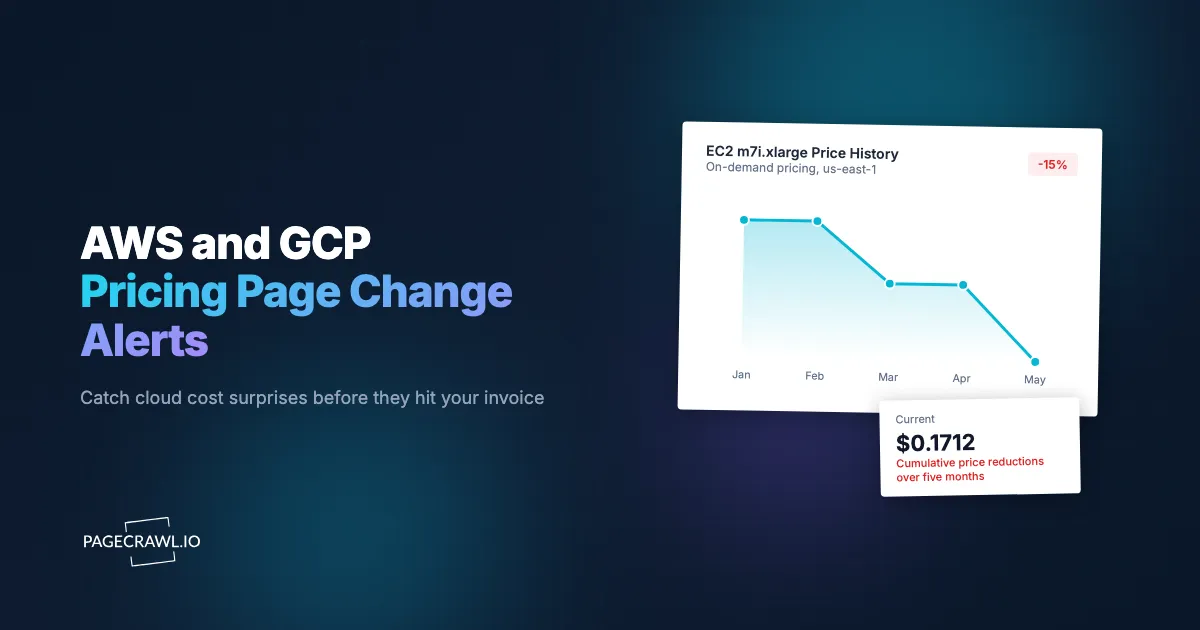
Many price changes apply to specific regions only, which means provider-wide announcements (where they exist) often miss the regions you actually use. A 15% S3 cut in eu-west-1 with no change elsewhere may never reach your inbox unless you are monitoring the page.
New Instance Generations Reshape the Cost Curve
New EC2, Compute Engine, and Azure VM families typically launch at different price points than the previous generation. Older families sometimes get price-cut in response, which is the optimization opportunity. Catching the launch and the response together informs your reserved-instance and committed-use strategy.
Egress and Inter-AZ Pricing Changes Are Painful
Some of the most painful cost changes are on data transfer, not compute. AWS, GCP, and Azure all charge for inter-AZ and inter-region transfer at rates that can swing real cost for data-heavy workloads. Egress pricing pages change less frequently than compute, but the impact when they do is disproportionate.
AI Service Rate Cuts Are Frequent
Foundation model pricing on Bedrock, Vertex, and Azure OpenAI is moving fast; cuts are common and often passed through to customers as soon as they are published. For teams running production AI workloads, per-token rate changes affect unit economics directly.
Free-Tier and Quota Changes Affect Dev and Test
Free-tier limits and free-tier expirations are quietly adjusted from time to time. Dev and test environment cost is sometimes more affected by free-tier changes than by retail-rate changes.
How do cloud providers publish pricing?
Each provider publishes service pricing at predictable URLs under its pricing hub (AWS, Google Cloud, Azure):
https://aws.amazon.com/ec2/pricing/on-demand/
https://aws.amazon.com/s3/pricing/
https://aws.amazon.com/bedrock/pricing/
https://cloud.google.com/compute/all-pricing
https://cloud.google.com/storage/pricing
https://cloud.google.com/vertex-ai/pricing
https://azure.microsoft.com/en-us/pricing/details/virtual-machines/
https://azure.microsoft.com/en-us/pricing/details/cognitive-services/openai-service/
Each page renders the current pricing for a specific service. Changes are detected by content monitoring. AWS pricing pages typically include a region selector that loads region-specific tables client-side; PageCrawl captures the default region but you can configure a specific region by URL.
Comparing Monitoring Approaches
| Approach | Cost | Latency | Coverage | Best For |
|---|---|---|---|---|
| Manual page checks | Free | Days to weeks | Per-page effort | Awareness only |
| AWS Price List API | Free | Real-time | All services, structured | Engineering-heavy teams |
| Cloudability / Apptio / Spot.io | Enterprise contract pricing | Real-time | Comprehensive plus optimization | Enterprise FinOps programs |
| Vantage / CloudZero | Subscription | Real-time | Comprehensive | Mid-market FinOps |
| Provider blog subscriptions | Free | Days late | Major changes only | Awareness |
| PageCrawl on pricing pages | Free tier to $80/year | Hours | Configurable per page | FinOps, platform engineering, finance |
The Price List APIs from AWS, GCP, and Azure are the canonical source and the right tool for any team doing programmatic cost modeling. PageCrawl is complementary: it gives you human-readable alerts when prices change, surfaced as diffs against the prior page state, which is often more useful for triggering review than a raw API delta.
Setting Up Pricing Monitoring in PageCrawl
Step 1: Pull your cloud bill and list services by spend
Pull last month's bill and list every service that represents more than 1-2% of cost. These are your monitor candidates. A typical mid-size SaaS application ends up with 8-15 services across one or two providers.
Step 2: Add the pricing page URL for each service
For each service, add the public pricing page URL to PageCrawl as a content monitor. Use full-page text mode so table cells are captured.
Step 3: For region-specific tracking, build per-region URLs
AWS and GCP support per-region URL parameters on most pricing pages. If you operate primarily in one or two regions, build region-specific monitor URLs to reduce noise from other regions.
Step 4: Daily check is enough
Pricing changes are not minute-sensitive. A daily check at the start of the business day catches changes in time for forecast updates. For AI provider pricing specifically, hourly checks may be appropriate (the cadence of model-rate cuts has been brisk).
Step 5: Route to FinOps and engineering
Alerts can go to a dedicated #cloud-pricing Slack channel for FinOps review and onward forecasting. Mirror to engineering for the services they directly run.
Step 6: Configure AI summaries
PageCrawl's AI change summaries describe the diff in plain language: "m5.large on-demand in us-east-1 reduced from $0.096 to $0.087." This is much more useful than a raw table diff.
Worked Example: A FinOps Cost-Forecasting Setup
Take a FinOps team supporting an organization with $200K/month AWS spend across compute, storage, networking, and AI services. The setup:
- Pull last month's Cost Explorer breakdown.
- Identify the 12 services that represent more than 1% of spend.
- Add 12 PageCrawl monitors, one per service pricing page.
- Set daily checks for compute and storage; hourly for AI services.
- Route to a
#finops-pricesSlack channel. - Configure AI summaries to flag specific instance types, regions, and per-token rates.
- On each alert, recalculate the affected line in the forecast model.
Total cost: Standard plan at $80/year covers the 12 monitors with room to spare. For a FinOps team responsible for forecasting accuracy, this is the cheapest credible early-warning setup.
Patterns Worth Watching For
Per-unit price changes in regions you operate. Per-region cuts are the most common pricing change and the easiest to miss without per-region monitoring.

New SKUs. New instance generations and new storage classes that may shift cost-optimal architecture choices. Often launched at a meaningful discount to the previous-generation equivalent.
Free-tier changes. Adjustments to free-tier limits or expirations that affect dev and test environments. These are routinely under-communicated.
Egress and cross-AZ changes. Can swing real cost meaningfully. AWS egress changes in 2024 were a textbook example.
AI per-token rate cuts. Bedrock, Vertex, and Azure OpenAI all cut model pricing routinely. Same-day awareness affects routing and caching decisions.
Reserved-capacity and savings-plan pricing changes. Commitment pricing changes affect the math on existing and prospective commits.
Quota and limit changes. Sometimes published alongside pricing, sometimes separate. Worth tracking in parallel.
Combining Pricing Monitoring With Other Signals
The full value of pricing monitoring shows up when you pair it with related infrastructure-cost signals.
Combine with AI provider pricing. Pair AWS/GCP/Azure pricing with our AI provider pricing monitor. Cross-provider AI pricing is the cleanest input to model-routing decisions.
Combine with cloud status pages. Use our cloud status page monitor. Some pricing changes follow infrastructure changes; correlating the two provides architectural context.
Combine with SaaS API deprecation. Our SaaS API deprecation monitor and API and documentation change monitoring cover vendor-side changes that affect cost (deprecated endpoints often force migration to more expensive replacements).
Combine with Kubernetes and container release feeds. Our Kubernetes monitor and Docker Hub monitor cover the layers that drive compute and storage cost.
Use Cases
FinOps teams. Same-day alerts feed forecast updates and showback reports. For organizations with monthly forecasting cycles, this prevents the unpleasant surprise of a 10% miss tied to an unannounced price change.
Platform engineering. Architectural choices are revisited when underlying pricing shifts. New instance generations sometimes change the cost-optimal architecture meaningfully.
Finance and procurement. Reserved-instance and committed-use discount planning benefits from same-day price awareness. Renewal timing decisions hinge on rate-curve direction.
Multi-cloud cost comparison. A monitored panel across AWS, GCP, and Azure makes ongoing cost benchmarking trivial, the same competitive intelligence monitoring pattern teams apply to rival pricing pages. Cross-provider arbitrage opportunities open and close in real time.
Pricing strategy and product teams. SaaS companies passing through cloud costs adjust margins based on upstream rate changes. Same-day awareness keeps pricing models accurate.
Consulting and advisory. Cloud cost consultants benefit from a continuously updated view of provider pricing across multiple regions and services. The monitored archive doubles as a longitudinal pricing dataset.
Frequently Asked Questions
How often do cloud providers change prices? Variable by service. Compute and storage prices change every few months; AI service prices have changed roughly monthly through 2024 and 2025. Egress pricing changes less frequently but with larger impact when it does.
Will PageCrawl detect changes inside region-specific tabs? PageCrawl captures the page state as rendered. For pages with region selectors that load via JavaScript, the default region is captured; for per-region tracking, use the URL parameter that selects the region directly.
Should I use the Price List API instead? The API is canonical and structured. PageCrawl is a complement: it gives human-readable diffs that trigger review workflows. Many FinOps teams run both: API for modeling, page monitors for alerting.
Can I monitor third-party SaaS pricing pages? Yes, the same approach works for Datadog, Stripe, Twilio, Auth0, and similar. Pricing-page diff monitoring is a general-purpose cost-management capability.
How do I avoid noise from cosmetic page changes? Use AI summaries; they distinguish substantive numeric changes from layout adjustments. For absolute precision, narrow the monitor to a CSS selector targeting the pricing table itself.
Do I need a paid plan? The Free plan supports 6 monitors at daily checks, enough for a small FinOps setup. Standard at $80/year covers 100 pages, which is enough for most multi-service, multi-cloud organizations.
Choosing your PageCrawl plan
PageCrawl's Free plan lets you monitor 6 pages with 220 checks per month, which is enough to validate the approach on your most critical pages. Most teams graduate to a paid plan once they see the value.
| Plan | Price | Pages | Checks / month | Frequency |
|---|---|---|---|---|
| Free | $0 | 6 | 220 | every 60 min |
| Standard | $8/mo or $80/yr | 100 | 15,000 | every 15 min |
| Enterprise | $30/mo or $300/yr | 500 | 100,000 | every 5 min |
| Ultimate | $99/mo or $999/yr | 1,000 | 100,000 | every 2 min |
Annual billing saves two months across every paid tier. Enterprise and Ultimate scale up to 100x if you need thousands of pages or multi-team access.
At an engineering hourly rate, Standard at $80/year pays for itself the first time you catch a breaking API change, a deprecated endpoint, or a silent config change before it takes down production. 100 monitored pages is enough to cover the changelogs and docs of every third-party API your stack depends on. Enterprise at $300/year adds 5-minute checks and 500 pages. All plans include the PageCrawl MCP Server, which plugs directly into Claude, Cursor, and other MCP-compatible tools. Developers can ask "what changed in the Stripe API docs this month?" and get a summary pulled from your own monitoring history. AI assistants can create monitors through conversation on every plan, including Free, turning your tracked pages into a living knowledge base instead of a pile of alert emails.
Getting Started
Pull your top 5 cloud services by spend and add their pricing pages to PageCrawl on a daily check. Create a free account, and the next price change will arrive in your FinOps channel the day it lands.
Once basic coverage is in place, expand to 12-20 services across compute, storage, networking, and AI, plus the major third-party SaaS dependencies. The Standard plan at $80/year covers a serious FinOps setup with room for sibling monitors. For organizations with meaningful cloud spend, the cost recovers itself the first time a region-specific cut leads to a same-day forecast update or a renegotiated commit.