When CVE-2024-9486 (a default-credentials issue in the Image Builder project that allowed root SSH to nodes built with the Proxmox provider) was disclosed in October 2024, the upstream Kubernetes security feed carried the advisory before most managed-Kubernetes providers addressed the impact in their own release notes. Self-hosted operators saw the advisory the same morning. Teams running EKS, GKE, or AKS found out on different days depending on each provider's release-note cadence, and some had to dig through release notes for the patched control-plane version before they could confirm they were no longer affected.
Kubernetes ships patch releases for the three supported minor versions on a regular cadence (typically monthly), plus out-of-band patches for security disclosures. The project publishes the schedule and every tagged patch on the Kubernetes releases page. Each release brings CVE fixes, behavior changes, occasional API deprecations, and notes about specific component updates. Most platform teams find out about a relevant Kubernetes patch days after it ships, when it lands in their managed control plane or is flagged by a vulnerability scanner. By then, the question is not "should we patch?" but "why didn't we know yesterday?"
This guide covers how the Kubernetes project publishes releases and security advisories, what to watch, and how to set up a continuous monitor that surfaces patches and CVEs on the first check after they land upstream.
Quick Setup
Pick the minor versions you run and preview the patch-release and CVE alerts you'd receive.
Why should you monitor Kubernetes upstream?
Because managed Kubernetes (EKS, GKE, AKS) follows upstream with a lag. Knowing what is in the upstream patch before it reaches your cluster lets you plan the rollout, brief application teams about behavior changes, and answer "are we affected?" on the day the advisory publishes rather than the week after.
CVE Patches Sometimes Ship Out-of-Band
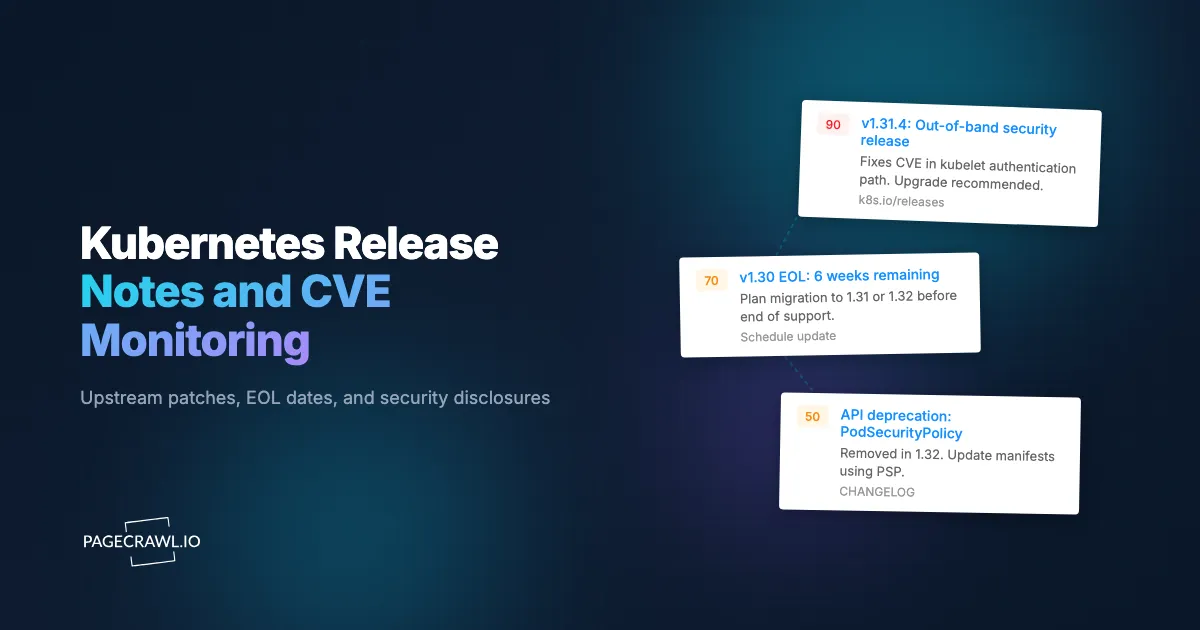
The Kubernetes security committee occasionally publishes out-of-band patches for critical disclosures. These are not on the regular monthly cadence and warrant priority cluster updates. Same-day awareness from the official CVE feed is the cleanest signal.
Deprecation Timelines Land in CHANGELOG First
API deprecation announcements appear in CHANGELOG before they break workloads, which is why API and documentation change monitoring belongs beside your CVE feed. Teams that read the CHANGELOG the day it ships have the full deprecation window to migrate; teams that wait for the API to actually be removed have a much harder migration.
Behavior Changes Are Documented Quietly
Behavior changes in scheduler, kubelet, and admission controllers are documented in release notes, often as a short paragraph deep in the file. These changes can affect application behavior subtly and are easy to miss without active monitoring.
EOL Dates Drive Upgrade Planning
End-of-life dates for minor versions drive upgrade planning. The release schedule is published in advance, but actual EOL announcements (and any schedule shifts) appear on the releases page. Same-day awareness lets you plan the upgrade with adequate lead time.
Component Updates Matter for Compliance
Kubernetes releases bundle specific versions of etcd, CoreDNS, and container runtime support. Compliance audits sometimes need evidence of which component versions are in production at a given time; the release notes are the authoritative source.
Which Kubernetes pages should you monitor?
Monitor four upstream sources: the releases page, the GitHub releases list, the official CVE feed, and the CHANGELOG file for each minor version your clusters run, which together give you the same release notes and changelog monitoring coverage you would want for any dependency. Managed-Kubernetes users should add their provider's version or release-notes page alongside them. All of them sit at stable URLs:

https://kubernetes.io/releases/
https://github.com/kubernetes/kubernetes/releases.atom
https://kubernetes.io/docs/reference/issues-security/official-cve-feed/
https://raw.githubusercontent.com/kubernetes/kubernetes/master/CHANGELOG/CHANGELOG-{version}.md
The official Kubernetes CVE feed lists confirmed advisories with affected versions and remediation. The releases page lists each tagged release with links to the CHANGELOG, and the kubernetes/kubernetes releases on GitHub carry the same tags with the raw notes attached. Their Atom feed (releases.atom, tracked with Feed mode) reports each one as an item, including alpha, beta, and release candidate builds such as v1.38.0-alpha.1, so expect those alongside patch releases. The per-version CHANGELOG file documents every patch release in detail.
For managed-Kubernetes users, the provider's own release notes page complements upstream:
https://docs.aws.amazon.com/eks/latest/userguide/kubernetes-versions.html
https://cloud.google.com/kubernetes-engine/docs/release-notes
https://learn.microsoft.com/en-us/azure/aks/supported-kubernetes-versions
Comparing Monitoring Approaches
| Approach | Cost | Latency | Coverage | Best For |
|---|---|---|---|---|
| GitHub watch on kubernetes/kubernetes | Free | Real-time | Everything, very noisy | Power users |
| Kubernetes mailing lists | Free | Hours | Major announcements | Awareness, not detail |
| Vulnerability scanners (Trivy, Grype) | Free | After image scan | Detection, not publish | Defensive scanning |
| Wiz / Aqua / Snyk Container | Enterprise contract | Real-time | Comprehensive | Mature container security |
| Managed-provider release notes | Free | Days after upstream | Provider-specific | Single-provider shops |
| PageCrawl on upstream pages | Free tier to $80/year | Hours | Configurable per page | Platform teams, multi-cluster operators, compliance |
The official Kubernetes channels (mailing lists, GitHub releases) are authoritative and the right source of truth. PageCrawl gives you a clean alert into the same Slack channel as your other security monitors, which is often the operational improvement that matters.
Setting Up Kubernetes Monitoring in PageCrawl
Step 1: Add the releases page and CVE feed
Add https://kubernetes.io/releases/ and the official CVE feed URL to PageCrawl as content monitors. New rows mean either a new release or a new advisory.
Step 2: Add the CHANGELOG for the versions you currently run
Pin a monitor to the CHANGELOG file of each minor version your clusters run. Any update to those CHANGELOG files is a new patch release for your line. Use the raw GitHub URL for cleaner diffs, for example https://raw.githubusercontent.com/kubernetes/kubernetes/master/CHANGELOG/CHANGELOG-1.34.md with Full Page Text; the newest patch release sits at the top of the file. Pasting the file's GitHub page into Track New Page sets up the same raw-text monitor. The help centre guide to monitoring GitHub and GitLab repositories covers raw file addresses and the release and commit feeds.
Step 3: Differentiate check frequency by source
Use daily checks for the releases page; hourly checks for the CVE feed. Out-of-band security releases warrant the faster cadence. For very high-assurance environments, 15-minute checks on the CVE feed are appropriate (Standard plan).
Step 4: Pair with managed-cloud release pages
Add the EKS, GKE, or AKS release notes page as a sibling monitor to see when the upstream patch reaches your managed environment. Together with the upstream monitor, this gives you the full picture from disclosure to managed availability.
Step 5: Configure notifications
Route security-feed alerts to a #k8s-security Slack channel with on-call paging. Release-notes alerts can go to a #platform-engineering channel for next-day review. See our Slack alerts guide, and the help-centre walkthrough for sending change notifications to a Slack channel if you need the webhook steps.
Step 6: Enable AI summaries
PageCrawl's AI summaries describe the new entry in plain language: "Kubernetes 1.30.5 patch release; addresses CVE-2024-xxxxx affecting kubelet on 1.28+." This is much more useful than a raw CHANGELOG diff. The help centre explains what the model reads and how to read its output in AI-powered change detection and smart filtering.
Worked Example: A Multi-Cluster Platform-Team Setup
Take a platform team running production clusters on EKS (1.30, 1.29) and a self-hosted cluster on 1.31. The setup:
- Add the upstream releases page, CVE feed, and three per-version CHANGELOG files as five monitors.
- Add the EKS release notes page as a sixth monitor.
- Set daily checks on releases and CHANGELOGs; hourly on the CVE feed.
- Route CVE alerts to
#k8s-securitywith PagerDuty webhook; route release alerts to#platform-engineering. - Pair with our CISA KEV monitor and Docker Hub monitor for complete container-stack coverage.
Total cost: Standard plan at $80/year. For a platform team responsible for cluster security and upgrade planning, the cost is rounding error against the cost of a delayed CVE response.
Patterns Worth Watching For
New CVEs affecting your running minor version. Top-priority signal. The official feed lists affected versions explicitly.
Out-of-band releases. Often address active security issues. Worth treating as default-priority for cluster updates.
API deprecation warnings. In release notes, deprecation of a Beta or Alpha API is the early signal that the API will be removed in 1-3 minor versions.
EOL announcements. For minor versions you operate, EOL announcements drive upgrade planning. Same-day awareness gives full lead time.
Behavior changes in scheduler or kubelet. Often documented in release notes as short paragraphs that are easy to miss; AI summaries surface them.
Component bumps. etcd, CoreDNS, container runtime version changes. Sometimes affect compliance scoping or compatibility with operators.
Critical fixes in storage and networking. CSI driver and CNI plugin fixes occasionally surface in release notes; relevant for teams running specific drivers.
Combining Kubernetes Monitoring With Other Signals
The full value of Kubernetes monitoring shows up when you pair it with other infrastructure-security data.
Combine with CISA KEV. Pair the K8s monitor with our CISA KEV monitoring guide. KEV additions affecting Kubernetes components warrant priority response.
Combine with Docker Hub tag releases. Use our Docker Hub monitor for base images that run inside the cluster. End-to-end visibility from image to orchestration layer.
Combine with cloud status pages. Our cloud status page monitor covers EKS, GKE, AKS control-plane incidents that may affect patch rollout windows.
Combine with Terraform provider releases. Our Terraform provider monitor tracks the providers that manage your clusters; new provider releases sometimes introduce or fix Kubernetes-specific behavior.
Who needs Kubernetes release and CVE monitoring?
Platform engineers, application owners, compliance teams, self-hosted operators, and managed-service providers all consume the same upstream feed for different reasons: patch planning, deprecation lead time, audit evidence, and answering client questions. One shared set of monitors serves all of them if alerts are routed by folder.
Platform engineering. Same-day awareness of upstream releases supports patch planning across managed and self-hosted clusters. For multi-cluster operators, this is the cleanest single source of upgrade signal.
Application teams. Deprecation alerts reach service owners before their manifests start emitting warnings. Sufficient lead time to migrate to newer API versions.
Compliance and audit teams. Documented monitoring of Kubernetes CVE feeds supports SOC 2, ISO 27001, and FedRAMP evidence. Archived monitoring history doubles as compliance evidence.
Open source operators. Self-hosted Kubernetes operators benefit from same-day awareness of upstream releases without subscribing to noisy GitHub channels.
Managed-service providers. MSPs running Kubernetes for clients benefit from same-day awareness; clients are often the first to ask "what about CVE-XXXX?"
Security researchers. Patterns in Kubernetes CVE disclosure cadence and component-update frequency are interesting research surfaces.
Frequently Asked Questions
How quickly does PageCrawl detect a new CVE? At 15-minute checks (Standard), within 15 minutes of feed update. At hourly checks (Free), within an hour. The bottleneck is the security committee's publication time, not detection.
Do I need to monitor every supported minor version? Only the ones you actually run. Three monitors covers most teams' active version surface.
What about EKS / GKE / AKS-specific advisories? Each managed provider publishes its own advisories that sometimes precede or follow upstream by days. Adding the provider's release-notes page as a sibling monitor gives complete coverage.
Can I monitor the security committee's announce list directly? The committee uses a mailing list; PageCrawl can monitor the public archive page. For absolute fastest signal, subscribe to the list directly and use PageCrawl as backstop.
Will I get noise from non-security releases? Use folders to organize: a k8s-security folder for the CVE feed (routed to on-call) and a k8s-releases folder for the release pages (routed to next-day review). AI summaries help distinguish security from routine.
Do I need a paid plan? For hourly checks on the CVE feed, yes. Standard at $80/year covers them, unlocks 15-minute checks for high-assurance environments, and supports a full multi-cloud setup. The Free plan is enough to try the releases page and a CHANGELOG on daily checks first.
Choosing your PageCrawl plan
PageCrawl's Free plan lets you monitor 6 pages with 220 checks per month, which is enough to validate the approach on your most critical pages. Most teams graduate to a paid plan once they see the value.
| Plan | Price | Pages | Checks / month | Frequency |
|---|---|---|---|---|
| Free | $0 | 6 | 220 | every 60 min |
| Standard | $8/mo or $80/yr | 100 | 15,000 | every 15 min |
| Enterprise | $30/mo or $300/yr | 500 | 100,000 | every 5 min |
| Ultimate | $99/mo or $999/yr | 1,000 | 100,000 | every 2 min |
Annual billing saves two months across every paid tier. Enterprise and Ultimate scale up to 100x if you need thousands of pages or multi-team access.
At an engineering hourly rate, Standard at $80/year pays for itself the first time you catch a breaking API change, a deprecated endpoint, or a silent config change before it takes down production. 100 monitored pages is enough to cover the changelogs and docs of every third-party API your stack depends on. Enterprise at $300/year adds 5-minute checks and 500 pages. All plans include the PageCrawl MCP Server, which plugs directly into Claude, Cursor, and other MCP-compatible tools. Developers can ask "what changed in the Stripe API docs this month?" and get a summary pulled from your own monitoring history. AI assistants can create monitors through conversation on every plan, including Free, turning your tracked pages into a living knowledge base instead of a pile of alert emails.
Getting Started
Add the Kubernetes releases page and CVE feed to PageCrawl, plus the CHANGELOG for the minor versions you run. Create a free account and the next CVE or patch will arrive in your channel the day it ships.
Once basic coverage is in place, add managed-provider release notes pages and pair with Docker Hub and KEV monitors. The Standard plan at $80/year is the right step for any platform team running production Kubernetes. For organizations operating under any compliance regime that references CVE response time, the cost is rounding error against the cost of a delayed patch cycle.