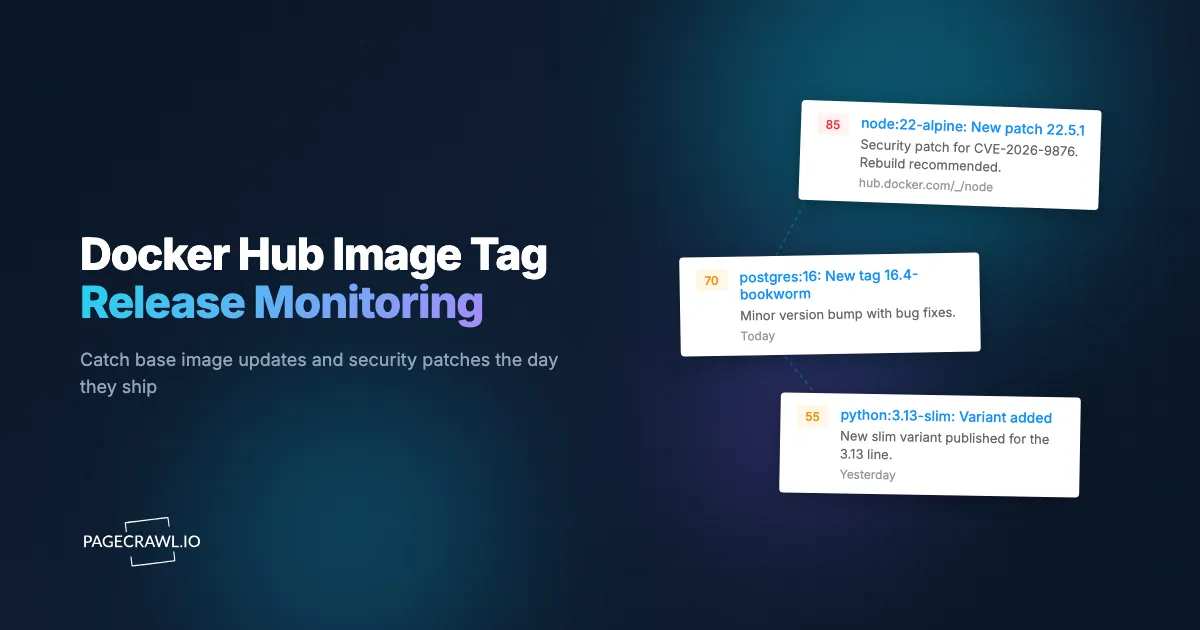
Official language and OS images frequently pick up a CVE patch within a day or two of the upstream advisory. Teams with a Docker Hub tag monitor on the image see the new digest on the next check, kick off rebuilds, and ship patched containers the same day. Teams relying on a weekly base-image refresh can run the vulnerable digest in production for another working week, weekend included.
The base image at the top of your Dockerfile is a moving target. Official images on Docker Hub for Node, Python, Ruby, Postgres, Nginx, Redis, and Alpine release new tags continually, often pushed to address security issues. Pinning to a tag is a best practice that catches major version changes, but you still need to know when a new patch tag (or digest under the same tag) is available so you can move forward intentionally. Docker Hub itself does not push notifications for tag publishes. You either rebuild on a schedule, hope your CI catches the digest change, or monitor the Tags tab yourself.
This guide covers how Docker Hub publishes tag data, what patterns matter for security and stability, and how to set up a continuous monitor that turns a new tag publish into a CI rebuild or Slack alert the same day.
Quick Setup
Type an image name (or pick a popular one) to preview new-tag and digest-moved alerts.
Why should you monitor Docker Hub tags?
You monitor Docker Hub tags because base image updates are one of the most common carriers of CVE remediation in containerized workloads, and Docker Hub sends no notification when one lands. Knowing about a new tag the day it ships is the difference between proactive and reactive patching.
Security Patches Land First as a New Tag
Security patches in official images often address CVEs that affect anything built FROM that image. The patched tag (or moved digest under an existing tag) is the carrier; everything downstream rebuilds from there.
LTS Minor Updates Matter for Stability
Long-term-support minor updates in language runtimes (Node 22.x, Python 3.13.x, Ruby 3.3.x) ship continually. Patch-level updates rarely break anything and routinely include performance fixes worth picking up.
New Major Versions Sometimes Change Defaults
New major versions of base images (Postgres 17, Node 22, Python 3.13) sometimes change defaults that affect your build. Same-day awareness lets you plan a migration before the older major reaches end of support.
Distribution-Specific Tags Update on Different Cadences
The Alpine, Slim, and Debian variants of an image update on different cadences and may include different CVE patches. Teams that standardize on a specific variant need per-variant awareness.
Digest Movement Under Stable Tags
Some images move the digest under stable tags (latest, lts) when a new patch ships. If your CI does not pin by digest, the same tag name may point to a different image week over week. Monitoring the Tags page surfaces these moves.
How does Docker Hub list image tags?
Docker Hub gives every repository a Tags tab at a stable, publicly readable URL, listing each tag with its pushed date, size, and digest, newest first. The same data is available as JSON from the v2 API path, which is the better target when you are feeding a CI or SOAR pipeline.
Each repository has a Tags tab at a stable URL:
https://hub.docker.com/_/{official-image}/tags
https://hub.docker.com/r/{user}/{repo}/tags
https://hub.docker.com/v2/repositories/{repo}/tags
The Tags page lists each tag with pushed date, size, and digest. New tags appear at the top. The v2 API endpoint exposes the same data in JSON and is preferable for SOAR or CI integration.
For multi-variant images (most official language images), tags include Alpine, Slim, Debian, and bullseye/bookworm variants under the same major-minor. The Tags page lists each variant separately.
How does tag monitoring compare to Dependabot and Renovate?
Dependabot and Renovate are dependency-update bots: they poll on a schedule and open a pull request. Tag monitoring is a publish-event detector that tells you a tag or digest moved, usually before the next bot poll. The two are complementary rather than competing, as the table below shows.
| Approach | Cost | Latency | Coverage | Best For |
|---|---|---|---|---|
| Dependabot Docker updates | Free | After release plus Dependabot polling | Per-repo PR | Routine updates, not security |
| Renovate (Docker) | Free / paid | After release plus polling | Per-repo PR | Routine updates |
| Trivy / Grype scheduled scans | Free | After image is in registry | Per-image | Scanning, not publish detection |
| Anchore / Snyk Container | Subscription | Real-time | Comprehensive | Mature container security programs |
| PageCrawl on Tags pages | Free tier to $80/year | Hours | Configurable per image | DevSecOps, platform engineering, CI integration |
Dependabot and Renovate are the right tools for opening update PRs on a schedule, and scanners such as Trivy tell you what is wrong with an image you already have. PageCrawl complements them with a publish-event alert that fires before the next Renovate poll, which is useful for security-driven workflows where same-day awareness matters.
Setting Up Docker Hub Monitoring in PageCrawl

Step 1: List your base images
Grep your Dockerfiles for FROM lines across all repos and build a list of the base images you depend on. Most organizations end up with a couple of dozen unique base images at most.
Step 2: Add each Tags page
For each base image, add the Tags page URL to PageCrawl as a content monitor, the same setup used for release notes and changelog monitoring across the rest of your stack. The full Tags page is the right target for most setups.
Step 3: Pick a check frequency
Most base images update on a daily or weekly cadence. A daily check is plenty for routine awareness. For security-critical images (Alpine, Debian, language LTS runtimes), hourly checks during patch windows give faster response.
Step 4: Webhook to CI
PageCrawl webhooks can fire a CI job that rebuilds your images with the new tag and runs your test suite, automating the upgrade-evaluation flow. This turns a publish event into a rebuild-and-test pipeline with no human intervention until the test results land. The help-centre article on sending change data to any external service with webhooks documents the payload fields you can map into your job parameters.
Step 5: Use AI summaries for change context
PageCrawl's AI change summaries describe the new tag in plain language: "New python:3.13.2-slim-bookworm tag pushed 2 hours ago, replacing 3.13.1-slim-bookworm." This is much more useful than a raw row diff. See how PageCrawl uses AI for what the summaries cover and how to read the importance scoring.
Step 6: Group by purpose
Use folders to organize: language-runtimes, databases, web-servers, infrastructure. Per-folder alerts route to the appropriate engineering team.
Worked Example: A Platform-Team Base-Image Pipeline
Take a platform team supporting 15 base images across 80+ application repos. The setup:
- List the 15 base images from a grep of all Dockerfiles.
- Add 15 Docker Hub Tags monitors.
- Set hourly checks on 5 security-critical images (Alpine, Debian, Node LTS, Python LTS, Postgres), daily on the rest.
- Configure webhooks into a Jenkins or GitHub Actions job that runs
docker pull --no-cache, rebuilds the platform's base-image catalog, runs the test suite, and opens a PR with the new digest references. - Route human-readable alerts to
#platform-imagesSlack. - Pair with our Kubernetes CVE monitor and CISA KEV monitor for full upstream-security coverage.
Total cost: Standard plan at $80/year covers all 15 monitors with frequent checks. For a platform team responsible for image hygiene across the organization, this is the cheapest credible automation.
Patterns Worth Watching For
Patch version bumps that often address CVEs. A 3.13.1 to 3.13.2 bump that includes security backports is the most common pattern.
New OS-base variants. A Debian Bookworm tag added to a previously Bullseye-only repo signals a migration window worth planning for.
Deprecation notices in the image description. Image descriptions sometimes flag upcoming tag deprecation, the same signal API and documentation change monitoring catches in vendor docs. Worth a check when a new tag lands.
New maintainer or owner for community images. Less common but relevant for non-official images. Same supply-chain awareness applies as with PyPI and npm.
Digest changes on stable tags. When a tag like lts or stable moves to a new digest, CI pipelines that pull without digest pinning are now running different code than yesterday.
Tag deletion. Occasional removal of older tags (often as part of registry cleanup) can break reproducible builds. Monitoring surfaces these so you can pull and store the affected image before it disappears.
Combining Docker Hub Monitoring With Other Signals
The full value of Docker Hub monitoring shows up when you pair it with other supply-chain and security data.
Combine with Kubernetes CVE feeds. Pair the Docker Hub monitor with our Kubernetes release notes and CVE monitor for end-to-end visibility from base image to orchestration layer.
Combine with CISA KEV. Use our CISA KEV monitoring guide. When a KEV addition matches a base image you use, prioritize that image's next tag rebuild.
Combine with PyPI and npm release monitoring. Our package release monitor covers the application-layer dependencies inside your images. Together with base-image monitoring, the picture is complete.
Combine with cloud status pages. Our cloud status page monitor covers infrastructure outages that affect container registries themselves.
Use Cases
Application engineering teams. Daily awareness of base image releases supports same-week patching cycles. Reduces the gap between upstream patch availability and production deployment.
DevSecOps. Webhook integration turns a new tag into an automated rebuild and scan, with results posted to the team channel. This is one of the cheapest ways to operationalize supply-chain hygiene.
Platform teams. Centralized monitoring of all approved base images keeps the platform image catalog current. Teams that maintain golden base images for the organization run this as standard infrastructure.
Open source maintainers. Watching the runtimes your project depends on helps set support matrix and CI expectations. New LTS minor versions often warrant CI matrix updates.
Compliance and audit teams. Documented monitoring of base image releases and rebuild cadence supports SOC 2 and FedRAMP evidence for patch management.
Security researchers. Patterns in image-update cadence across vendors are a useful research surface.
Frequently Asked Questions
How quickly does PageCrawl detect a new tag? At hourly checks, within an hour of publication. At daily checks, within 24 hours. Most platform teams find hourly checks the right balance.
Can I monitor private Docker Hub repos? Yes, with appropriate session-cookie headers configured per monitor. The page URL is the same; only the auth changes.
What about other registries (GHCR, ECR, GCR)? PageCrawl monitors any URL that returns text or JSON. GHCR and similar registries expose tag listings that can be monitored with the same approach. ECR and GCR are typically private, with auth handled via session headers.
Will webhook delivery handle bursts of releases? Yes. Some images batch-publish many tags at once (especially during major version cycles). PageCrawl delivers each detected change as it is found.
Can I get alerts on digest moves under stable tags? Yes. AI summaries flag when an existing tag points to a new digest, which is the signal that matters for CI pipelines pulling without digest pinning.
Do I need a paid plan? The Free plan supports 6 monitors at hourly checks, enough to test the workflow on a few critical images. Standard at $80/year supports 100 monitors, enough for most platform teams.
Choosing your PageCrawl plan
PageCrawl's Free plan lets you monitor 6 pages with 220 checks per month, which is enough to validate the approach on your most critical pages. Most teams graduate to a paid plan once they see the value.
| Plan | Price | Pages | Checks / month | Frequency |
|---|---|---|---|---|
| Free | $0 | 6 | 220 | every 60 min |
| Standard | $8/mo or $80/yr | 100 | 15,000 | every 15 min |
| Enterprise | $30/mo or $300/yr | 500 | 100,000 | every 5 min |
| Ultimate | $99/mo or $999/yr | 1,000 | 100,000 | every 2 min |
Annual billing saves two months across every paid tier. Enterprise and Ultimate scale up to 100x if you need thousands of pages or multi-team access.
At an engineering hourly rate, Standard at $80/year pays for itself the first time you catch a breaking API change, a deprecated endpoint, or a silent config change before it takes down production. 100 monitored pages is enough to cover the changelogs and docs of every third-party API your stack depends on. Enterprise at $300/year adds 5-minute checks and 500 pages. All plans include the PageCrawl MCP Server, which plugs directly into Claude, Cursor, and other MCP-compatible tools. Developers can ask "what changed in the Stripe API docs this month?" and get a summary pulled from your own monitoring history. AI assistants can create monitors through conversation on every plan, including Free, turning your tracked pages into a living knowledge base instead of a pile of alert emails.
Getting Started
List your top 10 base images, add their Docker Hub Tags pages to PageCrawl on a daily check. Create a free account, and the next base image push will arrive in your CI channel the day it ships.
Once basic coverage is in place, configure webhook integration with your CI pipeline so each new tag triggers a rebuild-and-test. The Standard plan at $80/year covers the full base-image catalog for most platform teams. For DevSecOps programs that treat upstream-image hygiene as a real security input, this is one of the highest-leverage automation investments available.