A major rule-making proceeding at the FCC routinely accumulates thousands of filings in the ECFS docket. In the days before a Commission vote, ex parte presentations from interested parties land in clusters, sometimes hourly, each one a small piece of the advocacy puzzle that determines the final rule. Telecom counsel and government affairs teams who refresh the docket every morning miss the afternoon filings; those who refresh in the afternoon miss the next morning's. Continuous monitoring of the dockets that matter to your business is the only practical way to keep up with what is actually being argued and by whom.
The FCC's ECFS docket system holds every filing in every active proceeding, including ex parte presentations, public comments, agency orders, and reply briefs, which makes it the natural anchor for regulatory filing monitoring in telecom. The Daily Digest summarizes new public notices and orders across all bureaus, but the underlying dockets update continuously throughout business hours. For telecom counsel, spectrum strategists, broadcast operators, and policy teams, knowing within hours when a major filing lands in a relevant docket is operationally important.
This guide covers how ECFS docket URLs work, the patterns worth watching for, and how to set up a continuous monitor that surfaces every new filing in your tracked proceedings into your team channel the day it posts.
Quick Setup
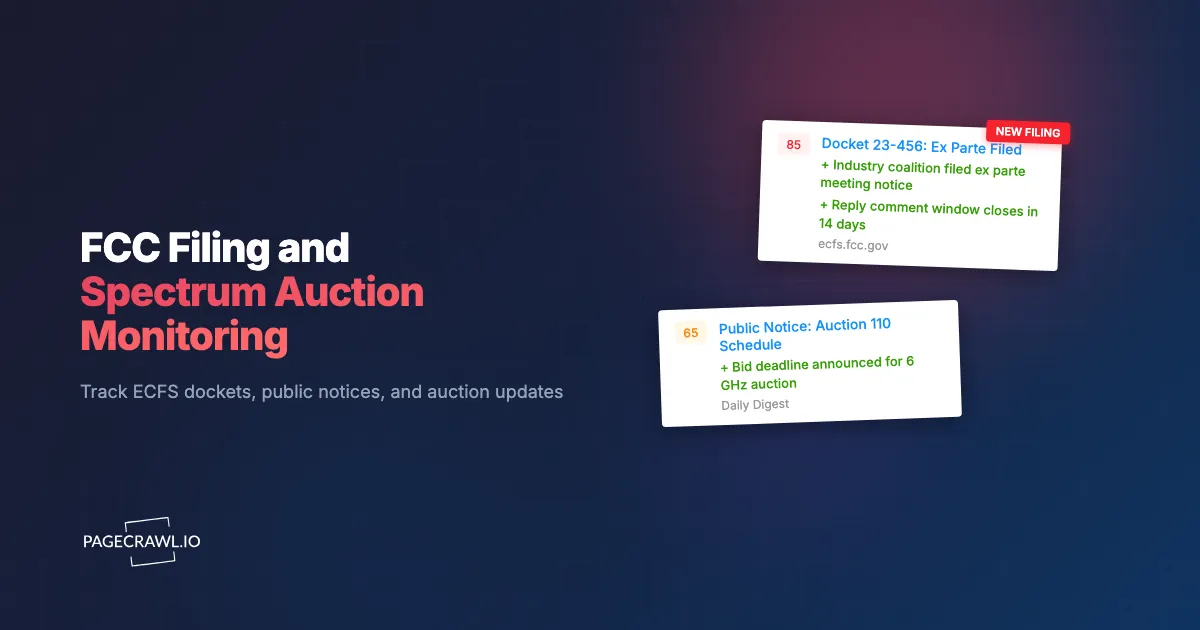
Enter the FCC docket you care about, pick the relevant bureau, and PageCrawl will alert you each time a new filing, public notice, or order is posted.
Why monitor FCC dockets?
Because proceedings often hinge on filings made by individual parties at specific moments in the cycle: a late ex parte presentation, a reply comment filed in the closing hours, a bureau order that lands without fanfare. Same-day awareness translates directly to better-positioned counsel and more responsive advocacy.
Ex Parte Presentations Reveal Real-Time Advocacy
Ex parte filings record meetings between parties and Commission staff. They reveal who is meeting with whom, what arguments are being made, and how the deliberative direction is shifting. Tracking ex parte activity in a docket is one of the most reliable ways to forecast which way a Commission vote will land.
Reply Comments Shape Final Orders
The reply comment period in a proceeding is where the most strategic filings often land. Late reply comments responding to weaknesses in opposing arguments frequently make their way into the final order language. Same-day awareness allows your team to draft responses while there is still time.
Agency Orders Affect Licenses, Spectrum, and Broadcast Operations
The FCC publishes orders, declaratory rulings, and notices of apparent liability on its release calendar. These directly affect license holders, spectrum users, and broadcast operations. Continuous monitoring catches orders relevant to your operations the day they release.
Auction Notices Drive Bidding Strategy
Spectrum auction notices, status updates, and procedural orders are released on tight timelines. Bidders monitoring the auction docket and related public notices stay ahead of competitors who learn from secondary sources.
How do FCC dockets and ECFS URLs work?
Every FCC proceeding has a docket number that is addressable as a search URL in the Electronic Comment Filing System, so a filtered results page is a stable address you can monitor. The search URL captures the docket filter and date sort:
https://www.fcc.gov/ecfs/search/filings?proceedings_name={docket}
https://www.fcc.gov/ecfs/search/filings?proceedings_name={docket}&sort=date_disseminated,DESC
New filings appear as new rows in the results table with filing date, filer name, document type, and a link to the full filing. PageCrawl detects each new row as a content change.
In addition to docket-specific searches, the FCC Daily Digest is a single page that summarizes every public notice and order released across all bureaus each business day:
https://www.fcc.gov/proceedings-actions/daily-digestFor broad coverage of agency activity beyond specific dockets, the Daily Digest is the canonical page to monitor.
How do FCC monitoring approaches compare?
Manual refreshing is free but leaky, FCC email subscriptions arrive as a daily digest, policy intelligence platforms cost five figures a year, and custom ECFS API polling costs engineering time. Page monitoring sits between them: any docket URL, checked on your schedule, for the price of a low-tier subscription.
| Approach | Cost | Latency | Coverage | Best For |
|---|---|---|---|---|
| Manual ECFS refresh | Free | Hours to days | Per-docket | Casual checking |
| FCC email subscription | Free | Daily digest | Public notices | Light awareness |
| Bloomberg Government / Politico Pro | $5K+/year | Hours | Comprehensive | Large lobbying shops |
| Custom ECFS API polling | Engineering time | Real-time | Programmatic | Vendors |
| PageCrawl on ECFS docket URLs | Free tier to $80/year | 15-60 minutes | Any docket or notice page | Counsel and gov affairs wanting same-day awareness |
For telecom-focused law firms and policy shops, PageCrawl is the practical middle ground: cheaper than the comprehensive policy intelligence platforms, more reliable than email subscriptions, and works for any FCC URL you can find.
Setting Up FCC Monitoring in PageCrawl

Step 1: List your tracked dockets
Identify the active proceedings relevant to your business. Most counsel teams have 5-15 active dockets at any given time, plus broader topical coverage.
Step 2: Build ECFS docket search URLs
Use the ECFS search interface to build a results page for each tracked docket, sorted by date descending. Copy the URL.
Step 3: Add each docket URL as a content monitor
Sign in to PageCrawl, click Track New Page, and paste each URL. Use content monitoring so new filings are detected as new rows.
Step 4: Add the FCC Daily Digest page
Add https://www.fcc.gov/proceedings-actions/daily-digest as a separate monitor. This catches public notices and orders across all bureaus, including dockets you do not specifically track but may want awareness on.
Step 5: Pick a check frequency
FCC publishes during business hours. Reasonable defaults:
- Awareness only: Daily checks for general counsel coverage.
- Active proceeding work: 60-minute checks for same-business-hour awareness on tracked dockets.
- Auction or major rule-making: 15-minute checks during high-activity periods.
Step 6: Wire alerts to counsel and policy channels
Route to a #fcc-watch Slack or Teams channel. PageCrawl's AI change summaries describe each new filing in one line. See the Slack alerts guide and the reference on sending change notifications to a Slack channel for setup.
Worked Example: A Telecom Law Firm's FCC Watch
A telecom-focused law firm with 12 active client matters at the FCC typically sets up:
- Add ECFS docket search URLs for each tracked docket (12 monitors).
- Add FCC Daily Digest page (1 monitor).
- Add FCC headlines and news release page (1 monitor).
- Add auction-specific pages for any active spectrum auctions (2-3 monitors).
- Set frequency to 60 minutes on tracked dockets, daily on Daily Digest.
- Route alerts to
#fcc-filingsSlack channel with per-client tags.
Total: 16-17 monitors. Total cost: $80/year. The firm gets continuous awareness across every client matter with a single channel.
What patterns are worth watching for in a docket?
Five recur across proceedings: ex parte clustering before a vote, late-cycle reply comments, the split between bureau-level and Commission-level releases, auction milestone notices, and petitions for reconsideration. Each tells you something the filing list alone does not.
Pre-vote ex parte clustering. In the week before a Commission vote, ex parte activity tends to cluster. The pattern reveals which parties are pushing hardest and on which issues.
Reply comment timing. Strategic reply comments often land in the final 24-48 hours of the reply period. Watch for late-cycle filings that may shape the order.
Bureau-level vs Commission-level releases. Bureau orders execute faster than Commission orders. Distinguishing the two affects how urgently your team needs to respond.
Auction milestone notices. Auction procedural orders mark milestones (short-form deadline, upfront payment, auction start). Each milestone has compliance obligations.
Petition for reconsideration filings. Reconsideration petitions sometimes succeed in narrow changes to recent orders. Worth tracking even on adverse outcomes.
Combining FCC Monitoring With Other Signals
FCC activity is most actionable in the broader policy context.
Combine with state AG enforcement. Pair with our state AG enforcement tracking guide. State AGs occasionally bring enforcement that overlaps with FCC jurisdiction, which is where legal, docket, and enforcement monitoring picks up the litigation side of the same dispute.
Combine with FTC enforcement. Pair with our FTC consent order tracking guide. The FCC and FTC sometimes coordinate on cross-cutting consumer protection.
Combine with Federal Register notices. Add the Federal Register telecom topic page for formal rulemaking publications.
Combine with congressional committee pages. Communications and Technology subcommittee pages reveal upcoming hearings that affect FCC priorities.
Combine with industry trade press. Add Communications Daily, Telecompetitor, or other trade pubs as siblings for industry context.
Who uses FCC docket monitoring?
Mainly telecom and broadcast counsel, spectrum strategists, broadcasters, government affairs teams, wireless carriers, and cable or ISP policy groups. What they share is a small set of proceedings where a filing landing that afternoon changes what they do the next morning.
Telecom and broadcast counsel. Same-day docket awareness supports proactive client advisories and timely filing strategy. Most firms find the cost recovers itself the first time the team gets ahead of an adverse filing.
Spectrum strategists. Auction monitoring informs bidding strategy and post-auction analysis. Same-hour procedural awareness is operationally critical during active auctions.
Broadcasters. License-related orders and notices affect operations and renewal strategy. Continuous monitoring of broadcast bureau releases keeps station counsel current.
Policy and government affairs teams. Active proceedings shape industry advocacy. Continuous monitoring informs lobbying strategy and message timing.
Wireless carriers. Carrier counsel teams monitor multiple dockets simultaneously across spectrum, interconnection, public safety, and consumer protection proceedings.
Cable and ISP teams. Title II reclassification debates, broadband mapping, and BEAD program activity all run through FCC dockets.
Frequently Asked Questions
How quickly do filings appear on ECFS after submission? Within minutes for most filings. Ex parte presentations may take up to a few hours depending on how they are submitted.
Can I monitor multiple dockets in a single search? ECFS search supports multi-docket queries with comma-separated docket numbers. Build the multi-docket URL and monitor it.
What about confidential filings? Confidential portions of filings are redacted before public docket posting. PageCrawl monitors only what is publicly visible.
Can I get alerts only on filings by specific parties? By default PageCrawl alerts on every detected change, but notification conditions and filters can narrow alerts to changes that mention a specific party. AI summaries also identify the filer, so you can filter in your channel by party name.
Does the FCC publish on weekends? Generally no. Most agency activity is business-hours Eastern with occasional Saturday public notice releases during high-activity periods.
Do I need a paid plan for FCC monitoring? The free plan supports 6 monitors, enough for a small policy team or a single major proceeding. Standard at $80/year supports a full firm-wide watch.
Choosing your PageCrawl plan
PageCrawl's Free plan lets you monitor 6 pages with 220 checks per month, which is enough to validate the approach on your most critical pages. Most teams graduate to a paid plan once they see the value.
| Plan | Price | Pages | Checks / month | Frequency |
|---|---|---|---|---|
| Free | $0 | 6 | 220 | every 60 min |
| Standard | $8/mo or $80/yr | 100 | 15,000 | every 15 min |
| Enterprise | $30/mo or $300/yr | 500 | 100,000 | every 5 min |
| Ultimate | $99/mo or $999/yr | 1,000 | 100,000 | every 2 min |
Annual billing saves two months across every paid tier. Enterprise and Ultimate scale up to 100x if you need thousands of pages or multi-team access.
Compliance monitoring is the cheapest insurance you can buy. A single missed regulatory change can trigger fines in the tens or hundreds of thousands, not to mention the audit overhead of proving you did not see it coming. Enterprise at $300/year covers 500 regulatory pages with unlimited history and timestamped screenshots, which is usually exactly what an assessor wants to see. All plans include the PageCrawl MCP Server, so your compliance team can ask Claude to summarize every change to a specific regulation over the last quarter and pull the exact diff, turning your monitoring history into a queryable audit trail. AI assistants can create monitors through conversation on every plan, including Free. Standard at $80/year is enough to cover 100 pages across your primary regulatory bodies if your program is smaller.
Getting Started
Pick the FCC dockets that affect your business, build ECFS search URLs for each, and add to PageCrawl on a daily check. Create a free account and the next docket filing or public notice will arrive in your channel the day it lands.