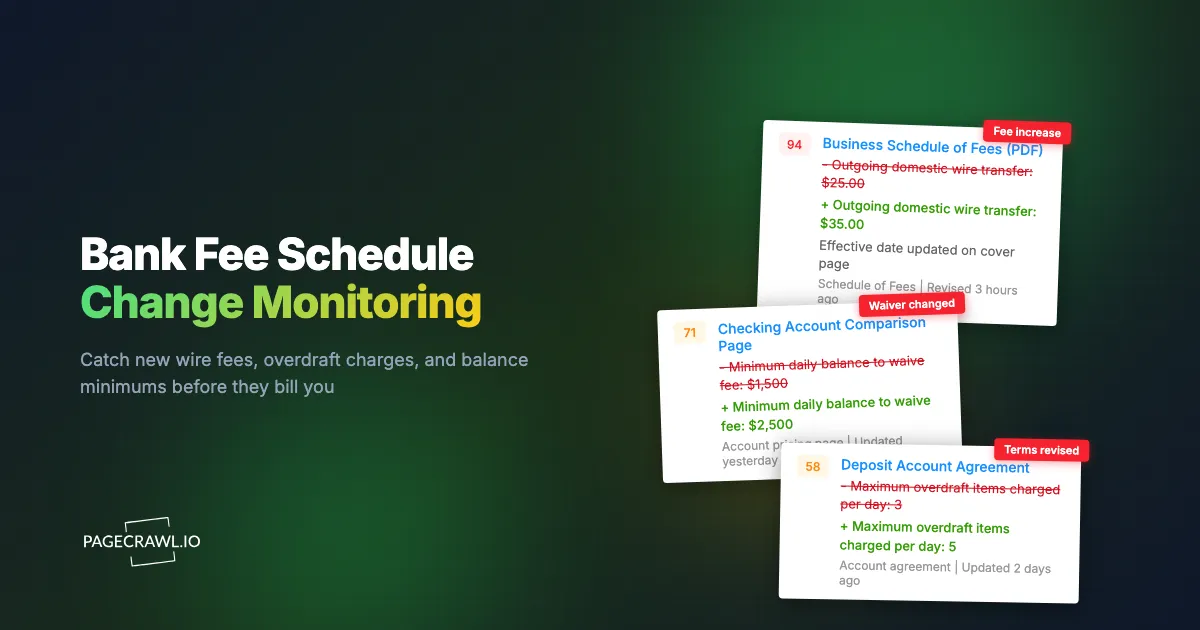
The controller at a 40-person logistics company found it in March, buried in a bank statement she was only skimming because the month looked heavy. An outgoing domestic wire fee had gone from $25 to $35. Her company sends roughly 60 wires a month to carriers and customs brokers. That is $600 a month, $7,200 a year, applied without a single conversation. The bank had done nothing wrong. It had posted an updated schedule of fees PDF to its website and mailed a change-in-terms notice that arrived in a windowed envelope alongside three marketing inserts and went straight into recycling.
She was not careless. She was doing what almost everyone does with bank pricing, which is to treat it as fixed. Fee schedules feel like furniture. They sit at a stable URL, usually as a PDF titled something like "Personal Deposit Account Fee Schedule" or "Business Services Pricing Guide," and they change perhaps once or twice a year. Nobody re-reads a 14-page PDF on the off-chance a single line moved. So the changes land silently, and the first time you learn about a new charge is when you have already paid it several times.
The other half of the problem is that the pricing lives in more than one place. The headline fee is in the PDF. The minimum balance that waives the monthly maintenance charge is on the account comparison page. The foreign transaction markup is in the cardholder agreement. Each document is revised independently, and none of them announce that they have been.
This guide covers which bank fee documents to watch, why the legally required notices keep failing to reach the person who cares, how to monitor a fee schedule that lives inside a PDF, and how to set up alerts that reach you when a check finds a changed line, so you renegotiate or move the account before the charges compound.
Why do bank fee schedule changes slip past you?
Fee changes slip past because they are published, not announced. A bank quietly replaces a PDF at the same URL, mails a notice that looks like junk, and the change takes effect on a date nobody diarised. The document itself rarely says what changed, so even someone who opens it has to compare 14 pages against a version they no longer have.
The document changes but the URL does not
Most banks host their fee schedule at a stable address and swap the file underneath it. Your bookmark still works, the page title is unchanged, and there is no version history to browse. Two identical-looking PDFs can differ by one line and one effective date on the cover. Without a saved copy of the previous version, you cannot prove what the old wire fee was.
Pricing is spread across several documents
The monthly maintenance fee is in the schedule of fees. The balance that waives it is in the account comparison table. The overdraft policy is in a separate deposit account agreement. Treasury pricing sits in a services guide that may only be linked from a logged-in portal. Each document is revised on its own schedule, so watching only the headline PDF still leaves gaps.
The person who pays is not the person who reads
At a company, the change-in-terms notice goes to the address of record, which is often a mail room or a registered agent, not the controller who approves the wires. At a household, it goes to the person who opened the account, not the one who manages the budget. The notice can be perfectly compliant and still never reach the human whose decisions depend on it.
What exactly should you monitor on a bank's fee schedule?
Watch four things: the schedule of fees document itself, the account comparison or pricing page, the deposit account agreement, and any treasury or business services pricing guide. Together those cover per-transaction charges, monthly maintenance fees, the balances that waive them, and the terms that govern overdrafts and holds.
The schedule of fees document
This is the core monitor and, for a personal account, often the only one you need. It is the itemised list: wire transfer in and out, domestic and international, stop payment, returned item, cashier's check, paper statement, dormant account, early withdrawal penalty, replacement card, and so on. Because it is usually a PDF, you want a monitor that reads the text inside the file rather than just noticing that the file's bytes changed. Our guide to monitoring PDF documents for changes covers extracting and comparing the text layer so an alert tells you which line moved, not merely that something did.
The account comparison and pricing page
The fee schedule tells you what the monthly maintenance charge is. The account comparison page tells you what you have to do to avoid it, and that requirement is the number that moves most often. A minimum daily balance rising from $1,500 to $2,500, or a direct-deposit threshold going from $500 to $1,000 per statement cycle, converts a free account into a charged one without changing a single fee amount. This is an HTML page, so a straightforward content monitor on the pricing table catches it.
The deposit account agreement
The agreement is where the rules behind the fees live: how many overdraft charges can be assessed per day, what counts as a sustained overdraft, funds availability and hold periods, and the order in which transactions are posted. A cap moving from three overdraft items a day to five doubles the worst-case cost of a bad week with no change to the headline fee. These are long-form legal documents, so a reading-mode monitor that extracts the main body text works better than a full-page pixel comparison.
Treasury and business services pricing
For businesses, this is where the real money is. Per-item ACH origination, positive pay, lockbox, remote deposit capture, account analysis earnings credit rates, and wire cut-off times all carry pricing that scales with volume. A $2 increase on a per-item charge is invisible on one transaction and material across 4,000 a month. If the guide sits behind a login, set it up as an authenticated monitor so checks see the same document you do.
Which bank fees change most often, and which cost the most?
Overdraft and non-sufficient funds charges, wire transfer fees, and the minimum balances that waive monthly maintenance are the three that move most and hurt most. Per-transaction fees on high-volume activity compound fastest, while balance-waiver thresholds are the most common way a free account quietly becomes a paid one.
| Fee or term | How often it moves | Why it matters | What to watch |
|---|---|---|---|
| Outgoing wire transfer | Occasionally, often in single-dollar steps | Multiplies directly by monthly wire volume | Schedule of fees, domestic and international lines |
| Overdraft / NSF | Periodically, up or down with policy shifts | High per-item cost, capped per day | Fee schedule plus the daily cap in the account agreement |
| Monthly maintenance | Rarely | Fixed annual cost per account | Schedule of fees |
| Minimum balance to waive | More often than the fee itself | Turns a free account into a charged one | Account comparison page |
| Foreign transaction markup | Rarely | Silent percentage on every overseas purchase | Cardholder agreement |
| ACH per-item origination | Reviewed with contract renewals | Scales with file volume | Treasury pricing guide |
| Paper statement fee | Occasionally | Small but recurring across many accounts | Schedule of fees |
Overdraft and NSF pricing is worth singling out because it has been genuinely volatile rather than merely drifting. The Consumer Financial Protection Bureau's data spotlight on overdraft and NSF revenue reported that overdraft and NSF revenue in 2023 was down more than 50 percent against pre-pandemic levels, saving consumers over $6 billion a year. Pricing that has moved that far in one direction can move back, and it moves institution by institution rather than all at once. That is precisely the kind of change a monitor catches and an annual review does not.
Note: the fees that damage a business are rarely the dramatic ones. A single $35 wire charge is annoying. The same charge across 60 wires a month is a line item worth renegotiating, and a per-item ACH price is worth renegotiating at a fraction of that increase.
Why isn't the bank's change-in-terms notice enough?
The notice is a legal minimum, not an alerting system. For consumer deposit accounts, Regulation DD requires at least 30 calendar days' advance notice of a change that may reduce the yield or adversely affect the consumer. That gets a document into the mail. It does not get the number in front of the person who acts on it.
It is mail, and mail is a channel nobody monitors
A change-in-terms notice arrives as a printed insert or a statement message that looks exactly like the marketing around it. Even recipients who open it are reading prose rather than a diff, and prose is very good at making a $10 increase sound procedural. On business accounts the mailing address is often a shared or outsourced one, so the document lands with someone who has no reason to escalate it.
The protections are narrower than people assume
Regulation DD's advance-notice rule applies to consumer deposit accounts, and it carries exceptions: no advance notice is required for changes to the interest rate and corresponding yield in a variable-rate account, or for changes to check printing fees. Business and commercial accounts sit outside that consumer framework entirely and are governed by the account agreement, which typically permits changes with whatever notice the contract specifies. Relying on a statutory notice to protect a commercial banking relationship is relying on a rule that was not written for you.
Thirty days is a deadline, not a reminder
Even when the notice is perfect, it starts a clock. Thirty days is enough time to renegotiate, restructure how you send payments, or move the account, but only if someone starts on day one. A notice discovered on day 34 while reconciling a statement has already expired. Monitoring the published document turns the notice period into usable time rather than hindsight.
How do you set up bank fee schedule monitoring in PageCrawl?
You point PageCrawl at each fee document, choose a tracking mode suited to the file type, check on a cadence that matches how often the document moves, and route alerts to the person who pays the fees. A personal setup takes about ten minutes. A multi-bank treasury setup takes an afternoon and then runs itself.
Step 1: Collect the URLs. Open your bank's website and find the schedule of fees PDF, the account comparison or pricing page, and the deposit account agreement. Search the site for "schedule of fees," "fee schedule," or "account disclosures" if the navigation buries them. Copy the direct URL of each document, not the landing page that links to it.
Step 2: Add the fee schedule PDF as a monitor and choose the PDF text tracking mode. This reads the text inside the document and compares it against the previous version, so an alert shows you the changed line, for example a wire fee moving from $25 to $35, rather than reporting that a file was replaced.
Step 3: Add the account comparison page as a separate monitor using content tracking, focused on the pricing table. This is the monitor that catches a minimum balance requirement rising, which is the change most likely to convert a free account into a charged one.
Step 4: Add the deposit account agreement using reading mode, which extracts the main body text of a long legal document and ignores navigation, cookie notices, and footer boilerplate. This catches changes to overdraft caps, posting order, and funds availability that never appear on a fee schedule.
Step 5: Set check frequency to match the document. Fee schedules are slow-moving, so daily checking is sufficient and keeps your check budget for pages that need it. If you are mid-negotiation with a bank or actively shopping accounts, tighten to a few times a day. Free-tier hourly checking is more than enough to prove the setup works.
Step 6: Add keyword and threshold rules so alerts stay quiet until something you care about moves. Restrict alerts to lines containing "wire," "overdraft," "minimum balance," or "per item," and set a numeric threshold so a rounding change does not ping you. Our walkthrough on conditional alerts using price, keyword, and threshold rules covers building these conditions.
Step 7: Choose your notification channels. Email suits a document that changes twice a year and gives you a permanent record in the inbox of the person who signs off on banking costs. For a finance team, route alerts into a shared Slack, Discord, or Microsoft Teams channel so the controller, the AP lead, and the CFO all see the same message. Telegram works well for a one-person business owner who wants it on a phone. Webhooks push the change into your own systems, for example opening a ticket or writing a row to a vendor-cost sheet.
Step 8: Turn on screenshot capture and keep the history. A timestamped capture of the fee schedule as it read on a given date is what you want in hand when you call your relationship manager to ask why a charge appeared.
How should a business monitor fees across several banks?
Monitor your own banks to control costs and your prospective banks to build negotiating leverage. A treasury team typically runs three to six monitors per institution, covering the fee schedule, pricing page, account agreement, and treasury services guide, then adds the same documents for two or three competitor banks.
Watch your own institutions first
Start with the banks that already hold your operating accounts. Every fee document for every account type you use goes into a folder named for that bank. This is the defensive layer: it ensures no increase reaches a statement before it reaches a person. For a company sending meaningful wire or ACH volume, catching a single per-item increase in its notice period usually justifies the entire monitoring programme.
Watch the banks you might move to
The offensive layer is monitoring the published pricing of two or three institutions you would plausibly switch to. When your bank raises a charge, the useful response is not an email of complaint but a specific comparison: here is your new price, here is a competitor's published price, here is our volume. Relationship managers have discretion on pricing, and they use it when there is a credible alternative on the table. Monitoring gives you the alternative in writing, with a date on it.
Track the regulators alongside the banks
Fee practices shift when supervisory expectations shift, and the changes tend to arrive across an entire peer group. The Consumer Financial Protection Bureau, the FDIC, and the Federal Reserve Board all publish rulemakings, guidance, and research that precede repricing across the industry. If you already run a compliance programme, our guide to monitoring OCC, FDIC, and Fed updates covers the same institutions from the regulatory side, and the fee monitors slot in alongside it.
What problems come up when monitoring bank fee documents?
The three recurring issues are PDFs that change format without changing content, documents that live behind a login, and pricing pages full of promotional noise. Each has a straightforward fix, and none of them require you to babysit the monitors once they are tuned.
PDFs that shift without meaning anything
A bank may regenerate its fee schedule PDF with a new footer date, different pagination, or a re-exported layout while every fee stays identical. If your monitor compares the raw file, that produces a false alarm. Comparing the extracted text instead removes most of this noise, and adding a keyword condition so alerts only fire on lines containing fee-related terms removes nearly all of the rest. After a couple of cycles the monitor is quiet unless a number actually moves.
Documents behind a login
Treasury pricing guides and account analysis statements often sit inside a business banking portal. Public fee schedules are usually open, but the pricing that matters most to a high-volume business may not be. Set those up as authenticated monitors so checks load the same view you see when signed in, and expect to refresh the session occasionally, the same way you would log back into any site.
Promotional noise on pricing pages
Account comparison pages carry rotating banners, bonus offers, countdown text, and "customers also viewed" panels that change constantly and mean nothing for your costs. Restrict the monitor to the pricing table region and tell it to ignore the regions that churn. After a change is detected you can click the noisy area and tell PageCrawl to disregard it in future, which trains the monitor down to the pricing table within a few cycles.
Knowing what to do with the alert
An alert is only worth the action it triggers. When one arrives, do three things in order: multiply the change by last month's actual volume to get the annual impact, check whether the effective date leaves you a notice window, and decide between renegotiating, restructuring the transaction type, or moving the balance. Many fee increases can be avoided outright by changing behaviour, for example by consolidating wires, switching a supplier to ACH, or raising a balance above a waiver threshold. That decision is only available while the clock is still running. If you also hold savings or CDs at the same institution, pair this with monitoring savings and CD rate changes, since banks frequently adjust both sides of the relationship in the same review cycle.
Choosing your PageCrawl plan
PageCrawl's Free plan lets you monitor 6 pages with 220 checks per month, which is enough to validate the approach on your most critical pages. Most teams graduate to a paid plan once they see the value.
| Plan | Price | Pages | Checks / month | Frequency |
|---|---|---|---|---|
| Free | $0 | 6 | 220 | every 60 min |
| Standard | $8/mo or $80/yr | 100 | 15,000 | every 15 min |
| Enterprise | $30/mo or $300/yr | 500 | 100,000 | every 5 min |
| Ultimate | $99/mo or $999/yr | 1,000 | 100,000 | every 2 min |
Annual billing saves two months across every paid tier. Enterprise and Ultimate scale up to 100x if you need thousands of pages or multi-team access.
In event-driven strategies, minutes matter. One actionable signal surfaced before the broader market reacts can return more than a year of Ultimate. Standard at $80/year covers the core IR, press, and filings pages for a handful of positions. Enterprise at $300/year scales to a full watchlist. All plans include the PageCrawl MCP Server, so you can ask Claude to summarize every material change across a company's IR, press, and filings over any period you care about and get the evidence pulled straight from your monitoring archive. AI assistants can create monitors through conversation on every plan, including Free. Ultimate at $999/year adds 2-minute frequency and web archiving, which matters if you need provable timestamps for a thesis.
Getting Started
Start with one document. Find your primary bank's schedule of fees PDF, add it as a monitor with PDF text tracking, set a daily check, and send alerts to the email address of whoever actually approves banking costs. That single monitor covers the charges most likely to change and costs you nothing on the free tier.
Add the account comparison page next, because the minimum balance that waives your monthly fee moves more often than the fee itself. Then add the deposit account agreement if you carry overdraft risk, and the treasury pricing guide if you run volume. Four monitors covers a business banking relationship end to end.
When the first alert arrives, cost it out against last month's volume before you do anything else. That number tells you whether to renegotiate, restructure, or move, and you will have it while the notice period is still open rather than three statements later.
Stop finding out about bank fees on the statement. Put the fee schedule on watch and let the change come to you.