Rafael runs risk for a 900-employee manufacturer with plants in four states. In March his broker emailed a renewal summary showing workers compensation premium up 9 percent. Two things behind that number had been public for months: the state rating bureau had filed a loss cost increase for his largest governing class, and a classification revision had merged the phraseology his machine shop was coded under into a code with a higher relativity. Both were published on pages Rafael could read. Neither reached him until the quote landed.
Workers compensation premium is one of the few large operating costs that gets repriced by documents nobody sends you. The formula is unglamorous: payroll per $100, multiplied by a class code rate, multiplied by your experience modification factor, adjusted by credits and state assessments. Every input in that chain is set somewhere public, in a filing, a bulletin, a manual revision or a commissioner's order, and the employer paying the bill is usually the last party to read any of it.
The gap is not secrecy. It is distribution. Rating bureaus and insurance departments publish, then move on. Nothing tells a specific employer "the code you are rated under just changed" or "your state approved a rate increase that lands two months before your renewal." This guide covers what changes, which pages display those changes, and how to monitor them so a repricing event reaches you while you can still challenge a classification, fix payroll coding, or budget honestly.
What actually changes in workers compensation pricing between renewals?
Four things move independently: the advisory loss cost or pure premium rate your state approves for each class code, the classification system itself (codes merged, split, renamed or re-scoped), your carrier's loss cost multiplier, and your experience modification factor. Any one of them can reprice the same payroll by double digits without a single new claim.
Loss costs and pure premium rates
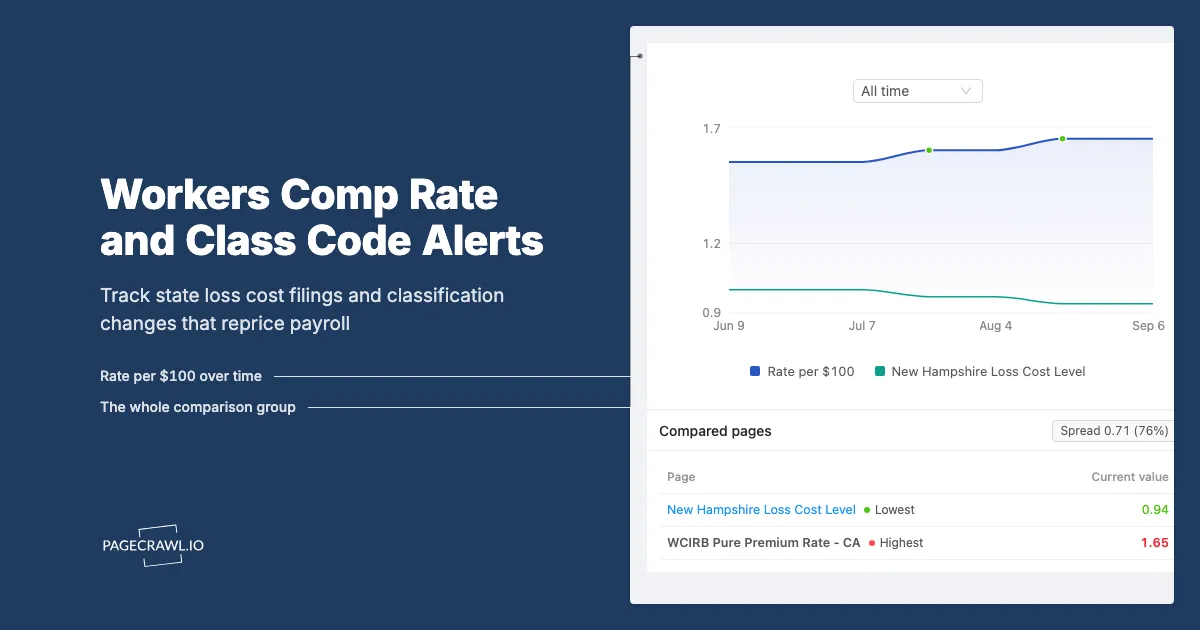
Most states rely on an advisory organization to file a per-$100-of-payroll figure by class, which each carrier converts into its own rate with a multiplier. The filings are annual, carry a fixed effective date, and are approved or amended by the insurance department. They are not small adjustments. In California, the WCIRB reported that the Insurance Commissioner approved advisory pure premium rates averaging $1.65 per $100 of payroll for policies effective on or after September 1, 2026, which the bureau described as 6.6 percent above the average approved a year earlier. In the same cycle other states moved the other way: the New Hampshire Insurance Department announced a 14th consecutive annual workers compensation rate reduction, lowering voluntary loss costs by an average of 6.1 percent for 2026. A multi-state employer is therefore absorbing increases and decreases at the same time on different effective dates.
Class code revisions
Codes are not permanent. Advisory organizations file item changes that retire codes, merge state-specific phraseology into multistate phraseology, or redraw the boundary between two operations. The published reference is the classification manual, and NCCI keeps its classification and statistical codes reference online. When your operation moves from one code to another, the rate attached to your payroll changes even though nothing on your shop floor did.
Rating mechanics and the fine print
Filings also adjust the machinery: expected loss rates and D-ratios that feed experience rating, the split point between primary and excess losses, payroll limits for executive officers, and the precision of published figures. NCCI has published guidance on extending loss costs, rates and expected loss rates to three decimal places for filings taking effect in the 2026 cycle. These items rarely make the trade press and routinely change what an employer pays.
Your own experience modification factor
The mod compares your reported losses to expected losses for your codes and payroll, so it moves when a claim reserve changes, when a unit statistical report is filed, and when expected loss rates are refiled. A reserve increase on a two-year-old claim can push a mod up for three policy periods. Employers who first see the mod on the promulgation worksheet have already lost the window to correct data errors.
Which public pages actually show these changes?
Four categories of page display the changing value itself rather than commentary about it: the rating bureau filing index, the state insurance department bulletin or order page, the state's public rate and form filing search, and the advisory organization's classification and circular pages. Each one has a stable URL and a list that grows when something is filed or approved.
Rating bureau filing pages
Several states run an independent rating bureau rather than using NCCI, and each publishes its own filing list. California's WCIRB maintains a regulatory and pure premium rate filings page showing filings submitted, proposed effective dates and the eventual decision. Pennsylvania's PCRB, New York's NYCIRB and North Carolina's NCRB run equivalent pages, and NCRB publishes a public class code lookup that changes when codes are revised. These pages are closest to the money: they show the proposal months before the number reaches a quote.
State insurance department filing search
Most states expose approved and pending filings through the NAIC's public SERFF Filing Access portal, with a per-state entry point such as filingaccess.serff.com/sfa/home/MI. Filtering to the workers compensation line gives you a list that changes as filings are submitted, amended, disposed or withdrawn. The status field is the most useful value on the page: it separates "proposed" from "you are paying this in 60 days."
Bulletins, orders and press notices
Departments announce approvals as bulletins, orders or news items. Connecticut's insurance department published its determination on the NCCI workers compensation rate filing for 2026, which the Professional Insurance Agents association reported as an approved overall 3.8 percent loss cost decrease. Texas routes equivalent traffic through the Texas Department of Insurance SERFF page. These pages are append-only lists: a new row is the whole signal.
Manuals, circulars and fee schedules
Classification manuals, circular libraries and state medical fee schedules reprice claims and therefore future loss costs. A fee schedule revision is often cited inside the rate filing as a driver of the change, so watching both gives you the cause and the effect. Where these are published as PDFs, monitor the document itself; our guide to monitoring PDF documents for changes covers reading a filed exhibit so a revised figure triggers an alert rather than a filename change.
Why isn't your broker's renewal notice early enough?
A renewal notice is a quote, not a forecast. It arrives 30 to 90 days before the effective date, after the rate change is locked, after the classification decision is applied and after the mod is promulgated. By then your options are limited to negotiating credits or shopping the account. The filings that produced those numbers were public months earlier.
The timing gap is structural
Bureau filings are submitted months ahead of their effective date so the department can review them, and the WCIRB notes its pure premium rate filings are typically made roughly six months before they take effect. That review period is the only window in which an employer or trade group can read the exhibits, model the impact on their own payroll mix, comment, or attend a hearing. A renewal packet lands long after it closes.
Nobody is subscribed on your behalf
Advisory organization circulars go to affiliates and carriers, not to employers. Department bulletin pages are publish-and-forget. SERFF's public access interface is a search tool with no watch list. Some departments run an email list, but coverage is inconsistent between states and a class code item filing may generate no notice at all. There is no vendor push here to lose out to, which is precisely why monitoring works.
Classification disputes have deadlines
If your operation is reassigned to a different code, the route to challenge it runs through the bureau's inspection and appeal process, and every state applies a time limit. Learning about the change from a renewal quote leaves little time to gather the payroll records, job descriptions and site evidence that argue for the original classification.
How do you set up workers compensation rate monitoring in PageCrawl?
You point monitors at the specific bureau, department and manual pages that carry your states and your class codes, choose a tracking mode that watches the list or the figure rather than the whole page, set a check frequency that matches how often those pages move, and route alerts to the people who own the budget. Setup for a four-state program takes under an hour.
Collect the URLs that matter to you. For each state where you have payroll, open the rating bureau filing index (or the NCCI state page), the department's filing search filtered to workers compensation, and the classification lookup for your governing codes. Copy each URL after applying the filters, so the monitor sees the view you do.
Add each URL to PageCrawl as a monitor. Name it something a CFO will understand later, for example "CA WCIRB pure premium filings" or "TX TDI WC filing search." Names become the subject lines of your alerts.
Pick the tracking mode per page type. Use content or text tracking for filing indexes and bulletin lists, where a new row is the signal. Use number tracking where a single figure matters, such as a published rate or a class relativity, so you get the old and new value rather than "something changed." Use document tracking for filings and manuals published as PDFs.
Set the check frequency to the page's rhythm. Filing indexes update in bursts around the annual filing season, so daily checks are usually enough and the free tier's hourly checks are more than sufficient. Tighten to 15-minute checks during a filing review or hearing period, when a disposition posts mid-morning and you want it on the next check rather than tomorrow.
Choose notification channels by audience. Send the risk team a Slack or Microsoft Teams message so the filing is discussed where work happens, email the CFO and controller, and push a webhook into your GRC system if you keep a register of regulatory events. Discord and Telegram suit smaller teams who want alerts on a phone. Our guide to conditional alerts using price, keyword and threshold rules shows how to route different changes to different channels.
Add keyword and threshold rules so alerts stay signal. On a filing index, filter for "workers compensation," "loss cost," "pure premium," "classification" or your specific code numbers. On a numeric monitor, set a threshold so a meaningful movement escalates and a rounding change stays silent.
Turn on screenshot capture and group monitors by state. A timestamped capture of the filing page as it appeared on a given date is the evidence you want when a broker says the change was not knowable. A four-state employer ends up with roughly twelve monitors in four folders, which fits comfortably inside a Standard plan.
What should a risk manager watch beyond the headline rate?
The headline percentage is an average across all classes and says almost nothing about your own bill. What moves your premium is the relativity on your governing codes, the assessments layered on top, the experience rating parameters, and the medical fee schedule driving future loss costs.
Your governing class codes, not the statewide average
A filing described as an overall decrease can still raise the rate for manufacturing, trucking or healthcare classes, because the average is weighted across the whole state's payroll. The by-class detail sits in the exhibits, so monitor the exhibit document rather than the press release and set keyword rules on your own code numbers.
| Input | Where it is published | Typical cadence | What a change costs you |
|---|---|---|---|
| Advisory loss cost or pure premium rate | Rating bureau filing page, department order | Annual, per state | Direct multiplier on payroll per $100 |
| Class code revision or merger | Classification manual, item filing | Irregular | Reassignment to a different rate |
| Experience rating parameters | Bureau filing exhibits | Annual | Shifts your mod without new claims |
| Assessments and surcharges | Department bulletin | Annual or ad hoc | Added on top of manual premium |
| Medical fee schedule | State workers comp agency | Periodic | Drives next year's loss costs |
Safety and regulatory changes that feed claims
Rate filings lag claim costs, and claim costs follow the regulatory environment, so employers who watch enforcement and standards alongside pricing see the driver before the price. Our post on monitoring OSHA safety regulation changes covers the pages worth pairing with a rate monitor, and carrier-side teams will recognise the approach in our guide to insurance underwriting web monitoring.
How do you turn rate alerts into a budget and audit process?
Route each alert to a decision rather than an inbox. A filing alert becomes a modelled impact on your payroll mix, a classification alert becomes a check against your payroll system's code mapping, and a mod-input alert becomes a data verification request. The point is not to read filings. It is to know which of the three actions is required.
When a filing posts, model it. Apply the by-class exhibit to your current payroll by code and give the CFO one number: the estimated premium delta at constant payroll and constant mod. Done during the review period, that is a budget line rather than a renewal surprise.
When a code changes, audit your mapping. Compare the revised manual against the codes your payroll system reports. A retired or merged code that keeps flowing through payroll becomes a premium audit adjustment later; the fix now is a configuration change.
When a mod input changes, verify the data. Check the unit statistical reports behind the calculation against your own claim and payroll records before the mod is promulgated. Reserve errors are correctable, but only before they are used.
Keep the evidence and recheck the monitors annually. File the timestamped capture with your renewal papers, and once a year confirm each monitored URL still returns the page you expect, since a monitor pointed at a redirect is worse than no monitor at all.
What goes wrong when monitoring insurance filing pages?
Three problems dominate: search pages that regenerate content on every load and produce noisy alerts, filings whose real numbers sit inside PDF exhibits, and site reorganisations that silently break a monitor. All three are manageable once you expect them.
Noisy search interfaces
A public filing search page often carries a timestamp, a session identifier, a record count or a rotating banner that changes on every load, and a week of meaningless alerts trains a team to ignore the real one. In PageCrawl you can select a detected change and mark that region as ignored, so later checks watch only the results list. Our guide to reducing monitoring false positives goes deeper.
The number lives in a PDF
Bureaus publish the summary as a web page and the substance as an attached exhibit, so monitoring the index tells you a filing exists while monitoring the document tells you what it says. When a filing is amended under the same link, document text tracking catches the changed figure that a filename comparison would miss.
Pages move and states differ
Filing search URLs sometimes encode a query that expires and department sites reorganise after redesigns, so prefer a stable index page over a deep search result and treat an error or empty result as a signal rather than silence. States differ too, in filing organisation, effective date and terminology (loss cost, pure premium rate, manual rate), so build a small consistent set per state and name them identically across states.
Choosing your PageCrawl plan
PageCrawl's Free plan lets you monitor 6 pages with 220 checks per month, which is enough to validate the approach on your most critical pages. Most teams graduate to a paid plan once they see the value.
| Plan | Price | Pages | Checks / month | Frequency |
|---|---|---|---|---|
| Free | $0 | 6 | 220 | every 60 min |
| Standard | $8/mo or $80/yr | 100 | 15,000 | every 15 min |
| Enterprise | $30/mo or $300/yr | 500 | 100,000 | every 5 min |
| Ultimate | $99/mo or $999/yr | 1,000 | 100,000 | every 2 min |
Annual billing saves two months across every paid tier. Enterprise and Ultimate scale up to 100x if you need thousands of pages or multi-team access.
In event-driven strategies, minutes matter. One actionable signal surfaced before the broader market reacts can return more than a year of Ultimate. Standard at $80/year covers the core IR, press, and filings pages for a handful of positions. Enterprise at $300/year scales to a full watchlist. All plans include the PageCrawl MCP Server, so you can ask Claude to summarize every material change across a company's IR, press, and filings over any period you care about and get the evidence pulled straight from your monitoring archive. AI assistants can create monitors through conversation on every plan, including Free. Ultimate at $999/year adds 2-minute frequency and web archiving, which matters if you need provable timestamps for a thesis.
Getting Started
Start with the state that carries the most payroll. Open its rating bureau filing index and its insurance department filing search, and set up two monitors on the free plan with daily checks and an email alert. That pair covers the documents most likely to reprice your largest exposure.
Then add the classification lookup for your governing codes with a keyword rule on your own code numbers, so a manual revision reaches you without every other code doing the same, and point the alerts at a channel your risk team and controller both read.
When the next filing season arrives you will read the exhibit while the filing is still under review, model it against your payroll, and walk into the renewal with a number you produced rather than one you received. Set up your largest state today.