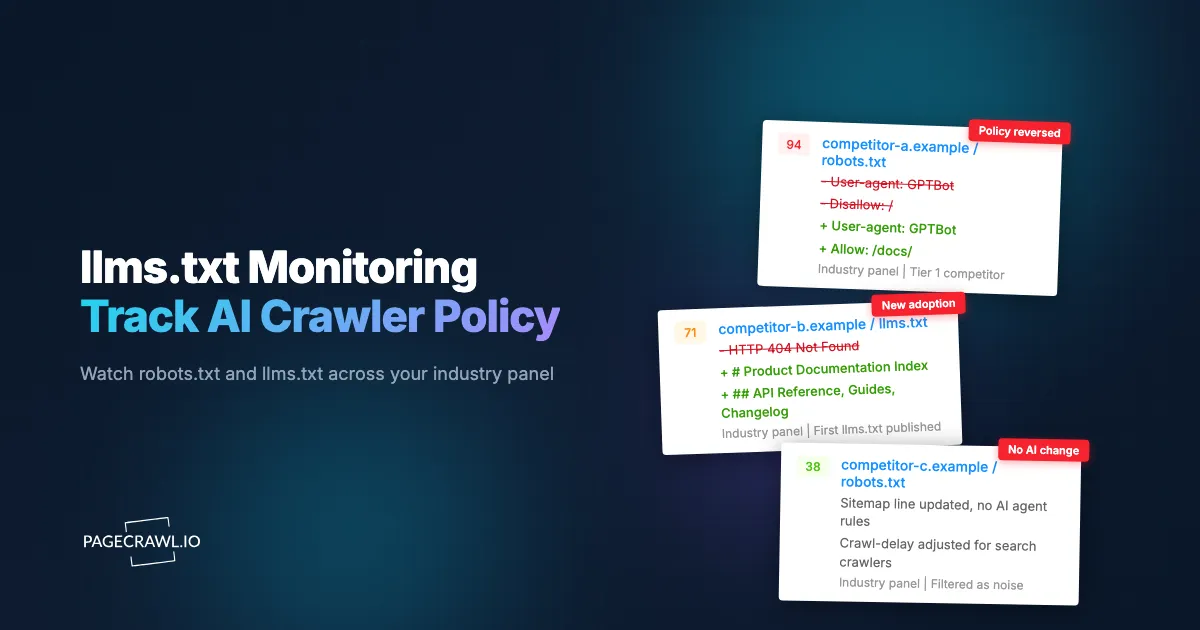
Monitor llms.txt and robots.txt as different kinds of evidence. An llms.txt file publishes information and links intended for agents. A robots.txt file declares crawler directives. Tracking both across a fixed group of sites can reveal published changes, but neither file tells you how much traffic a competitor receives or whether its AI search visibility improved.
This guide covers a repeatable comparison across an industry watchlist. For checks on your own site, use the companion guide to llms.txt and robots.txt monitoring. For content and search measurement, see generative engine optimization.
What can a crawler-policy watchlist tell you?
A watchlist records what selected sites publish and when your checks detect a change. It can show a new directory, a revised link list or a changed crawler directive. Keep the observation separate from its possible explanation: a platform update, an editorial choice and an intentional access-policy decision can produce similar file changes.
Start with a stable group of relevant domains. Record the reason each belongs in the group, the URLs being checked, the baseline date and who reviews the results. A fixed list makes comparisons more useful than a changing sample of whichever sites happen to attract attention.
Do not infer an industry-wide adoption rate from a small competitor list. Report the actual sample, such as “three of our ten monitored domains added a readable file during this period,” and include the capture dates. That is a verifiable observation rather than a claim about the whole web.
How are llms.txt and robots.txt different?
llms.txt is a proposed format for publishing background information, guidance and links that agents can use. robots.txt is a protocol for declaring crawler access rules. A site's addition of an llms.txt directory does not grant access, replace crawler directives or demonstrate that a search service uses the file.
The llms.txt proposal is the reference for the directory format. Check the paths a site actually publishes; a directory can cover a section such as documentation rather than the entire domain. Treat an expanded text file, when offered, as another published resource to inspect.
The Robots Exclusion Protocol describes crawler rules, not an authorization system. Google's robots.txt introduction also explains why blocking crawling is not a reliable way to keep a page out of search results. Avoid treating access, indexing and visibility as interchangeable measurements.
Does publishing llms.txt improve Google AI search visibility?
Google says an llms.txt file does not improve inclusion or ranking in its generative search features. Monitor the file if its published contents are useful to your research, not as a proxy for search performance. Measure visibility with the relevant search reports and a documented evaluation of the answers your audience encounters.
Google's AI search guidance is the primary source for its requirements. Other services can choose to consume these directories, so check their documentation separately instead of extending Google's statement to every agent or assistant.
If your task is following the pages that AI answers reference, use cited-source page monitoring. Changes to a cited page, changes to an assistant's answer and changes to your search traffic are three different observations.
Which files and changes should you record?
Record each file's URL, response status, captured contents and observation time. For robots.txt, record the relevant user-agent group and paths, then review the whole file before interpreting a changed line. For llms.txt, record added or removed links and descriptions without assuming that they reveal a launch or strategic commitment.
| Observed change | What you can report | What still needs verification |
|---|---|---|
| A directory becomes available | A readable file was captured at this URL | Whether it was newly authored, generated or moved |
| A directory gains links | The published list now includes these pages | Whether the pages themselves contain new information |
| A crawler directive changes | This user-agent group or path rule changed | The crawler's documented purpose and applicable rules |
| A response becomes 200 | The server returned a successful status | Whether the body is the intended file or an error page |
| Several sites change similarly | The same pattern appeared in the sample | Whether a shared platform explains the pattern |
Search retrieval, training and user-requested fetching can have separate agents and policies. Consult the relevant vendor's current documentation before labeling a directive. A rule for one purpose does not establish what happens for the others.
How do you set up the watchlist in PageCrawl?
Add the specific public file URLs, confirm that the first captures contain the intended text, and select a schedule that fits your review process. Use content comparisons for wording and link changes. Use an HTTP status check when availability is the question. Validate the captured result before expanding the watchlist.
- List the domains and the files you want to observe. Include section-specific directories when relevant.
- Create a monitor for each existing file and inspect the captured baseline.
- For a currently missing file, use an HTTP status monitor to watch for a changed response. Inspect the body if a later check succeeds.
- Choose a frequency and calculate the total checks across the watchlist.
- Send detected changes to the person or channel responsible for reviewing them.
- Record the relevant wording and the reason for any interpretation alongside the capture date.
Conditional alert rules can reduce unrelated notifications. Test them carefully: a rule that only looks for a named agent could miss a change to a wildcard group that also affects it. Keep a periodic full-file review when coverage matters.
How should the team interpret a detected change?
Review the captured difference, confirm that it is the intended resource, and write down what changed before proposing a cause. Check linked pages or published policy announcements when they could explain the update. Leave the cause unknown when the available evidence does not support a conclusion.
A useful review record contains the domain, source URL, capture date, affected directive or directory entry, interpretation and supporting source. “A training-crawler rule changed” is more defensible than “the company is abandoning AI visibility.” A directory generated by a platform is not evidence of a large editorial investment.
Use the watchlist to identify questions for your own team. It can prompt a review of access policies or an inspection of competitor documentation. Your policy should still reflect your objectives and the relevant service documentation; competitors' choices do not establish what will work for you.
How often should the files be checked?
Match frequency to the time your team needs to respond and the available check allowance. Daily checks may be sufficient for a watchlist reviewed weekly. Your own critical access files may warrant a shorter interval. Alerts follow successful checks that detect changes, so brief changes between observations can be missed.
For example, ten domains with two monitored files each require about 600 checks over a 30-day month when checked once daily. Additional status monitors and more frequent checks increase that total. Compare the planned usage with the current plan allowances before expanding the list.
Start with a small sample, confirm that the captures and review records are useful, and expand based on the decisions the work supports. A period with no detected changes means only that the checks did not observe a qualifying update. It does not show whether a company invested in AI, changed its strategy or gained search visibility.