"I have to go through a whole IT review process to be allowed to enable AI, which typically takes weeks to even months."
That sentence comes up often, and it is a real constraint rather than an objection. In banks, insurers, public bodies, healthcare, and legal teams, sending content to a third-party model is a decision with a paper trail behind it. Someone has to assess the provider, the data flow, and the retention terms before anyone clicks a toggle.
Meanwhile the actual job, knowing when a supplier's terms page changed or a competitor moved a price, does not pause and wait for the review to finish.
The good news is that these are separable problems. Detecting a change on a web page is a comparison, not a prediction. AI is a layer that reads changes after they are found and helps you triage them. It is genuinely useful, and it is genuinely optional.
Can you use website change monitoring without AI?
Yes. Change detection is deterministic: the tool fetches the page on a schedule, compares the new capture against the stored previous one, and records a change when they differ. No model is involved in deciding whether something changed. AI only reads a change that has already been detected, in order to describe it in a sentence and score how much it matters.
That means the core loop, check the page, spot the difference, alert the right people, works with AI switched off entirely. In PageCrawl, with AI off no page content is sent to any AI provider at any point in the pipeline.
What do you actually lose without AI?
This is the honest part, and it is worth being specific rather than pretending the trade is free. AI mostly buys you triage. Without it you still see every change; you just do more of the sorting yourself.
| Capability | With AI | Without AI |
|---|---|---|
| Detecting that a page changed | Yes | Yes |
| Highlighted diff of what changed | Yes | Yes |
| Screenshots and visual comparison | Yes | Yes |
| Alerts to email, Slack, Teams, Discord, Telegram, webhooks | Yes | Yes |
| Scheduled reports and shared report links | Yes | Yes, with a summary built from the change data |
| Plain-language description of the change | "The refund window was shortened from 30 to 14 days" | The diff itself, with the changed words highlighted |
| Importance score per change | 0 to 100, used to filter alerts | Not available |
| Alerting only above an importance threshold | Yes | Not available, so rules do the filtering |
| Muting repeat noise from your thumbs up / thumbs down feedback | Yes, learned per site for your workspace only | Not available |
| Suggestions for what to track on a page | Yes | You pick the element yourself |
The one that matters most in practice is the third from the bottom. Importance scoring is what lets you monitor a noisy page and only hear about it when something significant moves. Turn it off and you fall back to the older, still perfectly workable approach: track a narrow element rather than a whole page, and write rules that ignore the parts you do not care about.
So the trade is roughly: without AI you spend a little more time on setup and a little more attention on each alert. You do not lose coverage, history, or evidence.
Can you keep AI summaries without letting AI decide what you see?
Yes, and for a lot of teams this is the setting that actually resolves the argument. The objection to AI in monitoring is rarely "do not describe this change for me". It is "do not let a model decide, on my behalf, that I did not need to know about something". Those are different features, and they unbundle.
In PageCrawl, summaries and importance scoring are separate toggles. Leave summaries on and turn scoring off, and AI writes a sentence about each change while every change still reaches you. AI describes; it never gates.
Two things can hold a notification back when AI is fully on, and both are switches rather than behaviour you have to accept:
- A minimum importance, below which a change is recorded but does not notify.
- Learned patterns from your own feedback, where something you previously marked as noise stops similar changes on that site from notifying.
Setting the minimum importance to zero switches off both at once, because zero means "notify me about every change". It is worth checking that value rather than assuming it: a new workspace starts at a minimum importance of 20, so with AI on, some low-scoring changes are filtered by default.
One thing that is worth being precise about, because it is the part people assume works the other way: a filtered change is not a discarded change. It is still detected, still recorded, and still visible in the page history with its full comparison and screenshot. What the threshold suppresses is the alert, never the evidence. If you need an auditable record of what a page did, you have it whether or not the change ever notified anyone.
What about patterns learned from your feedback?
Change monitoring tools that offer thumbs up and thumbs down are learning something from those clicks. In PageCrawl, marking a change as noise teaches a pattern so that similar changes on that site stop notifying you, which is useful right up until you want a guarantee that nothing is being quietly muted.
So it is a separate toggle, under team features rather than buried in AI settings. Turning Change Feedback off hides the thumbs buttons, stops new feedback being recorded, and stops every pattern already learned from filtering anything. Patterns are not deleted when you do this, so switching it back on restores them as they were.
Being separate cuts both ways, and it is worth stating plainly rather than letting someone discover it: because these patterns come from feedback you gave explicitly, turning AI off does not switch them off. If you have used the thumbs buttons and you want a guarantee that nothing is muted, turn Change Feedback off too, or set the minimum importance to zero, which disables both paths at once.
The scoping matters too, especially in a vendor review. These patterns are stored per workspace and per site. They are never shared between workspaces, between teams, or between customers. Nothing you mark as noise trains anything outside your own account, and nothing another customer marks affects what you see.
How do you turn AI off across a whole team?
In PageCrawl there are three levels, and the broadest one wins. A single team-level switch under Settings turns AI off for every workspace at once, which is the one to use when the decision is organisation-wide. Each workspace has its own toggle underneath it, with separate controls for summaries and for importance scoring, so you can keep one without the other. Individual pages and templates can opt out on their own.
A workspace cannot re-enable AI while the team switch is off, which is what makes the top-level switch usable as a real control rather than a suggestion. Full detail is in Monitoring Without AI.
Why does a staged rollout beat waiting?
Because the two decisions have very different review costs. Monitoring a public web page and storing the diff is ordinary web traffic and ordinary data retention. Sending that page's content to a model provider is the part that needs the assessment.
Splitting them lets you deploy monitoring now, under your existing rules, and treat AI as a separate change request later. Frameworks encourage exactly this shape of decision. The NIST AI Risk Management Framework is built around governing and mapping a specific AI use case rather than approving AI in general, and the EU AI Act sets obligations by the risk of the particular application. A narrow, well-described use case ("summarise a detected change on a page we already monitor") is a far easier thing to put in front of a review board than an open-ended one.
It also means the review, when it happens, is informed. You will have months of real changes in hand and can point at exactly which ones you would have wanted a summary for.
What does the interface look like with AI off?
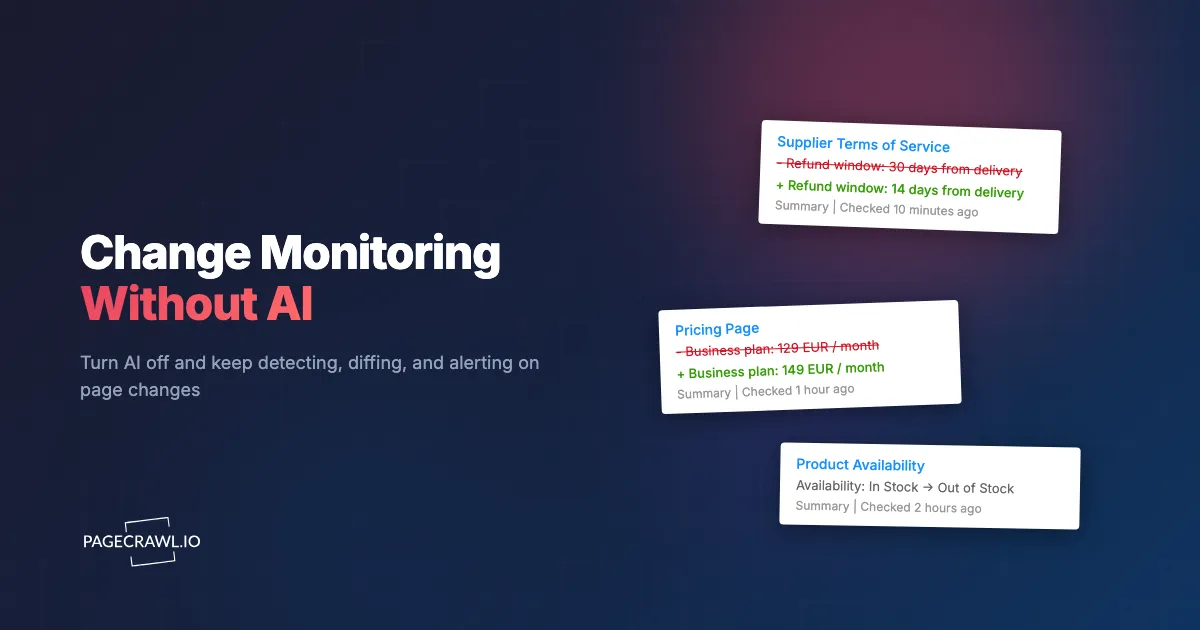
The summary block on a page's history stays where it is. It is headed simply Summary, and instead of a written sentence it shows the detected difference directly: the old and new text with the changed part highlighted, Availability: In Stock → Out of Stock for a stock monitor, or a visual difference percentage for a screenshot monitor.
Report digests behave the same way. The summary is generated from the change data rather than by a model, so it is labelled Summary with no AI disclaimer attached. Nothing in the interface claims to be AI-generated when it is not, which is a small thing that matters a great deal if your compliance team ever reads a shared report.
Can you turn AI on later without losing anything?
Yes. Enabling AI is a toggle, not a migration. Your pages, history, screenshots, archives, and notification settings are unchanged, and new changes start getting summaries and scores from that point on. Past changes keep whatever they had.
The reverse also holds. Summaries generated while AI was on stay on those past changes if you later switch it off. Turning AI off stops new content being sent; it does not delete history.
Where this leaves you
If your AI review is underway, you do not need to treat monitoring as blocked on it. Set up the pages that matter, track narrow elements rather than whole pages, let your notification rules do the filtering, and revisit the AI layer when the paperwork clears. Alerts arrive when the next check detects a change either way.
And if your organisation decides never to enable AI, that is a supported configuration rather than a degraded one.