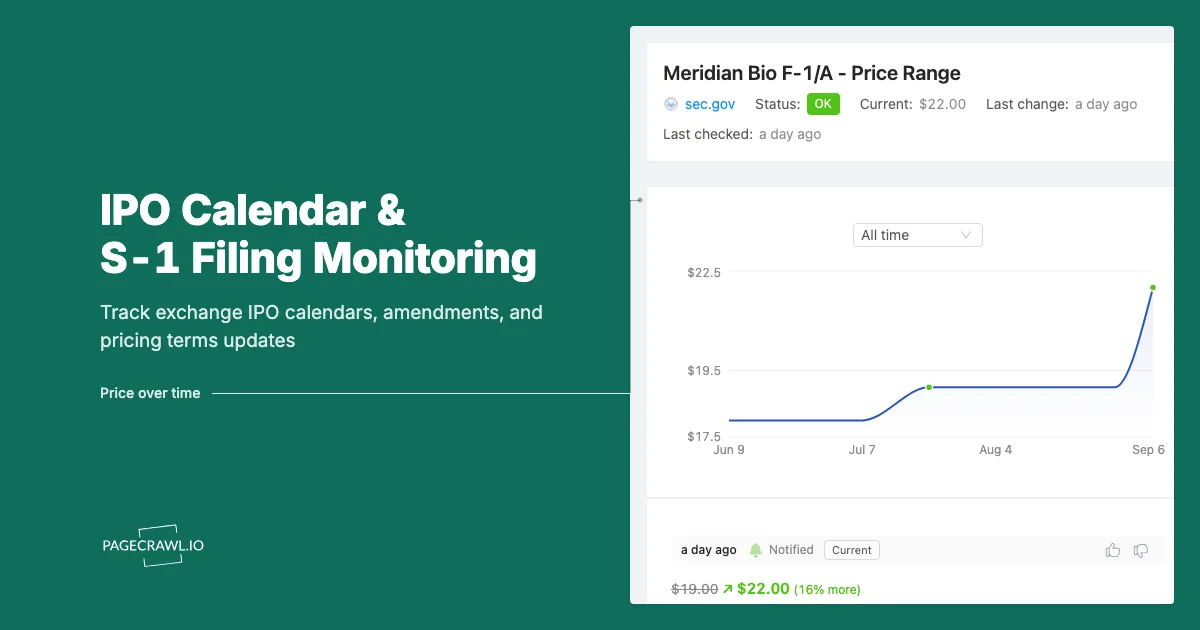
A syndicate desk analyst spent Tuesday building a model for a mid-cap software listing scheduled to price Thursday night. The range in her spreadsheet was the one printed in the last amendment she read: 14 million shares at $17 to $19. On Wednesday afternoon the company filed a new S-1/A that lifted the range to $21 to $23 and upsized the deal to 17 million shares. She found out Thursday morning, from a client, in an email that began "have you seen this?"
Nothing about that miss was exotic. The revised terms sat on a public page for most of a day. The exchange IPO calendar had already updated the deal's row. The company's own filing index had a new line on it. Every fact she needed was published and free. She simply had no process that looked at those pages more than once a day, and an IPO in its final week changes faster than a once-a-day habit can track.
This is the part of IPO work that reading S-1s does not solve. The initial registration statement is a document you sit down and study. The calendar around it is a moving object: expected weeks slip, ranges get revised up or cut, deals get upsized, postponed, or withdrawn outright, and foreign issuers running F-1 registrations follow the same choreography on a different timetable. This guide covers what an exchange IPO calendar actually tells you, why amendments carry more tradeable information than the original filing, which pages to watch, and how to set up monitoring so a change in terms reaches you on the next check instead of through a client.
What does an exchange IPO calendar actually tell you?
An exchange IPO calendar is a table of deals in the pipeline, usually split into expected pricings, recently priced offerings, new filings, and withdrawn or postponed deals. It gives you the shape of the week: which names are live, roughly when, and at what terms. It is a scheduling document, not a guarantee.
The two US exchange calendars most people start with are the Nasdaq IPO calendar and the NYSE IPO center filings page. Both publish rolling tables of deals by status. Nasdaq is explicit that expected IPO dates on its calendar are estimated by EDGAR Online from dates found in company filings, that they are not official, and that Nasdaq does not endorse them. That caveat is the whole reason monitoring matters: the calendar is a derived view that gets corrected as filings arrive, so the corrections are the signal.
The four states a deal moves through
Most calendars organise the pipeline into the same buckets, and the transitions between them are what you want alerts on.
| Calendar state | What it means | Why the transition matters |
|---|---|---|
| Filed | A registration statement is on file, no date set | First public view of the economics |
| Expected / upcoming | A week or date is estimated, terms usually published | Range, share count, and timing become tradeable facts |
| Priced | The offering priced and shares are about to trade | Final price versus range tells you demand |
| Withdrawn / postponed | The company pulled or shelved the deal | Often a sector-wide sentiment signal |
A deal moving from expected to withdrawn on a Friday afternoon is a story. A deal moving from a $17 to $19 range to a $21 to $23 range is a different story. Both appear as a row change on a public table before most coverage catches up.
Calendars outside the US
The same pipeline exists on every major venue, published on the exchange's own pages rather than aggregated by a data vendor. HKEXnews carries new listing information, application proofs, and post-hearing information packs for Hong Kong deals, which is unusually early visibility by global standards. The London Stock Exchange publishes new issue and admission information for UK listings. If your mandate is global, watching two or three exchange pages alongside the US calendars covers most of what you need without paying for a terminal.
Why do S-1 and F-1 amendments matter more than the original filing?
Because the original registration statement has no price. An S-1 or F-1 tells you what the business is; the amendments tell you what it costs. Share counts, price ranges, selling-shareholder participation, use of proceeds, updated quarterly financials, and the final timetable all arrive through amendments in the weeks before pricing.
The initial S-1 on EDGAR is a public event that gets thoroughly covered. Journalists read it, sell-side notes get written, and within a day the obvious analysis is commoditised. Amendments get a fraction of that attention despite carrying the numbers that determine whether the deal is attractive. An S-1/A that adds a price range is the first time the market sees an implied valuation. An S-1/A that revises that range is a live demand read. An S-1/A filed after a quiet period that quietly restates a segment number is the kind of detail that only surfaces if someone diffs the document.
What changes between amendments
Amendments are versions of the same document, so the useful question is always what moved. In practice the recurring changes are:
- Price range added or revised. The single highest-value change. A range lifted before pricing signals oversubscription; a range cut signals the opposite.
- Share count changed. Upsizing or downsizing the base deal, and changes to the greenshoe over-allotment option.
- Selling shareholder mix. A shift between primary shares (money to the company) and secondary shares (money to existing holders) changes the story materially.
- Updated financials. A new quarter stubs in, sometimes turning a growth narrative into a deceleration narrative.
- Risk factor edits. New litigation, new customer concentration, new regulatory exposure, added late in the process.
- Underwriter syndicate changes. Banks added or dropped from the cover page.
F-1 filings and the foreign issuer path
Companies that qualify as foreign private issuers register with the SEC on Form F-1 rather than Form S-1. Form F-1 is the basic Securities Act registration form for foreign private issuers, generally used when such a company undertakes a US initial public offering and no other form is prescribed. F-1/A amendments do the same job as S-1/A amendments, and the same pricing terms arrive through them. If you only screen for S-1 activity you will miss an entire category of listings, including many of the largest cross-border deals. Our guide to tracking S-1 filings and new public offerings covers the discovery side of finding those registration statements in the first place; this post is about what happens to them afterwards.
Which pages should you monitor for a full IPO pipeline view?
Four page types cover almost everything: the exchange IPO calendars for pipeline state, each company's EDGAR filing index for new amendments, the company's investor relations or IPO microsite for the roadshow and pricing press release, and the exchange's withdrawn or postponed table for deals that die.
Exchange calendar tables
Start with one calendar per venue you care about, pointed at the specific tab you use most. The upcoming or expected table is the workhorse. The withdrawn table is the one nobody watches and the one that most reliably produces a surprise. Because these tables are generated from filings, a row that changes tells you a filing changed, which makes the calendar a cheap early-warning system even when you are not diffing filings directly.
Company filing indexes
For any deal you actually care about, watch that specific issuer's filing index page. A new S-1/A or F-1/A row appearing is unambiguous: something in the offering changed. This is far quieter than watching the whole EDGAR firehose, and it scales to a watchlist because each name is one monitor. Our EDGAR filing alerts walkthrough covers the mechanics of watching a company's filing index and the specific form types worth flagging.
IPO microsites and IR pages
Companies preparing to list usually stand up an investor page or a dedicated offering site carrying the roadshow deck, the preliminary prospectus, and eventually the pricing press release. The pricing release is often the first plain-English statement of final terms, published before the 424B prospectus appears. Adding the IR newsroom to your watchlist catches it.
Post-listing follow-through
The calendar does not end at the first trade. Lock-up expiry, the end of the quiet period, index inclusion decisions, and the first earnings report as a public company all sit on predictable pages and all move the stock, so the post-listing dates belong in the same folder as the pre-pricing ones. Our event-driven investing guide treats scheduled corporate events as a monitoring problem rather than a calendar-reminder problem.
How do you set up IPO calendar monitoring in PageCrawl?
You add each calendar or filing page as a monitor, choose a tracking mode that matches the page type, set the check frequency to match how fast that page moves, route alerts to the channel you actually read, and add keyword or numeric rules so routine page noise stays silent. Setup takes a few minutes per page.
Add the URL. Copy the exact URL of the page you want watched, including the tab or filter in the query string if the calendar uses one. An exchange calendar filtered to upcoming pricings is a different page from the same calendar's default view, and you want the filtered one.
Pick the tracking mode. For a calendar table, content tracking on the table region works best, because it ignores the surrounding page furniture. For a company filing index, content tracking on the filing list catches new rows. For a prospectus or amendment document, use the mode that extracts document text so you get a readable diff rather than a layout change. For a page where you only care about one figure, such as a published price range, use a specific-number or specific-text monitor pointed at that value.
Set the check frequency. Match the cadence to the deal stage. A calendar page in a normal week is fine on hourly checks. A named deal in its pricing week deserves the fastest frequency your plan allows, because terms revisions land during the trading day and the window between the filing and the general read-through is short. PageCrawl's free tier checks every 60 minutes, Standard every 15, Enterprise every 5, and Ultimate every 2.
Choose your notification channels. Route alerts where your desk actually looks. Email suits a daily pipeline digest. Slack, Discord, Microsoft Teams, and Telegram suit a live channel your team is already sitting in during market hours. Webhooks let you push the change into your own system, tag it against a ticker, and fan it out from there.
Add keyword and threshold rules. This is what turns a noisy page into a useful feed. On a calendar page, alert on words that mark a state change: priced, postponed, withdrawn, upsized. On a filing index, alert on the form types you care about: S-1/A, F-1/A, 424B4. On a page carrying a numeric price range, set a numeric rule so any change to the figure fires while surrounding text edits do not. Our walkthrough on conditional alerts using price, keyword, and threshold rules covers the syntax for each.
Group monitors into folders. Create a folder per pipeline stage, for example "IPO calendars", "Live deals", and "Post-listing dates", then move names between folders as deals progress. A live deal gets high frequency and a live channel; everything else can sit on a slower schedule and email.
Turn on screenshot capture. For a calendar table, a screenshot attached to the alert tells you which row moved without opening the site, and it gives you a timestamped record of what the page said at that moment. That record matters more than it sounds when you are reconstructing why you sized a position the way you did.
How do you keep IPO alerts from becoming noise?
By narrowing what counts as a change. Exchange calendars carry advertising, market-data widgets, and rotating headlines that change constantly and mean nothing. Scope the monitor to the table itself, ignore the regions that churn, and attach keyword or numeric conditions so only status transitions and terms revisions break the silence.
Exclude the parts of the page that always change
Financial sites are dense with live tickers, index quotes, and promotional modules. Left unscoped, a monitor on a calendar page will alert every few minutes about a number nobody cares about. PageCrawl lets you tell a monitor to ignore a region after it flags a change there, so a couple of corrections trains the noise out. The same discipline applies to filing indexes, where a "last updated" timestamp can otherwise trigger every check.
Alert on transitions, not on presence
The useful event is a row moving between states, not the row existing. Keyword conditions do this cheaply: fire when the text "withdrawn" or "postponed" newly appears in the tracked region, or when a deal name you follow shows up alongside "priced". You get a handful of alerts a week instead of a stream.
Tier your watchlist
Not every name deserves 2-minute checks. A workable split is three tiers: live deals in their pricing week on the fastest frequency with a chat channel alert, filed-but-unscheduled names on a daily check with email, and the broad calendar pages on hourly checks to catch new entrants. Rebalancing the tiers weekly keeps alert volume proportional to what you can act on.
What are the limits of monitoring IPO calendars?
Monitoring tells you a public page changed, on the next check. It does not give you access to the deal, an allocation, or non-public information about book demand, and it cannot confirm a rumoured timetable that has not been filed anywhere. Being early to a published fact is the whole benefit, and it is a real one.
Calendar dates are estimates, not commitments
Nasdaq states plainly that expected IPO dates shown on its calendar are estimated by EDGAR Online from dates in company filings and are not official. Deals slip, get pulled the night before, or price a day early. Treat any date on a calendar as a hypothesis that the next amendment will confirm or contradict, which is exactly why watching for the change is more useful than reading the date once.
Filings arrive on the SEC's clock, not yours
Registration statements and amendments become public when they are accepted, which is frequently after the close or on a Friday afternoon. A monitor that checks around the clock covers those windows; a person refreshing during market hours does not. Weekend and after-hours filings are common enough in IPO processes that they should shape your check frequency rather than surprise you.
Access is a separate problem from information
Knowing that a range was lifted does not get you shares. Retail allocation in traditional IPOs is limited, and the practical use of early awareness for most people is positioning in adjacent names, adjusting a sector view, or being ready on day one rather than reacting on day three. If your interest is competitive rather than financial, the same amendments are a rich source of operating metrics on a private competitor, and our 10-K and 10-Q diff monitoring guide covers the same document-diffing approach applied to ongoing reporting once the company is public.
Choosing your PageCrawl plan
PageCrawl's Free plan lets you monitor 6 pages with 220 checks per month, which is enough to validate the approach on your most critical pages. Most teams graduate to a paid plan once they see the value.
| Plan | Price | Pages | Checks / month | Frequency |
|---|---|---|---|---|
| Free | $0 | 6 | 220 | every 60 min |
| Standard | $8/mo or $80/yr | 100 | 15,000 | every 15 min |
| Enterprise | $30/mo or $300/yr | 500 | 100,000 | every 5 min |
| Ultimate | $99/mo or $999/yr | 1,000 | 100,000 | every 2 min |
Annual billing saves two months across every paid tier. Enterprise and Ultimate scale up to 100x if you need thousands of pages or multi-team access.
In event-driven strategies, minutes matter. One actionable signal surfaced before the broader market reacts can return more than a year of Ultimate. Standard at $80/year covers the core IR, press, and filings pages for a handful of positions. Enterprise at $300/year scales to a full watchlist. All plans include the PageCrawl MCP Server, so you can ask Claude to summarize every material change across a company's IR, press, and filings over any period you care about and get the evidence pulled straight from your monitoring archive. AI assistants can create monitors through conversation on every plan, including Free. Ultimate at $999/year adds 2-minute frequency and web archiving, which matters if you need provable timestamps for a thesis.
Getting Started
Start with three monitors, not thirty. Add the Nasdaq IPO calendar's upcoming table, the NYSE IPO filings page, and the EDGAR filing index for the one deal you are currently modelling. Scope each monitor to the table or filing list so the surrounding page furniture stays quiet.
Then add the rules that make the alerts worth reading: keyword conditions on "priced", "postponed", and "withdrawn" for the calendars, and a form-type condition on S-1/A and F-1/A for the filing index. Route the live deal to a chat channel and the calendars to email.
Run it through one pricing week. The first time an amendment lands at 4:40pm and the alert reaches you before anyone has written about it, the setup has already justified itself. Then widen the watchlist one deal at a time, and add lock-up and quiet-period dates for the names you keep after they list.
Stop reading yesterday's terms. Let the revision come to you.