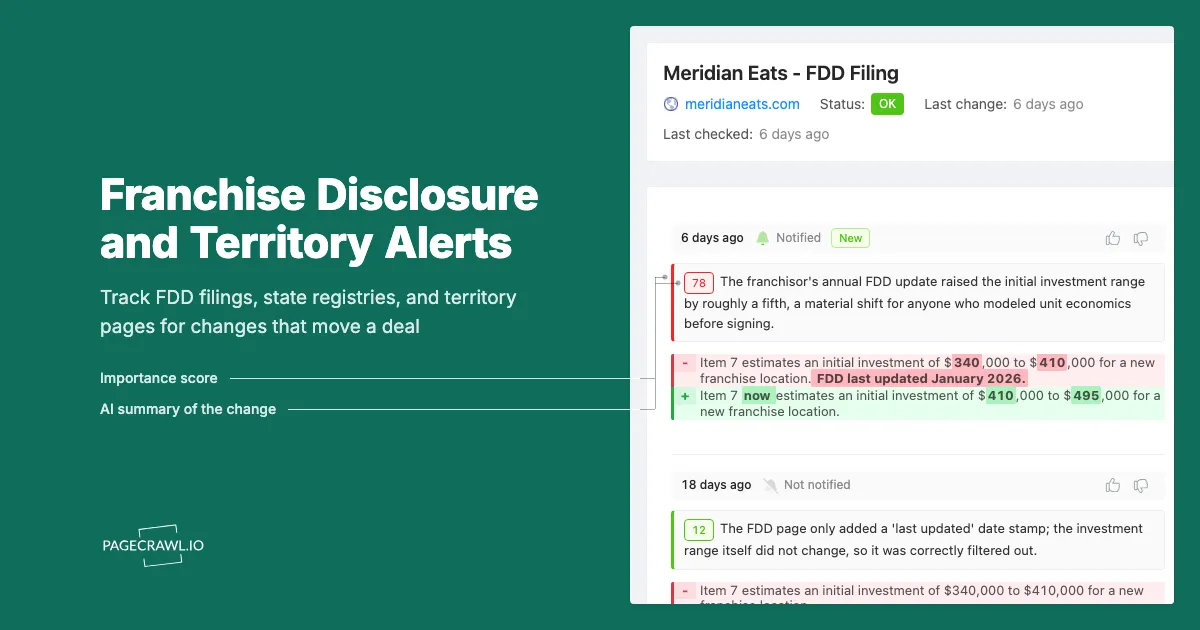
A multi-unit operator in Ohio spent four months building a case for a third brand. He read the franchisor's disclosure document twice, modelled the unit economics off the earnings claims in Item 19, and lined up financing against a build-out cost he had written into a spreadsheet in March. When the signed franchise agreement came back in August, the initial investment range had moved up by roughly a fifth and the earnings section had been rewritten around a smaller sample of stores. Nobody had hidden anything. The franchisor had filed its annual update, the numbers changed on the public record, and he simply never looked again.
Disclosure documents are not static contracts you read once. They are living filings, amended when a fee moves, when litigation is added, or when the franchisor re-registers in a state for another year. On the other side of the same market, the territory you want is a line on a development map that quietly flips from "reserved" to "available" when a candidate drops out, and nobody sends you a note about it.
Brokers, prospective franchisees, franchise attorneys, and development teams inside franchisors all face the same problem: the source documents are public, scattered across a federal rule, thirteen state regulators, and a few hundred franchisor websites, and none of them announce a change. This guide covers what actually moves inside an FDD, where states publish the filings, how to watch territory pages, and how to set up monitoring so a filing or a freed market reaches you on the next check instead of six weeks later.
What changes in a franchise disclosure document actually matter?
The items that move deals are the money and risk items: initial and ongoing fees, the estimated initial investment range, the financial performance representation, litigation and bankruptcy history, territory rights, and the outlet tables showing openings, closures, and transfers. Everything else is usually boilerplate that rarely changes year to year.
The Franchise Rule requires a numbered structure, which is what makes monitoring practical. You are not watching a free-form marketing page. You are watching sections that appear in the same order in every document, from every brand, every year. The rule text lives in 16 CFR Part 436 on eCFR, and the FTC's business guidance explains what a prospective franchisee is entitled to receive and when.
The items worth a dedicated alert
| FDD item | What it contains | Why a change matters |
|---|---|---|
| Item 3 | Litigation history | New suits can signal system-level disputes or a franchisor under pressure |
| Item 5 | Initial fees | Direct hit to your entry cost, and often a sign of a repositioning brand |
| Item 6 | Other fees | Royalty, ad fund, technology, and renewal fees compound over the term |
| Item 7 | Estimated initial investment | The single number your financing model depends on |
| Item 12 | Territory | Protected radius, reserved rights, and e-commerce carve-outs |
| Item 19 | Financial performance representation | Whether earnings claims are made at all, and on how many outlets |
| Item 20 | Outlet and franchisee information | Openings, closures, terminations, transfers, and non-renewals |
| Item 21 | Financial statements | Audited statements showing whether the franchisor itself is solvent |
Item 20 deserves special attention because it is the closest thing franchising has to a health metric. A brand that opened forty units and closed thirty-five in the same year is telling you something the marketing site never will. Because that table is rebuilt every annual update, a year-over-year comparison of Item 20 is one of the highest-signal diffs you can run in the whole category.
The annual update rhythm
Franchisors do not amend continuously. The Franchise Rule ties the annual refresh to the close of the franchisor's fiscal year, with the updated document, including audited financials, prepared within 120 days of that close. For the large majority of brands running a calendar fiscal year, that puts the new document in circulation in the spring. Material changes between annual updates are handled with amendments, which is why a monitor that only looks once a year in April will still miss things.
The practical consequence is that franchise monitoring has one loud season and a long quiet tail. Watch a brand year-round at a modest frequency, and expect a burst of real diffs in spring.
Where do state franchise registries publish FDD updates?
Thirteen states require franchisors to register or file the FDD with a state regulator before offering franchises there: California, Hawaii, Illinois, Indiana, Maryland, Michigan, Minnesota, New York, North Dakota, Rhode Island, Virginia, Washington, and Wisconsin. Several of those regulators expose a public search page, which is where a filing becomes visible before anyone tells you about it.
State registration is the part of franchising that behaves like securities regulation, and it is administered by securities divisions in several states for that reason. Registration is not permanent. It has to be renewed to keep selling in the state, so the registry records an annual heartbeat for every brand operating there.
The registries worth watching first
- Wisconsin. The Department of Financial Institutions runs a public Wisconsin franchise search, and its securities division franchising page explains the e-filing process. Filings are made online and re-registered each year, which makes Wisconsin the cleanest single window into whether a brand is still actively selling.
- California. The Department of Financial Protection and Innovation operates a self-service portal where publicly available franchise applications can be looked up by legal name. California is the highest-volume registration state, so a brand of any size usually has a record there.
- Minnesota. The Minnesota Department of Commerce files franchise registrations through its securities division and publishes regulatory documents through a public search.
- The remaining registration states. Hawaii, Illinois, Indiana, Maryland, Michigan, New York, North Dakota, Rhode Island, Virginia, and Washington all require registration or filing, with varying degrees of public access to the documents themselves.
Registry monitoring versus franchisor-site monitoring
The two sources answer different questions. A state registry answers "is this brand registered, current, and what did it file?" A franchisor website answers "what is this brand telling candidates today?" A brand that quietly stops renewing in three states while its site still runs a development map is a story the site alone will not tell you.
On registry search pages, the result count often carries more signal than the page text. If a brand name returns two registrations this year and returned five last year, that delta is the story. Monitoring the search result page rather than any single filing catches new registrations and lapses in one monitor.
Why do territory and opportunity pages change without notice?
Territory availability changes because a candidate withdraws, financing collapses, a development agreement lapses, or a franchisor redraws a market. Those events happen inside the franchisor's pipeline and surface on the public development map or "available markets" page as a quiet status flip, with no announcement, no email, and often no date stamp.
Development teams treat the availability map as a sales tool, not a public record. It gets updated when someone remembers, which makes the page the first public evidence that a market has opened. If three other operators want the same metro, the gap between the flip and your discovery of it is the whole contest.
The pages that carry availability signal
- Development and territory maps. A state-by-state or metro-level map with statuses like open, limited, or sold out. The status labels are the content worth watching, not the graphic.
- "Available markets" or "priority markets" lists. Metros the brand is actively pushing, often with incentives attached.
- Franchise fee and incentive pages. Reduced fees for veterans, multi-unit deals, or underdeveloped regions appear and expire here.
- Resale and existing-unit listings. Units for sale by existing franchisees move faster than greenfield territory.
- Discovery day and event schedules. New dates going up is a leading indicator of a development push.
Why the alert has to be filtered
A franchise development page is full of noise: rotating testimonials, unit counters, embedded social feeds, and lead-form scripts. Unfiltered, those produce an alert every check and nothing useful. Scope the monitor to the availability block and attach a rule so only a status change or a new market name breaks the silence. Our guide to conditional alerts using price, keyword, and threshold rules walks through those conditions, and the walkthrough on reducing monitoring false positives covers training a monitor to ignore a region that changes without meaning anything.
How do you set up franchise monitoring in PageCrawl?
You add each source as its own monitor, choose a tracking mode that matches the format (document extraction for FDD PDFs, text or content tracking for registry search pages and development maps), set a check frequency that matches how fast the source moves, and route alerts to the channel your team actually reads.
- Collect the URLs first. For each brand on your list, gather four things: the franchise opportunity or development page, the territory or availability map, the state registry search result page for the brand name, and the direct link to the FDD or state filing if the state publishes documents openly. Four monitors per brand is a realistic baseline.
- Add the URL to PageCrawl. Paste it in and let the monitor be created. Give it a name in a consistent format like "Brand, Item 19" or "Brand, WI registry" so a phone notification is readable without opening anything.
- Pick the tracking mode. Use document extraction for FDD PDFs so the monitor reads the text inside the file rather than treating it as an image. Use reader or content tracking for long-form disclosure pages, and text tracking scoped to the availability block for development maps. Our guide to monitoring PDF documents for changes covers multi-hundred-page filings in detail.
- Scope the monitor to the section that matters. On a long FDD, point the monitor at one item rather than the whole document, so a reformatted table of contents does not fire an alert about Item 19.
- Set the check frequency to the source. Registry searches and FDD documents move on a filing cycle, so daily is usually right, and the free tier's hourly checks already outpace the source. Territory and resale pages reward tighter intervals: Standard checks every 15 minutes, Enterprise every 5, and Ultimate every 2, which matters when several operators chase the same metro.
- Choose notification channels. Email suits the filing monitors that feed a weekly research review. Push availability and resale monitors to Slack, Discord, Teams, or Telegram so a status flip reaches whoever can act on it that day, and use webhooks to drop the change into your CRM or deal tracker.
- Add keyword and threshold rules. Keyword conditions on "available", "now open", "resale", "amended", or "withdrawn" turn a noisy feed into a short list. A threshold rule on the initial investment range or the royalty percentage means you hear about a move in the money and nothing else.
- Turn on screenshot capture and history. A timestamped capture of what a registry search or development map said on a given date is the evidence you want if a claim is later withdrawn. Franchise diligence is a paper trail exercise.
- Group monitors by brand. Put all four monitors for a brand in one folder. When a brand is out, you pause the folder rather than hunting individual monitors.
What should a franchise research watchlist include?
A useful watchlist is layered: the brands you are seriously evaluating get the deepest coverage, the brands on your shortlist get filing and territory coverage, and the wider category gets a light registry watch so you notice a new entrant or a brand that stops renewing. Depth should follow how close you are to signing.
A three-tier structure
| Tier | Who it covers | What to monitor | Suggested frequency |
|---|---|---|---|
| Tier 1 | Brands under active diligence | FDD or state filing, Item 19, Item 20, territory map, fee page, registry search | Daily or faster on territory |
| Tier 2 | Shortlist and comparison brands | Registry search page, opportunity page, territory map | Daily |
| Tier 3 | Category and emerging brands | Registry search page only | Weekly |
What each audience gets out of it
Prospective franchisees get an early read on cost drift and system health. Item 7 climbing across two annual updates while Item 20 shows accelerating closures is worth more than any brochure.
Brokers and consultants get supply intelligence. A brand newly registered in three states is opening markets your candidates can be first into, and a resale listing is an inventory event.
Franchise attorneys get filing awareness across a client portfolio without manually re-pulling registry searches. Amendments and lapses show up as diffs, not as a discovery during a closing.
Franchisor development teams get competitive intelligence. Watching a rival's territory map, fee incentives, and Item 20 outlet counts is the same discipline as any competitor monitoring program, in a category where the underlying data is unusually public.
What goes wrong when monitoring franchise pages?
The recurring problems are large PDFs that change formatting without changing substance, registry search pages that require a query rather than sitting at a stable URL, marketing pages full of rotating content, and the temptation to monitor so many brands that nobody reads the alerts. Each has a practical fix.
Documents that change without changing
An FDD reissued for the new fiscal year differs on almost every page: dates, page numbers, exhibit labels, state-specific addenda. Diff the whole document and you get a wall of noise. Scope monitors to the items you care about, run one monitor per item where the structure allows it, and treat the whole-document monitor as a "something was refiled" trigger rather than the analysis itself.
Registry searches that live behind a query
Some state search tools produce a result page at a stable, shareable URL and some do not. Where the URL is stable, monitor the brand's result page directly, because a change in the result count is the signal. Where it is not, monitor the regulator's filings or notices page as a slower but reliable secondary source. Government sites also change layout on their own schedule, the same reality covered in our guide to monitoring permit and license status pages.
Watchlist sprawl
It is easy to add sixty brands and then stop reading the digest. Keep Tier 1 small enough that every alert gets looked at, usually three to six brands, and push everything else to a daily or weekly summary. A watchlist you read beats a watchlist that is comprehensive.
What monitoring cannot do
Monitoring tells you a document was refiled or a market flipped to available. It does not read the franchise agreement for you, and it does not replace an attorney or an accountant reviewing Item 19 and Item 21. It also cannot see documents a state does not publish, or the parts of a franchisor's pipeline that never reach a public page. It tells you when to look, not what to conclude.
Choosing your PageCrawl plan
PageCrawl's Free plan lets you monitor 6 pages with 220 checks per month, which is enough to validate the approach on your most critical pages. Most teams graduate to a paid plan once they see the value.
| Plan | Price | Pages | Checks / month | Frequency |
|---|---|---|---|---|
| Free | $0 | 6 | 220 | every 60 min |
| Standard | $8/mo or $80/yr | 100 | 15,000 | every 15 min |
| Enterprise | $30/mo or $300/yr | 500 | 100,000 | every 5 min |
| Ultimate | $99/mo or $999/yr | 1,000 | 100,000 | every 2 min |
Annual billing saves two months across every paid tier. Enterprise and Ultimate scale up to 100x if you need thousands of pages or multi-team access.
In event-driven strategies, minutes matter. One actionable signal surfaced before the broader market reacts can return more than a year of Ultimate. Standard at $80/year covers the core IR, press, and filings pages for a handful of positions. Enterprise at $300/year scales to a full watchlist. All plans include the PageCrawl MCP Server, so you can ask Claude to summarize every material change across a company's IR, press, and filings over any period you care about and get the evidence pulled straight from your monitoring archive. AI assistants can create monitors through conversation on every plan, including Free. Ultimate at $999/year adds 2-minute frequency and web archiving, which matters if you need provable timestamps for a thesis.
Getting Started
Start with one brand, not sixty. Pick the franchise you are closest to signing with and create four monitors: the FDD or state filing, the territory or availability map, the fee and incentive page, and a state registry search for the brand name. Group them in a folder named after the brand.
Set the filing monitors to a daily check and the territory monitor to the fastest frequency your plan allows, then route the territory alert to a push channel and the filing alerts to email. Turn on screenshot capture so every alert carries a timestamped record of what the page said.
Run it through one annual update cycle. The first time a refiled document lands in your inbox with a diff on Item 7 rather than as a surprise at signing, the setup has already earned its place.
Stop re-reading last year's disclosure document. Let the next filing find you.