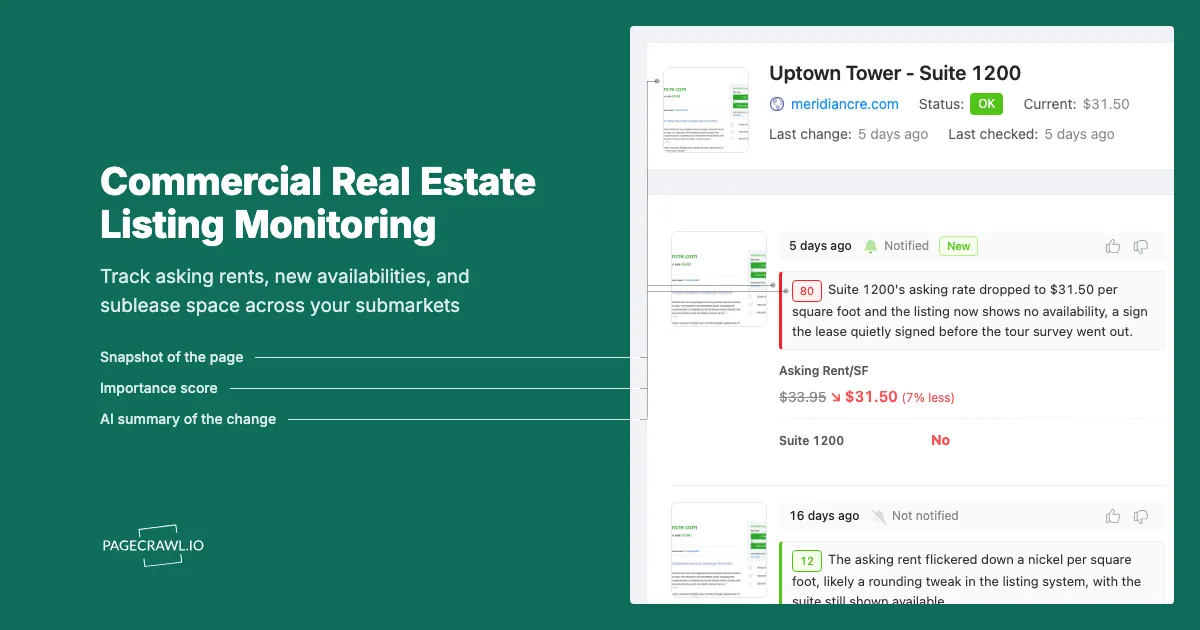
A tenant-rep broker in Dallas spent a Tuesday afternoon building a tour set for a client who needed 18,000 square feet of office space. She pulled eight buildings, wrote the survey, and sent it. Two days later the client's real estate committee asked why one of the buildings had gone dark. The landlord had quietly pulled the full-floor availability off their leasing page after signing a lease that had been out for signature the whole week she was working. Another building on the survey had cut its asking rate by $2.50 per square foot, which she heard about from a competing broker in a meeting.
Neither of those changes was announced. They were edits to a leasing page and a listing record. Commercial real estate does not publish a changelog. Availabilities appear, asking rates get quietly adjusted, "call for pricing" replaces a published rate, sublease space hits the market, and the only public trace is a page that reads differently today than it did last week. Nobody sends a notice, and by the time a quarterly market report captures the shift, the deal that created it closed a month ago.
The brokers and occupier teams who look best informed are rarely the ones with the biggest research budget. They are the ones who noticed a page change first, then called the listing broker while the change was fresh enough to be worth a conversation. Doing that by hand across forty buildings is not realistic. Doing it with automated page monitoring is a one-afternoon setup that then runs on its own.
This guide covers what actually changes on commercial real estate listing pages, which pages are worth watching in a target submarket, and how to set the monitors up so they report rent and availability moves rather than a rotating hero image.
Why do commercial real estate listings change without any announcement?
Because a listing page is a marketing document, not a filing. Landlords and listing brokers edit asking rates, suite availability, and concession language whenever the leasing strategy shifts, and there is no obligation to date, log, or publicise the edit. The page simply reads differently on the next visit. A suite appears when the owner decides to market it and disappears when a lease signs, and neither event is dated anywhere.
Asking rents are a negotiating position, not a price list
An asking rate is closer to an opening bid than a retail price tag. Owners move it in response to a competing building's new listing, a lender conversation, or a quarter of no activity. Some drop the number. Others hold the headline rate and quietly increase free rent and tenant improvement allowance instead, which is why "the rate did not move" tells you very little on its own. When the published number does move, the owner has decided to be seen competing on price, and that is worth a call.
"Call for pricing" is itself a data point
Replacing a published rate with "call for pricing," "market rate," or "contact broker" is one of the most common leasing-page edits, and it means the owner no longer wants a number in front of the market. Either they are pushing the rate up in a tightening submarket, or they are prepared to go well below the last published figure without resetting the comp publicly. The change from a number to no number is a shift no platform alert will flag.
Sublease space moves fastest of all
Sublease availabilities are posted by companies with a cost problem and a deadline, so the marketing changes far more often than on direct space. Term shortens, asking rates get cut, furniture gets added to the offer, and the listing can vanish in a week. Research groups including NAIOP, the commercial real estate development association, track sublease availability as a leading indicator of occupier demand because it reacts before direct-space fundamentals do. At building level, that reaction is an edit to a listing page.
What should you monitor in a target submarket?
Watch the pages where the primary information actually lives: individual building leasing pages on the owner's site, the availability or stacking-plan page for each institutional owner in the submarket, the listing-brokerage availability pages that cover your product type, and the filtered marketplace search URL for your size and asset class.
Owner and property-level leasing pages
The building's own leasing page, run by the owner or their leasing agent, is closest to the source. It carries the available suites, floor sizes, asking rate where published, and the marketing copy that changes when strategy changes. A monitor per competitive building is not excessive: ten to forty pages covers most office or industrial submarkets end to end, and the next time an owner adds a floor you learn it from your own alert.
Institutional owner availability pages
Large owners publish one availabilities or leasing portfolio page covering everything they hold in a metro, so a single monitor covers many buildings. That makes them the highest-yield pages to start with: when the owner adds an availability anywhere in the metro, you get the alert on the next check. Note: these pages are noisier than a single building page, so scope the tracking to the availability list.
Brokerage availability and market-report pages
Listing brokerages publish availability sheets, submarket pages, and quarterly market reports. The reports are slower, but they are the artefact your client's committee will actually read. Cushman & Wakefield's US MarketBeat reports are one such quarterly series covering vacancy, availability, absorption, and asking rents by market, and most national brokerages publish an equivalent. Monitoring the series landing page tells you when a fresh quarter posts.
Marketplace search URLs for your criteria
Public marketplaces cover space that never appears on an owner's own site, particularly smaller buildings and owner-user product. Build a filtered search URL for your submarket, asset class, and size band, then monitor it so new matching listings surface as page changes. Our companion guide on LoopNet and Crexi listing alerts covers the acquisitions side, where the buyer watches for new for-sale listings and price reductions rather than leasing availabilities, and the real estate investor monitoring guide pairs with it.
Municipal and development pipeline sources
Future supply changes your advice as much as current availability. Planning commission agendas and permit portals show what is being built long before it appears as an availability. The Urban Land Institute covers these trends at market level, but the underlying documents are city planning PDFs you can monitor directly.
Why aren't platform saved-search alerts enough?
Saved searches on listing platforms tell you when a new record appears that matches your filters. They rarely tell you when an existing record was edited, which is where most of the signal in commercial real estate lives. A rate cut on a listing you already knew about produces no new record, so no email.
Edits are invisible to new-listing alerts
The premise of a saved search is novelty: a listing is new, or it is not. A landlord dropping an asking rate from $34.00 to $31.50 full service does not create a new listing. Neither does adding six months of free rent, shrinking a contiguous block from three floors to two, or pushing the available date to next January. Those are the events that change your recommendation, and they arrive as silent edits.
Owner-direct pages are not in any platform's index
A meaningful share of institutional space is marketed on the owner's own site and through broker relationships without ever appearing on a public marketplace. No saved search covers those pages, because the platform never sees them.
Digests are slow and unfilterable
Platform notifications are typically batched into a daily digest, which is fine for slow-moving investment product and poor for a live requirement being finalised this week. With your own monitoring you set the cadence, and alerts arrive when the next check detects the change rather than once a day. You also get filtering a saved search cannot do, because it filters on listing attributes at creation time and cannot say "only tell me when the words free rent, TI allowance, or reduced appear in the change." Our guide to conditional alerts using price, keyword, and threshold rules covers how those rules are built.
How do you set up commercial real estate listing monitoring in PageCrawl?
Point a monitor at each leasing page, availability page, or filtered search URL you care about, choose a tracking mode that matches what the page is, set the check frequency to match how fast that page actually moves, and route the alerts to the channel your team already lives in.
Add the URL. Copy the exact page you would check by hand: the building's leasing page, the owner's availabilities page, or your filtered marketplace search URL with all the criteria already applied. Add it as a new monitor. If a page requires a login, set it up as authenticated monitoring using the steps in our guide to monitoring pages behind a login form, so every check sees the same view you do.
Pick the tracking mode. Use content tracking, which ignores navigation and boilerplate, for any leasing page where a substantive edit to the availability table or marketing copy matters. Use number tracking on a published asking rate you want to trend over time, so you get a value history rather than a wall of text. For a filtered marketplace search URL, content tracking on the results area works best, because a new row is what you are hunting.
Set the check frequency. Individual building leasing pages change slowly, so an hourly or daily check is plenty. Institutional availability pages and active marketplace searches justify the 15-minute frequency on Standard. Tracking a competitive set during a live negotiation is the case for the 5-minute or 2-minute frequencies on Enterprise and Ultimate.
Choose notification channels. Email suits a daily roll-up of a wide submarket sweep. Slack, Discord, and Microsoft Teams are better for a deal team, because the alert lands where the requirement is already being discussed. Telegram is the practical choice for a broker between tours. Webhooks push changes into a CRM so availability history attaches to the property record.
Add keyword and threshold rules where useful. Set a keyword condition on leasing terms: sublease, reduced, free rent, TI allowance, LOI, leased. Set a numeric threshold on a tracked asking rate so a rounding change stays quiet while a real cut fires. This is the difference between a feed you read and a feed you mute.
Turn on screenshots. A timestamped screenshot of a listing page as it read on a given date settles the "they were asking $31.50 in September" argument, supports a comp you are quoting, and preserves a visual record of a suite since pulled from the market.
Organise by submarket. Group monitors into folders named for the submarket or requirement they support, and tag them by asset class. When a new requirement lands in a submarket you already cover, you can produce a current availability picture the same day instead of starting a survey from scratch.
Which changes actually signal that a landlord is getting flexible?
The reliable tells are a published rate coming down, a rate disappearing behind "call for pricing," new or lengthened concession language, a contiguous block being broken into smaller suites, and an availability sitting untouched on the page for several quarters. Each one is an edit you can catch on a page.
| Change on the page | What it usually means | How to catch it |
|---|---|---|
| Published asking rate falls | Owner has decided to compete on headline rate | Number tracking on the rate with a threshold rule |
| Rate replaced by "call for pricing" | Owner is repositioning up or down, away from public view | Keyword rule on "call for pricing" or "market rate" |
| Concession language appears or grows | Economics are moving without touching the headline rate | Keyword rule on "free rent", "TI", "allowance" |
| Large block split into smaller suites | Owner has given up on a single large user | Content tracking on the availability table |
| Availability removed | Space leased, under LOI, or held for expansion | Content tracking, watch for the row disappearing |
| New sublease posted | An occupier in the building is downsizing | Keyword rule on "sublease" or "sublet" |
| Available date pushed out | Existing tenant extended or holdover | Content tracking on the availability table |
Time on market is the underrated signal
A suite unchanged on a leasing page for four quarters is a different negotiation from one posted last month at the same rate. Every check either records a change or confirms the page is unchanged, so that history builds itself. Telling a client with dates that a floor has been marketed at the same number since last spring beats an impression that it has been around a while.
What goes wrong when monitoring commercial real estate listing pages?
The usual problems are noisy marketing pages that trigger alerts about nothing, listing content that loads dynamically after the page, availability data locked inside PDF flyers, and coverage that quietly goes stale when a page is retired. All four are manageable once you know to look for them.
Rotating banners and marketing noise
Leasing pages carry hero carousels, "featured availability" modules, and news feeds that change without any availability changing, and those alerts train you to ignore the channel. Scope content tracking to the availability area, then mark any region that produces a false alert as ignored. Our guide to reducing monitoring false positives walks through tightening a noisy monitor down.
Availability data that arrives after the page
Many leasing sites load the availability table separately from the rest of the page. PageCrawl renders pages the way a browser does, so this normally works, but check the first capture actually contains the suite list rather than an empty table.
PDF flyers and stacking plans
Plenty of buildings publish the real detail in a PDF flyer or stacking plan linked from the leasing page. Those files are replaced quietly and usually keep the same filename, so nothing on the page tells you a new version landed. Monitor the PDF URL directly with text extraction and a replaced flyer becomes a diff showing which suite, rate, or date changed.
Coverage decay
Owners restructure their websites and buildings are sold and rebranded, so a leasing page that worked in March returns a 404 by autumn. A monitor on a dead URL is worse than no monitor, because it makes you feel covered. Review your submarket folders once a quarter and clear out the failures.
How do you turn listing alerts into something a client can act on?
Route the alerts into the channel where the requirement is already being worked, keep the dated screenshots, and summarise each month's changes into a short submarket note. The value is not any individual alert. It is the accumulated, dated record of how a submarket moved while everyone else waited for a quarterly report.
Timestamped screenshots turn an opinion into a documented position. "This floor has been available since last February and the asking rate has come down twice" is a sentence you can support with dates and images, and it changes how a landlord responds. It is the same discipline that makes documented change history valuable in property tax assessment appeals, where the dated record is the argument.
Nobody on a real estate committee wants forty alerts, so once a month turn the accumulated changes into a note: availabilities added, blocks removed, rates that moved, sublease space that appeared. Every change is already captured with a date and a diff, so that takes minutes.
Choosing your PageCrawl plan
PageCrawl's Free plan lets you monitor 6 pages with 220 checks per month, which is enough to validate the approach on your most critical pages. Most teams graduate to a paid plan once they see the value.
| Plan | Price | Pages | Checks / month | Frequency |
|---|---|---|---|---|
| Free | $0 | 6 | 220 | every 60 min |
| Standard | $8/mo or $80/yr | 100 | 15,000 | every 15 min |
| Enterprise | $30/mo or $300/yr | 500 | 100,000 | every 5 min |
| Ultimate | $99/mo or $999/yr | 1,000 | 100,000 | every 2 min |
Annual billing saves two months across every paid tier. Enterprise and Ultimate scale up to 100x if you need thousands of pages or multi-team access.
In event-driven strategies, minutes matter. One actionable signal surfaced before the broader market reacts can return more than a year of Ultimate. Standard at $80/year covers the core IR, press, and filings pages for a handful of positions. Enterprise at $300/year scales to a full watchlist. All plans include the PageCrawl MCP Server, so you can ask Claude to summarize every material change across a company's IR, press, and filings over any period you care about and get the evidence pulled straight from your monitoring archive. AI assistants can create monitors through conversation on every plan, including Free. Ultimate at $999/year adds 2-minute frequency and web archiving, which matters if you need provable timestamps for a thesis.
Getting Started
Pick one submarket you already cover and list the competitive set. Start with the institutional owner availability pages, because one monitor there covers many buildings, then add leasing pages for the five or six assets you quote most often. Six pages fits inside the free tier.
Set content tracking on the availability area of each page, add a keyword rule for sublease, reduced, and free rent, and route the alerts to the channel where your deal team already works. Turn on screenshots so the dated record starts building from day one.
Give it a month. The first time you call a listing broker about a rate change the same week it posted, instead of hearing it from the tenant across the table, the setup has paid for itself. Then widen coverage to the rest of the submarket and your marketplace search URLs.
Stop rebuilding the survey from scratch. Let the submarket tell you when it moves.