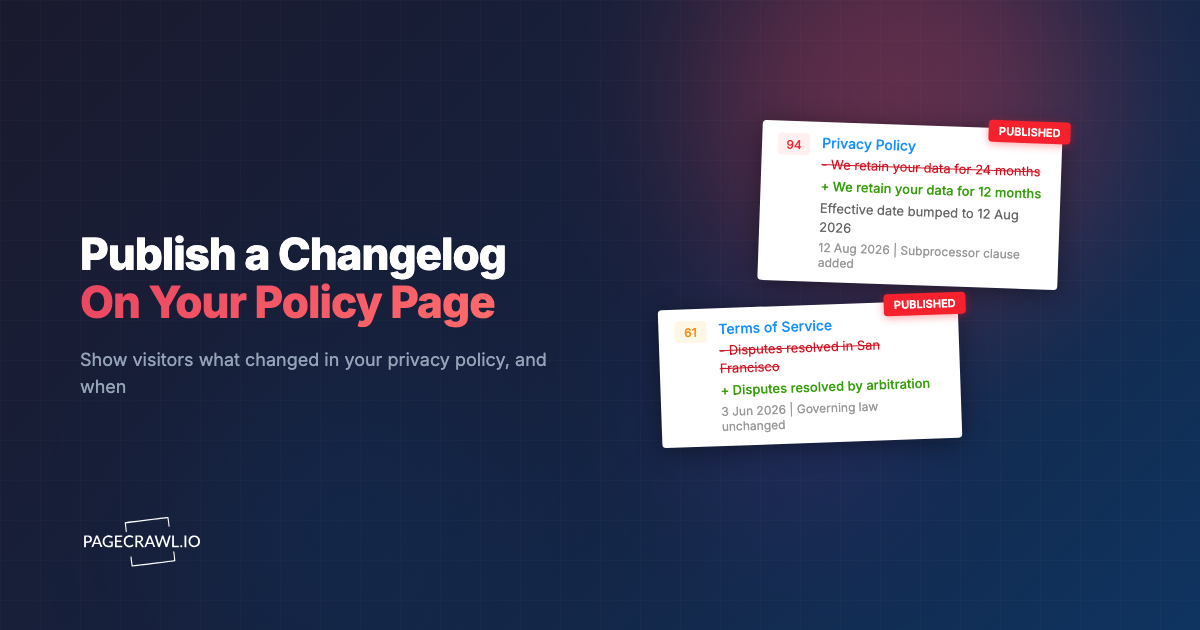
Most pages that matter to your customers change quietly. The terms get a new clause, the pricing page drops a plan, the subprocessor list gains a vendor, and the only trace is a "Last updated" date that says when but never what. Anyone who wants to know what changed has to find an old copy and compare the two by hand.
A changelog widget fixes that on the page itself. It is a small embed that lists the recent updates to one of your pages, newest first: the date, a one-line summary and, if you choose, a redline of the exact words that were removed and added. PageCrawl builds it from monitoring the page, so nobody has to keep it up to date by hand.
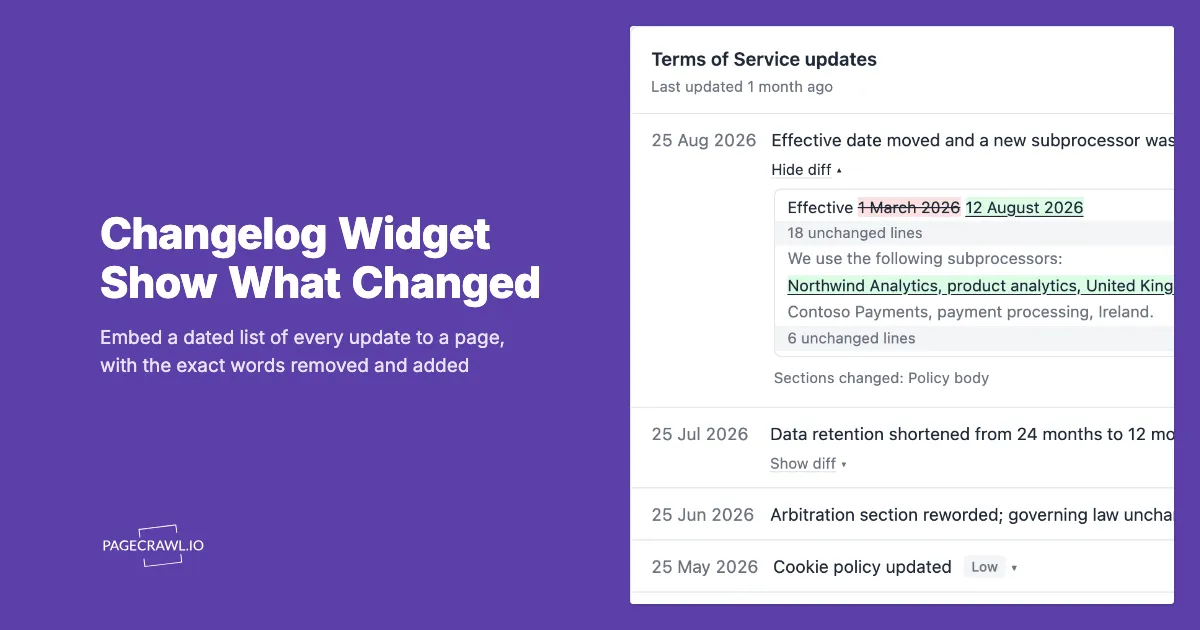
The example below is the real widget with sample entries. Open Show diff on the first entry.
What is a changelog widget?
A changelog widget is an embed that shows the history of a page on that same page. Each entry has the date a change was detected, a short summary of it and an optional Show diff link with the exact wording removed and added. Readers get the history without leaving the page, and it builds itself as the page changes.
The important word is "builds itself". A changelog someone maintains by hand decays: an edit gets forgotten, the wording drifts from what actually shipped, and within a year the list is less trustworthy than no list at all. PageCrawl records each entry when it detects the change on the live page, so the list reflects what was really published, not what someone remembered to write down.
How is it different from a release-notes changelog?
A release-notes changelog is written by a team to announce product changes, usually in a marketing voice and usually after the fact. A changelog widget is a record of edits to one specific page, generated from the page itself. Release notes tell readers what you want to highlight; the widget shows what actually changed.
The two work well together. Many teams keep release notes for features and add a changelog widget to the pages where readers care about exact wording, such as terms, privacy policies and pricing, where "we made some updates" is not an answer anyone accepts.
What does each entry show?
Each entry has the date the change was detected and a one-line summary of what changed, for example "Data retention shortened from 24 months to 12 months". Where the page's text changed, a Show diff link under the summary opens the exact edit. You can also show an importance label (Critical, Important, Medium or Low) next to each summary.
Where AI summaries are off, the entry names the part of the page that changed instead. Opening an entry also shows which tracked parts of the page changed, using the names you gave them in PageCrawl, and the exact time the change was detected. A "Last updated 3 weeks ago" line sits under the widget's title, which answers the first question most readers arrive with.
How does Show diff work?
Show diff opens a redline of the change: removed words are struck through and added words are underlined, and within a reworded sentence only the words that changed are marked. One unchanged line either side gives context, and longer unchanged stretches collapse into a line such as "12 unchanged lines". The link reads Hide diff while it is open.
So a one-word edit reads as exactly that. If a retention clause changes from 24 months to 12, the diff shows "We retain your personal data for 24 12 months after your account closes", not two copies of the paragraph for the reader to compare.
A few details matter on a public page:
- It does not rely on colour. Removed text is struck through and added text is underlined, so the difference survives for readers who cannot distinguish red from green, in line with the WCAG guidance on use of colour. Screen readers are told which words were removed and which were added.
- Only wording is published. Link addresses and image sources on your page never appear in the diff, only the visible link text. Raw HTML source, hidden text and documents such as PDFs are never diffed, and prices, numbers and other values keep their one-line summary.
- Your ignore rules apply. Any line one of your ignore rules touches is left out of the diff entirely.
- It needs no JavaScript. The widget opens and closes the diff with plain HTML, so it works even where scripts are blocked.
If an update cannot be shown line by line, for example because most of the page was rewritten, the entry says so instead of guessing.
Which pages is it for?
Any page where readers care about what changed, not just that something did. Legal pages are the obvious fit, but the same widget works on commercial and technical pages where an unannounced change costs someone money or time, such as pricing, SLAs and API documentation.
| Page | Who reads the history | Example entry |
|---|---|---|
| Terms of service | Customers, procurement teams | "Liability cap lowered to fees paid in the last 12 months" |
| Privacy policy | Privacy-conscious users, regulators | "Data retention shortened from 24 months to 12 months" |
| Subprocessor list | Vendor-risk and security teams | "Added a new subprocessor for product analytics" |
| Pricing page | Buyers comparing plans | "Starter plan now includes 10 seats instead of 5" |
| SLA or support policy | Enterprise customers | "Response time for priority tickets changed to 4 hours" |
| API documentation | Developers integrating with you | "v1 endpoints marked as deprecated from 1 March" |
| Refund or returns policy | Shoppers | "Return window extended from 14 to 30 days" |
Transparency expectations point the same way. The GDPR's transparency articles ask for information that is concise and easy to access, the California Consumer Privacy Act sets out what consumers must be told about their data, and the FTC's privacy and security guidance repeatedly returns to honest, clear disclosures. None of them requires a changelog. A dated record of every edit is simply the most direct way to show your wording was never changed quietly.
Note: a changelog is a communication tool, not a compliance shortcut. It does not change what your terms say or which obligations apply. Check anything binding with your own counsel.
Can you keep small edits out of the list?
Yes. Set Minimum importance on the monitor to "Medium and above", "Important and above" or "Critical only", and updates PageCrawl scores below that level are left out of the widget, the feed and the JSON. A footer tweak or a reworded cookie banner then stays off the list. Updates without a score are always listed.
The setting lives on the monitor in PageCrawl, not in the embed code, so you can change it later without touching the snippet on your site. Detail works the same way: set it to "Summary only" if you would rather publish the summaries without the page's own wording.
How do you add a changelog widget to your site?
Monitor the page in PageCrawl, open Share on that monitor, switch on the changelog embed, pick your options and paste the snippet onto your site. It takes four steps, and only the first, choosing which page to monitor, needs any real thought.
- Monitor the page. Add your terms, privacy policy or any other page to PageCrawl as a monitored page. From then on, every change is recorded with the date it was detected.
- Switch on the embed. Open the page in PageCrawl, choose Share, and switch on the changelog embed. New embeds start with Show diff on.
- Pick the options. Choose the number of rows, the theme (light, dark or match the visitor), the date format, whether to show importance labels, the accent colour and the corner radius. Set Detail and Minimum importance here too.
- Paste the snippet. Copy the script snippet and paste it where the changelog should appear, usually under the "Last updated" line. The widget sizes itself to its content.
You can try the layout and Detail options without an account on the Policy changelog tab of the changelog widget builder, which previews the widget with sample entries as you change them. The help article covers every setting in detail.
How do you embed it in React, Vue or another framework?
In a single-page app, use an iframe instead of the script snippet: point it at your embed address with resize=1, and listen for the height message the widget sends so the frame grows to fit. PageCrawl's Share dialog generates ready-to-paste React and Vue components with your embed id and options filled in.
A React component looks like this (in the Next.js App Router, add 'use client' at the top of the file):
import { useEffect, useRef, useState } from 'react';

export default function PolicyChangelog() {
    const frame = useRef(null);
    const [height, setHeight] = useState(240);

    useEffect(() => {
        const onMessage = event => {
            const value = event.data && event.data.pagecrawlChangelogHeight;
            if (event.source === frame.current?.contentWindow && typeof value === 'number' && value > 0) {
                setHeight(Math.min(value, 20000));
            }
        };
        window.addEventListener('message', onMessage);
        // The frame may have loaded before this listener existed (server rendering).
        frame.current?.contentWindow?.postMessage({ pagecrawlChangelogPing: 1 }, '*');
        return () => window.removeEventListener('message', onMessage);
    }, []);

    return (
        <iframe
            ref={frame}
            src="https://pagecrawl.io/widget/changelog/YOUR_EMBED_ID?theme=auto&resize=1"
            title="Policy changelog"
            scrolling="no"
            style={{ width: '100%', height, border: 'none', display: 'block' }}
        />
    );
}
Svelte, Angular and anything else follow the same pattern: an iframe with resize=1 in its address, a message listener that sets the frame's height when the message comes from that frame, and one pagecrawlChangelogPing message to the frame once the listener is in place, so a server-rendered page still gets the height. The help article has the Vue version and a plain JavaScript one. We use the React version on our own Terms of Service.
Does the widget set cookies or run scripts on your page?
The widget sets no cookies, and its list and Show diff links work without JavaScript. The script snippet loads one small PageCrawl script on your page that adds the frame and sizes it. Inside the frame, a height reporter runs when the address has resize=1, and an invisible bot check loads whenever the Get notified button is on.
Everything the widget shows renders inside its own frame, so nothing from the monitored page can reach your site's markup, styles or cookies. If your site does not allow third-party scripts at all, use the plain iframe snippet with a fixed height and switch the "Get notified" button off in the Share dialog.
Can visitors follow updates without an account?
Yes. An RSS link in the widget's footer opens an Atom feed anyone can follow in a reader, with no email and no account; with Show diff on, entries whose wording changed carry the redline too. For email alerts, the Get notified button takes an address and, once confirmed, adds the page to the reader's own PageCrawl account.
The email box stays collapsed behind the Get notified button in the top corner, and the feed is a small RSS link in the footer, so the list stays the point of the widget. When the email box is open, it says plainly what the address is used for.
Can you render the changelog in your own design?
Yes. Every embed also has a JSON version at the same address with /json on the end, so you can fetch the entries and lay them out to match your site. With Show diff on, each entry whose wording changed carries a structured diff: sections, lines of removed, added and unchanged text, and counts of the unchanged lines left out.
All text in the JSON is plain text, never HTML, so render it with your framework's normal escaping. The help article documents every field.
What stays private?
Screenshots, your account, internal ids and, for a private monitor, the page address are never published. The embed uses its own id, separate from the link that opens a monitor's full public history, so pasting the snippet exposes only the changelog. Detail and Minimum importance are stored on the monitor, so nobody can change them by editing the snippet.
If you are adding a changelog to your privacy policy, the guide to publishing a policy changelog covers what a good entry says and where the line sits between useful transparency and publishing more than you meant to.
Getting started
Pick the one page your customers would most like a history of, usually your terms or privacy policy. Monitor it in PageCrawl, switch on the changelog embed from Share, and paste the snippet under the "Last updated" line. From the next change on, the page answers the question that date always raised: updated how?