Almost every privacy policy on the internet carries a line like "Last updated: 14 March 2026". Almost none of them answer the question that line provokes: updated how? A reader who wants to know what actually changed has to find an old copy somewhere, paste both versions into a diff tool, and read the result themselves.
That is a strange gap. You already know what changed. Your legal team tracked it, your compliance folder has the old version, and the edit was deliberate. The information exists; it just never reaches the page where people are standing when they wonder about it.
A policy changelog closes that gap. It is a short, dated list of the edits to a page, published on that same page, so a reader can see the history without leaving it. This guide covers what to put in one, how to keep it accurate without maintaining it by hand, and where the line sits between useful transparency and publishing more than you meant to.
What is a policy changelog?
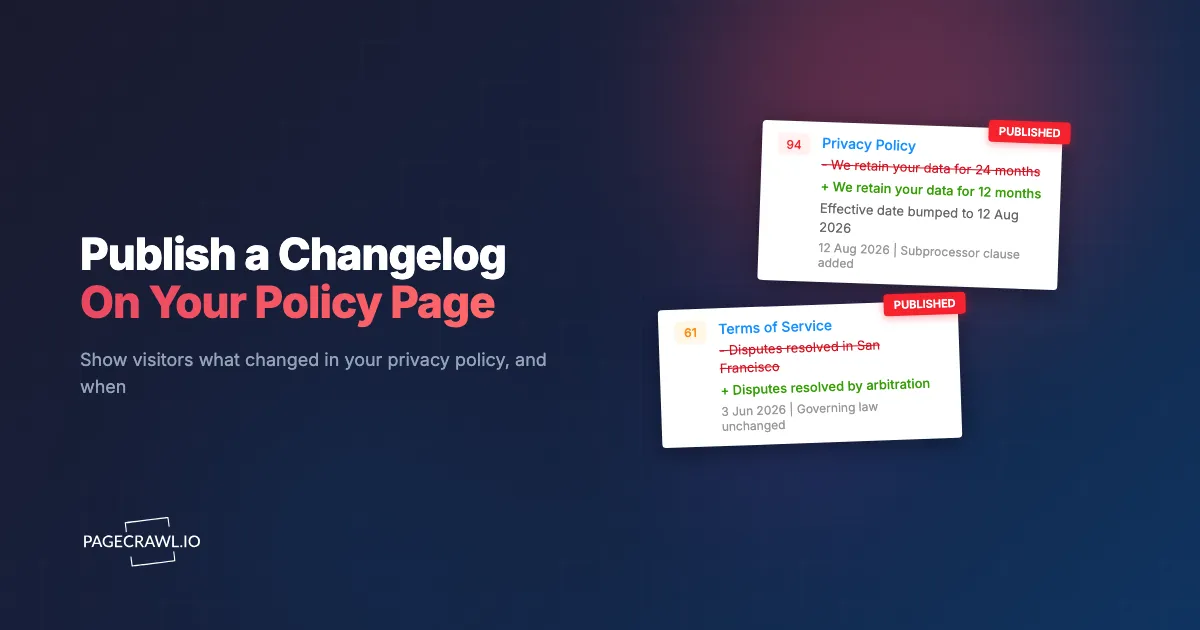
A policy changelog is a dated list of the changes made to a legal page, shown on that page. Each entry gives the date and a short description of what changed: an effective date bumped, a clause added, a retention period shortened. It is the same idea as a software release changelog, applied to terms and privacy policies.
The format matters less than the discipline. A changelog answers three questions a "last updated" date leaves open: when did it change, how often does it change, and what changed this time. Those are the questions that turn a policy page from a wall of text into something a reader can actually assess.
Why does it matter what changed, not just when?
Because the date alone is unfalsifiable. "Last updated last week" is equally consistent with fixing a typo and with adding a new category of data sharing. A reader who cannot tell the two apart has to either read the entire document again or trust you, and most will do neither.
Regulators frame this as a transparency question. The California Consumer Privacy Act, administered by the state's Attorney General, expects businesses to tell consumers how their personal information is handled in a form they can actually understand, and the California Privacy Protection Agency maintains the regulations that put detail behind that. In Europe, the European Data Protection Board publishes guidance on what meaningful transparency looks like in practice. None of these require a changelog specifically. All of them point in the direction of one.
Note: publishing a changelog is a communication decision, not a compliance shortcut. It does not change what your policy says or what obligations attach to it. Treat this article as informational and check anything binding with your own counsel.
Who reads a policy changelog?
Four groups, and they want different things from it. Privacy-conscious individuals want to know whether the terms they agreed to still hold. Procurement and vendor-risk teams want a record when they reassess you. Journalists and researchers compare policies across companies. And your own legal and support teams want one place to point at.
That last group is often the one that makes the case internally. Support tickets asking "did your terms change?" get an answer that is a link rather than a paragraph.
How do you publish a changelog without maintaining it by hand?
By monitoring your own policy page and letting the record build itself. A hand-maintained changelog decays: someone forgets an edit, the wording drifts from what actually shipped, and within a year the list is less trustworthy than no list at all. A monitored page produces the entries as a by-product of the change actually happening.
The setup is three steps.
Step 1: Monitor your own policy page
Add your privacy policy, terms of service, DPA, or cookie policy as a monitored page. This is the same thing you would do to watch a vendor's terms, pointed at your own site. From then on, every substantive edit is captured with a timestamp.
Step 2: Turn on the changelog embed
Open that page in PageCrawl, choose Share, and switch on the changelog embed. This is a separate setting from making the page's full monitoring history public, and it uses its own id, so switching it on exposes the changelog and nothing else.
Step 3: Paste the snippet into your policy page
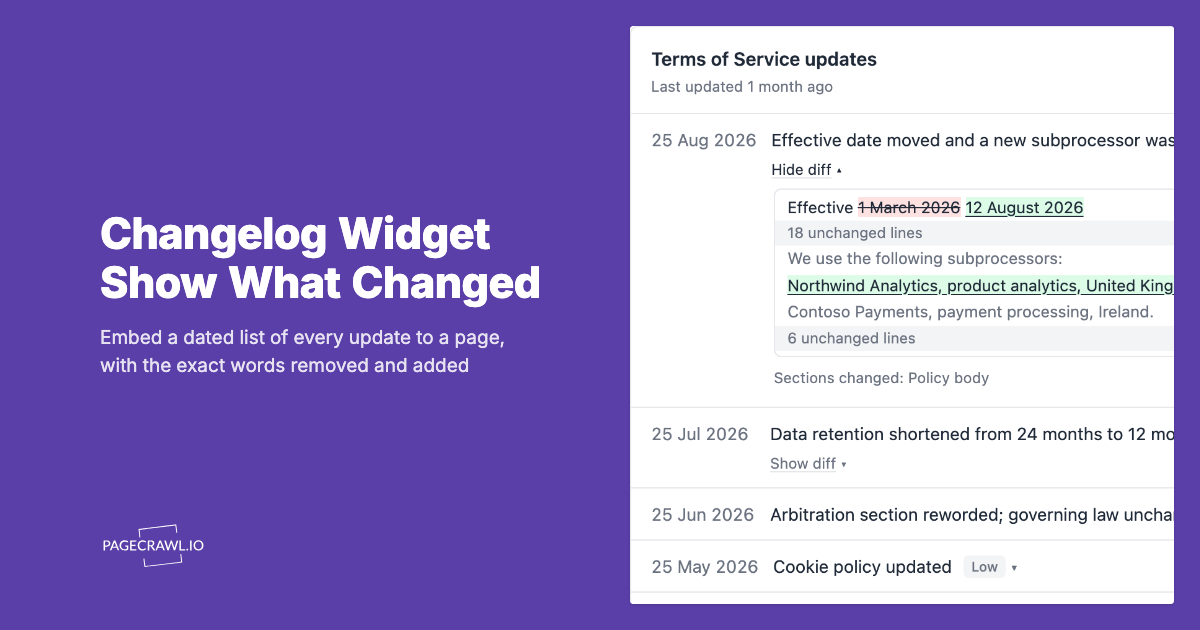
You get a snippet to paste wherever the changelog should appear, usually directly under the "Last updated" line. Pick the number of entries, the theme and the date format. Detail sets how much wording is published: "Summary and diff" adds a "Show diff" link under each summary, and "Summary only" leaves the wording out. Minimum importance keeps small edits, such as a footer tweak, off the list.
What should a changelog entry actually say?
Enough to let a reader decide whether to read further, and no more. "Effective date bumped and a new subprocessor added" tells someone what happened. "Policy updated" does not. "Section 7.3(b) amended" is precise and useless to anyone who has not memorised your section numbering.
The useful middle ground names the thing that changed in the reader's terms: retention periods, data sharing, dispute resolution, pricing, who your subprocessors are. If you use AI summaries, this is what they produce automatically. If you write entries yourself, aim for one sentence a customer would understand.
What does the changelog publish, and what stays private?
The dates, a short summary of each change, and the names you gave the tracked parts of the page, plus, with the diff on, the wording each edit removed and added. It does not publish screenshots, the page address, or anything about your account. Readers can expand an entry to see which sections changed and when the change was detected.
The diff is a redline under a "Show diff" link: removed words struck through, added words underlined, and inside a reworded line only the words that changed are marked, with one unchanged line either side for context. A new embed starts with it on, an embed that was already on keeps its setting, and you can switch Detail to "Summary only" at any time. The setting is stored on the monitor rather than in the embed code, so nobody can turn the diff on by editing the snippet.
Only text you track is diffed. Prices and other values keep their one-line summary, raw HTML and documents such as PDFs are never diffed, and lines your ignore rules touch are left out. Link addresses inside the page are never published, only the visible link text.
Does the widget set cookies or run scripts on your policy page?
It sets no cookie. That matters more here than anywhere else, because this widget is designed to sit on privacy and cookie policy pages, where an unexpected third-party cookie would be an embarrassing thing to explain.
The expandable entries and diffs work without any JavaScript. Two things do load a script, and only where they are needed: the script version of the embed adds a small height reporter so the widget sizes itself to its content, and where the subscribe box is shown, an invisible bot check runs on the email field. Switch the "Get notified" button off and the bot check goes too; use the fixed-height iframe as well and no script loads at all.
Can visitors follow the page without creating an account?
Yes. The changelog carries an Atom feed, so anyone who tracks policy pages in a feed reader can subscribe with no email and no account. The address is shown in full so it can be copied without leaving the page.
Visitors who would rather be emailed can enter their address and monitor the page in their own account, which is useful for the procurement and vendor-risk readers who are watching several companies at once.
How often do policy pages actually change?
More often than most teams expect, and unevenly. An active SaaS provider will touch its terms or privacy policy several times a year, often in clusters around a funding event, a new product line, a new subprocessor, or a regulatory deadline. Long quiet stretches are normal and then three edits arrive in a month.
That pattern is itself worth publishing. A changelog showing two years of history with four entries says something reassuring about stability that no paragraph of marketing copy can.
Getting started
Pick one page: whichever of your privacy policy or terms of service changes most. Monitor it, turn the changelog on, and paste the snippet under the "Last updated" line. You will have an empty changelog until the next edit, which is honest, and the first real entry writes itself.
For a tour of the widget itself, including Show diff, the minimum importance setting and embedding it in React or Vue, see what a changelog widget is and how it works.
Start monitoring your policy pages and publish a changelog your readers can actually check.