
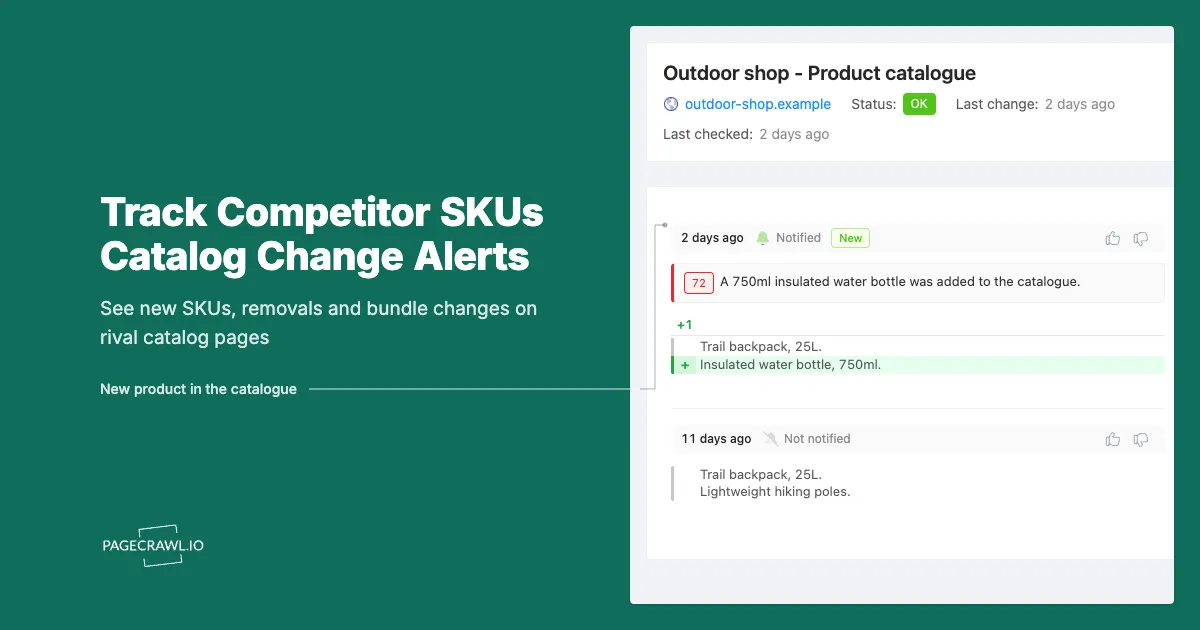
Noor runs category management for a mid-market housewares brand. In March her quarterly review showed the category holding share against its closest rival. In June the same deck showed a six-point slide and nobody could explain it. It took a week of digging to find the cause: the rival had added eleven SKUs to a single collection page between the two reviews, all at price points sitting underneath Noor's opening range. There was no press release and no launch campaign. The products appeared on the catalog page, got picked up by retailer feeds, and started absorbing the entry-level demand that used to land on her line.
The evidence was public the whole time. A competitor's catalog page is the most honest document they publish. Marketing copy describes the company they want to be, but the product listing describes the company they actually are this week: what they are betting on, what they have quietly killed, and how they are repackaging what remains. It updates the day a decision ships, not the day a campaign is approved.
Almost nobody watches it, because watching it manually is miserable. A single competitor might have eight category pages and 400 SKUs, and diffing that by eye across four competitors is a job nobody does consistently. So teams fall back on the anecdote, the sales rep who noticed something, the customer who mentioned a new option, and by then the assortment shift has already been priced into somebody's quarter.
This guide covers the three catalog signals worth tracking (additions, removals, and bundle restructuring), which specific pages carry them, how to set up monitoring that alerts you on the next check after a catalog changes, and how to keep the alerts quiet enough that your team still reads them in month four.
Why does a competitor's catalog change before their marketing does?
A catalog page is operational, not promotional. A SKU goes live when merchandising publishes it, which happens whenever the product is ready to sell, often weeks before the launch campaign runs and sometimes without any campaign at all. Removals are quieter still: discontinued items are usually pulled with no announcement whatsoever.
Launches leak through the catalog first
A new variant frequently appears on the category listing so retail partners, affiliates, and search engines can start indexing it, days or weeks ahead of any announcement. Soft launches, regional pilots, and single-market tests may never get an announcement at all. If your only competitive input is a press feed and a newsletter, you see the subset of launches a competitor decided to promote, which is systematically biased toward the ones they already think are working.
Removals are almost never announced
No company issues a release saying "we killed our mid-tier product." The SKU stops appearing on the category page, the product page starts redirecting, and the only public trace is the delta between last week's listing and this week's. That silence is why removals are such a clean signal: a competitor exiting a price band tells you where they lost, usually before anyone in your industry has noticed the vacancy.
The exception: regulated and enterprise hardware
Some categories publish their discontinuations formally, and those pages are gifts. Cisco maintains a public end-of-sale and end-of-life products listing, and under its published end-of-life policy external notification of end of sale typically comes about six months before the end-of-sale date. Opengear publishes a similar end-of-life products page listing discontinued models alongside replacement part numbers. Here the discontinuation is a dated, structured, public page, which makes it one of the highest-value pages a competitive intelligence program can watch.
What exactly should you monitor on a competitor's catalog?
Watch the pages that enumerate products rather than the ones that describe a single product: the full category or collection listing, the "new arrivals" or "new releases" page, any end-of-life or discontinued index, and the bundles or packages page. Those four page types carry additions, removals, and repackaging between them.
The full category listing
This is the workhorse monitor. A category page such as a rival's complete cookware collection contains the whole SKU set, so any addition or removal changes the page content. If the competitor paginates, monitor page one sorted by newest plus the last page, where discontinued items tend to fall out. One monitor per category per competitor is the right granularity: fine enough to tell you where the change happened, coarse enough that you are not managing 400 monitors.
The new arrivals page
Many brands publish a dedicated recent-additions feed, for example Anker's public new releases collection. These pages are purpose-built to surface exactly the signal you want, and they are usually short, stable, and low in noise. When a competitor has one it should be your first monitor for them, not your fifth. When they do not, the category listing sorted by newest is the closest substitute.
The end-of-life or discontinued index
If your competitors publish one, monitor it. Enterprise hardware, industrial component, and regulated equipment vendors typically do. A new row on that page is a dated commitment with a deadline attached: a last-time-buy window, a support cutoff, and a named replacement part. It tells you both that a competitor is exiting a position and roughly when their installed base will be forced to decide. Procurement teams watch the same page type on their own suppliers, which our guide to supplier price list and catalog monitoring covers from the buying side.
The bundles, kits, and packages page
Bundle pages change more often than product pages and reveal more about strategy. When a competitor folds a standalone accessory into a starter kit, they have decided the accessory does not sell on its own. When they break a kit apart into separate SKUs, they are usually chasing an entry price point. Neither move generates a press release, and both change your competitive position on the shelf.
The sitemap as a backstop
Most storefront platforms publish a machine-readable index of their pages. Shopify generates one automatically and documents how to find your store's sitemap, with a separate child sitemap for products that updates when a product is added. A product sitemap is a blunt instrument, since it tells you a URL appeared without telling you what it is, but it catches launches outside any category page you are watching. Use it as a safety net, not a primary signal. For store-level tracking on that platform, see our Shopify competitor monitoring guide.
How do you spot a discontinued SKU before your customers do?
Watch the category listing that contains the SKU rather than the product page itself. A discontinued product page often stays live for months or redirects silently, but the category listing drops the item on the day merchandising pulls it. The disappearance from the list is the reliable signal, not the state of the individual page.
Why the product page lies
Brands keep dead product pages online deliberately: they hold search rankings, carry accumulated reviews, and give existing owners somewhere to land for support. So a product page can show "temporarily unavailable" for a quarter, then quietly redirect to a successor, and at no point announce a discontinuation. Meanwhile the item vanished from the shoppable listing weeks earlier. The catalog page is where the commercial decision is visible.
Telling a stockout from an exit
The difference matters enormously and is easy to confuse. A useful rule of thumb, applied over three or four checks rather than one:
| Observation | Likely stockout | Likely discontinuation |
|---|---|---|
| Item still on category page, marked unavailable | Yes | Sometimes |
| Item removed from category page entirely | Rare | Yes |
| Variants disappearing one colour at a time | Possible | Common (sell-through before exit) |
| Price cut deeply just before disappearing | Rare | Common (clearance) |
| Successor SKU appears in the same slot | No | Yes |
The pattern to trust most is a deep discount, then removal, then a new SKU in the same price band. That sequence is a planned replacement, and it plays out over weeks, which gives you room to respond if you caught it at the start rather than the end.
The commercial window a removal opens
When a competitor exits a price band, their installed base becomes addressable and their shelf space becomes contestable. Both have deadlines: retail resets happen on a calendar, and a customer forced to replace a discontinued item makes that decision once. Learning about the exit in the week it happens gives you runway. Learning about it from a lost deal gives you none.
What does bundle restructuring tell you about a competitor's strategy?
Bundle changes are pricing moves disguised as merchandising. When a competitor adds a bundle, they are trying to lift average order value or protect a headline price. When they unbundle, they are usually chasing a lower entry price. When they move a feature from the base SKU into an add-on, they have raised the real price without changing the advertised one.
Reading the direction of travel
Track three transitions on a competitor's bundles page. First, components moving out of the base product into paid add-ons, which signals margin pressure and creates a comparison you can win on total cost. Second, standalone SKUs collapsing into kits, which signals weak individual sell-through. Third, a new bundle priced below the sum of its parts, which is a share-grab and usually precedes a broader discount cycle. All three are invisible on a pricing page that still shows the same headline number.
The same behaviour shows up in software as tier restructuring, where a feature migrates from a mid tier to an enterprise tier and the list price never moves. If your competitors sell both a product and a subscription attached to it, monitor both pages, because the repackaging tends to happen on whichever one gets less attention.
How do you set up competitor catalog monitoring in PageCrawl?
Point a monitor at each competitor category listing, track the page content rather than the full visual rendering, check daily for most catalogs and hourly for fast-moving ones, and route alerts to the channel your team already reads. A four-competitor program is typically 15 to 30 monitors and takes about an hour to build.
Collect the URLs first. For each competitor: the full category listing for the categories you compete in, the new arrivals page, the bundles or kits page, and the end-of-life index if they publish one. Sort category listings by newest where the site allows it, since that puts additions at the top of the page where they are easiest to read in a diff.
Add each URL to PageCrawl as its own monitor. Resist monitoring a single parent page that contains everything. One monitor per page keeps the alert specific enough to act on, and a redesign of one section does not blind you to the others.
Pick content tracking rather than full-page or visual tracking. Catalog listings are text-heavy and structurally noisy: carousels rotate, badges flip, recommendation strips reshuffle. Content tracking focuses on the listing text, which is where SKU names and product titles live. For an end-of-life index published as a document, use PDF text extraction so the table content is compared rather than the file.
Set the check frequency to match the category. Daily suits most catalogs, because merchandising publishes on business days and a one-day lag costs nothing. Move to hourly or faster for a competitor mid-launch, a seasonal reset window, or an end-of-life page with a last-time-buy deadline in play. The free tier checks every 60 minutes, Standard every 15, Enterprise every 5, and Ultimate every 2.
Choose notification channels your team already lives in. Email works for the weekly digest, but a catalog change is a team event, so route it to Slack, Microsoft Teams, or Discord where product and pricing people can react in the thread. Telegram suits the one or two accounts you personally own. Webhooks push the change into your warehouse, CRM, or an internal intelligence board so the history accumulates somewhere queryable.
Add keyword and threshold rules to sharpen the alert. On a category listing, a keyword condition on your own product names or on terms like "new," "bundle," or "kit" cuts most of the noise. On an end-of-life page, alert on any addition at all, since those pages change rarely and every row matters. On a bundle page, a numeric threshold on price catches repricing a text diff would bury. Our walkthrough of conditional alerts using price, keyword, and threshold rules covers the syntax.
Turn on screenshots and keep the history. A catalog diff reads far better as a before-and-after image than as a text delta, and six months in you can answer "when did they add this line and what did they drop to make room" from your own records.
Group monitors by competitor, then by page type. A folder per competitor with consistently named monitors ("Rival A - Cookware category," "Rival A - Bundles") makes every alert self-describing.
How do you keep catalog alerts from becoming noise?
Catalog pages are among the noisiest on the web, so filter aggressively from day one. Exclude recommendation carousels, review counts, badge text, and stock labels; alert on product titles and SKU identifiers instead. A program that pings twice a week gets read. One that pings twice an hour gets muted in a fortnight.
The four usual noise sources
Recommended-products strips reshuffle on nearly every load and will fire an alert every check if you let them. Review counts increment constantly. Promotional badges ("Best seller," "Save 20%") rotate on merchandising schedules. Stock labels flip on individual variants without any assortment change. All four are excludable: click the region in the detected change and tell the monitor to ignore it, and after a couple of checks the noise is trained out.
Separate "tell me now" from "tell me weekly"
Not every catalog change deserves a ping. Route additions on your two highest-threat competitors and any row added to an end-of-life page to a chat channel, and batch everything else into a weekly digest one person reviews on a fixed day. That split survives the six-month test, which is the only one that matters. Competitive intelligence programs rarely fail because the monitoring stopped working. They fail because the alerts got ignored.
Competitors also redesign category pages, and a redesign produces one large, useless alert. It is a two-minute fix: confirm the URL still resolves, re-point the monitor if the path changed, re-apply your exclusions. Budget for one per competitor per year.
How do you turn catalog alerts into a decision?
Treat each alert as a question rather than a conclusion. A new SKU asks which of your products it targets and at what price. A removal asks which customers are now shopping. A bundle change asks whether your comparison is still accurate. The value is in the standing routine that answers those questions, not in the alert itself.
A working triage habit
When an addition fires, note the SKU, the price point, and which of your products it sits against, then check whether it is genuinely new or a rename. When a removal fires, wait one more check to rule out a stockout, then look for a successor in the same slot. When a bundle changes, recompute your total-cost comparison before your sales team quotes an outdated one. Fifteen minutes per alert is enough, which is exactly why the filtering work matters: fifteen minutes on three alerts a week is sustainable, fifteen minutes on thirty is not.
Feed it back into the wider program
Catalog changes read best beside the other signals a competitor emits. A wave of new SKUs alongside a hiring push in the same product area is a far stronger read than either alone, which is why teams pair assortment monitoring with competitor job posting monitoring. Assortment tells you what shipped, hiring tells you what is coming, and neither will be sent to you.
Choosing your PageCrawl plan
PageCrawl's Free plan lets you monitor 6 pages with 220 checks per month, which is enough to validate the approach on your most critical pages. Most teams graduate to a paid plan once they see the value.
| Plan | Price | Pages | Checks / month | Frequency |
|---|---|---|---|---|
| Free | $0 | 6 | 220 | every 60 min |
| Standard | $8/mo or $80/yr | 100 | 15,000 | every 15 min |
| Enterprise | $30/mo or $300/yr | 500 | 100,000 | every 5 min |
| Ultimate | $99/mo or $999/yr | 1,000 | 100,000 | every 2 min |
Annual billing saves two months across every paid tier. Enterprise and Ultimate scale up to 100x if you need thousands of pages or multi-team access.
One competitive signal caught early can swing a deal worth more than a decade of Enterprise. If you win one additional deal per year because you spotted a pricing change, a product launch, or a messaging shift before your competitors did, $300/year is a rounding error. Standard at $80/year handles 100 monitored pages, enough for a Tier 1 and Tier 2 competitor program. Enterprise adds 500 pages and SSO. All plans include the PageCrawl MCP Server for AI assistants like Claude and Cursor. Your sales and product teams can ask "summarize every change to Competitor X's pricing page over the last quarter" and get an answer pulled straight from your own archive. AI assistants can create monitors through conversation on every plan, including Free, turning the tracked pages into a living competitor database, not just an alert feed.
Getting Started
Start with one competitor and three pages: the category listing for the category you compete in, the new arrivals page if they publish one, and the bundles or end-of-life page. Three daily monitors fit inside the free tier and will tell you within a fortnight whether their catalog moves often enough to justify a wider program.
Then widen it. Add your second and third competitors, send only the two you actually fear to a chat channel, and let the rest land in a weekly digest. Exclude the recommendation carousels and review counters on the first noisy alert rather than tolerating them.
By the next quarterly review you will have what most category teams never have: a dated record of exactly when each competitor added, dropped, and repackaged, sitting next to your own share numbers.
Your competitors publish their strategy every week. Set up the monitor and start reading it.


