Ingrid runs growth at a mid-market analytics vendor. In March her trial-to-paid rate was healthy and her cost per qualified trial was flat. In May both numbers fell off a cliff, and nobody could explain why. Paid search costs had not moved. The product had not regressed. Sales kept losing the same profile of deal at the same stage, and the loss reason field kept saying "went with the incumbent."
It took six weeks and a customer interview to find the answer. Her closest competitor had quietly dropped the credit card requirement from their signup form and extended their trial from 14 days to 30. No press release, no changelog entry, no LinkedIn post. Just a form field that disappeared and a number that changed on a page Ingrid's team had last screenshotted in January. By the time she knew, two quarters of pipeline had already been shaped by a decision she never saw being made.
Signup and onboarding pages are the most honest surface a software company has. Marketing pages describe what a company wants to be. The signup form describes what it is actually willing to do to get you in the door. Trial length, card requirement, seat minimums, the plan preselected by default, and the wall you hit on day 15 are all packaging decisions, and packaging decisions move revenue faster than feature releases do.
This guide covers what changes on a competitor's trial funnel, why those changes are the earliest reliable signal of a strategy shift, how to monitor signup and onboarding pages without tripping over noise, and how to route the alerts to people who can act on them.
Why do competitor signup and trial pages change so often?
Signup pages change often because they are the cheapest place to run an experiment. Changing trial length or removing a card field takes an afternoon and moves conversion inside a single billing cycle, while building a feature takes a quarter. Growth teams iterate on the funnel continuously, and almost none of those iterations are announced anywhere.
Experiments are invisible by design
Nobody publishes an A/B test. A competitor running a 14-day versus 30-day trial split will show different values to different visitors, and the winner quietly becomes the default weeks later. There is no announcement because there is nothing to announce yet. If you only learn about packaging from press releases and changelogs, you learn about it after the decision is final and after it has already touched your pipeline.
Onboarding changes reveal the product roadmap early
The onboarding sequence names things the marketing site has not caught up to yet. A new step called "Connect your warehouse" or a checkbox for "Enable governance controls" appears in the signup flow before the feature has a landing page. Competitor webinar abstracts leak the same way, which is why teams also watch competitor webinar and event pages. The signup flow leaks earlier, because it has to work before it can be marketed.
Regulation is now pushing changes onto these pages
Subscription and free trial mechanics are an active regulatory area, so competitors are editing trial disclosures for legal reasons as well as growth reasons. The US Federal Trade Commission's Negative Option Rule governs how free trials that roll into paid subscriptions must be disclosed and cancelled, and in the UK the subscription contracts regime in Part 4 of the Digital Markets, Competition and Consumers Act 2024 sets out reminder notices and cooling-off requirements around trials and renewals. When rules like these shift, whole cohorts of vendors update trial copy, cancellation links, and renewal disclosures in the same few weeks. Watching that wave tells you what your own legal team is about to ask for.
What exactly should you monitor on a competitor's trial funnel?
Monitor four page types: the pricing page, the signup or trial start page, any "start free trial" landing pages used in ads, and the public onboarding or getting-started documentation. Together these expose trial length, card requirement, seat minimums, plan defaults, feature gates, and the first-run experience, which is most of the packaging story.
The pricing page
The pricing page carries the headline trial terms and the plan structure they sit inside. Watch the trial length text ("14-day free trial", "Try free for 30 days"), the presence or absence of "no credit card required", plan names, per-seat prices, minimum seat counts, annual discount percentages, and the feature checkmarks in the comparison table. A tier that gains a feature or loses one tells you where the company thinks its value is concentrated this quarter. For a deeper treatment of the pricing surface itself, see our guide to monitoring SaaS pricing pages for competitor changes.
The signup or trial start page
This is the page most CI programs forget, and it is the most informative one. The form itself is the data: how many fields, whether a work email is required, whether a card is required, whether a company size or use case dropdown appears, and which plan is preselected. A form that grows fields is qualifying harder and moving upmarket. A form that shrinks is chasing volume.
Trial landing pages used in paid campaigns
Many vendors run dedicated trial landing pages that never appear in site navigation, reached only from ads or email. These carry the most aggressive offer the company is willing to make: an extended trial, a waived setup fee, or a card-free variant the main site does not show. Monitor them separately from the pricing page, because they diverge.
Public onboarding and getting-started docs
The documentation a new user is pointed to in their first session describes the intended first-run path. New steps, a removed "talk to sales" detour, or a new prerequisite all indicate product changes ahead of the marketing announcement. Docs sites are also the easiest surface to monitor cleanly, because they change less often and change deliberately.
What to track on each page type
| Page | Signals worth an alert | Noise to ignore |
|---|---|---|
| Pricing page | Trial length, "no card required" text, per-seat price, seat minimums, plan names, feature checkmarks | Testimonial carousels, customer logo rotation, live chat widget |
| Signup / trial start | Field count, card requirement, work-email rule, preselected plan, SSO options | Session tokens, CSRF fields, timestamps |
| Trial landing pages | Offer length, waived fees, card-free variants, urgency deadlines | Countdown timers, visitor counters |
| Onboarding docs | New setup steps, new prerequisites, renamed features, removed sales gate | Version stamps, "last updated" lines, sidebar reordering |
| Terms and cancellation pages | Auto-renewal wording, cancellation route, refund window | Boilerplate reformatting |
What does a change in trial length or card requirement actually tell you?
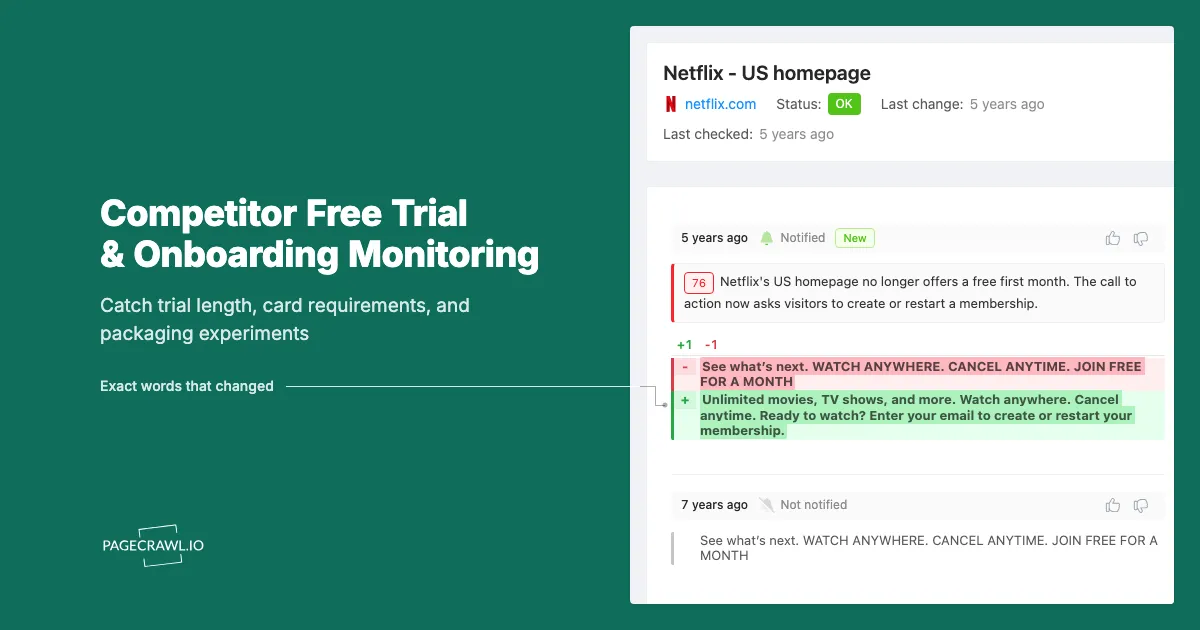
Trial mechanics encode a company's current priority. Dropping the credit card requirement means they are optimizing for top-of-funnel volume and accepting weaker trial intent. Adding one means they are protecting sales capacity and filtering for buyers. Shortening a trial usually signals confidence in time-to-value or pressure on the sales cycle.
Card requirement is the strongest single tell
Requiring a card at signup filters the trial population hard. Benchmark studies of B2B software trials consistently report that card-required trials convert to paid at multiples of card-free trials, at the cost of far fewer trials starting. So when a competitor removes the card field, they have decided raw trial volume is worth more to them than trial quality, which usually accompanies a self-serve push or a lower entry price. When they add it back, their sales team is drowning in unqualified trials, or they are moving upmarket.
Trial length maps to sales cycle and time-to-value
A 30-day trial says the product needs setup time, data to accumulate, or a committee to be convinced. A 7-day or 14-day trial says the value shows up fast, or that the company wants a decision inside a monthly sales cadence. A trial that lengthens is usually a response to evaluations running out of time. A trial that shortens is an urgency lever. Either way the change tells your sales team what objection the competitor is now trying to solve.
Seat minimums and plan defaults
A quietly introduced three-seat minimum raises the effective entry price without changing the advertised per-seat number. A preselected "Pro" radio button instead of "Starter" raises average order value with no price change at all. These changes never make it into a blog post and never show up in a manual quarterly review, because the headline price is identical.
How do you set up competitor trial monitoring in PageCrawl?
Add each funnel page as its own monitor, choose a tracking mode that matches the page type, set a frequency proportional to how much that competitor matters, route alerts to the channel where your team already works, and add keyword or threshold rules so only packaging changes break the silence.
- Add the URL. Start with one competitor and one page: their pricing page. Paste the URL into PageCrawl and create the monitor. Add their signup or trial start page as a second monitor, then their getting-started docs as a third. Keep each page separate so alerts are legible on their own.
- Pick the tracking mode. Use content tracking for pricing and signup pages. Use text or number tracking on a specific element when you want a clean, chartable series, for example the trial-length number or the per-seat price. Reader mode suits long-form terms and cancellation pages.
- Set the check frequency. Tier 1 competitors, the two or three you lose deals to, deserve the fastest frequency your plan allows, so pricing experiments surface within minutes on higher plans rather than at the end of the month. Tier 2 competitors and docs pages are fine on a daily rhythm.
- Choose notification channels. Route Tier 1 alerts to a shared Slack, Discord, Microsoft Teams, or Telegram channel so sales and product see them together, keep email for the digest, and send a webhook into your CRM if you want packaging changes stored alongside win/loss records.
- Add keyword and threshold rules. Set conditions so a change only alerts when it contains words that matter: "trial", "credit card", "free", "per seat", "minimum", "days". Add a numeric threshold on the price element so a rounding change stays quiet and a real increase does not. Our walkthrough of conditional alerts using price, keyword, and threshold rules covers the syntax.
- Turn on screenshots. A packaging claim is only useful to sales if it is provable. A timestamped screenshot of the signup form on the day the card field disappeared settles a deal review far better than a paraphrase.
- Group the monitors. Put every page for one competitor in a folder named after them, and tag pages by type (pricing, signup, docs). When a competitor changes four pages in one week, the folder view is what makes the pattern visible.
Two Tier 1 competitors at four pages each, plus three Tier 2 competitors at two pages each, is fourteen monitors. That is a complete trial-funnel program for most mid-market companies, with room to add messaging and comparison pages later.
How do you avoid false alerts on signup and onboarding pages?
Signup pages are full of things that change on every load: session tokens, hidden form fields, CSRF values, experiment identifiers, chat widgets, and rotating testimonials. Narrow the monitor to the region that carries the offer, exclude the noisy parts once, and use keyword conditions so only packaging words trigger a notification.
Scope the monitor to the offer region
Rather than watching the whole page, point the monitor at the block that contains the trial terms and the form. On a pricing page that is the plan comparison area. On a signup page it is the form and the copy wrapped around it. Narrow scope removes most noise before you have to filter anything.
Train out the rest
Cookie banners, live chat bubbles, visitor counters, and A/B test class names will still slip through occasionally. When a meaningless change is detected, mark that region as ignored so future checks skip it. After a few cycles the monitor settles into silence broken only by real changes. Our guide to reducing website monitoring false positives walks through the process page type by page type.
Expect split tests to look like flapping
If a competitor is running an A/B test on trial length, different checks may legitimately see different values, and the monitor will report a change back and forth. That flapping is itself the signal: an experiment is live. Note the date range, keep the screenshots, and watch for the value to settle. The variant that persists is the one that won.
Some flows you simply cannot watch
The steps after account creation are behind an account, and a lot of onboarding lives there. Monitor what is publicly reachable (pricing, signup form, public docs, terms) and accept that the in-product sequence needs a human to walk it once a quarter. Where a signup flow is protected by a challenge or a verification step, that page is not a monitoring target, and no monitoring tool should promise otherwise.
How should your team act on a trial funnel alert?
Route the alert to a shared channel, decide within a day whether it is an experiment or a decision, and translate it into one artifact each for sales, product, and growth. An alert nobody converts into a battlecard update or a pricing discussion is just a notification, and notifications that nothing follows get muted within a month.
Sales: update the battlecard the same week
When a competitor extends their trial or drops the card requirement, your reps will start hearing "we are going to try them first, it is free for a month." That objection needs an answer before the fifth rep improvises one. Add the change and the response to the battlecard, with the screenshot attached. The same discipline applies to competitor comparison and alternatives pages, where claims about your product change without notice.
Product: read the onboarding changes as roadmap
A new onboarding step or a new prerequisite is a feature announcement written in advance. Feed these into whatever forum reviews competitive positioning, alongside the hiring signals you get from monitoring competitor job postings. A new step for connecting a data warehouse plus three new data engineering roles is a roadmap, not a coincidence.
Growth: run your own experiment deliberately, not reflexively
The wrong response to a competitor removing their card requirement is to remove yours the next morning. Their funnel economics are not yours, and you are seeing the change, not the result. Log it with a date, watch whether it persists, and if it does, treat it as evidence worth testing rather than a decision already made.
Keep an archive you can query
Every check builds a dated record of what a competitor's funnel looked like. Six months in, that archive answers questions nobody could answer before: how many times did they change trial length this year, when did the seat minimum appear, was the card requirement removed before or after the funding round. Public snapshots on the Internet Archive Wayback Machine can fill gaps for the period before you started, though its coverage of any given signup page is patchy.
Monitor ethically and publicly
Everything described here uses pages a competitor publishes to the open web for anyone to read, at a polite rate, without touching anything behind authentication. Reading a public pricing page is ordinary market research. Misrepresenting yourself to get inside someone's product is not.
Choosing your PageCrawl plan
PageCrawl's Free plan lets you monitor 6 pages with 220 checks per month, which is enough to validate the approach on your most critical pages. Most teams graduate to a paid plan once they see the value.
| Plan | Price | Pages | Checks / month | Frequency |
|---|---|---|---|---|
| Free | $0 | 6 | 220 | every 60 min |
| Standard | $8/mo or $80/yr | 100 | 15,000 | every 15 min |
| Enterprise | $30/mo or $300/yr | 500 | 100,000 | every 5 min |
| Ultimate | $99/mo or $999/yr | 1,000 | 100,000 | every 2 min |
Annual billing saves two months across every paid tier. Enterprise and Ultimate scale up to 100x if you need thousands of pages or multi-team access.
One competitive signal caught early can swing a deal worth more than a decade of Enterprise. If you win one additional deal per year because you spotted a pricing change, a product launch, or a messaging shift before your competitors did, $300/year is a rounding error. Standard at $80/year handles 100 monitored pages, enough for a Tier 1 and Tier 2 competitor program. Enterprise adds 500 pages and SSO. All plans include the PageCrawl MCP Server for AI assistants like Claude and Cursor. Your sales and product teams can ask "summarize every change to Competitor X's pricing page over the last quarter" and get an answer pulled straight from your own archive. AI assistants can create monitors through conversation on every plan, including Free, turning the tracked pages into a living competitor database, not just an alert feed.
Getting Started
Pick the one competitor you lose to most often and add three monitors: their pricing page, their signup or trial start page, and their getting-started docs. Scope each monitor to the block that carries the offer rather than the whole page, so the first diff you see is readable.
Add keyword conditions for "trial", "credit card", "per seat", and "minimum", turn on screenshots, and send the alerts to the Slack or Teams channel where your sales and product people already talk. Then leave it alone for a month.
The first time a card field disappears or a trial number moves, you will find out that week instead of two quarters later, with a screenshot to prove it. Add your second competitor once that loop is working, and let the funnel tell you what the press release will say next quarter.