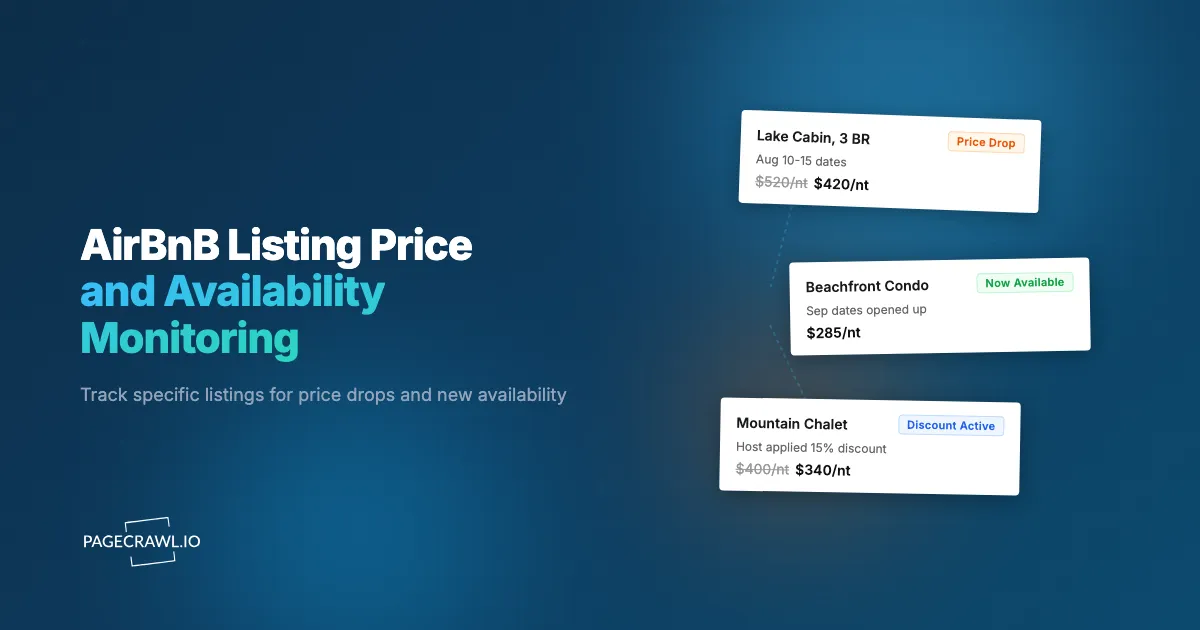
Picture a Lake Tahoe cabin that has been blocked solid through the entire ski season suddenly opening up for a prime February week at $312 a night, down from the original $580 ask. The host had a cancellation, recalibrated the rate to fill the gap, and the listing reappeared in search results at 2 in the morning Pacific time. By 9am, it was booked again. The only people who could catch a window like that are the ones with a continuous monitor on that exact URL.
Airbnb does not notify you when a host changes price or opens a previously-blocked date. The platform's own "watch this listing" feature is limited to coarse price-drop emails that arrive long after the fact, and search results are protected by anti-bot defenses that make broad scraping unreliable. But individual listing pages have stable URLs, render on a normal browser, and update the moment a host changes their calendar or nightly rate. That is the level where useful monitoring lives.
This guide covers how to set up continuous monitoring on specific Airbnb listings, what signals are worth alerting on, and how to combine listing-level alerts with broader travel monitoring so the next price drop or calendar opening lands in your inbox the same day it happens.
Quick Setup
Paste an Airbnb listing URL, set your dates and max nightly rate, and PageCrawl will alert you on any price drop or availability change.
Why are specific Airbnb listings worth monitoring?
Hosts adjust pricing and availability constantly, often in response to soft demand or a cancellation. The savings from catching one of those moments are often larger than the entire annual cost of a monitoring plan, and the listings that benefit most are exactly the ones you would actually book.
Hosts Reprice Dynamically and Without Notice
Airbnb's Smart Pricing tool and most third-party host pricing engines, such as PriceLabs and Beyond, adjust nightly rates automatically based on local demand, competing inventory, and remaining lead time. A listing that was $620 a night six weeks out can drop to $390 inside the booking window, with no email, no banner, and no visible "price drop" badge. The only way to catch the change is to look at the listing page on a schedule.
Calendars Open When Bookings Cancel
Cancellations happen for every reason imaginable: changed plans, work conflicts, weather, illness. When a booking falls off the calendar, the dates reopen instantly and become bookable by anyone watching. For peak-season weekends or holiday windows, those reopenings can be the only path to inventory that has been sold out for months.
Discount Activations Show Up Quietly
Weekly discounts, monthly discounts, and last-minute discount thresholds are configured per listing in the host's settings. When a host enables or expands one of those, the displayed nightly rate drops without any announcement. The listing page reflects the new total the next time it renders, but Airbnb does not push the change to your saved-listings feed.
Description and Policy Changes Affect Suitability
Hosts edit house rules, cancellation policies, and minimum-night requirements with regularity. A minimum-night drop from 7 to 3 can suddenly make a short weekend viable. A change in pet policy or check-in time can change whether the property still fits the trip. These edits are invisible unless you reload the page.
How do Airbnb listing pages behave?
Each Airbnb listing has a numeric ID and a URL pattern that accepts check-in and check-out parameters as query strings, and the page rendered for a given URL contains the exact price and calendar state for those dates. The base structure looks like this:
https://www.airbnb.com/rooms/12345678?check_in=2026-07-15&check_out=2026-07-22&adults=2The page rendered for that URL contains the per-night rate for those exact dates, the total including fees, the calendar state, the cancellation policy, and the full description. If you change the dates in the URL, the rate and totals update because Airbnb recomputes pricing for the specific window. This is what makes monitoring practical: you point the monitor at the exact dates you care about and changes to that window's price or availability surface as content changes.
Search-results pages and broad city browsing are a different matter. Those pages are aggressively protected against automated access and frequently render different content depending on session and geography. The reliable monitoring surface is the listing detail page, not search.
Comparing Approaches
| Approach | Cost | Latency | Coverage | Best For |
|---|---|---|---|---|
| Manual refresh | Free | Hours to days | Single listing | Casual checking |
| Airbnb saved-listings emails | Free | Days | Saved listings only | Light watchers |
| Browser extension price trackers | Free / Paid | Variable | Limited reliability | Occasional users |
| Custom scraping | Engineering time | Minutes | Any URL | Technical users |
| PageCrawl on listing URLs | Free tier to $80/year | Hours | Any specific URL | Active travel planning |
Airbnb's native saved-listings feature exists, but the email cadence is slow and many price drops are missed entirely. Third-party trackers come and go because Airbnb regularly changes its frontend in ways that break extensions. PageCrawl operates on the rendered HTML of the listing page itself, which is the most stable surface Airbnb exposes.
Setting Up Airbnb Listing Monitoring in PageCrawl

Step 1: Collect the listing URLs you would actually book
Be ruthless about the list. Add only listings that pass the "if the price were right and the dates were open, I would click book within 10 minutes." Vague aspirational saves clutter the alerts and dilute the signal.
Step 2: Append your target check-in and check-out dates
Build the URL with the specific dates and guest count you are targeting. If you have flexibility on dates, create two or three monitors for the same listing across alternate windows. Each combination has its own price and availability state.
Step 3: Add each URL to PageCrawl as a content monitor
Sign in, click Track New Page, paste the URL, and pick content monitoring from the available tracked element types so the listing's price block, calendar state, and policy text are all tracked. Screenshots are useful here because the price total is the load-bearing field and a visual diff is the fastest way to confirm a change.
Step 4: Set a daily check frequency
Host pricing changes are rarely minute-sensitive. A daily morning check catches the vast majority of meaningful price drops and calendar openings while keeping check usage low. For high-priority listings in peak windows, bump to every 4-6 hours.
Step 5: Route alerts to email or push
For travel planning, email is usually the right channel because you want to scan the change details before committing. For peak-season chases where the dates are about to evaporate, web push or a Telegram alert reaches your phone promptly after a check detects the change and lets you act from anywhere.
Step 6: Group listings into a travel folder
Using labels and nested folders, create a "Trips" folder with subfolders per destination (Tahoe Winter, Lisbon Summer, etc.). The folder view rolls up every recent change across a region on a single page, which is how you spot patterns like a market-wide softening in pricing.
Worked Example: Chasing a Summer House
You have a long weekend in late August and have shortlisted six houses on the Oregon coast. Listed nightly rates range from $480 to $720, and your budget is $500. Setup:
- Build six URLs with your check-in/check-out dates and add them to PageCrawl.
- Tag all six with
oregon-coast-aug. - Set daily checks and route alerts to a
#travelSlack channel. - Add a sibling monitor on the Airbnb host-discount help page just to catch any platform-wide promotion announcements.
Two weeks later you get an alert: one of the houses dropped from $610 to $475 for your exact dates because of a host-side last-minute discount activation. You book within the hour. Total setup time was 20 minutes. Total cost was $0 on the free plan because the watchlist fits inside six monitors.
Patterns Worth Watching
Per-night rate drops on saved listings. The cleanest signal. Any drop of more than 10% on your target dates is worth at least a second look.
Calendar openings inside a previously-blocked window. When a booked night reverts to available, the listing page shows a different total because the date is now bookable. PageCrawl catches the change.
Minimum-night requirement reductions. A drop from a 7-night to a 3-night minimum opens entirely new trip shapes. Hosts often lower the minimum as the booking window narrows.
Cancellation policy softening. A move from Strict to Moderate or from Moderate to Flexible reduces your downside if plans change. Worth knowing before you book.
New photos or major description edits. Sometimes a listing goes from "okay" to "yes" after a host renovates or adds new amenity language. The page reflects the change immediately.
Combining Listing Alerts With Broader Travel Monitoring
Single-listing monitors are most powerful when paired with adjacent signals.
Pair with airline fare monitors. If a saved listing drops at the same time as travel and flight price monitoring shows fares to that city softening, that combination is much stronger than either alone. See the Southwest fare sale alerts guide for a parallel setup on the airfare side.
Pair with hotel promotion pages. Sometimes a hotel-loyalty promotion makes a points stay more compelling than a discounted Airbnb. Cross-reference with the hotel promotion monitoring guide for the same trip dates.
Pair with city-level event calendars. If you are watching a destination for general travel, the local convention or festival calendar drives demand. A monitor on that calendar plus a monitor on your saved listings explains many of the price moves you will see.
Pair with weather forecasts for outdoor destinations. For ski, beach, or hiking trips, the long-range forecast often moves prices. A weather page in the watchlist provides context for why a listing softened or tightened.
Use Cases
Travelers planning a specific trip. A handful of listings on your shortlist with daily monitoring catches the price you were hoping to see without the daily refresh ritual.
Repeat guests who book the same property annually. Loyal returners can monitor "their" listing and pounce when the host opens the right window or activates a discount.
Travel agents managing client trips. Per-client folders with the listings each client has shortlisted, alerts routed to the agent's email. Saves hours per booking and surfaces savings the client never sees.
Property analysts and real-estate investors. Watching specific properties (or competing properties to a unit you own) alongside real estate listing monitoring reveals host pricing behavior over time and informs your own rate strategy.
Group trip organizers. Coordinating five or ten people on the same property is hard. Monitoring the listing for any change in price or availability lets you commit the group as soon as an alert shows the right window opening.
Long-stay nomads. Monthly discounts and 28+ day stays have their own pricing dynamics. A monitor on a saved long-stay listing surfaces month-by-month rate changes that are invisible in search.
Frequently Asked Questions
Will Airbnb block PageCrawl from accessing listing pages? Listing detail pages are publicly available and render normally in a browser. PageCrawl renders each listing the way a visitor sees it and checks at a low frequency, so listing monitoring works reliably. Search-results pages are a different matter and not recommended as a monitoring target.
How quickly will I be notified of a price drop? On a daily check, within 24 hours of the change. On hourly checks, within an hour. For most travel planning, daily is more than fast enough.
Can I monitor a listing for multiple date ranges at once? Yes. Each unique combination of listing ID and check-in/check-out is a separate monitor with its own price and availability state. You can run two or three date windows for the same property in parallel.
What if a listing's URL changes? Airbnb sometimes restructures listing IDs or slugs. If a monitor stops detecting changes for an unexpectedly long time, re-fetch the URL from a search result and update the monitor. The numeric room ID is stable across most URL changes.
Does this work for Airbnb Experiences or restaurants? Yes, any Airbnb page with a stable URL can be monitored. Experiences sometimes have less frequent price movement, so daily checks are usually appropriate.
Do I need a paid plan to monitor Airbnb listings? No. The free plan includes 6 monitors at 60-minute frequency, which is enough for a tight shortlist on a single trip. Standard at $80/year covers up to 100 listings, enough for a full travel watchlist across multiple trips.
Choosing your PageCrawl plan
PageCrawl's Free plan lets you monitor 6 pages with 220 checks per month, which is enough to validate the approach on your most critical pages. Most teams graduate to a paid plan once they see the value.
| Plan | Price | Pages | Checks / month | Frequency |
|---|---|---|---|---|
| Free | $0 | 6 | 220 | every 60 min |
| Standard | $8/mo or $80/yr | 100 | 15,000 | every 15 min |
| Enterprise | $30/mo or $300/yr | 500 | 100,000 | every 5 min |
| Ultimate | $99/mo or $999/yr | 1,000 | 100,000 | every 2 min |
Annual billing saves two months across every paid tier. Enterprise and Ultimate scale up to 100x if you need thousands of pages or multi-team access.
The math is straightforward. Standard at $80/year covers 100 product pages. If monitoring catches one $20 price drop, one mispriced competitor SKU, or one restock you would otherwise miss each month, the plan has paid for itself roughly four times over in the first year.
Getting Started
Save the specific Airbnb listings you want to book, copy the URLs with your target dates, and add them to PageCrawl on a daily check. Create a free account and price drops or new availability will arrive in your inbox the day they change.