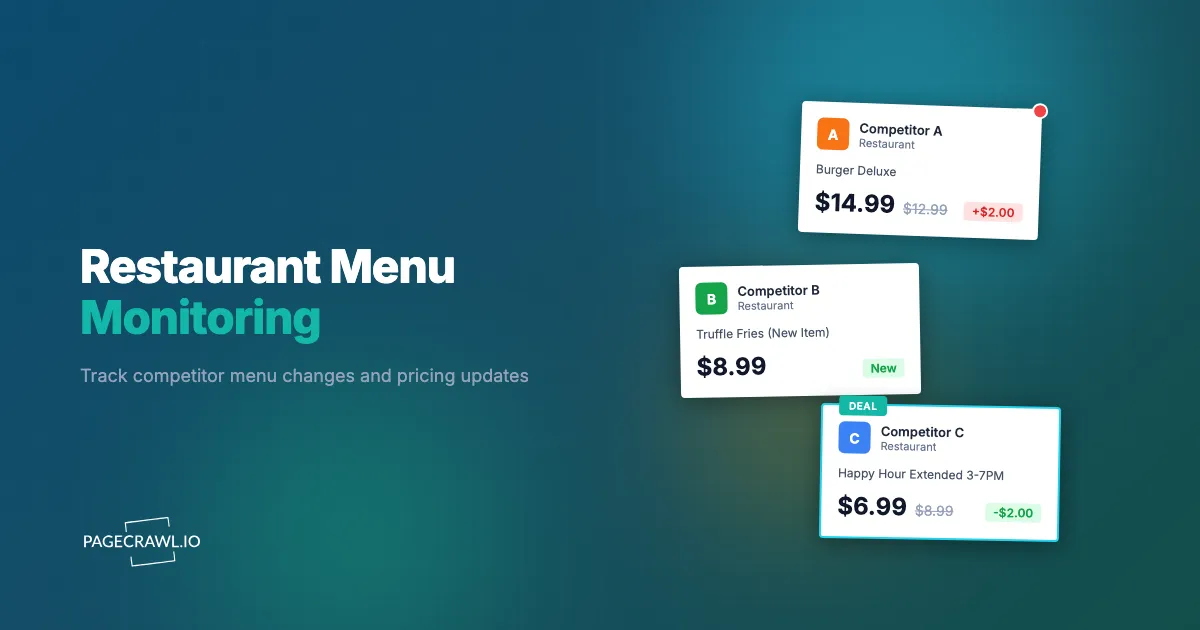
A burger restaurant raises its signature combo price from $12.99 to $14.49. Two blocks away, a competing burger spot still lists the same combo style at $11.99. Neither restaurant knows what the other charges because both are too busy running a kitchen to check competitor menus every week. The one that raised prices loses lunch traffic for a month before anyone notices the pattern.
Restaurant pricing decisions are made with incomplete information far more often than they should be. Menus change constantly, driven by food costs, seasonal availability, competitor moves, and delivery platform dynamics. A restaurant operator managing even a handful of locations is dealing with dozens of competitor menus across websites, DoorDash, UberEats, Grubhub, and sometimes PDF documents that get updated without any notification.
This guide covers how to set up automated restaurant menu monitoring, what to track across different platforms, how to handle the unique challenges of menu content, and how to turn menu intelligence into better pricing and competitive decisions.
Why should restaurants monitor competitor menus?
Menu monitoring tells you what competitors charge, what they add or drop, and how fast a market absorbs food cost increases. That intelligence feeds pricing, menu engineering, and franchise compliance decisions that are otherwise made on guesswork and secondhand rumours.
Competitor Pricing Intelligence
Restaurants operate on famously thin net margins, so a price difference of even $1-2 on popular items can shift customer traffic, especially in dense markets where multiple restaurants serve similar cuisines within walking distance. Knowing when competitors raise or lower prices lets you make informed decisions about your own pricing rather than guessing.
This is especially important for price-sensitive categories: pizza, burgers, coffee, and lunch specials. When a competitor drops the price of their lunch combo, you need to know whether to match it, differentiate on quality, or hold your price.
For a broader look at competitive pricing strategy, see the competitor price monitoring guide.
Food Cost Inflation Tracking
When ingredient costs rise, restaurants across a market tend to adjust prices in waves. Monitoring competitor menus reveals how the market is responding to cost increases. If most of your competitors have already raised prices on chicken dishes by $1.50, you can adjust your own pricing with confidence that customers expect it. If you are the first to raise prices while competitors hold, you risk losing traffic.
Tracking these patterns over time also helps with forecasting. You can see how quickly price increases propagate through your market and plan your own adjustments accordingly.
Menu Trend Detection
New menu items, format changes, and category shifts signal where a market is heading. When three competitors in your area all add a grain bowl option within the same quarter, that tells you something about customer demand. When a competitor removes their salad section and expands sandwiches, that is a strategic signal.
Monitoring menus across your competitive set reveals these trends earlier than waiting to hear about them secondhand. It also helps with menu engineering: if a competitor introduces a new category that stays on the menu and expands, that is useful market research.
Franchise Compliance
Franchise operators face a different monitoring challenge. Corporate mandates specific menu items, pricing ranges, and promotional schedules. Franchisees need to verify compliance, and corporate needs visibility into whether franchisees follow the program.
Monitoring franchise location pages and delivery platform listings confirms that pricing, descriptions, and promotions match corporate standards, especially during promotional periods when consistency across locations is critical.
What should you track on a competitor's menu?
Track five things: the restaurant's own website menu, its delivery platform listings, any PDF menus, individual item prices, and additions or removals. Restaurant menus live across multiple channels, each with its own format and update rhythm, so effective monitoring covers all of them rather than the website alone.
Online Menus on Restaurant Websites
Most restaurants publish menus on their own websites, either as HTML pages or embedded PDFs. Website menus are the primary source of truth for dine-in pricing and the full menu offering. They tend to update less frequently than delivery platforms but reflect the restaurant's intended positioning.
Track the main menu page for overall changes, and if the site structures its menu across multiple pages (lunch, dinner, drinks, desserts), monitor each section individually. Using CSS selectors to target specific menu sections lets you focus on the categories that matter most, like entrees or daily specials, without getting noise from minor formatting changes elsewhere on the page.
Delivery Platform Listings
Listings on DoorDash, Uber Eats, and Grubhub often tell a different story than a restaurant's own website. Each platform publishes tiered partnership plans whose commission rates run into the double digits, and menu pricing is usually raised to offset them, but the markup varies by restaurant and by item. Some restaurants absorb part of the commission, while others pass the full cost to customers.
Monitoring competitor listings on delivery platforms reveals:
- Platform-specific pricing strategies: How much competitors mark up for delivery versus dine-in
- Menu differences: Items available for delivery may differ from the dine-in menu
- Promotional activity: Platform-exclusive deals, featured placement, and discount offers
- Availability patterns: Items that go in and out of stock, or time-based availability restrictions
Track the same competitor across multiple platforms to see if they price differently on DoorDash versus UberEats, which is more common than you might expect.
PDF Menus
Many restaurants still publish menus as PDF documents, especially for catering menus, banquet packages, wine lists, and seasonal specials. PDF menus present unique monitoring challenges (covered in the next section), but they are worth tracking because they often contain pricing for high-value offerings like private dining, event packages, and large-format catering orders.
PageCrawl can monitor PDF documents directly, extracting text and detecting changes between versions. For a detailed walkthrough of PDF monitoring capabilities, see the PDF monitoring guide or the help centre walkthrough on setting up PDF file monitoring.
Pricing Changes
Price tracking is the highest-value element of restaurant monitoring. Set up price and availability monitors specifically targeting price elements on competitor menus. When a price changes, you want to know the old value, the new value, and when the change happened.
For restaurants that display prices in structured HTML, price tracking mode automatically detects and tracks numeric values. For less structured pages, targeting specific menu sections with selectors narrows the focus to the prices you care about.
New Items, Removed Items, and Seasonal Specials
Menu additions and removals are as informative as price changes. A new menu item signals a strategic bet. A removed item suggests it underperformed or that ingredients became too expensive. Seasonal menus rotating in and out follow patterns that are useful for planning your own seasonal offerings.
Full-page monitoring captures these additions and removals automatically. When a competitor adds a new section to their menu page or removes items from an existing section, you receive an alert with the specific changes highlighted.
What makes restaurant menus harder to monitor than product pages?
Three things: menus are often published as PDFs, many are posted as images with no extractable text, and daily specials generate constant expected changes. Each has a workaround, but none of them is the plain HTML price element an e-commerce monitor expects.
PDF Menus
Many restaurants publish menus exclusively as PDF files. These range from simple text documents to heavily designed files with custom fonts and complex layouts. The challenge is that PDF content does not always extract cleanly into comparable text. PageCrawl handles text-based PDFs reliably, extracting content and comparing versions. Image-heavy PDFs with text embedded as graphics are harder, and visual comparison mode can help catch changes that text extraction misses.
Image-Based Menus
Some restaurants display menus as images rather than text. A photo of a chalkboard menu, a designed graphic menu, or a scanned printed menu all present the same problem: the "text" is actually pixels, not searchable content. Visual monitoring captures changes to these image-based menus by comparing screenshots over time, alerting you when the visual appearance changes even if there is no text to extract.
Frequent Seasonal Changes
Restaurants with rotating menus, daily specials, and seasonal offerings generate a high volume of expected changes. A restaurant that posts new daily specials every morning will trigger a change alert every morning. This is noise if you are interested in structural menu changes and pricing shifts, not daily specials.
Handling this requires thoughtful monitor configuration. Target the portions of the menu that represent permanent offerings, and use separate monitors for sections you expect to change frequently. AI-powered summaries can also help by describing what changed in plain language, making it faster to determine if a change is meaningful or routine.
Setting Up Automated Monitoring
Building an automated competitor monitoring system starts with identifying your competitive set and the specific pages to track.

Step 1: Map Your Competitive Landscape
List the restaurants you compete with directly. For most single-location restaurants, this is 5-15 nearby competitors in similar categories. For chains, include both direct competitors and adjacent competitors (different cuisine but same occasion, like lunch).
For each competitor, find their menu URLs: main website, DoorDash, UberEats, and Grubhub listings. Note which ones use PDF menus versus HTML pages.
Step 2: Create Monitors for Each Source
Set up a monitor for each competitor menu page. For HTML menus, full-page monitoring captures all text content changes. For menus with clear price formatting, price tracking mode focuses specifically on numeric values. For PDF menus, point the monitor directly at the PDF URL.
Organize monitors into folders by competitor name or by platform (all DoorDash listings together, all UberEats listings together) depending on how you want to review changes.
Step 3: Configure Check Frequency
Restaurant menus do not change as frequently as e-commerce prices. For most competitors, daily checks are sufficient. For delivery platform listings where pricing and availability change more often, checks every few hours may be warranted. During specific events like a competitor launching a new menu or a market-wide price adjustment, you can temporarily increase frequency.
Step 4: Set Up Alerts
Configure email alerts or notifications to your preferred channel. For restaurant monitoring, a daily digest of all changes across your competitive set is often more useful than one message per change, since most menu changes do not require same-day action. PageCrawl can bundle changes into scheduled digest reports on a daily or weekly cadence. Reserve per-change alerts for high-priority competitors or specific items you are tracking closely, where you want to hear as soon as a check picks up the difference.
Tracking Delivery Platform Pricing
Delivery platforms deserve special attention because they represent an increasingly large share of restaurant revenue, and pricing dynamics on platforms differ substantially from dine-in.
Why Platform Pricing Differs
Restaurants pay a commission on every platform order, and the rate depends on which partnership tier they signed up for. How they handle that commission varies. Some apply a flat markup to all items. Others selectively mark up high-margin items while keeping popular items near dine-in prices to attract orders.
Understanding how competitors handle platform pricing gives you a strategic advantage. If competitors are absorbing commissions on popular items, that tells you something about their margins and priorities. If they pass full commissions to customers, their delivery prices will be higher, creating an opportunity for you to undercut on platforms.
Monitoring Multiple Platforms
The same restaurant may price differently across DoorDash, UberEats, and Grubhub because each platform has different commission structures and customer demographics. A restaurant might price aggressively on UberEats where they get more orders and maintain higher prices on Grubhub where volume is lower.
Set up separate monitors for each platform listing. Comparing prices across platforms for the same competitor reveals their platform strategy.
Tracking Platform Promotions
Delivery platforms run promotional programs: featured placement, percentage-off deals, free delivery, and buy-one-get-one offers. Competitors participating in these programs temporarily change their effective pricing. Monitoring platform listings catches these promotions, showing you when competitors invest in platform visibility and what discounts they offer.
Monitoring Franchise Consistency
For franchise operations, menu monitoring serves an internal compliance function in addition to competitive intelligence.
Corporate Menu Compliance
Corporate offices set menu standards, pricing guidelines, and promotional calendars. But with dozens or hundreds of locations managing their own websites and delivery profiles, drift happens. A franchisee might not update pricing after a corporate increase. A location might still run a promotion that ended last week. A delivery listing might show items removed from the corporate menu.
Monitoring franchise location pages and delivery profiles flags these inconsistencies automatically.
Regional Pricing Verification
Franchises often set different pricing by region, reflecting differences in costs, competition, and market conditions. Monitoring confirms that each location is using the correct regional pricing and that price changes propagate to all locations in a region when updates are rolled out.
Building a Restaurant Competitive Intelligence Workflow
Individual menu monitors generate data. A workflow turns that data into decisions.
Organize by Competitor and Platform
Structure your monitors so that changes are easy to review in context. Group monitors by competitor, with sub-groupings by platform (website, DoorDash, UberEats, Grubhub). This makes it easy to see a competitor's full pricing picture when reviewing changes.
Tags help further categorize monitors: tag by cuisine type, price tier, or geographic zone for multi-location operators.
Weekly Competitive Review
Set aside time weekly to review accumulated menu changes across your competitive set. A weekly cadence works for most restaurants because menu changes are rarely urgent enough to require same-day response. During the review, look for:
- Price trends: Are competitors generally raising or lowering prices? By how much?
- Menu additions: What new items are appearing? Do they signal a trend?
- Promotional patterns: When and how often do competitors run deals?
- Platform strategy shifts: Are competitors changing their delivery platform approach?
Act on Patterns, Not Individual Changes
A single competitor changing one price is data. Multiple competitors raising prices on similar items within the same timeframe is a trend. Base pricing decisions on patterns rather than reacting to every individual change.
Build a simple tracking spreadsheet that logs competitor price changes over time. Over months, this reveals seasonal pricing patterns, typical markup ranges, and how quickly competitors respond to cost changes.
Connect to Broader Competitive Intelligence
Menu monitoring is one piece of your overall competitive awareness. Combine it with broader competitor website tracking to catch new location announcements, hiring activity, and marketing campaigns. Together, these signals build the kind of competitive intelligence monitoring that shows what competitors are doing and where the market is heading.
Can you see one menu item's price across every delivery platform in a single view?
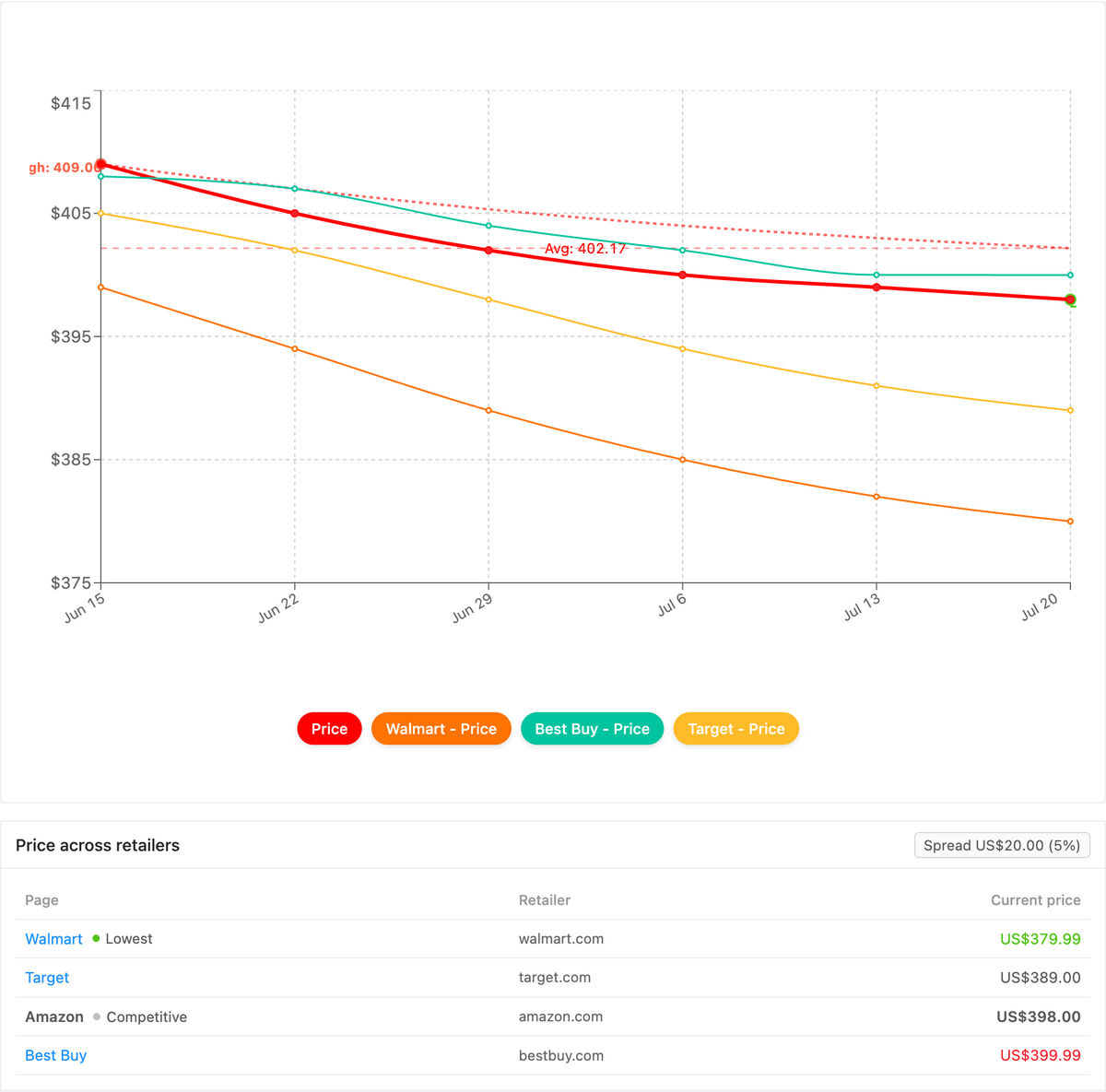
Yes. PageCrawl's Product Comparison capability groups the monitors for one menu item across every channel into a single view, highlights the cheapest advertised price, and tracks the spread between the lowest and highest listing. That turns a restaurant's DoorDash markup or a competitor's platform-only discount into an obvious figure instead of a number buried on one of a dozen delivery pages.
Once your per-page menu monitors are running, Product Comparison stitches together the ones that share an item (by your own reference tag, or a SKU where a platform exposes one) so a competitor's signature combo lines up side by side across their website, DoorDash, UberEats, and Grubhub. The lowest price is flagged and the spread between cheapest and most expensive stays live, so when a rival cuts their lunch combo on one platform the gap widens and a spread alert surfaces on the next check, routed to email, Slack, or a webhook. You can also export the whole grid as a spreadsheet for your weekly competitive review. The full walkthrough lives in the cross-retailer price comparison guide, and Product Comparison is a custom capability we enable on request.
Choosing your PageCrawl plan
PageCrawl's Free plan lets you monitor 6 pages with 220 checks per month, which is enough to validate the approach on your most critical pages. Most teams graduate to a paid plan once they see the value.
| Plan | Price | Pages | Checks / month | Frequency |
|---|---|---|---|---|
| Free | $0 | 6 | 220 | every 60 min |
| Standard | $8/mo or $80/yr | 100 | 15,000 | every 15 min |
| Enterprise | $30/mo or $300/yr | 500 | 100,000 | every 5 min |
| Ultimate | $99/mo or $999/yr | 1,000 | 100,000 | every 2 min |
Annual billing saves two months across every paid tier. Enterprise and Ultimate scale up to 100x if you need thousands of pages or multi-team access.
The math is straightforward for restaurants operating on thin margins. Knowing a competitor dropped their lunch combo by $1.50 before you lose a month of lunch traffic to them is the kind of intelligence Standard at $80/year easily covers. That plan gives you 100 monitors, enough to track 10 to 15 competitors each across their website, DoorDash, and UberEats listings, with daily checks. For multi-location operators and franchise groups monitoring compliance across dozens of locations alongside a full competitive set, Enterprise at $300/year covers 500 pages and checks every 5 minutes, which is a tight enough cadence to catch promotional changes and delivery platform price adjustments the same day they appear.
Getting Started
Restaurant menu monitoring does not require a large investment to produce useful intelligence. Begin by identifying your top five competitors and setting up monitors for their menu pages and delivery platform listings. With PageCrawl's free tier, you can monitor up to 6 pages at no cost, enough to cover your most important competitors.
As you see the value, expand with a paid plan. The $8/month plan covers up to 100 pages, enough for most single-location restaurants to monitor 10-15 competitors across multiple platforms. Multi-location operators and franchise organizations can use the $30/month plan for up to 500 pages to cover a full competitive landscape plus internal compliance monitoring.
Start with daily checks, configure a digest-style alert so changes arrive in a single summary, and commit to a weekly review. Within a month, you will have a clearer picture of your market's pricing dynamics than most restaurant operators ever achieve.