Dani had been putting off the upgrade for eight months. Her phone still worked, the battery was tired, and she had a vague plan to trade it in "when the deals get good." In late August she checked the manufacturer's trade-in estimator, saw a number she thought was fine, and mailed the device off. Three weeks later a colleague traded the same model in the same condition and got a materially larger credit, because a launch promotion had lifted values in the meantime. Same phone, same website. Different week.
That is the whole problem with trade-in and upgrade offers. The pages look static. The estimator sits at a stable URL for years and the carrier's deals page keeps the same headline for months, while the numbers underneath are revised on a schedule nobody tells you about. Manufacturers reprice their published trade-in ranges periodically, carriers rotate promotional credit amounts around launches and holidays, and the terms attached to those credits (eligible plans, required lines, number of bill-credit months) get rewritten in the footnotes without announcement.
Check once and you get whatever number is live that day. Watch the page and you see the shape of the offer over time, so you can time the trade for the week it is worth most. That is real money on a device you were handing over anyway.
This guide covers which pages carry the real numbers, why the value moves, how to monitor estimators and carrier promo pages without drowning in noise, and how to read the fine print that decides whether the headline credit is one you can actually get.
Why do phone trade-in values change without warning?
Trade-in values are a pricing lever, not a fixed appraisal. Manufacturers and carriers reprice them against the resale market, inventory needs, and product launch calendars, and they publish the new numbers on the same URLs with no changelog. Apple states plainly that its trade-in figures are estimates and that the final offer depends on inspection.
The residual value curve
A used phone loses value continuously, but the published credit does not drop smoothly. It sits flat for weeks, then steps down when the program refreshes its price sheet. That step is invisible unless you happened to look on both sides of it, so the only way to know which step you are standing on is to have a record of what the page said last month.
Launch cycles pull values up, then push them down
New flagship launches distort the whole board. In the run-up to a launch and the weeks after it, trade-in credits on older models are often inflated, because the point of the credit is to move new hardware, not to reflect what your old phone is worth on the open market. After the launch window closes, those inflated numbers usually retreat. Apple Trade In and the Samsung Trade-In program both publish their qualifying models and credit amounts on their own pages, and both reserve the right to revise them.
Carrier promos are contractual, not just a discount
A carrier's headline number is rarely a cheque. It is a stream of bill credits spread over a finance agreement, contingent on the line staying active. Verizon's own trade-in program FAQs describe promotional credits being applied to the monthly statement rather than paid up front, and T-Mobile's offers page states its top-line trade-in amounts are delivered via 24 or 36 monthly bill credits depending on the finance term. That structure means the terms matter as much as the number, and the terms change too.
Condition grading sits underneath everything
Every published value assumes a condition grade: powers on, holds a charge, screen intact, no liquid damage, and so on. Samsung sets these out explicitly in its trade-in terms and conditions. When a program tightens or loosens a grading rule, the headline number can stay identical while the offer you personally qualify for moves. Monitoring the terms page catches what monitoring the number alone would miss.
Which pages should you actually monitor?
Watch four kinds of page: the manufacturer trade-in estimator for your exact model, the carrier deals and offers hub, the promotion terms or footnote page attached to the offer you care about, and the device product page where the "with trade-in" price is displayed. Each one carries a different part of the deal.
Manufacturer trade-in estimators
This is your baseline. Apple and Samsung both publish device-by-device trade-in credit ranges, and those pages are the reference point every other offer gets measured against. Monitor the estimator for the model you own, or the summary page listing values across models if a household has several devices. When the published range moves, the whole board has been repriced.
Carrier deals and offers hubs
Carrier promotions live on a rotating offers page rather than one stable per-deal URL, so the hub is what you monitor. It is where new promotions appear, where expiring ones vanish, and where the headline credit amount is stated. Because these pages carry a lot of marketing furniture that changes for reasons unrelated to the deal, this is the monitor most worth tuning carefully with region exclusions and keyword rules so only real offer changes reach you.
Terms, footnotes and eligibility pages
The single most useful and least monitored page in this category. A carrier can leave the headline "up to" number untouched while quietly adding a plan requirement, changing how long the device must have been active on the account, or altering the credit schedule. The Federal Trade Commission's advertising guidance is clear that material conditions on an offer must be disclosed clearly, which is exactly why those conditions exist in writing on a page you can watch. If the footnote changes, the deal changed.
The device page with the trade-in price
Product pages usually show two prices: the outright price and the price "with eligible trade-in." The trade-in price is what you will actually pay, and it moves when either input moves, so it is the fastest single signal that something in the deal has shifted. It will not tell you which half moved, which is why it works best alongside an estimator monitor rather than instead of one.
| Page type | What it tells you | How often it changes | Worth a fast check? |
|---|---|---|---|
| Manufacturer trade-in estimator | Baseline credit for your model | Periodic repricing, often around launches | Daily is usually enough |
| Carrier deals hub | New and expiring promotions | Frequently, especially around launches and holidays | Yes, during launch season |
| Promotion terms / footnotes | Eligibility, credit schedule, required plan | Quietly, without announcement | Daily |
| Device page with trade-in price | Your actual out-of-pocket number | Whenever either input moves | Yes |
| Manufacturer newsroom / press page | Launch dates that reset the whole board | Rarely, but decisively | Weekly |
How do you set up trade-in monitoring in PageCrawl?
Add each page as its own monitor, choose a tracking mode that matches what the page is (a number, a block of text, or a whole promo layout), set the check frequency to match how fast that page moves, and route alerts to a channel you actually read. A useful setup is four to six monitors and takes about ten minutes.
Collect your URLs first. Open the manufacturer trade-in page for your exact model, your carrier's deals hub, the terms page linked from the promotion you care about, and the product page for the phone you want. Copy all four. Doing this before you touch PageCrawl saves you switching back and forth.
Add the URL. Paste each link in as a new monitor and name it something you will recognise in a notification six weeks from now. "Trade-in value, my model" beats a truncated URL.
Pick the tracking mode. Use price or number tracking on the estimator and the device page so PageCrawl follows the figure itself and reports old and new values. Use content tracking on the carrier deals hub, and reader or text tracking on the terms page so you get a readable diff of the wording.
Set the check frequency. Trade-in values do not move hourly, so daily checks suit the estimator most of the year. During a launch window, move the carrier hub and device page to your plan's fastest cadence. The free tier checks every 60 minutes, Standard every 15, Enterprise every 5, Ultimate every 2.
Choose your notification channels. PageCrawl can send changes by email, Slack, Discord, Teams, Telegram, and webhooks. For a personal upgrade decision, Telegram or Discord reach your phone while you are away from a desk. If you would rather batch it, email works well as a daily digest for the pages that only move occasionally.
Add threshold and keyword rules. This is what turns the setup from noisy to useful. Set a numeric threshold so the estimator only alerts on a meaningful move, and add keyword conditions on the deals hub for the words that signal a real offer ("trade-in", "bill credits", your model name) so unrelated marketing stays silent. Our walkthrough of conditional alerts using price, keyword and threshold rules covers the syntax.
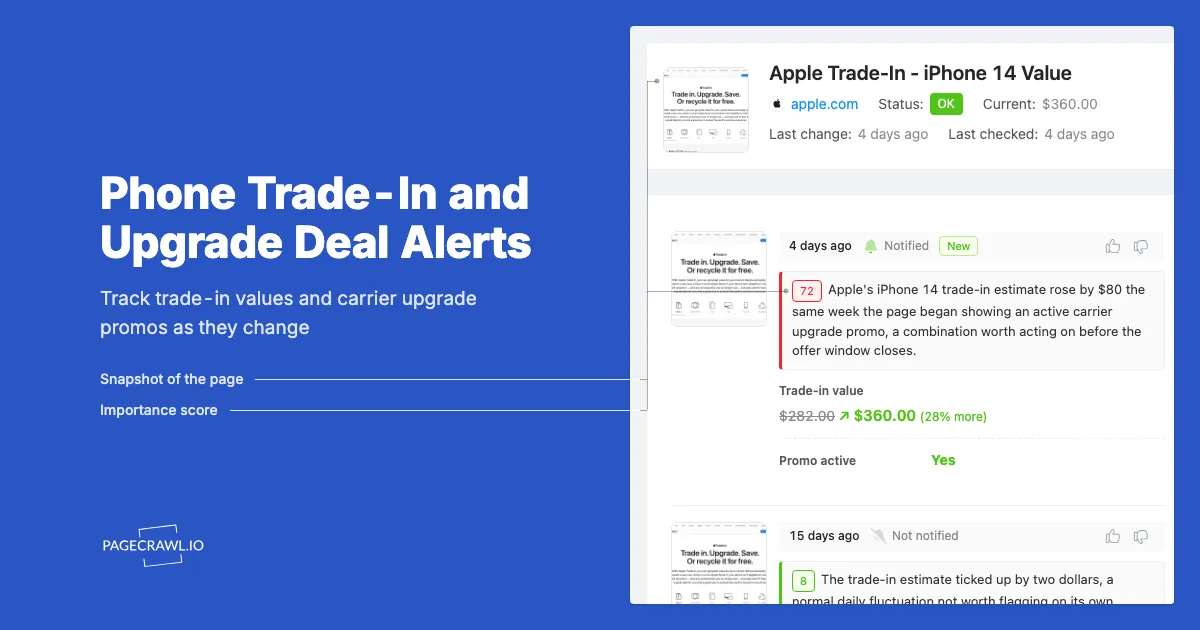
Turn on screenshots. A dated screenshot of the offer as it appeared is useful when the credit quoted in store does not match what you saw online, and it is the fastest way to read an alert without opening the site.
Group them in a folder. Name it for the upgrade you are planning, so when the decision is made you archive one folder instead of hunting scattered monitors.
A worked example setup
Say you own a two-generation-old flagship and want to upgrade this quarter. Monitor the manufacturer estimator for your model daily, with a threshold that only fires on a change of $20 or more. Monitor your carrier's deals hub and one rival carrier's hub on a faster cadence with keyword rules on your model name. Monitor the terms page for the promotion you favour in text mode with no threshold, because any wording change is worth reading. Four monitors, inside the free tier's six.
When is the best time to trade in a phone?
The strongest windows are the weeks around a major flagship launch, when promotional credits on older models are lifted to move new hardware, and the holiday promotional period. The worst time is a quiet mid-cycle month when nothing is competing for your upgrade. Monitoring tells you which one you are in.
Launch season
Flagship launches reset the trade-in board. Older models often get temporarily generous credits during pre-order and launch weeks, because the credit is a customer acquisition cost rather than a valuation. That is when carrier promos are most aggressive and when trading this week versus next month matters most. Watch the manufacturer's own newsroom for launch timing rather than rumour coverage, then let your monitors tell you when the numbers respond.
Holiday promotional periods
The late-year shopping period brings a second wave of upgrade promotions, often structured differently from launch offers: bigger headline numbers, tighter eligibility, shorter windows. If you are patient enough to wait for it, this is frequently the strongest window outside launch season. The general pattern of watching a retailer's promo pages through a holiday period is the same one described in our guide to Black Friday and Cyber Monday deal alerts.
The quiet months
Between cycles, trade-in credits drift down with residual value and carrier promos get thin. If your phone still works and nothing is forcing your hand, this is the period to monitor rather than act. Waiting costs you nothing but a notification you can ignore.
The one deadline that is real
Your own device's condition. A cracked screen, a battery that stops holding charge, or liquid damage can drop a device out of the eligible grade entirely, and no promotion recovers that. If your phone is deteriorating, the window is bounded by the hardware, not the calendar. Trade while it still grades well.
How do you avoid getting alerted about nothing?
Carrier and manufacturer pages are dense with rotating banners, personalised recommendations, countdown timers, and A/B tested layouts that change constantly without any change to the actual offer. Narrow each monitor to the element that carries the number or the terms, add thresholds, and train out the noisy regions.
Track the number, not the page
For the estimator and the device price, number tracking is far quieter than watching the whole page, because it extracts one figure and compares it against the previous one. You get "credit moved from X to Y" instead of "something changed." That is also what makes thresholds possible: set yours at the movement that would genuinely change your plans, because a one dollar shift is not a decision and a fifty dollar one might be.
Teach the monitor to ignore the furniture
Carrier hubs are among the noisiest pages on the consumer web: rotating hero carousels, "customers also viewed" strips, session greetings, live countdowns. PageCrawl lets you exclude those regions once and stop hearing about them. Our guide to reducing false positives in website monitoring walks through trimming a page down to the part you meant to watch.
Separate the number monitor from the terms monitor
Keep them apart deliberately. The number monitor should be thresholded and quiet. The terms monitor should have no threshold at all, because a single sentence added to a footnote can disqualify you from an offer while the headline stays flat. Two monitors on the same promotion, tuned in opposite directions, give you both signals cleanly.
What should you check before you accept a trade-in offer?
Read the credit structure, the eligibility conditions, and the grading rules before you send the device. The headline "up to" figure is the best case for the newest eligible model in the best condition on the right plan. Your number is somewhere below it, and the gap lives entirely in the fine print.
"Up to" means the ceiling, not your offer
Trade-in advertising is built around a maximum, and that maximum usually applies to one recent model in excellent condition, often on a specific plan or a new line. The FTC's advertising and marketing guidance requires material conditions to be disclosed, so the qualifying detail is on the page somewhere. Find it before you commit, and keep watching it, because it can be revised mid-promotion.
Credit delivery: cash now versus credits later
A manufacturer estimator typically offers a credit toward a purchase or a gift card. A carrier promotion typically offers bill credits spread across a two or three year finance agreement, which you forfeit if you leave early or change the line. Those are very different products with the same headline number. Work out which one you are actually being offered before comparing them.
Eligibility conditions that catch people out
Common ones include a required plan tier, a minimum period the traded device must have been active on the account, a new-line or port-in requirement, and limits on devices per account. Verizon documents several in its device deals FAQs. None are hidden, and none are in the headline either. Independent buyback services and private sale are the comparison worth running before you accept any of it.
Grade honestly, then verify what arrives
Every program reserves the right to re-evaluate on inspection and revise the offer. Apple says outright that in-store credit can differ from the online estimate if condition does not match your description. Describe the device accurately, photograph it before shipping, and keep the screenshot your monitor captured of the offer you accepted. If a revised offer comes back low, you have a record of both what was promised and what you sent.
Choosing your PageCrawl plan
PageCrawl's Free plan lets you monitor 6 pages with 220 checks per month, which is enough to validate the approach on your most critical pages. Most teams graduate to a paid plan once they see the value.
| Plan | Price | Pages | Checks / month | Frequency |
|---|---|---|---|---|
| Free | $0 | 6 | 220 | every 60 min |
| Standard | $8/mo or $80/yr | 100 | 15,000 | every 15 min |
| Enterprise | $30/mo or $300/yr | 500 | 100,000 | every 5 min |
| Ultimate | $99/mo or $999/yr | 1,000 | 100,000 | every 2 min |
Annual billing saves two months across every paid tier. Enterprise and Ultimate scale up to 100x if you need thousands of pages or multi-team access.
If monitoring helps you land one sold-out concert ticket pair, one limited sneaker drop, or one in-demand product at retail instead of resale, Standard at $80/year is already paid for. 100 monitored pages covers every major retailer you care about, and the 15-minute check frequency catches most drops the moment they go live.
Getting Started
Start with the single page that carries your number: the manufacturer trade-in estimator for the exact model you own. Add it as a number monitor on a daily check with a threshold set at the amount that would actually change your decision. That one monitor, on its own, tells you whether you are on a flat stretch or a step down.
Then add your carrier's deals hub and the terms page for the promotion you favour, and put all three in a folder named for the upgrade. Route alerts to your phone through Telegram or Discord, or take a daily email digest if you would rather batch the reading.
Run it through one launch cycle. When the credit on your model moves and the alert lands with the old and new figure side by side, you will know exactly which week to trade, instead of finding out three weeks later from a colleague who happened to check on a better day.
Stop guessing when the offer peaks. Let the page tell you.