
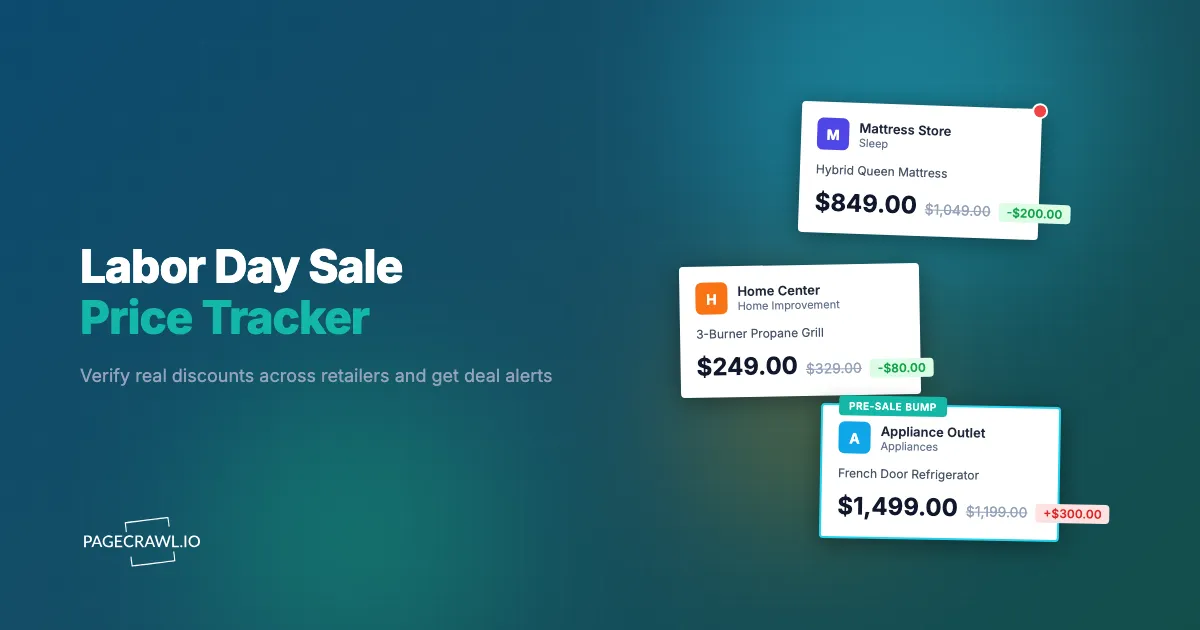
You have been waiting all summer to replace the mattress. Labor Day weekend arrives, the retailer's banner screams "50% OFF SITEWIDE," and the queen you wanted shows $999, slashed from $1,999. It feels like the win you were holding out for. Except you have a nagging memory that this same mattress was $1,049 in July, with no sale banner at all. Was the "regular" price ever real, or did it exist mainly to make the discount look enormous?
This is the core problem with Labor Day shopping. It is one of the biggest promotional weekends of the year for mattresses, grills, appliances, patio furniture, and end-of-summer apparel, and every retailer runs a sale at the same time. Some of those discounts are genuine clearance events. Others are anchored prices, where the "was" number is inflated or briefly raised before the sale so the markdown looks dramatic. Without a record of what the price actually was in the weeks before the holiday, you cannot tell the two apart, and you have no way of knowing whether the retailer across the street quietly went lower.
The fix is not more willpower or more tabs. It is a price tracker: point a monitor at the sale pages and product pages you care about a few weeks out, let it record the real pre-sale prices, and get an alert when a price genuinely drops or a sale section goes live. This guide covers which pages to watch, how anchored pricing works, and how to set up Labor Day deal alerts in PageCrawl step by step.
Why do Labor Day sales need a price tracker?
Because Labor Day compresses hundreds of overlapping promotions into one long weekend, and "sale" prices only mean something relative to what the item cost before. A tracker records the real pre-holiday price, watches every retailer you care about at once, and alerts you when a price moves, so you judge deals on evidence instead of banner claims.
Labor Day, celebrated on the first Monday of September and a federal holiday since 1894 according to the U.S. Department of Labor's history of the holiday, has grown into a major retail event because it sits at a seasonal hinge. Summer inventory (grills, patio sets, outdoor gear) needs to clear before autumn stock arrives, and categories like mattresses and large appliances have trained shoppers to wait for holiday weekends. That combination produces real markdowns, but it also produces enormous pressure on retailers to make every price look like a markdown.
Manually comparing prices across five retailers, each with its own sale page, coupon stack, and countdown timer, is a part-time job for one weekend. And the comparison you actually need, today's price versus the same retailer's price three weeks ago, is impossible unless you started taking screenshots in early August. A monitor that has been quietly recording prices hands you that history for free.
There is a second reason: timing. Many Labor Day promotions start days before the weekend and some of the best prices appear early, sell through, and are replaced by weaker offers. Watching a sale page for its first real change beats showing up on Monday to shop the leftovers.
What are anchored prices, and how do fake discounts work?
An anchored price is an inflated reference number, the "was $1,999" next to the sale price, chosen to make the discount look larger than it is. If the item never genuinely sold at that reference price for a sustained period, the advertised bargain is misleading, and comparing against the anchor instead of the real recent price costs you money.
This is not a new trick, and in the United States it is explicitly addressed by regulation. The Federal Trade Commission's Guides Against Deceptive Pricing (16 CFR Part 233) say a former price is a legitimate basis for a comparison only if it was the actual, bona fide price at which the item was openly offered for a reasonably substantial period in the recent, regular course of business. A reference price established mainly to enable a large-looking reduction is, in the FTC's words, a false bargain. The Federal Trade Commission publishes consumer guidance in the same spirit: a discount is only as honest as the price it is measured against. Shoppers in the EU get a structural version of the same protection, where sale announcements must reference the lowest price from the prior 30 days, a rule we cover in detail in our guide to EU Omnibus 30-day lowest price monitoring.
In practice, anchoring around a holiday weekend takes a few recognisable shapes:
- The pre-sale bump: the price quietly rises in mid-August, then "drops" for Labor Day back to roughly where it was in July. The percentage badge is real arithmetic against a price almost nobody paid.
- The perpetual sale: the item is "40% off" every week of the year. The list price is a fiction that exists only to be crossed out.
- The inflated MSRP comparison: the "was" price is a manufacturer suggested price no major retailer ever charged, common with mattresses and furniture where MSRPs are elastic.
- The shrinking bundle: the headline price falls but the offer loses the free pillows, the delivery, or the accessory kit that were included at the pre-sale price, so the effective price barely moves.
None of these are detectable from the sale page on the day. All of them are obvious from a price history that starts a few weeks earlier. That is the whole argument for tracking: you do not have to guess whether the anchor is honest, you can simply look at what the page said on August 12th.
Which Labor Day sale pages should you monitor?
Monitor two layers: the retailer-level sale landing pages that light up when the event starts, and the individual product pages for the specific items you intend to buy. The landing pages tell you when and where the sale begins. The product pages give you the price history that separates real discounts from anchored ones.
The sale landing pages
Most large retailers maintain a deals or sale hub at a stable URL year round, and repurpose it for each holiday event. Watching that hub tells you when Labor Day pricing actually goes live, which is often earlier than the advertised date. Typical pages worth a monitor include a department store's sale directory, a home improvement chain's appliance savings page, a mattress brand's promotions page, and an electronics retailer's deal hub. You are watching for the event banner, the start of a new promo code, or a wave of new markdowns appearing at once.
The specific product pages
For anything over about a hundred dollars that you already know you want, add the product page itself as a price monitor a few weeks ahead. This is where verification happens. By the time the sale banner appears, your monitor holds a dated record of the ordinary price, and the "was" claim either matches your history or it does not.
A category map for the weekend
| Category | Why Labor Day matters | What to watch |
|---|---|---|
| Mattresses | Signature Labor Day category, aggressive bundles | Product page price plus what the bundle includes |
| Large appliances | Model-year transitions push old stock out | Product pages for specific models, appliance sale hubs |
| Grills and patio | End-of-season clearance, real markdowns common | Category clearance pages, stock status |
| Summer apparel | Deep clearance, sizes vanish fast | Sale category pages, size availability |
| Tools and outdoor equipment | Holiday promo pricing at home improvement chains | Deal hub pages, combo-kit prices |
| Electronics | Moderate discounts, often previews of autumn events | Product pages, to compare later against November pricing |
If you are choosing between several sellers for the same item, run one monitor per retailer on the equivalent product page. Our guide to cross-retailer price comparison monitoring covers how to structure those monitors so the best price surfaces on its own.
How do you set up a Labor Day price tracker in PageCrawl?
You add each sale page or product page as a monitor at pagecrawl.io, pick a tracking mode suited to the page, set the check frequency, and choose where alerts should reach you. Starting two or three weeks before the holiday gives you the pre-sale price history that makes discount claims verifiable.
- Add the URL. Sign in at pagecrawl.io, click to add a new monitor, and paste the sale page or product page URL. Start with the two or three purchases you actually plan to make, then add landing pages for the retailers you shop most.
- Pick a tracking mode. For a product page, use price tracking so PageCrawl extracts the price itself and records it as a number over time. For a sale landing page, use content tracking on the deals area so a new banner, promo code, or markdown wave triggers a change. For a specific figure like a bundle total, target that exact element.
- Set the check frequency. In the quiet weeks before the holiday, a daily or hourly check is plenty to establish history. As the weekend approaches, raise the frequency on your must-buy items so a price move is caught on the next check rather than the next morning. Paid plans check as often as every 15, 5, or 2 minutes.
- Choose your notification channels. PageCrawl can deliver alerts by email, Slack, Discord, Microsoft Teams, Telegram, and webhooks. A phone-friendly channel like Telegram or Discord is worth setting up for a shopping weekend, since a price alert you read an hour later can mean a sold-out clearance item.
- Add keyword or threshold rules (optional but recommended). Attach a condition so the monitor only alerts when the price falls below your target number, or when the page starts containing a phrase like "Labor Day" or a specific promo code. Our walkthrough on conditional alerts with price, keyword, and threshold rules shows how to keep the alert stream quiet until something worth acting on happens.
- Enable screenshots. A dated screenshot attached to each change gives you a visual record of the price and the claimed discount, useful both for deciding quickly and for a price-adjustment request after the fact.
That is the whole setup. From then on, every check appends to the price history, and the history is what turns "50% off" from a claim into something you can check against dated evidence.
How do you tell a real Labor Day discount from a fake one?
Compare the sale price against your own recorded history, not against the retailer's "was" price. A real discount is meaningfully below what the item sold for through August. If the sale price roughly equals the pre-bump price, or the anchor never appears in your history, the discount is theater.
A simple verification routine using your monitor data:
- Open the price history for the item. PageCrawl keeps a timeline of every recorded price with timestamps and screenshots. Look at the two to four weeks before the sale began.
- Check the anchor against reality. If the page claims "was $1,999" and your history shows $1,049 for all of August, the honest discount is measured from $1,049. The FTC's former price comparison guidance is explicit that a reference price must reflect a genuine, sustained offer, and your history shows whether it did.
- Watch for the pre-sale bump. A price that rose in the last two weeks of August and then "dropped" for the holiday is the classic anchoring pattern. Your timeline makes it unmissable.
- Compare across retailers. A discount that is real at one store can still be beaten at another. Side-by-side monitors on the same product answer this in one glance.
- Check what the price includes. For mattresses and appliances especially, note whether the pre-sale listing bundled accessories or delivery that the sale listing dropped. The headline number is not the whole price.
One honest caveat: no tracker can tell you whether a price will fall further. What it can tell you is whether today's price is genuinely low relative to recent history, which is the question that actually matters when the checkout button is in front of you. For bigger-ticket electronics, it is often worth keeping the monitor running after the weekend, since autumn sale events sometimes reprice the same items; our guide to Black Friday and Cyber Monday deal alerts covers carrying the same setup into November.
When should you start tracking Labor Day prices?
Two to three weeks before the holiday weekend is the sweet spot. That window is long enough to record a stable baseline price and catch any pre-sale bump, and early enough to see the early-access offers many retailers release in the days before the weekend itself.
If you are reading this in the final days before the holiday, it is still worth setting up monitors. You lose the deep baseline, but you keep everything else: alerts when prices move, cross-retailer comparison, a record of the price you saw, and coverage of the post-holiday clearance phase, which frequently produces the lowest prices of all as retailers purge whatever summer stock survived the weekend.
The rhythm of the event is worth knowing:
- Early access (the week before): many retailers open "Labor Day preview" pricing days ahead of the weekend. Some of the best prices on limited-stock items appear here and are gone by Saturday.
- The weekend itself: the widest selection of offers, plus the heaviest anchoring. This is where your recorded history earns its keep.
- The Tuesday-after clearance: leftover seasonal stock (patio, grills, summer apparel) often takes a final cut. A monitor left running catches this phase automatically, when most shoppers have stopped looking.
What problems come up when tracking sale prices?
The common issues are noisy pages that change without a real price move, prices that vary by selected size or configuration, and sale pages that swap products in and out. Each has a straightforward fix: narrow what the monitor watches, target the exact variant you want, and use threshold rules so only meaningful changes alert you.
Countdown timers and rotating banners
Holiday sale pages are full of elements that change on every load: countdown clocks, "23 people are viewing this" widgets, rotating hero banners. Left unfiltered, they generate alerts that mean nothing. PageCrawl lets you exclude a region from comparison or track only the element that matters, so a ticking timer stays silent while a price change does not.
Variant pricing
A mattress page might show the twin price by default while you want the queen; an appliance page might price the model in one finish. Make sure the URL you monitor reflects the exact variant you intend to buy, or target the price element for that configuration. Otherwise you build a beautiful history of the wrong number.
Disappearing products
Clearance items sell out, and a sold-out page is its own signal. A monitor on the product page catches the flip to "out of stock," which tells you the clearance price you were pondering is gone, and catches the flip back if returns restock it. Treat availability changes as part of the deal picture, not noise.
Alert fatigue
The failure mode of any monitoring setup is getting pinged so often you stop reading the alerts. Threshold rules are the cure: "only alert me below $850" turns a chatty product page into a silent one that speaks exactly once, when it matters. The same rules work year round if you want an always-on version of this setup beyond one holiday weekend.
Choosing your PageCrawl plan
PageCrawl's Free plan lets you monitor 6 pages with 220 checks per month, which is enough to validate the approach on your most critical pages. Most teams graduate to a paid plan once they see the value.
| Plan | Price | Pages | Checks / month | Frequency |
|---|---|---|---|---|
| Free | $0 | 6 | 220 | every 60 min |
| Standard | $8/mo or $80/yr | 100 | 15,000 | every 15 min |
| Enterprise | $30/mo or $300/yr | 500 | 100,000 | every 5 min |
| Ultimate | $99/mo or $999/yr | 1,000 | 100,000 | every 2 min |
Annual billing saves two months across every paid tier. Enterprise and Ultimate scale up to 100x if you need thousands of pages or multi-team access.
The math is straightforward. Standard at $80/year covers 100 product pages. If monitoring catches one $20 price drop, one mispriced competitor SKU, or one restock you would otherwise miss each month, the plan has paid for itself roughly four times over in the first year. For teams running real competitive pricing programs, Enterprise at $300/year tracks 500 SKUs, which is usually enough to cover a full category across every major competitor.
Getting Started
Pick the one or two purchases you are actually planning for the holiday weekend, a mattress, an appliance, a grill, and add their product pages as price monitors today. Add the sale landing page of the retailer you shop most as a second monitor, then attach a Telegram or email alert so changes reach you wherever you are.
Let the monitors run through the pre-sale weeks. When the banners go up, open your price history and check the claimed discount against what the page really charged in August. Buy the real markdowns, skip the anchored ones, and leave the monitors running for the clearance wave after the weekend.
The retailers know exactly what their prices were last month. This weekend, so will you.


